jasmsharp 1.0.3
dotnet add package jasmsharp --version 1.0.3
NuGet\Install-Package jasmsharp -Version 1.0.3
<PackageReference Include="jasmsharp" Version="1.0.3" />
<PackageVersion Include="jasmsharp" Version="1.0.3" />
<PackageReference Include="jasmsharp" />
paket add jasmsharp --version 1.0.3
#r "nuget: jasmsharp, 1.0.3"
#:package jasmsharp@1.0.3
#addin nuget:?package=jasmsharp&version=1.0.3
#tool nuget:?package=jasmsharp&version=1.0.3
Just another State Machine for C#
Introduction
This is an easy-to-use state machine implementation for C#.
There are a lot of variants known to implement state machines. Most of them merge the code of the state machines behavior together with the functional code. A better solution is to strictly separate the code of the state machines logic from the functional code. An existing state machine component is parametrized to define its behavior.
This readme includes the documentation of an implementation of a ready to use FSM (Finite State Machine). Using this state machine is very simple. Just define the states, the transitions and the state actions.
There is also a visualisation avialable to see the actual state in real-time (see debug-adapter).
Basic steps to create a State Machine
- Model your state machine inside a graphical editor e.g. UML tool or any other applicable graphic tool.
- Create all states in your code.
- Transfer all your transitions from the graphic to the code.
- Register the action handlers for your states.
- Start the state machine.
How to ...
- Get it.
- Implementing a simple Finite State Machine.
- The Classes.
- Synchronous vs Asynchronous.
- Composite States.
Nuget
The library jasm is distributed via Nuget. Just look for "jasmsharp" in the Nuget package manager.
How to: Create a simple State Machine
This topic shows how to implement a simple Finite State Machine using the jasm component. The example shows the modelling of a single traffic light.
Start with the model of the state machine
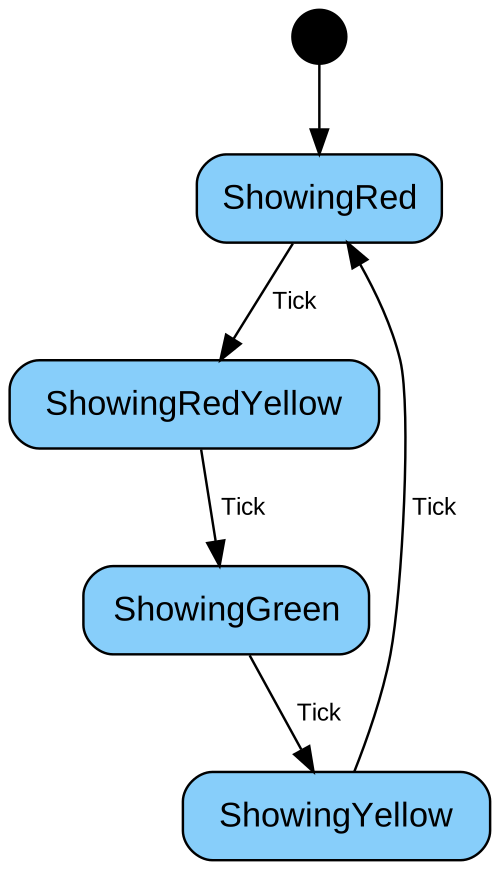
A simple traffic light with four states, starting with showing the red light.
Create the state machine and the states
// create the states...
var showingRed = new State("ShowingRed");
var showingRedYellow = new State("ShowingRedYellow");
var showingYellow = new State("ShowingYellow");
var showingGreen = new State("ShowingGreen");

// create the state machine...
var fsm =
    FsmSync.Of(
        "simple traffic light",
        // define initial state with transitions and other parameters...
        showingRed
            .Entry(() => Console.WriteLine("x--")) // add an entry function
            .Transition<Tick>(showingRedYellow), // add one or more transitions
        // define other states with transitions and other parameters...
        showingRedYellow
            .Entry(() => Console.WriteLine("xx-"))
            .Transition<Tick>(showingGreen),
        showingGreen
            .Entry(() => Console.WriteLine("--x"))
            .Transition<Tick>(showingYellow),
        showingYellow
            .Entry(() => Console.WriteLine("-x-"))
            .Transition<Tick>(showingRed)
    );

// start the state machine
fsm.Start();

Assert.IsTrue(fsm.IsRunning);

// trigger an event
fsm.Trigger(new Tick());

Assert.AreEqual(showingRedYellow, fsm.CurrentState);
The Classes
FsmSync
A synchronous (blocking) state machine. The call to trigger is blocking.
var state = new State("MyState");
var fsm =
    FsmSync.Of(
        "MyFsm",
        // add at minimum one state
        state
            .TransitionToFinal<Tick>()
    );

fsm.Start();
FsmAsync
An asynchronous (non-blocking) state machine. The call to trigger is non-blocking. The events are queued and triggered sequentially.
var state = new State("MyState");
var fsm =
    FsmAsync.Of(
        "MyFsm",
        // add at minimum one state
        state
            .TransitionToFinal<Tick>()
    );

fsm.Start();
Synchronous vs Asynchronous
A function calling trigger() on a synchronous state machine waits until all entry and exit functions are executed and the transition table was processed. After the trigger() function is returned, the next function can call trigger().
At an asynchronous state machine the call to trigger only blocks until the event is queued. All the processing will be executed non-blocking.
Following example shows the difference. The code is identically, only the type of state machine is different.
public class Event1 : Event;
public class Event2 : Event;

private readonly ConcurrentQueue<string> output = [];
private readonly State state1 = new("first");
private readonly State state2 = new("second");

private FsmSync CreateFsmSync() =>
    FsmSync.Of(
        "MySyncFsm",
        this.state1
            .Transition<Event1>(this.state2)
            .Entry<int>(i =>
            {
                this.output.Enqueue($"- {i}");
                Thread.Sleep(100);
            }),
        this.state2
            .Entry<int>(i =>
            {
                this.output.Enqueue($"- {i}");
                Thread.Sleep(100);
            })
            .Transition<Event1>(this.state2)
            .TransitionToFinal<Event2>()
    );

private FsmAsync CreateFsmAsync() =>
    FsmAsync.Of(
        "MySyncFsm",
        this.state1
            .Transition<Event1>(this.state2)
            .Entry<int>(i =>
            {
                this.output.Enqueue($"- {i}");
                Thread.Sleep(100);
            }),
        this.state2
            .Entry<int>(i =>
            {
                this.output.Enqueue($"- {i}");
                Thread.Sleep(100);
            })
            .Transition<Event1>(this.state2)
            .TransitionToFinal<Event2>()
    );

private async Task<List<string>> RunFsm(Fsm fsm)
{
    this.output.Clear();

    fsm.Start(42);

    var task1 = Task.Run(
        () =>
        {
            while (fsm.IsRunning)
            {
                Thread.Sleep(100);
            }
        },
        this.TestContext.CancellationTokenSource.Token);

    var task2 = Task.Run(
        () =>
        {
            for (var i = 0; i <= 5; i++)
            {
                this.output.Enqueue($"+ {i}");
                fsm.Trigger(new DataEvent<Event1, int>(i));
                Thread.Sleep(10);
            }

            fsm.Trigger(new Event2());
        },
        this.TestContext.CancellationTokenSource.Token);

    var task3 = Task.Run(
        () =>
        {
            for (var i = 10; i <= 15; i++)
            {
                this.output.Enqueue($"+ {i}");
                fsm.Trigger(new DataEvent<Event1, int>(i));
                Thread.Sleep(1);
            }
        },
            this.TestContext.CancellationTokenSource.Token);

    await task1;
    await task2;
    await task3;

    this.output.ForEach(Console.WriteLine);

    return [.. this.output];
}

[TestMethod]
public async Task RunSyncVsAsync()
{
    var outputAsync = await this.RunFsm(this.CreateFsmAsync());
    Assert.HasCount(0, outputAsync.TakeLast(10).Where(i => i.StartsWith('+')));

    Console.WriteLine();

    var outputSync = await this.RunFsm(this.CreateFsmSync());
    Assert.IsGreaterThanOrEqualTo(2, outputSync.TakeLast(5).Count(i => i.StartsWith('+')));
}
The output produced by both calls to runFsm():
| synchronous | asynchronous |
|---|---|
| - 42 | - 42 |
| + 10 | + 0 |
| + 0 | + 10 |
| - 10 | - 0 |
| - 0 | + 1 |
| + 11 | + 11 |
| - 11 | + 12 |
| + 1 | + 2 |
| - 1 | + 13 |
| + 12 | + 3 |
| - 12 | + 14 |
| + 2 | + 4 |
| - 2 | + 15 |
| + 13 | + 5 |
| - 13 | - 10 |
| + 3 | - 1 |
| - 3 | - 11 |
| + 14 | - 12 |
| - 14 | - 2 |
| + 4 | - 13 |
| - 4 | - 3 |
| + 15 | - 14 |
| - 15 | - 4 |
| + 5 | - 15 |
| - 5 | - 5 |
Composite States
This library also supports nested state machines through composite states.
A composite state can be build from the scratch or encapsulated in a class derived from CompositeState.
To see how composite states work together with the history states, look at this example: How History States work.
The diagram of the nested state machine
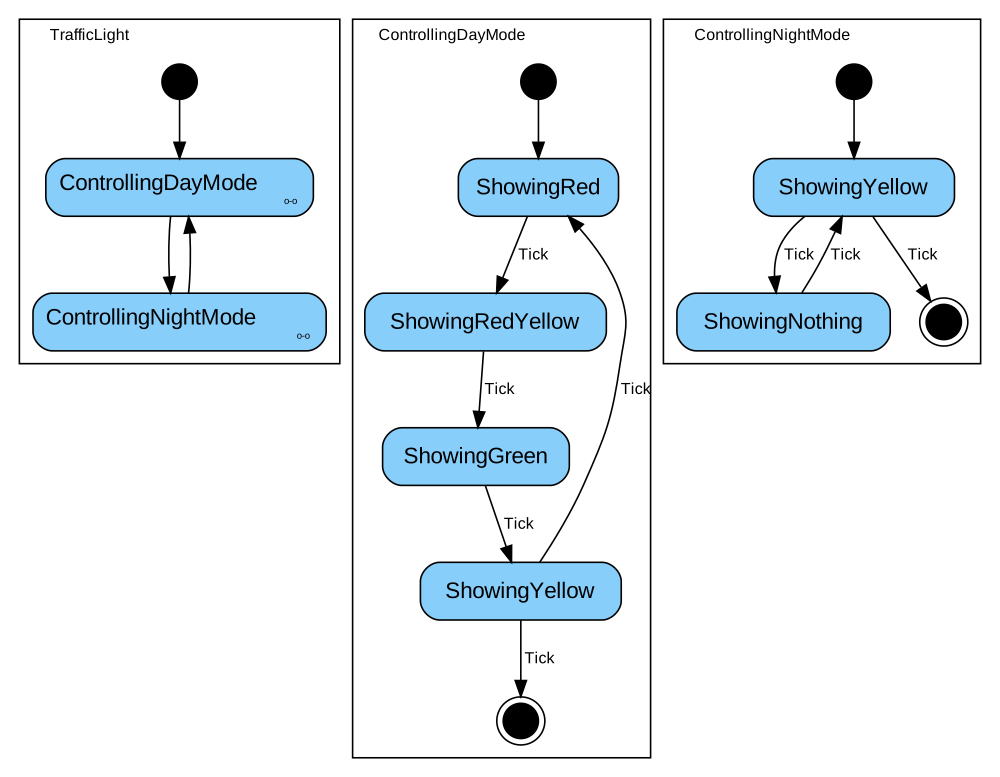
A traffic light with normal operation over the day and flashing yellow in the night.
Nested State Machine as Composite State
When deriving from the CompositeState class, the sub state machine must be part of the state and
will be added automatically to the parent state machine when used.
public class ControllingDayMode : CompositeState
{
    private readonly State showingGreen = new("ShowingGreen");
    private readonly State showingRed = new("ShowingRed");
    private readonly State showingRedYellow = new("ShowingRedYellow");
    private readonly State showingYellow = new("ShowingYellow");

    public ControllingDayMode()
    {
        this.SubMachines =
        [
            FsmSync.Of(
                this.Name,
                this.showingRed
                    .Transition<Tick>(this.showingRedYellow),
                this.showingRedYellow
                    .Transition<Tick>(this.showingGreen),
                this.showingGreen
                    .Transition<Tick>(this.showingYellow),
                this.showingYellow
                    .Transition<Tick, bool>(this.showingRed, b => b)
                    .Transition<Tick, bool>(new FinalState(), b => !b)
            )
        ];
    }

    public override IReadOnlyList<FsmSync> SubMachines { get; }
}
Nested State Machine - manually created
A composite state can be also created by using a normal state as base and adding one or more child machines when creating the parent state machine.
var showingNothing = new State("ShowingNothing");
var showingYellow = new State("ShowingYellow");

var fsmNight =
    FsmSync.Of(
        "ControllingNightMode",
        showingYellow
            .Transition<Tick, bool>(showingNothing, b => !b)
            .Transition<Tick, bool>(new FinalState(), b => b),
        showingNothing
            .Transition<Tick>(showingYellow)
    );
Putting all together
The parent machine with two composite states.
var controllingDayMode = new ControllingDayMode();
var controllingNightMode = new State("ControllingNightMode");

var trafficLight =
    FsmSync.Of(
        "TrafficLight",
        controllingDayMode // is a composite state - child is added automatically
            .Transition(controllingNightMode),
        controllingNightMode // normal state to use as a composite state
            .Child(fsmNight) // child must be added manually
            .Transition(controllingDayMode)
    );
| Product | Versions Compatible and additional computed target framework versions. |
|---|---|
| .NET | net8.0 is compatible. net8.0-android was computed. net8.0-browser was computed. net8.0-ios was computed. net8.0-maccatalyst was computed. net8.0-macos was computed. net8.0-tvos was computed. net8.0-windows was computed. net9.0 is compatible. net9.0-android was computed. net9.0-browser was computed. net9.0-ios was computed. net9.0-maccatalyst was computed. net9.0-macos was computed. net9.0-tvos was computed. net9.0-windows was computed. net10.0 is compatible. net10.0-android was computed. net10.0-browser was computed. net10.0-ios was computed. net10.0-maccatalyst was computed. net10.0-macos was computed. net10.0-tvos was computed. net10.0-windows was computed. |
-
net10.0
- No dependencies.
-
net8.0
- No dependencies.
-
net9.0
- No dependencies.
NuGet packages (1)
Showing the top 1 NuGet packages that depend on jasmsharp:
| Package | Downloads |
|---|---|
|
jasmsharp-debug-adapter
Debug adapter for Jasmsharp |
GitHub repositories
This package is not used by any popular GitHub repositories.