Archneter 1.6.0
dotnet tool install --global Archneter --version 1.6.0
dotnet new tool-manifest
dotnet tool install --local Archneter --version 1.6.0
#tool dotnet:?package=Archneter&version=1.6.0
nuke :add-package Archneter --version 1.6.0
Archneter Architecture CLI

Empower your engineering teams with instant, production-ready .NET architectures.
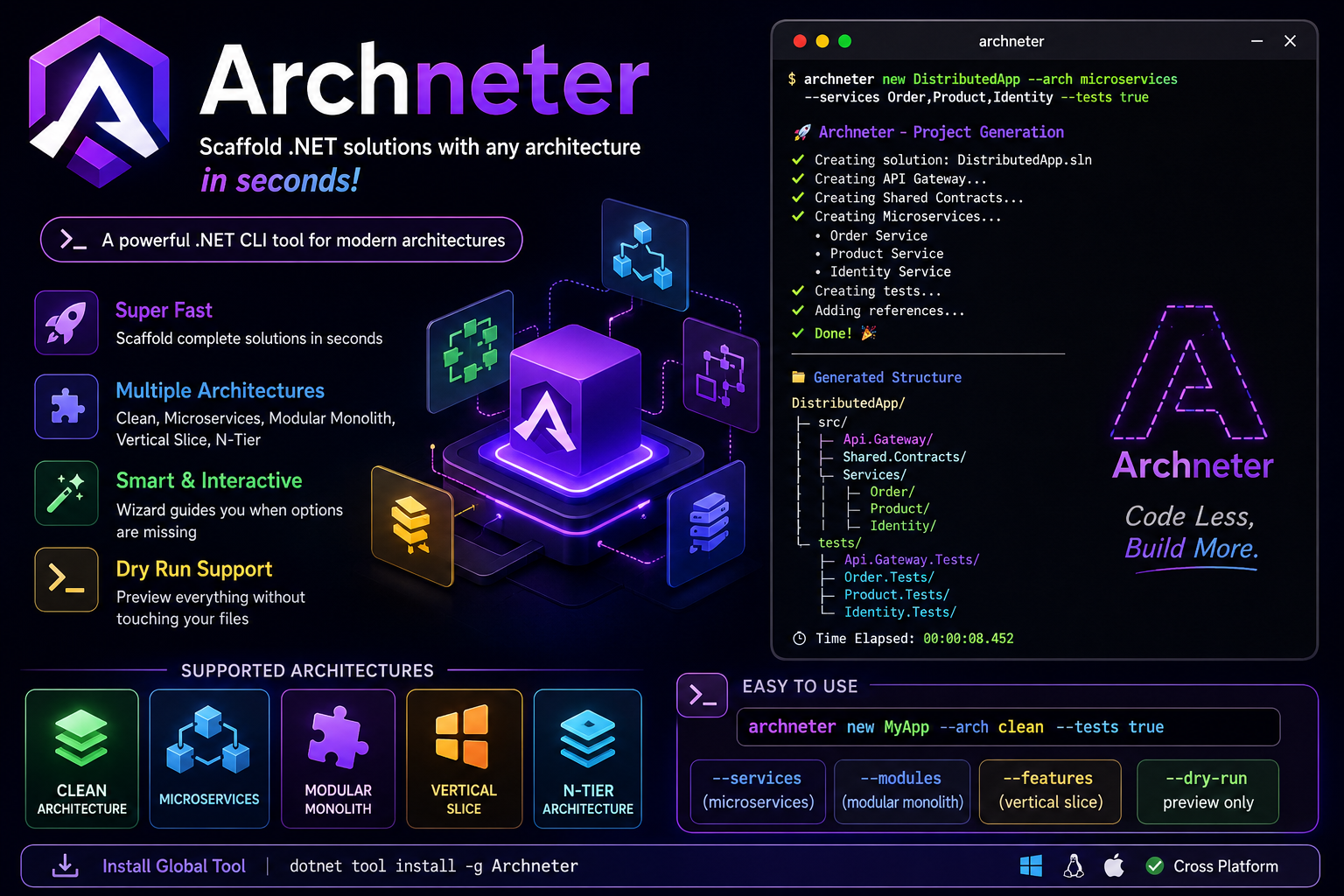
Archneter is an enterprise-grade, extensible command-line interface (CLI) engineered to accelerate .NET application development. Built upon Microsoft's best practices and Microsoft.Extensions.DependencyInjection, Archneter eliminates manual boilerplate setup by automating the scaffolding of highly cohesive, scalable software architectures.
Whether you are building a lightweight API, refactoring a legacy MVC monolithic mess, or scaffolding a complex distributed system, Archneter configures your project folders, layers, solutions, cross-project references, and essential NuGet packages in seconds—guaranteeing a standardized foundation every time.
🛠️ How to Get Started
Prerequisites
Install the Tool (Global)
Archneter is packaged as a .NET Global Tool. You can install it globally on your machine by running:
dotnet tool install -g Archneter
Note: If archneter is not recognized, ensure your ~/.dotnet/tools directory is added to your system's PATH.
📖 Command Catalog
Archneter is designed to be as simple or as advanced as you need. Below is the complete catalog of commands, ranging from simple scaffolding to intelligent, AI-like deep code refactoring.
1️⃣ The new Command (Project Scaffolding)
Generates a brand-new, production-ready solution from scratch, pre-configured with industry-standard NuGet packages (MediatR, FluentValidation, Swagger, EF Core) and your database provider of choice.
Syntax:
archneter new <ProjectName> --arch <type> [options]
Supported Architectures (--arch):
clean(Clean Architecture - Default)microservices(Microservices)modularmonolith(Modular Monolith)verticalslice(Vertical Slice)n-tier(N-Tier)<custom-name>(Custom Architecture via Plugin System)
Examples: From Simple to Advanced
🟢 Simple: Standard Clean Architecture Scaffolds a 4-layer Clean Architecture (Domain, Application, Infrastructure, API). The tool will interactively prompt you for your Database Provider (SQL Server, PostgreSQL, MongoDB).
archneter new CleanApp --arch clean
🟡 Intermediate: Vertical Slice with Test Projects Scaffolds a highly cohesive API organized by Features rather than technical layers, and generates accompanying xUnit test projects.
archneter new SliceApp --arch verticalslice --features Orders,Cart,Payments --tests true
🟠 Advanced: Microservices Ecosystem Scaffolds a full microservices ecosystem (API Gateway, Shared Contracts, and independent Microservices, each with their own internal Clean Architecture).
archneter new DistributedApp --arch microservices --services Order,Product,Identity --tests true
🔴 Expert: Dry-Run Preview
Curious about what the Modular Monolith will look like? Use --dry-run to print the exact execution plan and folder tree without modifying your disk.
archneter new MonolithApp --arch modularmonolith --modules Sales,Catalog --dry-run
2️⃣ The refactor Command (Intelligent Modernization)
This is Archneter's most powerful feature. It intelligently analyzes an existing legacy codebase (like a monolithic API or an old MVC project) and transforms it into a well-defined target architecture. It handles creating boundary projects, moving files, recalculating namespaces, rewiring cross-project dependencies, and migrating NuGet packages.
Syntax:
archneter refactor --to <architecture> [--dir <path>] [options]
Supported Targets (--to):
clean, microservices, modularmonolith, verticalslice, n-tier, api.
Examples: From Simple to Advanced
🟢 Simple: Unstructured API to Clean Architecture Takes a folder full of unstructured code and intelligently sorts it into Domain, Application, Infrastructure, and API layers based on advanced heuristics.
archneter refactor --to clean
🟡 Intermediate: MVC to Pure Web API
Strips away UI components (Views, Pages, wwwroot), converts Controller to ControllerBase, injects Swagger, and prints a Refactoring Report highlighting any endpoints requiring manual payload updates.
archneter refactor --to api --remove-static-files
🟠 Advanced: The MVC "Magic Pipeline" Pass an MVC project and ask for Clean Architecture! Archneter will automatically pre-process the MVC project into a Pure Web API, and then instantly pipeline it into a Clean Architecture solution—all in one step! Core packages (MediatR, EF Core) are automatically injected into the newly formed layers.
archneter refactor --to clean --remove-static-files --force
🔴 Expert: Deep Dependency Extraction
Enables a Roslyn-based deep refactoring mode. Archneter parses your syntax trees, finds tightly coupled concrete instantiations (e.g., new SqlUserRepository()), generates interfaces (IUserRepository), extracts them to the Application/Domain layer, and rewires the original classes to use Constructor Injection.
archneter refactor --to clean --deep-refactor
3️⃣ The ui Command (Web Dashboard) 🌐
Launch an interactive, visually stunning Web Dashboard to configure and generate your architecture from the browser!
Syntax:
archneter ui
Features:
- Zero-Touch Configuration: Select architectures, define microservices/modules, and toggle tests via a beautiful UI.
- Live Console Tracking: Watch the execution logs live as Archneter builds your project in real-time.
- Speed & Stability: Lightning-fast generation with automated
--no-restorebatching. - Direct Explorer Integration: Instantly open the generated project folder in your OS file explorer with a single click.
4️⃣ The inspect Command (Dependency Inspector) 🔍
Analyze and visualize your project's architecture, dependencies, and potential structural issues.
Syntax:
archneter inspect dependencies [ClassName] [options]
Features:
--details: Full dependency information (Injected interfaces, external services).--used-by: Discover which classes depend on a specific service.--circular: Detect dangerous circular dependencies (A → B → C → A).--unused: Find registered DI services that are never injected or used.--graph: Generate a visual dependency graph (HTML/SVG) using Mermaid.js.--stats: Display architecture statistics (Number of controllers, average dependencies, etc).
5️⃣ The help Command (Documentation)
Displays the complete list of available CLI commands, options, arguments, and examples directly in your terminal.
Syntax:
archneter help
6️⃣ The --version Flag
Checks the currently installed version of Archneter.
Syntax:
archneter --version
🌟 Release Notes
What's New in v1.6.0 (Latest)
- Plugin System (Extensibility): Archneter is now a fully extensible ecosystem! Developers can write their own
.dllfiles containing custom generators (implementingIArchitectureGeneratorand using[GeneratorPlugin("my-arch")]) and drop them into thepluginsdirectory. The CLI will dynamically load them and allow you to scaffold usingarchneter new MyApp --arch my-arch. - Custom Architectures: Added support for passing custom string names to the
--archflag to execute loaded plugins seamlessly.
What's New in v1.5.0
- Dependency Inspector (
archneter inspect): Added advanced static analysis capabilities powered by Roslyn! You can now analyze dependency trees, detect circular dependencies, find unused services, and generate visual HTML graphs of your C# codebase!
What's New in v1.4.0
- Web UI Dashboard (
archneter ui): Added a visually stunning, interactive web interface to scaffold architectures directly from the browser. Includes live console tracking, one-click folder opening, and zero-touch configuration. - Lightning Fast Restores: Implemented
--no-restorebatching for NuGet packages, drastically reducing scaffolding time for complex architectures by up to 10x! - Non-Interactive Execution: Added the
--forceflag to skip interactive prompts (Database, Services) and intelligently fallback to defaults, which powers the new UI pipeline.
What's New in v1.3.1
- Main Packages Auto-Injection: The
refactorcommand now automatically installs essential enterprise NuGet packages (MediatR,FluentValidation,EF Core) into the newly generated architecture layers (Application/Infrastructure) during the refactoring process, matching the robust behavior of thenewcommand!
What's New in v1.3.0
- Intelligent MVC Refactoring & Pipelining: When refactoring a legacy MVC project to any architecture (e.g.,
--to cleanor--to microservices), Archneter intelligently detects the MVC components. It executes a complete cleanup (converting it into a Pure Web API by removingViews, rewritingControllerBase, and injectingSwagger) in the background, then seamlessly pipelines the clean API into your requested target architecture! - Refactoring Report: After an MVC conversion, Archneter prints a beautiful summary report detailing updated controllers and explicitly warns you about any endpoints that still return
View(),PartialView(), orRedirectToAction().
What's New in v1.2.1
- Intelligent Module/Service Inference: Enhanced heuristics in
MicroservicesandModular Monolithrefactoring to correctly parse feature-based directories and recursively strip CQRS verbs, preventing the generation of excessive projects. - Resilient File Operations: Robust retry mechanism to handle transient
.NETbackground locks (MSBuild/OmniSharp) preventingIOExceptioncrashes.
| Product | Versions Compatible and additional computed target framework versions. |
|---|---|
| .NET | net8.0 is compatible. net8.0-android was computed. net8.0-browser was computed. net8.0-ios was computed. net8.0-maccatalyst was computed. net8.0-macos was computed. net8.0-tvos was computed. net8.0-windows was computed. net9.0 was computed. net9.0-android was computed. net9.0-browser was computed. net9.0-ios was computed. net9.0-maccatalyst was computed. net9.0-macos was computed. net9.0-tvos was computed. net9.0-windows was computed. net10.0 was computed. net10.0-android was computed. net10.0-browser was computed. net10.0-ios was computed. net10.0-maccatalyst was computed. net10.0-macos was computed. net10.0-tvos was computed. net10.0-windows was computed. |
This package has no dependencies.