AsyncFixer 1.4.0
See the version list below for details.
dotnet add package AsyncFixer --version 1.4.0
NuGet\Install-Package AsyncFixer -Version 1.4.0
<PackageReference Include="AsyncFixer" Version="1.4.0"> <PrivateAssets>all</PrivateAssets> <IncludeAssets>runtime; build; native; contentfiles; analyzers</IncludeAssets> </PackageReference>
<PackageVersion Include="AsyncFixer" Version="1.4.0" />
<PackageReference Include="AsyncFixer"> <PrivateAssets>all</PrivateAssets> <IncludeAssets>runtime; build; native; contentfiles; analyzers</IncludeAssets> </PackageReference>
paket add AsyncFixer --version 1.4.0
#r "nuget: AsyncFixer, 1.4.0"
#:package AsyncFixer@1.4.0
#addin nuget:?package=AsyncFixer&version=1.4.0
#tool nuget:?package=AsyncFixer&version=1.4.0
AsyncFixer helps developers in finding and correcting common async/await misuses (i.e., anti-patterns). It currently detects 5 common kinds of async/await misuses and fixes 3 of them via program transformations. AsyncFixer has been tested with thousands of open-source C# projects and successfully handles many corner cases. It is also one of the most common analyzers used in C# projects from Microsoft.
AsyncFixer will work just in the IDE and work as an analyzer on every project you open in Visual Studio. It can also operate in batch mode to correct all misuses in the document, project, or solution. You can download the VSIX from here.
If you want AsyncFixer to deploy as a NuGet package and work as a project-local analyzer that participates in builds, you can use the nuget package. Attaching an analyzer to a project means that the analyzer travels with the project to source control and so it is easy to apply the same rule for the team. You can download the nuget package from here.
Here are async/await misuses (i.e., anti-patterns) that AsyncFixer can currently detect:
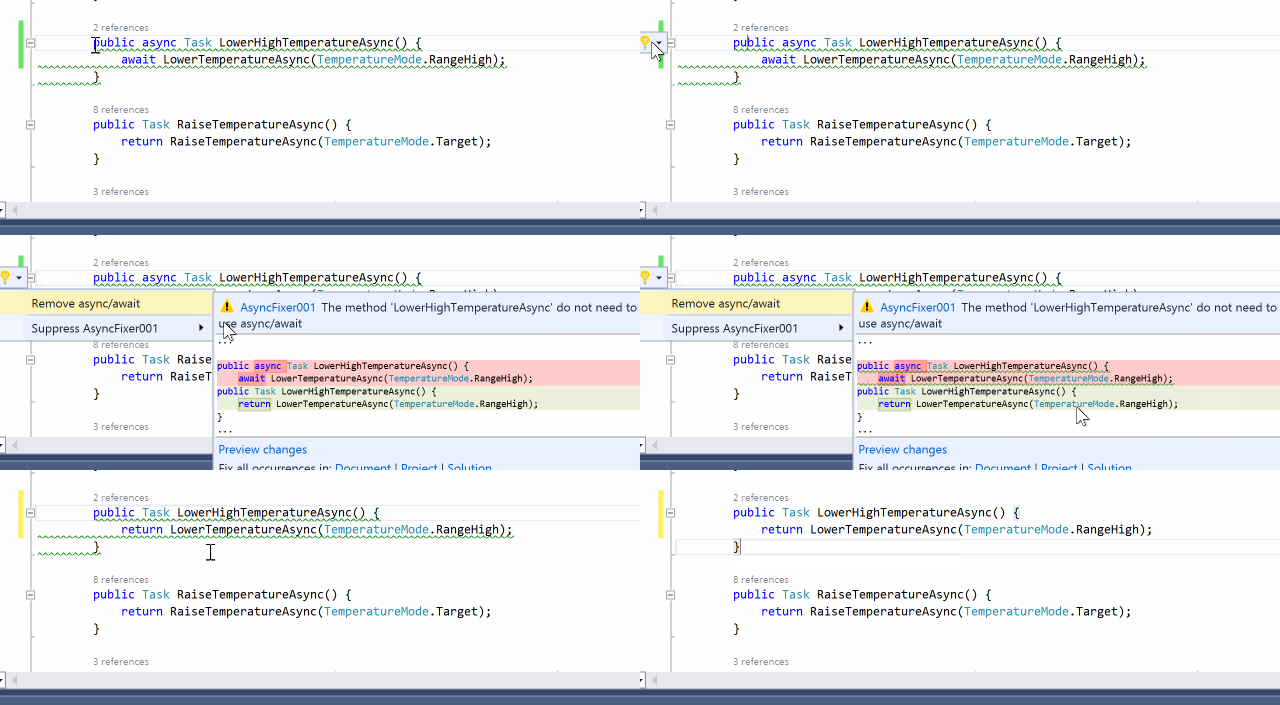
AsyncFixer01: Unnecessary async/await usage
There are some async methods where there is no need to use async/await keywords. It is important to detect this kind of misuse because adding the async modifier comes at a price. AsyncFixer automatically removes async/await keywords from those methods.
AsyncFixer02: Long-running or blocking operations inside an async method
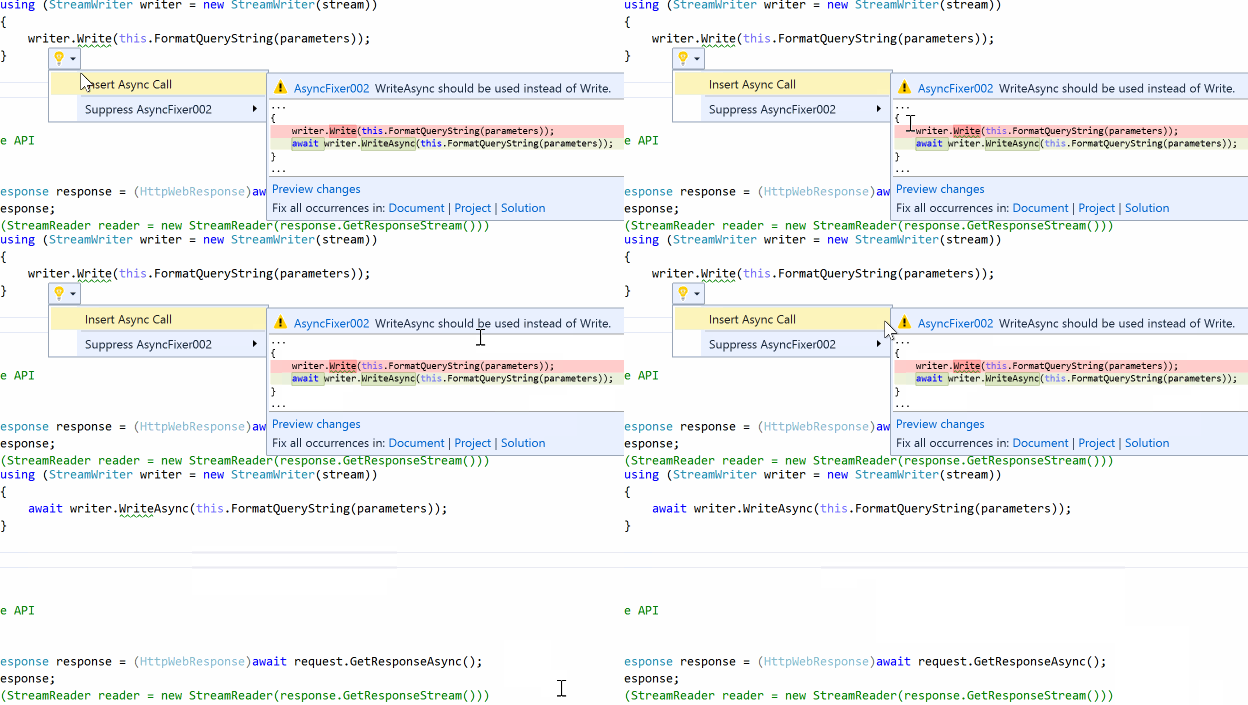
Developers use some potentially long-running or blocking operations inside async methods even though there are corresponding asynchronous versions of these methods in .NET or third-party libraries. Some examples for such operations: Task.Wait(), Task.Result, StreamReader.ReadToEnd(), Thread.Sleep(), etc.
AsyncFixer automatically replaces those operations with their corresponding asynchronous operations and inserts an await expression. For instance, it converts Thread.Sleep(...) to await Task.Delay(...).
AsyncFixer03: Fire & forget async void methods
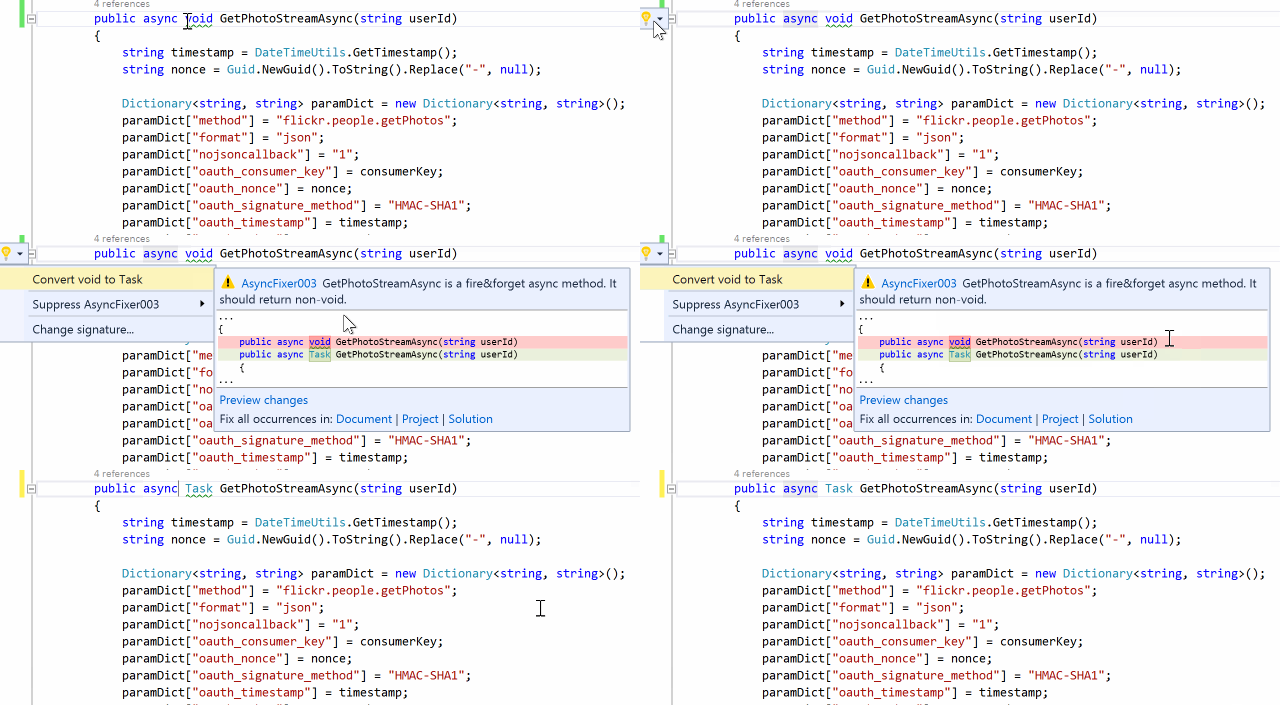
Some async methods are 'fire & forget', which return void. Unless a method is only called as an event handler, it must be awaitable. Otherwise, it is a code smell because it complicates control flow and makes error detection & correction difficult.
AsyncFixer automatically converts void to Task.
AsyncFixer04: Fire & forget async call inside a using block
Inside a using block, developers insert a fire & forget async call which uses a disposable object as a parameter or target object. It can cause potential exceptions or wrong results. For instance, developers create a Stream in the using statement, pass it to the asynchronous method, and then Stream will be implicitly disposed via a using block. When the asynchronous method comes around to writing to Stream, it is (very likely) already disposed and you will have an exception.
AsyncFixer05: Downcasting from a nested task to an outer task.
Downcasting from a nested task to a task or awaiting a nested task is dangerous. There is no way to wait for and get the result of the child task. This usually occurs when mixing async/await keywords with the old threading APIs such as TaskFactory.StartNew. Here is an example:
async Task foo()
{
    Console.WriteLine("Hello");
    await Task.Factory.StartNew(() => Task.Delay(1000)); // StartNew call returns a nested task: Task<Task>
    Console.WriteLine("World");
}
A developer might expect one-second latency between "Hello" and "World" lines. However, those strings will be printed instantaneously without any latency. The reason is that we await a nested task, which is the return type of StartNew call. When we await the nested task, the return value is the inner task that is the result of Task.Delay call. As we do not await the inner task, we do not see the effect of the delay call. There are three possible fixes:
- We can await the inner task as well:
await (await Task.Factory.StartNew(() => Task.Delay(1000)));
- We can use
Unwrapto expose the inner task to theawaitexpression:
await Task.Factory.StartNew(() => Task.Delay(1000)).Unwrap();
- If you do not have reasons to use
TaskFactory.StartNewsuch asTaskCreationOptionsand a customTaskScheduler, we should always useTask.Runto automatically unwrap the inner task.
await Task.Run(() => Task.Delay(1000));
Learn more about Target Frameworks and .NET Standard.
This package has no dependencies.
NuGet packages (8)
Showing the top 5 NuGet packages that depend on AsyncFixer:
| Package | Downloads |
|---|---|
|
Omnia.Fx
Package Description |
|
|
Lombiq.Analyzers
Lombiq .NET Analyzers: .NET code analyzers and code convention settings for general .NET projects. See the project website for detailed documentation. |
|
|
Brupper.Forms
This package contains Brupper to use with Xamarin.Forms |
|
|
Kiruyuto.DotNet.Config
A personal NuGet package containing rules and analyzers to share .NET code style and configuration across multiple projects. |
|
|
Brupper.Forms.FontAwesome
This package contains Brupper to use with Xamarin.Forms |
GitHub repositories (37)
Showing the top 20 popular GitHub repositories that depend on AsyncFixer:
| Repository | Stars |
|---|---|
|
MvvmCross/MvvmCross
The .NET MVVM framework for cross-platform solutions, including Android, iOS, MacCatalyst, macOS, tvOS, WPF, WinUI
|
|
|
exceptionless/Exceptionless
Exceptionless application
|
|
|
ArduPilot/MissionPlanner
Mission Planner Ground Control Station for ArduPilot (c# .net)
|
|
|
FoundatioFx/Foundatio
Pluggable foundation blocks for building distributed apps.
|
|
|
Baseflow/LottieXamarin
Render After Effects animations natively on Android, iOS, MacOS and TvOS for Xamarin
|
|
|
rotorgames/Rg.Plugins.Popup
Xamarin Forms popup plugin
|
|
|
cezarypiatek/MappingGenerator
:arrows_counterclockwise: "AutoMapper" like, Roslyn based, code fix provider that allows to generate mapping code in design time.
|
|
|
Baseflow/XamarinMediaManager
Cross platform Xamarin plugin to play and control Audio and Video
|
|
|
minio/minio-dotnet
MinIO Client SDK for .NET
|
|
|
Baseflow/XF-Material-Library
A Xamarin Forms library for implementing Material Design
|
|
|
dsbenghe/Novell.Directory.Ldap.NETStandard
.NET LDAP client library for .NET Standard >= 2.0, .NET Core >=1.0, NET5/NET6/NET7/NET8 - works with any LDAP protocol compatible directory server (including Microsoft Active Directory).
|
|
|
vknet/vk
Vkontakte API for .NET
|
|
|
aaru-dps/Aaru
Aaru Data Preservation Suite
|
|
|
exceptionless/Exceptionless.Net
Exceptionless clients for the .NET platform
|
|
|
nsnail/NetAdmin
通用后台权限管理系统、快速开发框架(基于C#13/.NET9、Vue3/Vite、ElementPlus等现代技术构建,具有十分整洁、优雅的编码规范)Universal backend permission management system, rapid development framework (based on modern technologies such as C#13/.NET9, Vue3/Vite, ElementPlus, etc., with very neat and elegant coding standards)
|
|
|
titarenko/OAuth2
OAuth2 client implementation for .NET
|
|
|
mehdihadeli/food-delivery-modular-monolith
🌭 A practical and imaginary food and grocery delivery modular monolith, built with .Net 8, Domain-Driven Design, CQRS, Vertical Slice Architecture, Event-Driven Architecture, and the latest technologies.
|
|
|
tpill90/steam-lancache-prefill
CLI tool to automatically prime a Lancache with Steam games
|
|
|
CrossGeeks/FirebasePushNotificationPlugin
Firebase Push Notification Plugin for Xamarin iOS and Android
|
|
|
VahidN/DNTIdentity
A highly customized sample of the ASP.NET Core Identity
|