AurorisNet.InteractiveReports
1.0.3
dotnet add package AurorisNet.InteractiveReports --version 1.0.3
NuGet\Install-Package AurorisNet.InteractiveReports -Version 1.0.3
<PackageReference Include="AurorisNet.InteractiveReports" Version="1.0.3" />
<PackageVersion Include="AurorisNet.InteractiveReports" Version="1.0.3" />
<PackageReference Include="AurorisNet.InteractiveReports" />
paket add AurorisNet.InteractiveReports --version 1.0.3
#r "nuget: AurorisNet.InteractiveReports, 1.0.3"
#:package AurorisNet.InteractiveReports@1.0.3
#addin nuget:?package=AurorisNet.InteractiveReports&version=1.0.3
#tool nuget:?package=AurorisNet.InteractiveReports&version=1.0.3
AurorisNet.InteractiveReports
Oracle APEX-style interactive reports for ASP.NET Core: a developer configures a SELECT, and users search, filter, sort, break, compute, highlight, group, pivot, chart, save and download the result.






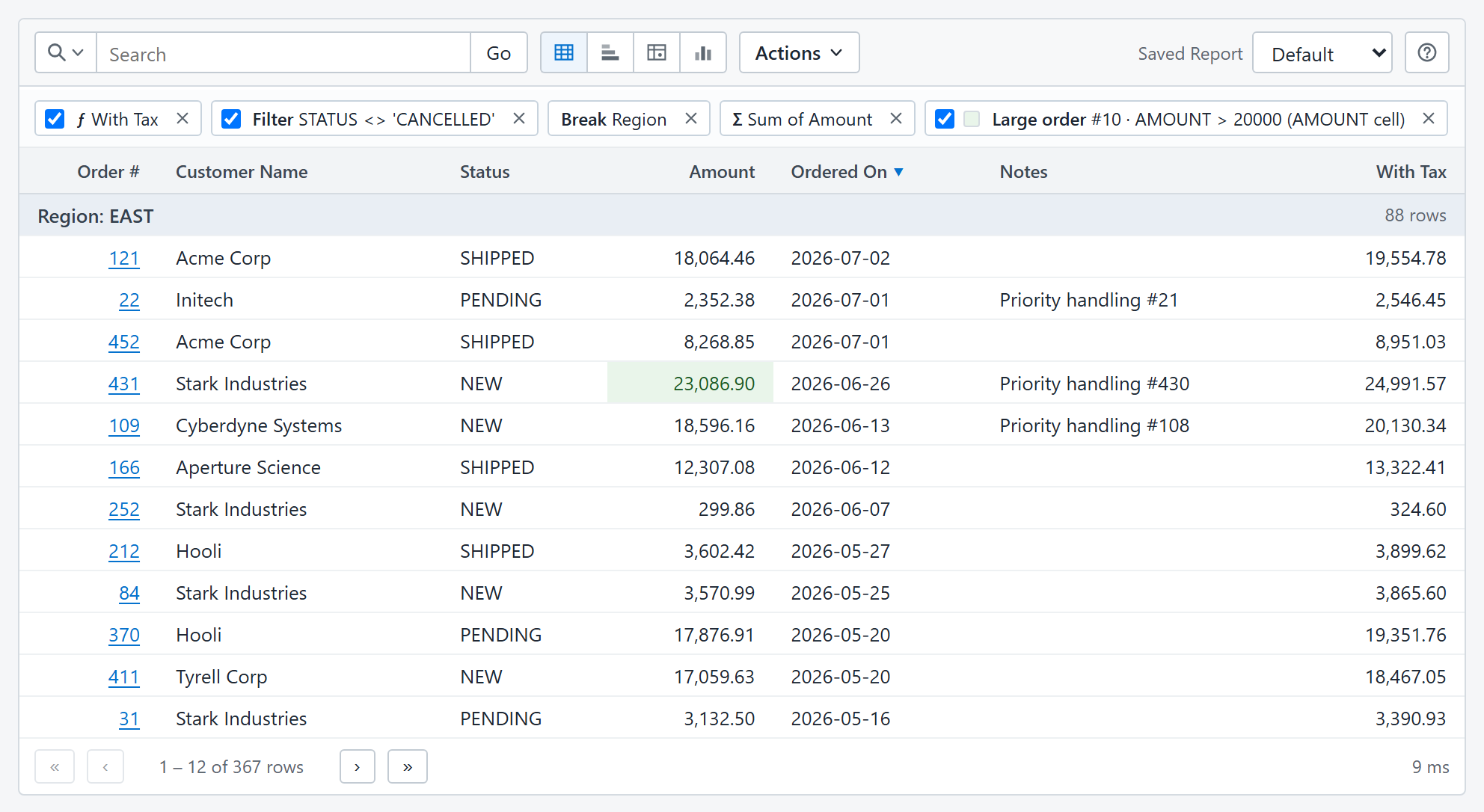
This is the package to start with. It adds the REST API, the packaged viewer and administration pages, and the <interactive-report> browser element. The browser bundle is embedded, so the application needs no Node.js and no front-end build. Try the live demo.
Install
In an ASP.NET Core application that targets .NET 8 or later:
dotnet add package AurorisNet.InteractiveReports
The package brings in AurorisNet.InteractiveReports.AspNetCore and AurorisNet.InteractiveReports.Core. The application references the ADO.NET driver of its database: SQL Server, PostgreSQL, Oracle and SQLite are supported.
Configure a connection and a report in appsettings.json, as the getting started guide shows. Then register the services and map the routes:
using InteractiveReport.AspNetCore;
using InteractiveReport.Client.Json;

var builder = WebApplication.CreateBuilder(args);
builder.Services.AddInteractiveReports(builder.Configuration);
builder.Services.AddInteractiveReportJson();

var app = builder.Build();
app.MapInteractiveReportJson("/api/reports");
app.Run();
For a report named orders, open /api/reports/orders/view. A report requires a signed-in caller unless its definition sets allowAnonymous.
Related packages
| Package | Adds |
|---|---|
| AurorisNet.InteractiveReports.Client.FileDownload | CSV and HTML downloads. The report's Download menu needs it. |
| AurorisNet.InteractiveReports.Client.GraphQL | A query-only GraphQL endpoint for saved reports. |
| AurorisNet.InteractiveReports.AspNetCore | The server. Installed with this package. |
| AurorisNet.InteractiveReports.Core | The engine. Installed with this package. |
The five packages are released together. Use one version for all of them. C# namespaces are InteractiveReport.*.
Documentation
The repository README has the settings tables and links every guide:
| Product | Versions Compatible and additional computed target framework versions. |
|---|---|
| .NET | net8.0 is compatible. net8.0-android was computed. net8.0-browser was computed. net8.0-ios was computed. net8.0-maccatalyst was computed. net8.0-macos was computed. net8.0-tvos was computed. net8.0-windows was computed. net9.0 was computed. net9.0-android was computed. net9.0-browser was computed. net9.0-ios was computed. net9.0-maccatalyst was computed. net9.0-macos was computed. net9.0-tvos was computed. net9.0-windows was computed. net10.0 was computed. net10.0-android was computed. net10.0-browser was computed. net10.0-ios was computed. net10.0-maccatalyst was computed. net10.0-macos was computed. net10.0-tvos was computed. net10.0-windows was computed. |
-
net8.0
- AurorisNet.InteractiveReports.AspNetCore (>= 1.0.3)
NuGet packages (1)
Showing the top 1 NuGet packages that depend on AurorisNet.InteractiveReports:
| Package | Downloads |
|---|---|
|
AurorisNet.Umbraco.AppBlocks.InteractiveReports
Optional Interactive Reports companion for AppBlocks on Umbraco. Requires AppBlocks. |
GitHub repositories
This package is not used by any popular GitHub repositories.