Axme 0.1.2
dotnet add package Axme --version 0.1.2
NuGet\Install-Package Axme -Version 0.1.2
<PackageReference Include="Axme" Version="0.1.2" />
<PackageVersion Include="Axme" Version="0.1.2" />
<PackageReference Include="Axme" />
paket add Axme --version 0.1.2
#r "nuget: Axme, 0.1.2"
#:package Axme@0.1.2
#addin nuget:?package=Axme&version=0.1.2
#tool nuget:?package=Axme&version=0.1.2
axme-sdk-dotnet
Official .NET SDK for the AXME platform. Send and manage intents, poll lifecycle events and history, handle approvals, and access the enterprise admin surface — async/await throughout, targeting .NET 6+.
Alpha · API surface is stabilizing. Not recommended for production workloads yet.
Alpha access: https://cloud.axme.ai/alpha · Contact and suggestions: hello@axme.ai
What Is AXME?
AXME is a coordination infrastructure for durable execution of long-running intents across distributed systems.
It provides a model for executing intents — requests that may take minutes, hours, or longer to complete — across services, agents, and human participants.
AXP — the Intent Protocol
At the core of AXME is AXP (Intent Protocol) — an open protocol that defines contracts and lifecycle rules for intent processing.
AXP can be implemented independently.
The open part of the platform includes:
- the protocol specification and schemas
- SDKs and CLI for integration
- conformance tests
- implementation and integration documentation
AXME Cloud
AXME Cloud is the managed service that runs AXP in production together with The Registry (identity and routing).
It removes operational complexity by providing:
- reliable intent delivery and retries
- lifecycle management for long-running operations
- handling of timeouts, waits, reminders, and escalation
- observability of intent status and execution history
State and events can be accessed through:
- API and SDKs
- event streams and webhooks
- the cloud console
What You Can Do With This SDK
- Send intents — create typed, durable actions with delivery guarantees
- Poll lifecycle events — retrieve real-time state events and intent history via
ListIntentEventsAsync - Approve or reject — handle human-in-the-loop steps from .NET services
- Control workflows — pause, resume, cancel, update retry policies and reminders
- Administer — manage organizations, workspaces, service accounts, and grants
Install
dotnet add package Axme
Quickstart
using System.Text.Json.Nodes;
using Axme.Sdk;

var client = new AxmeClient(new AxmeClientConfig
{
    ApiKey = "AXME_API_KEY", // sent as x-api-key
    ActorToken = "OPTIONAL_USER_OR_SESSION_TOKEN", // sent as Authorization: Bearer
    // Optional override (defaults to https://api.cloud.axme.ai):
    // BaseUrl = "https://staging-api.cloud.axme.ai",
});

// Check connectivity
Console.WriteLine(await client.HealthAsync());

// Send an intent to a registered agent address
var intent = await client.CreateIntentAsync(
    new JsonObject
    {
        ["intent_type"] = "order.fulfillment.v1",
        ["to_agent"] = "agent://acme-corp/production/fulfillment-service",
        ["payload"] = new JsonObject
        {
            ["order_id"] = "ord_123",
            ["priority"] = "high",
        },
    },
    new RequestOptions { IdempotencyKey = "fulfill-ord-123-001" }
);
Console.WriteLine($"{intent["intent_id"]} {intent["status"]}");

// List registered agent addresses
var agents = await client.ListAgentsAsync("acme-corp-uuid", "prod-ws-uuid");
Console.WriteLine(agents["agents"]);
Minimal Language-Native Example
Short basic submit/get example:
Run:
export AXME_API_KEY="axme_sa_..."
# use examples/BasicSubmit.cs inside your app project (or script host)
Full runnable scenario set lives in:
- Cloud: https://github.com/AxmeAI/axme-examples/tree/main/cloud
- Protocol-only: https://github.com/AxmeAI/axme-examples/tree/main/protocol
API Method Families
The SDK covers the full public API surface:
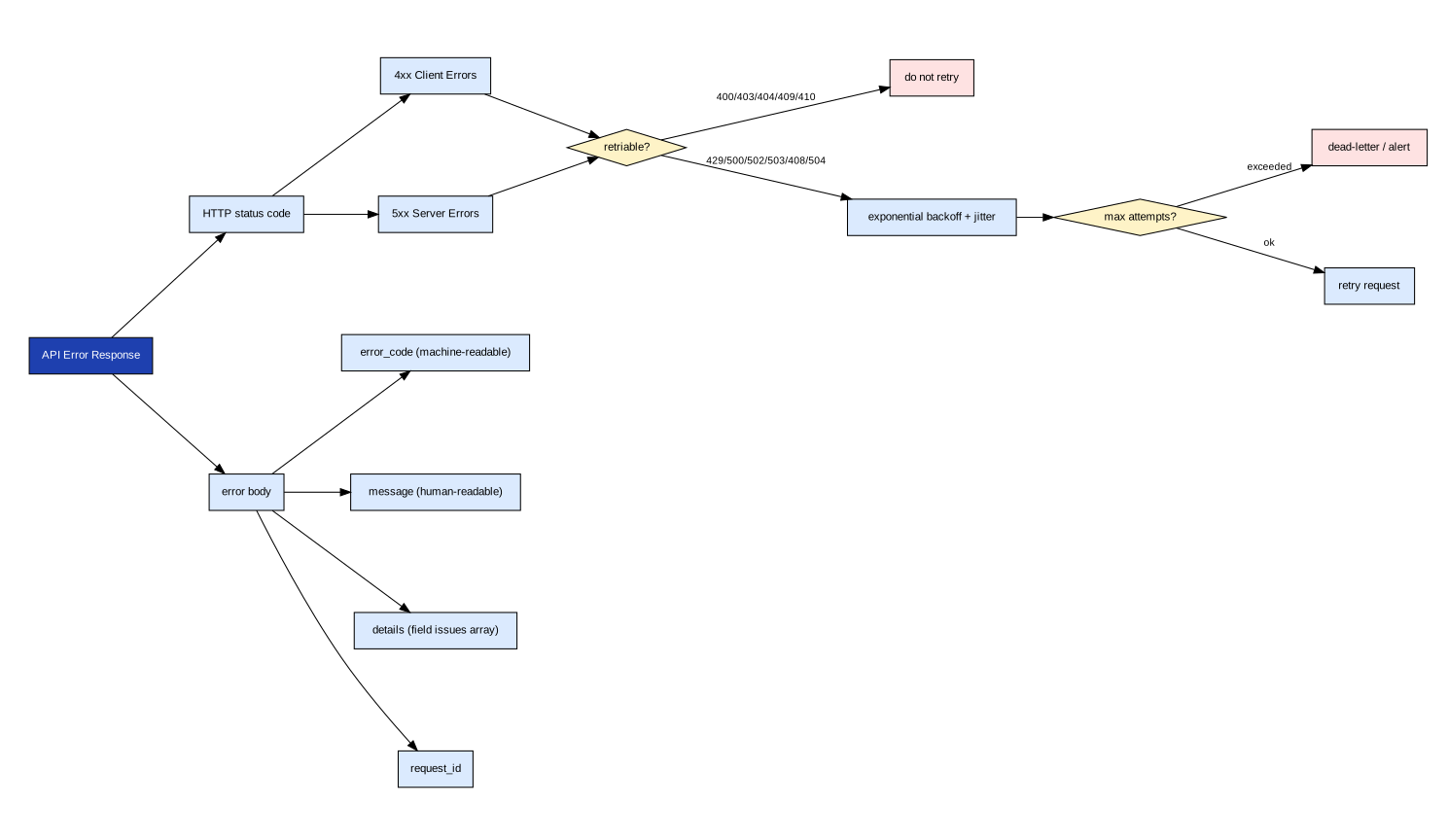
4xx client errors throw AxmeClientException — do not retry. 5xx server errors throw AxmeServerException — safe to retry with the original idempotency key. The RetryAfter property provides the wait hint.
Pagination, Filtering, and Sorting
// Paginate through pending intents
var page = await client.ListIntentsAsync(
    new JsonObject { ["status"] = "PENDING", ["limit"] = 20 }
);

while (page["cursor"] != null)
{
    page = await client.ListIntentsAsync(
        new JsonObject { ["after"] = page["cursor"]!.GetValue<string>(), ["limit"] = 20 }
    );
}
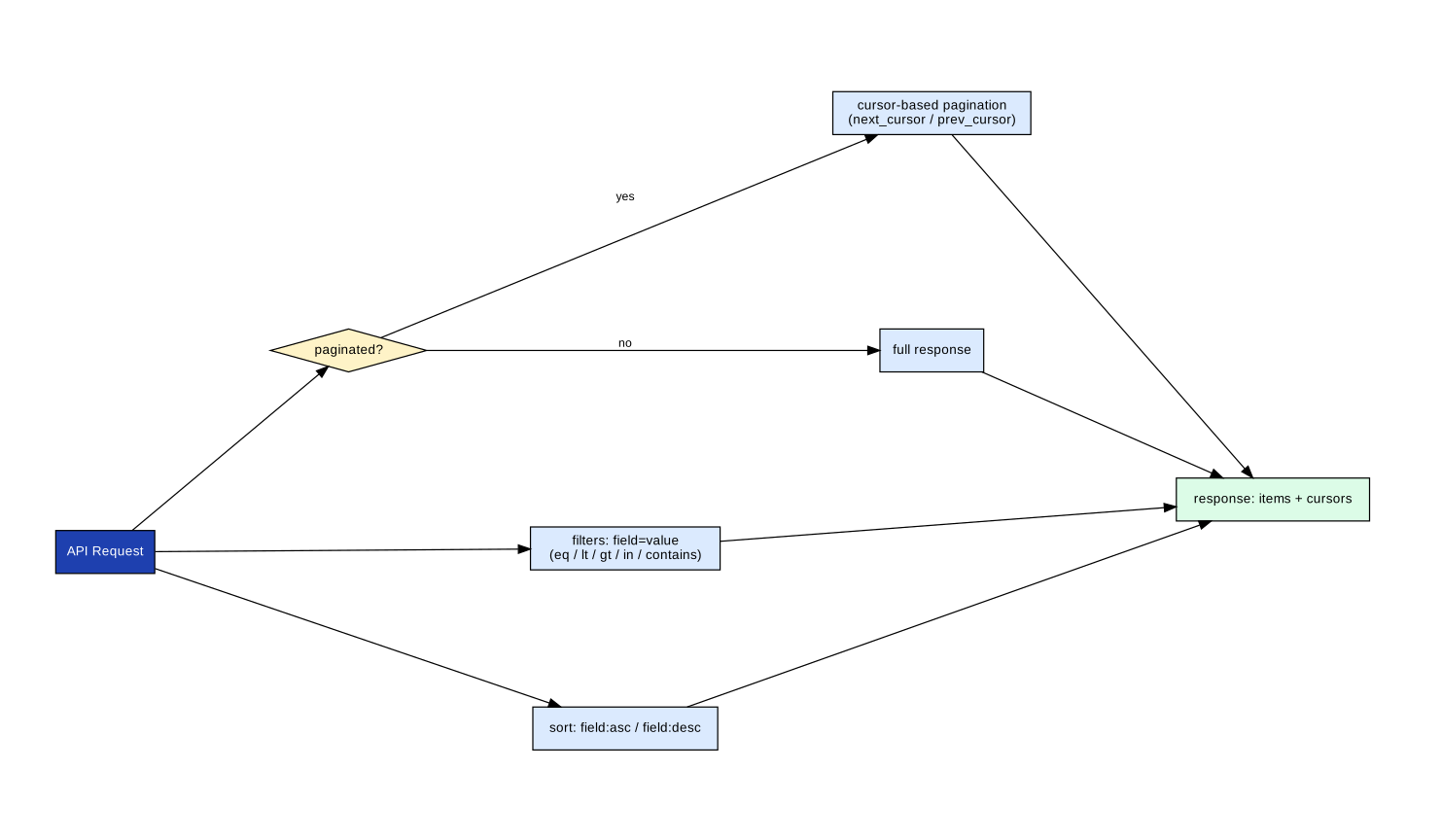
All list methods return a cursor field. Pass it as after in subsequent calls. The SDK does not buffer pages — you control the iteration.
Approvals
var inbox = await client.ListInboxAsync(
    new JsonObject { ["owner_agent"] = "agent://manager", ["status"] = "PENDING" }
);

foreach (var item in inbox["items"]!.AsArray())
{
    await client.ResolveApprovalAsync(
        item!["intent_id"]!.GetValue<string>(),
        new JsonObject { ["decision"] = "approved", ["note"] = "Reviewed and approved" },
        new RequestOptions()
    );
}
Enterprise Admin APIs
The .NET SDK includes the full service-account lifecycle surface:
// Create a service account
var sa = await client.CreateServiceAccountAsync(
    new JsonObject { ["name"] = "ci-runner", ["org_id"] = "org_abc" },
    new RequestOptions { IdempotencyKey = "sa-ci-runner-001" }
);

// Issue a key
var key = await client.CreateServiceAccountKeyAsync(
    sa["id"]!.GetValue<string>(),
    new RequestOptions()
);

// List service accounts
var list = await client.ListServiceAccountsAsync("org_abc");

// Revoke a key
await client.RevokeServiceAccountKeyAsync(
    sa["id"]!.GetValue<string>(),
    key["key_id"]!.GetValue<string>()
);
Available methods:
CreateServiceAccountAsync/ListServiceAccountsAsync/GetServiceAccountAsyncCreateServiceAccountKeyAsync/RevokeServiceAccountKeyAsync
Nick and Identity Registry
var registered = await client.RegisterNickAsync(
    new JsonObject { ["nick"] = "@partner.user", ["display_name"] = "Partner User" },
    new RequestOptions { IdempotencyKey = "nick-register-001" }
);

var check = await client.CheckNickAsync("@partner.user");

var renamed = await client.RenameNickAsync(
    new JsonObject
    {
        ["owner_agent"] = registered["owner_agent"]!.GetValue<string>(),
        ["nick"] = "@partner.new",
    },
    new RequestOptions { IdempotencyKey = "nick-rename-001" }
);

var profile = await client.GetUserProfileAsync(
    registered["owner_agent"]!.GetValue<string>()
);
Repository Structure
axme-sdk-dotnet/
├── src/Axme.Sdk/
│   ├── AxmeClient.cs          # All API methods
│   ├── AxmeClientConfig.cs    # Configuration record
│   ├── RequestOptions.cs      # Idempotency key and correlation ID
│   └── AxmeAPIException.cs    # Typed exception hierarchy
├── tests/Axme.Sdk.Tests/      # xUnit test suite
├── examples/
│   └── BasicSubmit.cs         # Minimal language-native quickstart
└── docs/
Tests
dotnet test tests/Axme.Sdk.Tests/Axme.Sdk.Tests.csproj
Related Repositories
| Repository | Role |
|---|---|
| axme-docs | Full API reference and integration guides |
| axme-spec | Schema contracts this SDK implements |
| axme-conformance | Conformance suite that validates this SDK |
| axme-examples | Runnable examples using this SDK |
| axme-sdk-python | Python equivalent |
| axme-sdk-typescript | TypeScript equivalent |
Contributing & Contact
- Bug reports and feature requests: open an issue in this repository
- Alpha access: https://cloud.axme.ai/alpha · Contact and suggestions: hello@axme.ai
- Security disclosures: see SECURITY.md
- Contribution guidelines: CONTRIBUTING.md
| Product | Versions Compatible and additional computed target framework versions. |
|---|---|
| .NET | net8.0 is compatible. net8.0-android was computed. net8.0-browser was computed. net8.0-ios was computed. net8.0-maccatalyst was computed. net8.0-macos was computed. net8.0-tvos was computed. net8.0-windows was computed. net9.0 was computed. net9.0-android was computed. net9.0-browser was computed. net9.0-ios was computed. net9.0-maccatalyst was computed. net9.0-macos was computed. net9.0-tvos was computed. net9.0-windows was computed. net10.0 was computed. net10.0-android was computed. net10.0-browser was computed. net10.0-ios was computed. net10.0-maccatalyst was computed. net10.0-macos was computed. net10.0-tvos was computed. net10.0-windows was computed. |
-
net8.0
- No dependencies.
NuGet packages
This package is not used by any NuGet packages.
GitHub repositories
This package is not used by any popular GitHub repositories.