BlazingStory.ProjectTemplates
1.0.0-preview.90
dotnet new install BlazingStory.ProjectTemplates@1.0.0-preview.90
 Blazing Story



📝 Summary
The clone of "Storybook" for Blazor — a frontend workshop for building UI components and pages in isolation.
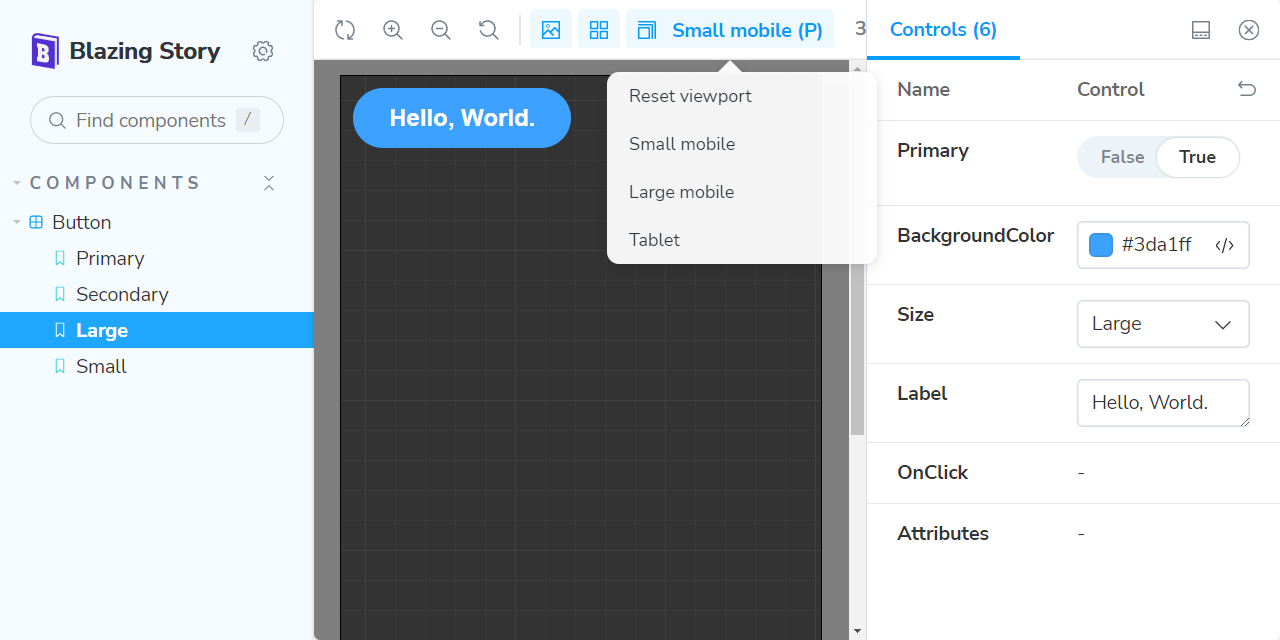
Built almost 100% on Blazor native (only a few JavaScript helpers), so you can create a UI catalog application the Blazor way — no npm, package.json, webpack, or JS/TS code required.
Blazing Story also provides an MCP server feature that exposes component and story information to AI agents for highly accurate code generation.
👉 Try the live demo: https://jsakamoto.github.io/BlazingStory/
🚀 Getting Started
This walkthrough assumes you already have a Blazor app project (e.g. MyBlazorApp1) with components you want to catalog.
1. Install the project template (one-time)
dotnet new install BlazingStory.ProjectTemplates
2. Create a Blazing Story app project
Add a Blazing Story app project alongside your existing app:
# For Blazor WebAssembly:
dotnet new blazingstorywasm -n MyBlazorApp1.Stories

# For Blazor Server (add -mcp to enable the MCP server feature):
dotnet new blazingstoryserver -n MyBlazorApp1.Stories

dotnet sln add ./MyBlazorApp1.Stories/
The MCP server feature is only available with the Blazor Server variant.
Visual Studio users can do the equivalent through Add → New Project and pick the "Blazing Story (WebAssembly App)" or "Blazing Story (Server App)" template.
3. Reference your component project
dotnet add ./MyBlazorApp1.Stories reference ./MyBlazorApp1
4. Add a story file
Place a *.stories.razor file (typically under a Stories/ folder) in the Blazing Story app project:
@* MyBlazorApp1.Stories/Stories/Button.stories.razor *@
@using MyBlazorApp1.Components
@attribute [Stories("Components/Button")]

<Stories TComponent="Button">
    <Story Name="Primary">
        <Template>
            <Button Label="Button" Primary="true" @attributes="context.Args" />
        </Template>
    </Story>
</Stories>
The file name must end with .stories.razor — this is required by the "Show code" feature on the "Docs" pages.
5. Run it!
dotnet run --project ./MyBlazorApp1.Stories
🎉 You'll see the Storybook clone built on Blazor!

📓 Documentation
For advanced topics — story structure, args, controls, decorators, addons, and more — see the Blazing Story Documentation Site.
🤖 AI Agent Skills
Agent skills are published to help AI coding assistants implement stories and custom addons for Blazing Story:
blazing-story-story— generate.stories.razorfiles for your componentsblazing-story-addon— scaffold and register custom addons (toolbar, panel, preview decorator)
Install with GitHub CLI (v2.90.0+):
gh skill install BlazingStory/agent-skills blazing-story-story
gh skill install BlazingStory/agent-skills blazing-story-addon
For details and the latest information, see the upstream repository: https://github.com/BlazingStory/agent-skills
📌 System Requirements
.NET SDK 8 or later
⚠️ Caveat
Assembly files of a Blazing Story app embed the project file path as metadata.
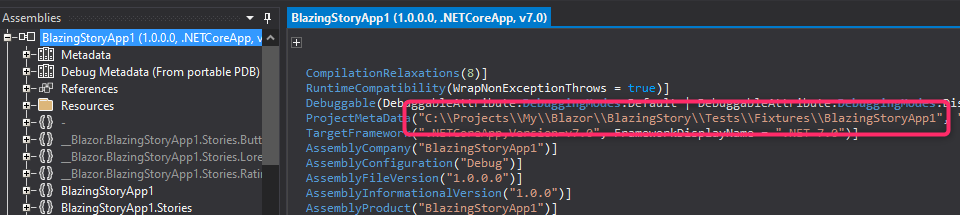
If the project path must remain confidential, avoid using Blazing Story.
🙇 Disclaimer
Blazing Story is a personal hobby project and a technical exhibition — it is not an officially derived product of Storybook. I plan to keep improving it, but it may be abandoned if I cannot spend enough time on it. Forks and community maintenance are welcome.
Because Blazing Story is a Blazor-native re-implementation that mimics Storybook's look, behavior, and functionality, none of the Storybook community's contributions, addons, or related services are available here. The trade-off is that Blazor developers get a Storybook-like component catalog within the familiar .NET ecosystem, free from the JavaScript front-end toolchain.
🎉 Release Notes
See RELEASE-NOTES.txt.
📢 License & Third Party Notice
Mozilla Public License Version 2.0
The third party notice is here.
This package has no dependencies.
NuGet packages
This package is not used by any NuGet packages.
GitHub repositories
This package is not used by any popular GitHub repositories.
| Version | Downloads | Last Updated |
|---|---|---|
| 1.0.0-preview.90 | 39 | 7/27/2026 |
| 1.0.0-preview.89.1 | 42 | 7/26/2026 |
| 1.0.0-preview.89 | 44 | 7/26/2026 |
| 1.0.0-preview.88 | 160 | 6/25/2026 |
| 1.0.0-preview.87 | 134 | 6/16/2026 |
| 1.0.0-preview.86 | 116 | 6/14/2026 |
| 1.0.0-preview.85 | 120 | 6/11/2026 |
| 1.0.0-preview.84 | 112 | 6/9/2026 |
| 1.0.0-preview.83 | 155 | 5/31/2026 |
| 1.0.0-preview.82 | 140 | 5/26/2026 |
| 1.0.0-preview.81 | 144 | 5/24/2026 |
| 1.0.0-preview.80 | 139 | 5/21/2026 |
| 1.0.0-preview.79 | 154 | 5/16/2026 |
| 1.0.0-preview.78 | 213 | 4/27/2026 |
| 1.0.0-preview.77 | 198 | 4/22/2026 |
| 1.0.0-preview.76 | 216 | 4/12/2026 |
| 1.0.0-preview.75 | 218 | 4/4/2026 |
| 1.0.0-preview.74 | 205 | 4/2/2026 |
| 1.0.0-preview.73 | 204 | 3/31/2026 |
| 1.0.0-preview.72 | 316 | 3/28/2026 |
v.1.0.0-preview.90
- Improve: Parameter summaries are now shown as a tooltip on parameter names in the Controls panel, making them visible in the Canvas view without switching to the Docs view. (PR #133 contributed by @Kebechet)
To see all the change logs, please visit the following URL.
- https://github.com/jsakamoto/BlazingStory/blob/main/RELEASE-NOTES.txt