C1.Win.InputPanel
10.0.20261.813
dotnet add package C1.Win.InputPanel --version 10.0.20261.813
NuGet\Install-Package C1.Win.InputPanel -Version 10.0.20261.813
<PackageReference Include="C1.Win.InputPanel" Version="10.0.20261.813" />
<PackageVersion Include="C1.Win.InputPanel" Version="10.0.20261.813" />
<PackageReference Include="C1.Win.InputPanel" />
paket add C1.Win.InputPanel --version 10.0.20261.813
#r "nuget: C1.Win.InputPanel, 10.0.20261.813"
#:package C1.Win.InputPanel@10.0.20261.813
#addin nuget:?package=C1.Win.InputPanel&version=10.0.20261.813
#tool nuget:?package=C1.Win.InputPanel&version=10.0.20261.813
About
InputPanel for WinForms is a container control that can automatically generate input forms using nineteen native data input controls. InputPanel makes it easy to create and maintain input forms.
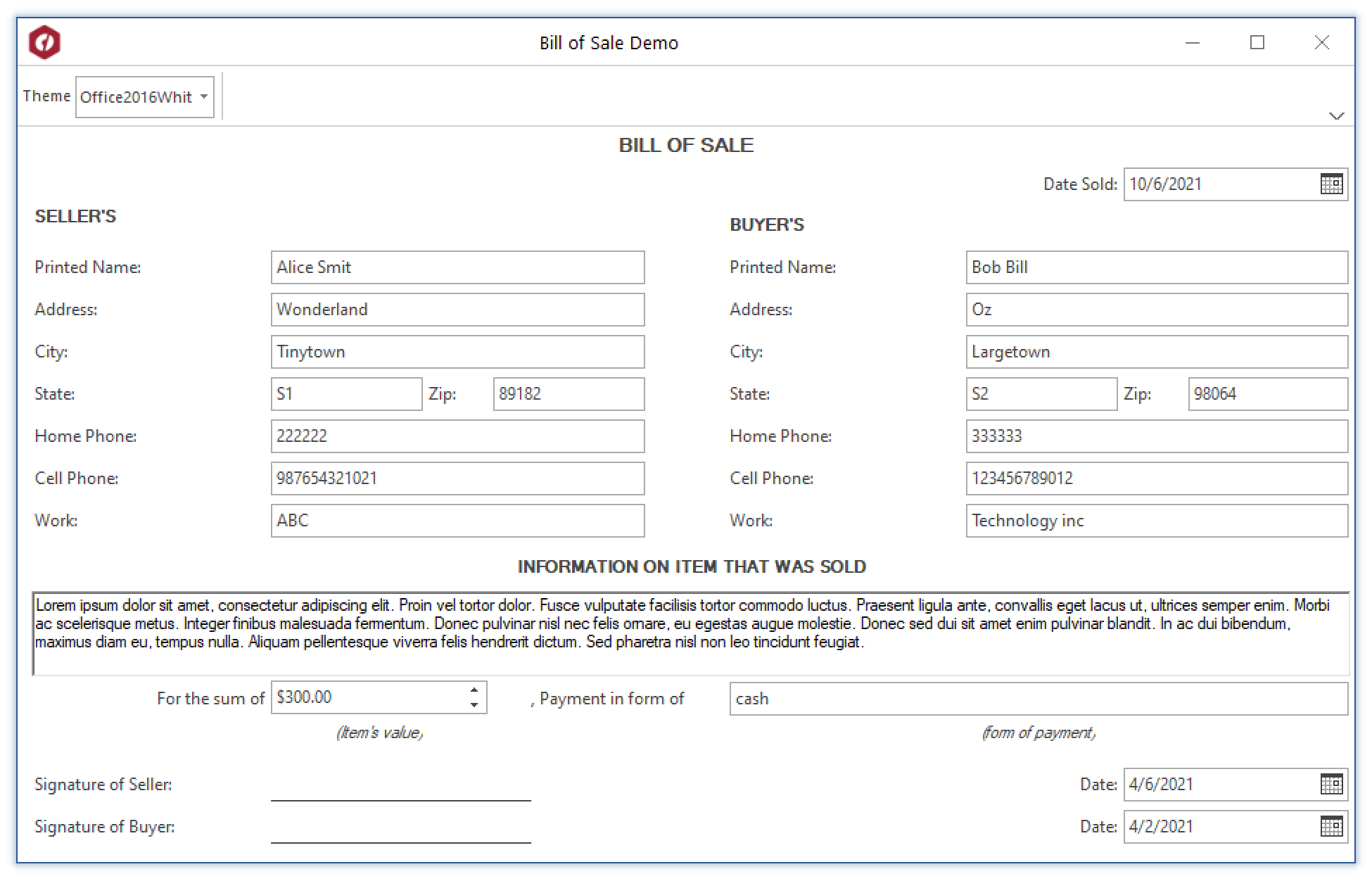
Key Features:
- Easy setup.
- WYSWYG (What You See is What You Get) designer.
- Universal .NET data binding.
- Automatic tab order.
- Accelerator keys.
- Validation and error handling.
- Easy layout settings.
- Spatially arrange components on the form.
- Easy to customize the appearance.
- Create rich toolTips.
- Toolitip text editor.
- Import and export panel layout.
- Interactive components with graphical effects.
- Scrollbars automatically added if needed.
Learn more at developer.mescius.com/componentone/input-panel-control-net.
Resources
| Product | Versions Compatible and additional computed target framework versions. |
|---|---|
| .NET | net6.0-windows7.0 is compatible. net7.0-windows was computed. net8.0-windows was computed. net8.0-windows7.0 is compatible. net9.0-windows was computed. net10.0-windows was computed. net10.0-windows7.0 is compatible. |
| .NET Framework | net462 is compatible. net463 was computed. net47 was computed. net471 was computed. net472 was computed. net48 is compatible. net481 was computed. |
NuGet packages (2)
Showing the top 2 NuGet packages that depend on C1.Win.InputPanel:
| Package | Downloads |
|---|---|
|
C1.Win.FlexViewer
ComponentOne FlexViewer for WinForms is a document previewing control that can be used to preview different document types such as C1Report, C1FlexReport, SSRS, and PDF documents. |
|
|
C1.Win.FlexGrid.RowDetails
Provides the collapsible row details feature for ComponentOne FlexGrid for WinForms. |
GitHub repositories
This package is not used by any popular GitHub repositories.
| Version | Downloads | Last Updated |
|---|---|---|
| 10.0.20261.813 | 701 | 8/7/2026 |
| 10.0.20261.796 | 556 | 7/3/2026 |
| 10.0.20261.779 | 472 | 5/29/2026 |
| 10.0.20252.761 | 851 | 3/20/2026 |
| 10.0.20252.755 | 475 | 2/12/2026 |
| 10.0.20252.740 | 2,378 | 12/1/2025 |
| 8.0.20251.721 | 955 | 9/18/2025 |
| 8.0.20251.714 | 648 | 7/11/2025 |
| 8.0.20251.709 | 433 | 5/30/2025 |
| 8.0.20251.708 | 448 | 5/16/2025 |
| 8.0.20242.700 | 1,207 | 3/5/2025 |
| 8.0.20242.693 | 768 | 12/27/2024 |
| 8.0.20242.688 | 644 | 11/20/2024 |
| 8.0.20242.681 | 422 | 11/12/2024 |
| 8.0.20241.672 | 1,707 | 9/3/2024 |
| 8.0.20241.664 | 733 | 7/8/2024 |
| 8.0.20241.657 | 663 | 5/29/2024 |
| 8.0.20233.643 | 1,018 | 3/12/2024 |
| 8.0.20233.636 | 542 | 1/19/2024 |
| 8.0.20233.631 | 1,511 | 11/21/2023 |