C1.Xaml.WPF.Docking.Cn
4.6.20261.15
dotnet add package C1.Xaml.WPF.Docking.Cn --version 4.6.20261.15
NuGet\Install-Package C1.Xaml.WPF.Docking.Cn -Version 4.6.20261.15
This command is intended to be used within the Package Manager Console in Visual Studio, as it uses the NuGet module's version of Install-Package.
<PackageReference Include="C1.Xaml.WPF.Docking.Cn" Version="4.6.20261.15" />
For projects that support PackageReference, copy this XML node into the project file to reference the package.
<PackageVersion Include="C1.Xaml.WPF.Docking.Cn" Version="4.6.20261.15" />
<PackageReference Include="C1.Xaml.WPF.Docking.Cn" />
For projects that support Central Package Management (CPM), copy this XML node into the solution Directory.Packages.props file to version the package.
paket add C1.Xaml.WPF.Docking.Cn --version 4.6.20261.15
The NuGet Team does not provide support for this client. Please contact its maintainers for support.
#r "nuget: C1.Xaml.WPF.Docking.Cn, 4.6.20261.15"
#r directive can be used in F# Interactive and Polyglot Notebooks. Copy this into the interactive tool or source code of the script to reference the package.
#:package C1.Xaml.WPF.Docking.Cn@4.6.20261.15
#:package directive can be used in C# file-based apps starting in .NET 10 preview 4. Copy this into a .cs file before any lines of code to reference the package.
#addin nuget:?package=C1.Xaml.WPF.Docking.Cn&version=4.6.20261.15
#tool nuget:?package=C1.Xaml.WPF.Docking.Cn&version=4.6.20261.15
The NuGet Team does not provide support for this client. Please contact its maintainers for support.
About
The ComponentOne WPF Docking library provides a multi-tabbed, docking interface inspired by Microsoft Visual Studio. Deliver customizable workspaces to your users complete with resizing, floating, and auto-hiding capabilities.
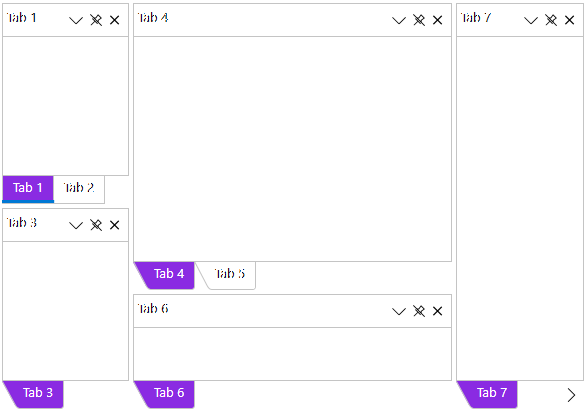
Key Features:
- Float and drag tabs outside your desktop application
- Dock tabs using a diamond UI paradigm just like Visual Studio
- Tabs can slide open and closed just like the pin (auto-hide) behavior seen in Visual Studio
- The C1DockTabControl will hide the tab header when only one tab exists
- In code you can persist layouts and restrict docking of certain tabs
Learn more at developer.mescius.com/componentone/wpf-ui-controls/custom-workspace-dockcontrol-wpf.
Resources
| Product | Versions Compatible and additional computed target framework versions. |
|---|---|
| .NET Framework | net462 is compatible. net463 was computed. net47 was computed. net471 was computed. net472 was computed. net48 was computed. net481 was computed. |
Compatible target framework(s)
Included target framework(s) (in package)
Learn more about Target Frameworks and .NET Standard.
-
.NETFramework 4.6.2
- C1.Xaml.WPF.Cn (= 4.6.20261.15)
NuGet packages
This package is not used by any NuGet packages.
GitHub repositories
This package is not used by any popular GitHub repositories.
| Version | Downloads | Last Updated |
|---|---|---|
| 4.6.20261.15 | 169 | 7/17/2026 |
| 4.6.20261.8 | 112 | 6/26/2026 |
| 4.6.20252.920 | 126 | 4/3/2026 |
| 4.6.20252.916 | 128 | 3/25/2026 |
| 4.6.20252.904 | 135 | 2/12/2026 |
| 4.6.20252.901 | 524 | 12/1/2025 |
| 4.6.20251.889 | 340 | 9/18/2025 |
| 4.6.20251.884 | 182 | 7/11/2025 |
| 4.6.20251.878 | 239 | 5/16/2025 |
| 4.6.20242.872 | 224 | 3/3/2025 |
| 4.6.20242.866 | 179 | 1/9/2025 |
| 4.6.20242.860 | 173 | 11/25/2024 |
| 4.6.20241.855 | 194 | 9/3/2024 |
| 4.6.20241.846 | 192 | 7/8/2024 |
| 4.6.20241.841 | 192 | 5/29/2024 |
| 4.6.20233.829 | 193 | 4/1/2024 |
| 4.6.20233.823 | 195 | 4/1/2024 |