CPMForge.uipsw.SemVer
0.1.23
dotnet add package CPMForge.uipsw.SemVer --version 0.1.23
NuGet\Install-Package CPMForge.uipsw.SemVer -Version 0.1.23
<PackageReference Include="CPMForge.uipsw.SemVer" Version="0.1.23" />
<PackageVersion Include="CPMForge.uipsw.SemVer" Version="0.1.23" />
<PackageReference Include="CPMForge.uipsw.SemVer" />
paket add CPMForge.uipsw.SemVer --version 0.1.23
#r "nuget: CPMForge.uipsw.SemVer, 0.1.23"
#:package CPMForge.uipsw.SemVer@0.1.23
#addin nuget:?package=CPMForge.uipsw.SemVer&version=0.1.23
#tool nuget:?package=CPMForge.uipsw.SemVer&version=0.1.23
CPMForge.uipsw.SemVer
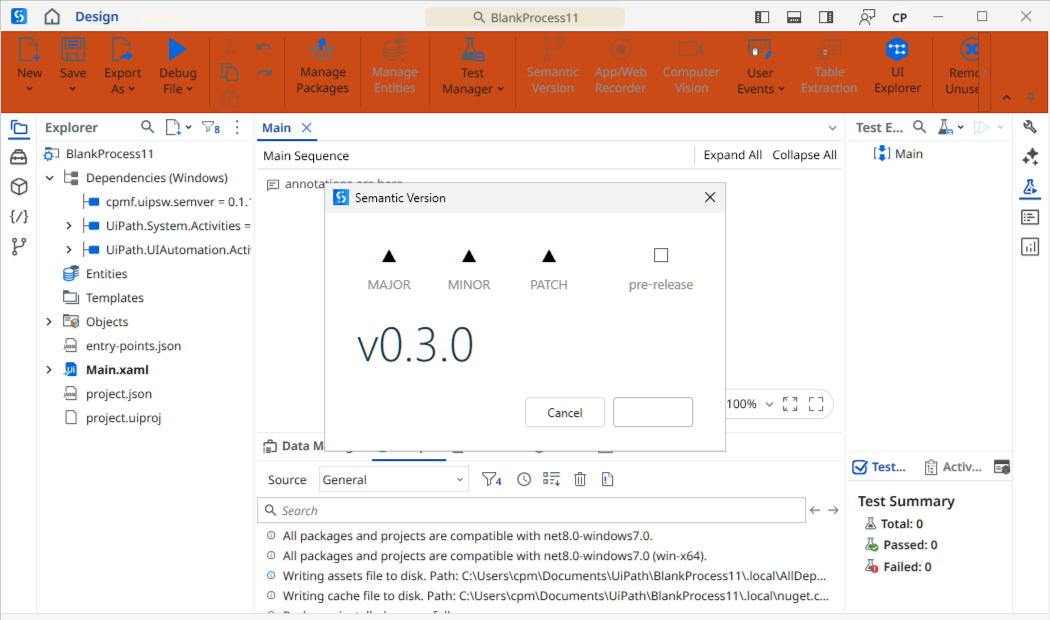
A UiPath Studio ribbon wizard for managing Semantic Versioning of UiPath projects and packages.
Overview
This package adds a Semantic Version wizard to the UiPath Studio ribbon. The wizard provides a guided interface for incrementing the project.json version according to SemVer rules (MAJOR.MINOR.PATCH), replacing manual edits and reducing version-bump errors.
The keyboard shortcut Ctrl+Shift+F10 opens the wizard directly without touching the mouse.
The wizard button is only active when a workflow (
.xaml) file is open in the designer — this is a Studio platform constraint that applies to all wizards.
Installation
From NuGet.org (recommended)
Add the package from Studio's Manage Packages dialog. NuGet.org is a built-in feed — no configuration needed.
Search for: CPMForge.uipsw.SemVer
From GitHub Releases (alternative)
Download the .nupkg from the Releases page, place it in a local folder, and add that folder as a package source in Studio:
Manage Packages → Settings → Add → (point to your local folder)
Once installed, the dependency appears in project.json:
"CPMForge.uipsw.SemVer": "[0.1.20]"
Requirements
- UiPath Studio 2022.4 or later (Windows edition)
- Project target framework: Windows — Cross-platform projects are not supported
CI/CD
Releases are fully automated via GitHub Actions.
Release flow:
# 1. merge development into main
git checkout main
git merge development
git push origin main

# 2. tag main — this triggers the workflow
git tag v0.1.21
git push origin v0.1.21
The workflow verifies the tag is on main before proceeding, then packs with the version from the tag, publishes to NuGet.org, and creates a GitHub Release with the .nupkg attached. Tags pushed from any other branch are rejected.
Build requirements: windows-latest runner — mandatory because the package targets net6.0-windows with WPF. No Studio installation needed on the runner; all compile-time dependencies are resolved via NuGet (UiPath.Workflow from the public UiPath-Official feed).
See .github/workflows/publish.yml for the full workflow definition.
Changelog
See CHANGELOG.md.
Author
Christian Prior-Mamulyan (@cprima) · cprior@gmail.com
License
Apache License 2.0 — see LICENSE.
Disclaimer
UiPath is a registered trademark of UiPath Inc. This project is independent and is not affiliated with, endorsed by, or sponsored by UiPath Inc. All product and company names are trademarks or registered trademarks of their respective holders.
| Product | Versions Compatible and additional computed target framework versions. |
|---|---|
| .NET | net6.0-windows7.0 is compatible. net7.0-windows was computed. net8.0-windows was computed. net9.0-windows was computed. net10.0-windows was computed. |
-
net6.0-windows7.0
- No dependencies.
NuGet packages
This package is not used by any NuGet packages.
GitHub repositories
This package is not used by any popular GitHub repositories.