CleanArchitecture.Aspire.Template
1.9.1
dotnet new install CleanArchitecture.Aspire.Template@1.9.1
Clean Architecture Template with Aspire
A flexible, production-ready .NET template implementing Clean Architecture with optional Aspire orchestration, CQRS, DDD, three database providers, optional JWT Authentication, front-end options (React/Angular/Blazor), Health Checks, OpenTelemetry, Serilog, Docker Compose, Azure deployment, and architecture tests.
Every wizard option is implemented and verified. Before each release, scripts/smoke-test.sh packs the template, installs it into an isolated hive, generates 32 different option combinations, and builds every one of them. See Verification.
📋 Template Wizard Preview
When creating a new project, the wizard lets you configure all options in one place:
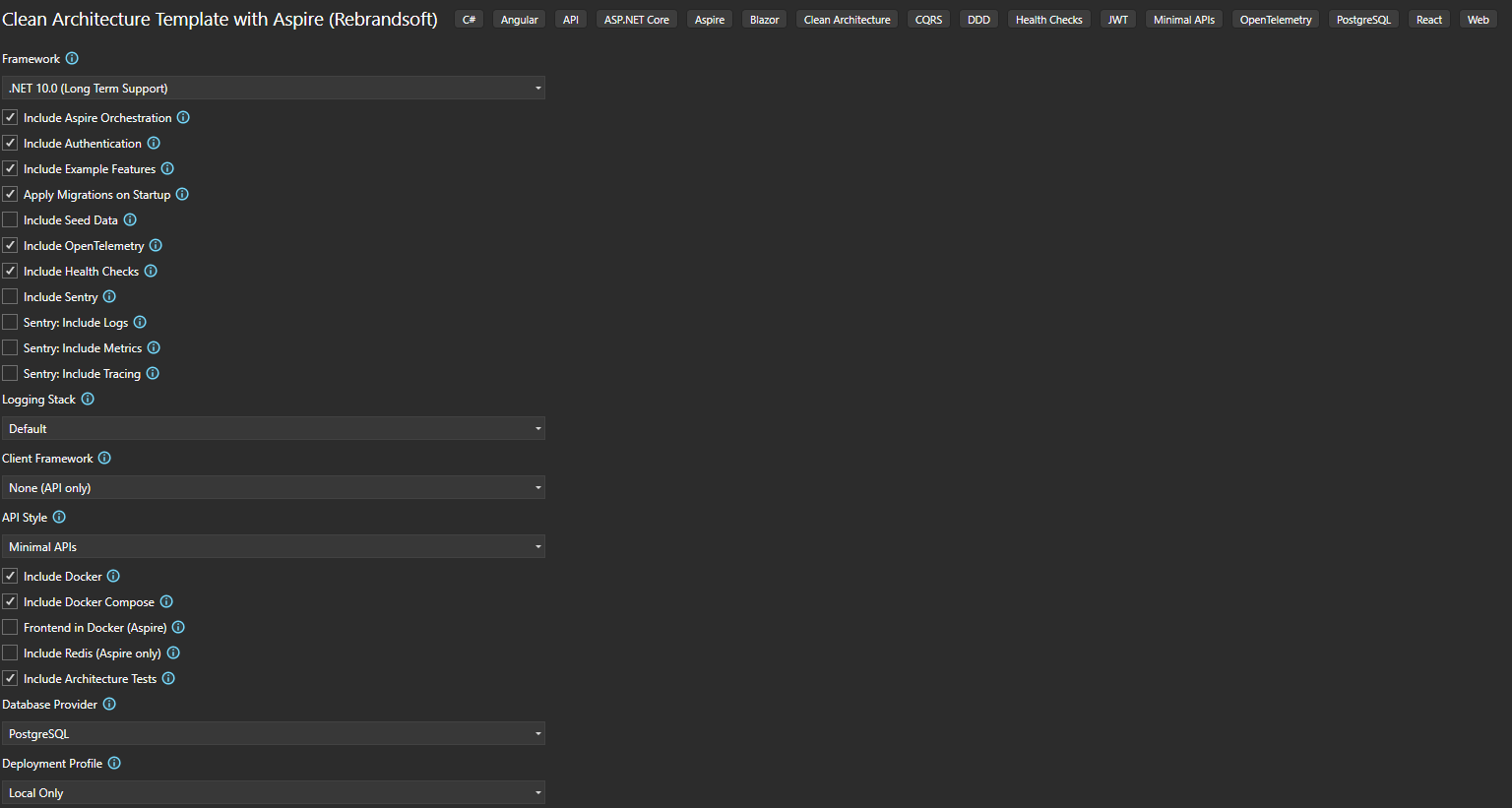
Configure Framework, Aspire, Authentication, Example Features, Migrations, Seed Data, OpenTelemetry, Health Checks, Logging, Client Framework (React/Angular/Blazor), API Style, Docker, Tests, Database Provider, and Deployment Profile.
🚀 Quick Start
Install from NuGet
dotnet new install CleanArchitecture.Aspire.Template
Create a New Project
Via Command Line:
dotnet new cleanarch-aspire -n YourProjectName
View all options:
dotnet new cleanarch-aspire -h
Via Visual Studio:
- Open Visual Studio
- Click "Create a new project"
- Search for "Clean Architecture" or "Aspire"
- Select "Clean Architecture Template with Aspire"
- Follow the wizard to configure options
- Click "Create"
📦 What's Included
Architecture Layers
- SharedKernel: Common abstractions and base classes
- Domain: Domain entities, value objects, and domain events
- Application: Use cases, CQRS handlers, and application logic
- Infrastructure: Data access, external services, and infrastructure concerns
- Web.Api: API endpoints, controllers, and presentation logic
Features
✅ Clean Architecture - Separation of concerns with clear boundaries
✅ CQRS - Command Query Responsibility Segregation pattern
✅ DDD - Domain-Driven Design principles
✅ Aspire (optional) - .NET Aspire 13 for cloud-native orchestration
✅ Three database providers - PostgreSQL, SQL Server, or SQLite, each with its own EF Core migrations
✅ Multi-targeting - .NET 10, .NET 9, or .NET 8, each with a matching package set
✅ JWT Authentication (optional) - Access tokens with rotating refresh tokens
✅ Permission-based Authorization - Fine-grained access control
✅ Refresh Tokens - Short-lived access tokens (15 min) + long-lived refresh tokens (7 days), stored in Redis or memory, rotated on refresh, single-use
✅ Rate Limiting - Sliding-window rate limiter (100 req/min per IP), HTTP 429 on exceed
✅ Redis (optional) - Distributed caching and refresh token storage when Aspire is selected
✅ Serilog (optional) - Structured logging to Console, plus Seq when Aspire is selected
✅ Health Checks (optional) - Application and provider-specific database health monitoring
✅ OpenTelemetry (optional) - Distributed tracing and metrics
✅ Sentry (optional) - Error monitoring, logs, metrics, tracing across API and frontends
✅ Seed Data (optional) - Idempotent demo user + todo items
✅ Swagger/OpenAPI - API documentation with Bearer token support
✅ Minimal APIs or Controllers - Your choice of endpoint style
✅ Docker + Docker Compose - Dockerfile plus a compose file wired to your chosen database, Redis, and Seq
✅ Azure deployment (optional) - Bicep infrastructure (Container Apps, ACR, Log Analytics, managed database) + azure.yaml for azd
✅ Architecture Tests - Automated architecture validation
✅ Central Package Management - Centralized NuGet version control
✅ Code Analysis - SonarAnalyzer integration
✅ React & Angular (.esproj) - JavaScript Project System for Solution Explorer (VS 2022/2026)
Project Structure
YourProjectName/
├── src/
│   ├── SharedKernel/           # Shared abstractions
│   ├── Domain/                 # Domain layer
│   ├── Application/            # Application layer (CQRS)
│   ├── Infrastructure/         # Infrastructure layer
│   │   └── Database/Migrations/  # Migrations for your chosen provider
│   ├── Web.Api/                # API layer
│   ├── Aspire.AppHost/         # Aspire orchestration (IncludeAspire=true)
│   ├── Aspire.ServiceDefaults/ # Aspire service defaults (IncludeAspire=true)
│   ├── Web.Client.React/       # React SPA (ClientFramework=React)
│   ├── Web.Client.Angular/     # Angular SPA (ClientFramework=Angular)
│   └── Web.Client.Blazor/      # Blazor WASM (ClientFramework=Blazor)
├── tests/
│   └── YourProjectNameTests/   # Architecture validation tests
├── infra/                      # Bicep infrastructure (DeploymentProfile=Azure)
├── azure.yaml                  # azd config (DeploymentProfile=Azure)
├── docker-compose.yml          # Local orchestration (IncludeDockerCompose=true)
├── Directory.Build.props       # Common build properties
├── Directory.Packages.props    # Central package management
└── YourProjectName.sln
⚙️ Configuration Options
| Option | CLI Parameter | Values | Default | Description |
|---|---|---|---|---|
| Project Name | -n, --name |
Any string | Current directory | Your project name (PascalCase recommended) |
| Framework | -F, --Framework |
net10.0, net9.0, net8.0 |
net10.0 |
Target framework. Package versions are selected to match. |
| Include Aspire | --IncludeAspire |
true, false |
true |
Aspire orchestration (AppHost, ServiceDefaults, Dashboard). Use false for API-only. |
| Include Authentication | --IncludeAuthentication |
true, false |
true |
JWT Authentication and permission-based Authorization. Excludes Users domain when false. |
| Include Example Features | --IncludeExampleFeatures |
true, false |
true |
Sample Todos and Users features |
| Apply Migrations on Startup | --ApplyMigrationsOnStartup |
true, false |
true |
Auto-apply EF migrations in Development |
| Include Seed Data | --IncludeSeedData |
true, false |
false |
Demo user + todo items. Requires Example Features and Authentication. |
| Include OpenTelemetry | --IncludeOpenTelemetry |
true, false |
true |
Tracing and metrics in ServiceDefaults. Applies when Aspire is selected. |
| Include Health Checks | --IncludeHealthChecks |
true, false |
true |
/health endpoint + provider-specific database check |
| Include Sentry | --IncludeSentry |
true, false |
false |
Sentry error monitoring. Configures Web.Api and the selected frontend. |
| Sentry: Include Logs | --IncludeSentryLogs |
true, false |
false |
Send ILogger logs to Sentry. Requires IncludeSentry. |
| Sentry: Include Metrics | --IncludeSentryMetrics |
true, false |
false |
Enable Sentry metrics. Requires IncludeSentry. |
| Sentry: Include Tracing | --IncludeSentryTracing |
true, false |
false |
Enable Sentry performance tracing. Requires IncludeSentry. |
| Logging Stack | --LoggingStack |
Default, Serilog |
Default |
Serilog adds Console logging, plus a Seq container when Aspire is selected. |
| Client Framework | --ClientFramework |
None, React, Angular, Blazor |
None |
Front-end (API only by default) |
| Frontend dev server in Aspire | --IncludeFrontendInAspire |
true, false |
false |
The AppHost runs the React/Angular dev server, so one F5 starts everything with hot reload. Requires Aspire + React or Angular. Takes precedence over Frontend in Docker. |
| Frontend in Docker (Aspire) | --IncludeFrontendInDocker |
true, false |
false |
Run the frontend as a production container orchestrated by Aspire (nginx, no hot reload). Requires Aspire + a frontend. |
| Include Redis | --IncludeRedis |
true, false |
false |
Distributed cache + refresh token store. Requires Aspire. |
| API Style | --ApiStyle |
MinimalApis, Controllers |
MinimalApis |
API endpoint style |
| Include Docker | -I, --IncludeDocker |
true, false |
true |
Dockerfile and .dockerignore |
| Include Docker Compose | --IncludeDockerCompose |
true, false |
true |
docker-compose.yml wired to your database, Redis, and Seq |
| Include Tests | -In, --IncludeTests |
true, false |
true |
Architecture tests project |
| Database Provider | -D, --DatabaseProvider |
PostgreSQL, SQLServer, SQLite |
PostgreSQL |
Provider, EF packages, migrations, and health check all follow this choice |
| Deployment Profile | --DeploymentProfile |
LocalOnly, Docker, Azure |
LocalOnly |
Azure adds Bicep infrastructure and azure.yaml for azd |
Wizard consistency: Options that don't apply are excluded automatically. Redis and OpenTelemetry only take effect with Aspire; seed data requires Example Features + Authentication; frontend Dockerfiles require Aspire + a frontend. The generated solution contains only the files your configuration needs.
Examples
# Defaults (.NET 10, PostgreSQL, Aspire, Docker, Tests, Minimal APIs)
dotnet new cleanarch-aspire -n MyAwesomeProject

# Target .NET 9 or .NET 8 (package versions follow automatically)
dotnet new cleanarch-aspire -n MyProject --Framework net9.0
dotnet new cleanarch-aspire -n MyProject --Framework net8.0

# API-only, no orchestration
dotnet new cleanarch-aspire -n MyProject --IncludeAspire false

# SQL Server or SQLite (provider-specific migrations are generated)
dotnet new cleanarch-aspire -n MyProject --DatabaseProvider SQLServer
dotnet new cleanarch-aspire -n MyProject --DatabaseProvider SQLite

# Front-ends
dotnet new cleanarch-aspire -n MyProject --ClientFramework React
dotnet new cleanarch-aspire -n MyProject --ClientFramework Angular
dotnet new cleanarch-aspire -n MyProject --ClientFramework Blazor

# Aspire runs the React dev server: one F5 starts database, API and React (hot reload)
dotnet new cleanarch-aspire -n MyProject --ClientFramework React --IncludeFrontendInAspire true
dotnet new cleanarch-aspire -n MyProject --ClientFramework Angular --IncludeFrontendInAspire true

# React as a Docker container orchestrated by Aspire (production build, no hot reload)
dotnet new cleanarch-aspire -n MyProject --ClientFramework React --IncludeFrontendInDocker true

# Redis distributed cache (Aspire)
dotnet new cleanarch-aspire -n MyProject --IncludeRedis true

# Serilog structured logging (adds Seq under Aspire)
dotnet new cleanarch-aspire -n MyProject --LoggingStack Serilog

# Controllers instead of Minimal APIs
dotnet new cleanarch-aspire -n MyProject --ApiStyle Controllers

# Demo seed data (demo@example.com / Demo123!)
dotnet new cleanarch-aspire -n MyProject --IncludeSeedData true

# Azure-ready: Bicep infrastructure + azd config
dotnet new cleanarch-aspire -n MyProject --DeploymentProfile Azure

# No authentication (excludes Users domain; Todos become unauthenticated)
dotnet new cleanarch-aspire -n MyProject --IncludeAuthentication false

# Empty skeleton (no example features)
dotnet new cleanarch-aspire -n MyProject --IncludeExampleFeatures false

# Lean API: no Aspire, no auth, SQLite
dotnet new cleanarch-aspire -n MyProject --IncludeAspire false --IncludeAuthentication false --DatabaseProvider SQLite

# Sentry with everything enabled
dotnet new cleanarch-aspire -n MyProject --IncludeSentry true --IncludeSentryLogs true --IncludeSentryMetrics true --IncludeSentryTracing true --ClientFramework React
📖 Feature Guide
| Feature | What it does | When to use |
|---|---|---|
| Framework | Sets the target framework for every project and selects a matching package set (EF Core, ASP.NET Core, Aspire, OpenTelemetry). | net10.0 for new work; net9.0/net8.0 when your hosting environment requires it. |
| Include Aspire | Adds AppHost + ServiceDefaults, orchestrates your database container, Redis, and Seq, and injects connection strings. | true for cloud-native apps and the Aspire dashboard. false for a plain API. |
| Include Authentication | JWT auth with rotating refresh tokens, permission-based authorization, and the Users feature. Access tokens expire in 15 min, refresh tokens in 7 days. | true for apps with login. false produces an API with no auth and no Users domain. |
| Include Example Features | Todos and Users CRUD (domain, handlers, endpoints, migrations). | true to learn the structure. false for a clean skeleton with an empty-schema migration. |
| Apply Migrations on Startup | Features:ApplyMigrationsOnStartup – applies EF migrations in Development, with retries. |
true for local convenience. false to run migrations manually. |
| Include Seed Data | Registers DatabaseSeeder and runs it at startup when Features:IncludeSeedData is true. Idempotent; creates demo@example.com / Demo123!. |
Local development and demos. Never enable in production. |
| Include OpenTelemetry | ASP.NET Core, HTTP, runtime, and EF Core instrumentation wired into ServiceDefaults, exported over OTLP. | When you want traces and metrics in the Aspire dashboard or an OTLP backend. |
| Include Health Checks | /health with a provider-specific database check, plus /alive under Aspire. |
Container orchestration and uptime monitoring. |
| Include Sentry | Sentry SDK for Web.Api plus the selected frontend, with a demo endpoint and UI. | Production error tracking. |
| Logging Stack | Default = built-in logging. Serilog = structured logging from appsettings.json, Console sink, plus a Seq container and sink under Aspire. |
Choose Serilog when you want structured logs and Seq. |
| Client Framework | React (Vite 8 + React 19), Angular (v20), Blazor (WebAssembly), or None. |
Pick your front-end stack. |
| Frontend dev server in Aspire | Registers the React/Angular dev server as an Aspire resource via Aspire.Hosting.JavaScript. Aspire installs npm packages, passes --port, injects the API address, and shows the app in the dashboard. Hot reload is preserved. |
You want a single startup project that runs the whole stack. |
| Frontend in Docker (Aspire) | Builds the frontend from a root Dockerfile and registers it in AppHost, served by nginx. ⚠️ No hot reload – assets are built once. | Containerized frontend, production-like. |
| API Style | MinimalApis = endpoint classes discovered by reflection. Controllers = MVC controllers. |
Minimal APIs for modern style; Controllers for familiarity. |
| Include Redis | IDistributedCache via Redis and Redis-backed refresh tokens; adds a Redis health check. Requires Aspire. |
Caching, session storage, refresh tokens across instances. |
| Include Docker Compose | docker-compose.yml with the API plus your database, and Redis/Seq when selected, with health-check gating. |
Running the whole stack locally without Aspire. |
| Deployment Profile | Azure adds infra/main.bicep + infra/resources.bicep (Container Apps, ACR, managed identity, Log Analytics, PostgreSQL/Azure SQL) and azure.yaml for azd up. |
Deploying to Azure Container Apps. |
| Database Provider | Selects EF provider packages, provider-specific migrations, health check, schema (public/dbo/none), and container image. |
PostgreSQL for production; SQLite for zero-setup local dev. |
🛠️ Getting Started After Creation
Restore dependencies:
dotnet restoreConfigure secrets in
src/Web.Api/appsettings.json(or User Secrets):- Connection string:
ConnectionStrings:Database— already filled in for Development - JWT secret: a unique development secret is generated into
appsettings.Development.jsonfor every new project. For production, set your own:
(use at least 32 characters)dotnet user-secrets set "Jwt:Secret" "your-secret-key" --project src/Web.Api
- Connection string:
Run migrations (only needed when
ApplyMigrationsOnStartup=false):dotnet ef database update --project src/Infrastructure --startup-project src/Web.ApiRun the application:
| Your choices | How to run | What starts |
|---|---|---|
| Aspire + API only | dotnet run --project src/Aspire.AppHost |
API (5000), Dashboard, database container |
| Aspire + Redis / Serilog | dotnet run --project src/Aspire.AppHost |
Adds Redis (6379) and/or Seq |
| Aspire + Blazor | 1. dotnet run --project src/Aspire.AppHost<br>2. dotnet run --project src/Web.Client.Blazor |
API + Blazor (5002) with CORS |
| Aspire + React | 1. dotnet run --project src/Aspire.AppHost<br>2. cd src/Web.Client.React && npm install && npm run dev |
API + React dev server (5173) with proxy |
Aspire runs the frontend (IncludeFrontendInAspire=true) |
dotnet run --project src/Aspire.AppHost |
API + React/Angular dev server, one command, hot reload kept |
| Aspire + Angular | 1. dotnet run --project src/Aspire.AppHost<br>2. cd src/Web.Client.Angular && npm install && npm start |
API + Angular dev server (4200) with proxy |
| Aspire + frontend in Docker | dotnet run --project src/Aspire.AppHost |
API + frontend container, single command |
| No Aspire + API only | dotnet run --project src/Web.Api |
API only (5000) |
| No Aspire + frontend | Run src/Web.Api, then the client project / npm run dev / npm start |
API + frontend with CORS or proxy |
| Docker Compose | docker compose up --build |
API + database (+ Redis/Seq when selected) |
⚠️ Hot reload does not work with
IncludeFrontendInDocker=true. The frontend runs as a production container (static assets via nginx). Usefalseand a local dev server for hot reload.
- Access the application:
- API: http://localhost:5000
- Swagger UI: http://localhost:5000/swagger
- Aspire Dashboard: printed in the console on startup (IncludeAspire=true)
- Blazor: http://localhost:5002 · React: http://localhost:5173 · Angular: http://localhost:4200
- Seq (Serilog + Aspire): http://localhost:5341
Visual Studio / Rider Launch Profiles
- Aspire only: Set startup project to
Aspire.AppHost. - Aspire + frontend: Solution → Properties → Multiple startup projects →
Aspire.AppHost+ your client. - No Aspire: Set startup project to
Web.Api.
VS Code Launch Profiles
.vscode/launch.json includes individual configurations (Web.Api, each client, Aspire AppHost) and compound ones (API + Blazor/React/Angular, Aspire + Blazor/React/Angular).
Default Ports
| Service | Port | When |
|---|---|---|
| Web.Api (HTTP / HTTPS) | 5000 / 5001 | Always |
| Redis | 6379 | IncludeRedis=true (Aspire) |
| Seq | 5341 | LoggingStack=Serilog |
| React (Vite) | 5173 | ClientFramework=React |
| Angular | 4200 | ClientFramework=Angular |
| Blazor WASM | 5002 / 5003 | ClientFramework=Blazor |
Config-driven ports (Aspire): ports come from src/Aspire.AppHost/appsettings.json (Api:HttpPort, Api:HttpsPort, Frontend:BlazorPort, …). Override with Api__HttpPort, Frontend__BlazorPort, etc. Web.Api's launchSettings.json is not used in that case.
📚 Architecture Concepts
Clean Architecture
- Domain Layer: Core business logic, independent of infrastructure
- Application Layer: Use cases and application logic (CQRS)
- Infrastructure Layer: External concerns (database, authentication, caching)
- Presentation Layer: API endpoints and controllers
CQRS Pattern
Commands modify state, queries read data, handlers process them, and FluentValidation validates input through a decorator.
Domain Events
Domain events are raised by entities, collected on SaveChangesAsync, and dispatched to handlers in the Application layer.
Result Pattern
Type-safe error handling with no exceptions for business logic. Error carries an ErrorType that maps to HTTP status codes:
| ErrorType | HTTP status |
|---|---|
Validation, Problem |
400 |
Unauthorized |
401 |
Forbidden |
403 |
NotFound |
404 |
Conflict |
409 |
Failure |
500 |
🔧 Configuration
Environment Variables
ASPNETCORE_ENVIRONMENT:Development,Staging,ProductionConnectionStrings__Database: Database connection stringConnectionStrings__cache: Redis connection string (injected by Aspire when IncludeRedis=true)Jwt__Secret,Jwt__Issuer,Jwt__AudienceJwt__ExpirationInMinutes(default 15),Jwt__RefreshTokenExpirationInDays(default 7)Jwt__RequireHttpsMetadata: defaults totrue; the generatedappsettings.Development.jsonsets it tofalsefor local HTTP
Features Section
{
  "Features": {
    "IncludeAuthentication": true,
    "ApplyMigrationsOnStartup": true,
    "IncludeSeedData": false
  }
}
These values are written from your wizard selections.
⚙️ Feature Details
Database Providers
Each provider gets its own EF Core migrations, health check, and schema convention:
| Provider | Packages | Schema | Local default |
|---|---|---|---|
| PostgreSQL | Npgsql.EntityFrameworkCore.PostgreSQL, AspNetCore.HealthChecks.NpgSql |
public |
Host=localhost;Port=5432;Database=<project>;Username=postgres;Password=postgres |
| SQL Server | Microsoft.EntityFrameworkCore.SqlServer, AspNetCore.HealthChecks.SqlServer |
dbo |
Server=(localdb)\MSSQLLocalDB;Database=<project>;Integrated Security=true |
| SQLite | Microsoft.EntityFrameworkCore.Sqlite, AspNetCore.HealthChecks.Sqlite |
none | Data Source=<project>.db |
Under Aspire, PostgreSQL and SQL Server run as containers and the connection string is injected automatically. SQLite needs no container.
JWT Authentication & Refresh Tokens
- Access token: short-lived (default 15 min), sent as
Authorization: Bearer <token>. - Refresh token: long-lived (default 7 days), single-use, rotated on every refresh.
- Endpoints:
POST /api/users/loginreturns{ accessToken, refreshToken, expiresAt };POST /api/users/refreshexchanges a refresh token for a new pair. A consumed or unknown refresh token returns 401. - Storage: keep the access token in memory and the refresh token in an HttpOnly cookie or secure storage — never
localStorage. - Server-side store: Redis when
IncludeRedis=true, otherwise an in-memory distributed cache. - HTTPS metadata:
Jwt:RequireHttpsMetadatadefaults totrue; only Development turns it off.
Rate Limiting
Sliding window, 100 requests per minute per IP, HTTP 429 on exceed. Configure in Program.cs via AddRateLimiter().
Redis
- With Aspire: Redis runs as a container and
ConnectionStrings:cacheis injected viaWithReference(cache). - Inject
IDistributedCachein your services:
public class MyService(IDistributedCache cache)
{
    public Task<string?> GetCachedAsync(string key, CancellationToken ct) =>
        cache.GetStringAsync(key, ct);
}
Serilog
LoggingStack=Serilog configures Serilog from the Serilog section of appsettings.json (Console sink, FromLogContext/WithMachineName/WithThreadId enrichers). With Aspire, a Seq container is added and its URL is injected into the Seq sink; browse logs at http://localhost:5341.
Seed Data
IncludeSeedData=true registers DatabaseSeeder and runs it after migrations when Features:IncludeSeedData is true. It creates demo@example.com with password Demo123! and two todo items, and does nothing if the demo user already exists. Seeding failures are logged and never block startup.
Azure Deployment
DeploymentProfile=Azure adds:
infra/main.bicep— subscription-scoped deployment creating the resource groupinfra/resources.bicep— Container Apps environment, Container Registry, user-assigned identity withAcrPull, Log Analytics, and a managed database (PostgreSQL Flexible Server or Azure SQL; SQLite runs in-container)azure.yaml—azdconfiguration
azd auth login
azd up
The JWT secret and database connection string are provisioned as Container App secrets.
Sentry
Sentry provides error monitoring, tracing, logs, and metrics for Web.Api and all frontends.
| Layer | When | What you get |
|---|---|---|
| Web.Api | IncludeSentry=true |
Sentry.AspNetCore, UseSentry(), appsettings config, GET /api/sentry/demo |
| Blazor | + ClientFramework=Blazor |
Sentry.AspNetCore.Blazor.WebAssembly, UseSentry(), SentryDemo component |
| React | + ClientFramework=React |
@sentry/react, instrument.ts, ErrorBoundary, replay, trace propagation |
| Angular | + ClientFramework=Angular |
@sentry/angular, sentry.ts, ErrorHandler, TraceService |
Setup: create a project at sentry.io, copy the DSN, then:
dotnet user-secrets set "Sentry:Dsn" "your-dsn" --project src/Web.Api
- Blazor:
src/Web.Client.Blazor/wwwroot/appsettings.json→Sentry:Dsn - React: copy
.env.exampleto.env.local, setVITE_SENTRY_DSN - Angular: set the
dsninsrc/app/sentry.ts
Call GET /api/sentry/demo or use the Sentry demo buttons on the frontend Home page to verify.
🧪 Testing
Run architecture tests:
dotnet test
🔬 Verification
This repository verifies the template end to end rather than relying on inspection:
./scripts/smoke-test.sh            # full matrix
./scripts/smoke-test.sh Default Net8 Sqlite   # selected cases
The script packs the template, installs it into an isolated dotnet new hive, generates 29 option combinations (each framework, each database provider, each API style, each frontend, auth on/off, Serilog, Redis, seeding, Azure, and several combined configurations), checks that no template placeholder survived substitution, and builds every generated solution. It exits non-zero if anything fails. Run it before publishing a new version.
🐳 Docker
docker compose up --build
The compose file is generated for your configuration: the API plus PostgreSQL/SQL Server (with health-check gating) or a SQLite volume, plus Redis and Seq when selected.
📝 Uninstalling the Template
dotnet new uninstall CleanArchitecture.Aspire.Template
🔍 Troubleshooting
Template Not Found
- Verify the installation command completed successfully
- Run
dotnet new listto confirm it is installed - Check your SDK version:
dotnet --version(.NET 10 SDK recommended)
Build Errors
- Ensure the SDK for your chosen
--Frameworkis installed - Run
dotnet restore - NuGet security advisories (NU1901–NU1904) are reported as warnings, not errors, so a newly disclosed CVE in a transitive package cannot break your build. Review and update them at your own pace.
Database Connection Issues
- Make sure the database is running (or use Aspire / Docker Compose, which start it for you)
- Verify
ConnectionStrings:Database - SQLite needs no server — the file is created next to the API
Aspire / Port Conflicts
- Free the default ports (5000/5001) or edit
src/Aspire.AppHost/appsettings.json:{ "Api": { "HttpPort": 5000, "HttpsPort": 5001 }, "Frontend": { "BlazorPort": 5002, "ReactPort": 5173, "AngularPort": 4200 } } - Override with env vars:
Api__HttpPort,Frontend__BlazorPort, … - When running via Aspire, Web.Api's
launchSettings.jsonis not used.
CORS / API Connection
- CORS is configured for React (5173), Angular (4200), and Blazor (5002/5003) whenever a frontend is selected. If you change ports, update the CORS policy in
Program.cs. - 404 on /api: start the API before the frontend.
- Proxy issues: check
vite.config.ts(React) orproxy.conf.json(Angular) — both targethttp://localhost:5000.
Frontend Projects in Solution Explorer
React and Angular use the JavaScript Project System (.esproj) and require the Node.js development workload in Visual Studio. If they don't appear: refresh Solution Explorer, clear any filter, reload the project, or use Add → Existing Project and pick src/Web.Client.React/Web.Client.React.esproj.
Authentication / JWT
- IDX10703 / "key length is zero":
Jwt:Secretis empty. New projects get a generated development secret; set your own for production via User Secrets. - 401 on protected endpoints: check that the access token has not expired (15 min) and that
Jwt:Issuer/Jwt:Audiencematch. - 401 from
/api/users/refresh: refresh tokens are single-use — use the newest one returned by the last refresh.
Migrations Not Applied
- Ensure
Features:ApplyMigrationsOnStartupistrueand the app runs in Development. - Migrations are skipped when
ConnectionStrings:Databaseis empty.
📄 License
PROPRIETARY LICENSE
Copyright (c) 2026 Rebrandsoft. All Rights Reserved.
This software is proprietary and confidential. Unauthorized copying, modification, distribution, or use is strictly prohibited. See LICENSE file for full terms.
ATTRIBUTION REQUIRED: If you use this template, you must include prominent attribution to Rebrandsoft as the original author.
🙏 Acknowledgments
- Inspired by Clean Architecture principles
- Built with .NET Aspire
- Uses FluentValidation, Scrutor, Serilog, and other excellent libraries
📞 Support
- Documentation: Clean Architecture Principles
- License Inquiries: Contact Rebrandsoft
📚 Additional Resources
Made with ❤️ by Rebrandsoft
This package has no dependencies.
NuGet packages
This package is not used by any NuGet packages.
GitHub repositories
This package is not used by any popular GitHub repositories.