Cogworks.Umbraco.FormsGuard.UmbracoAI
1.0.0
Prefix Reserved
dotnet add package Cogworks.Umbraco.FormsGuard.UmbracoAI --version 1.0.0
NuGet\Install-Package Cogworks.Umbraco.FormsGuard.UmbracoAI -Version 1.0.0
<PackageReference Include="Cogworks.Umbraco.FormsGuard.UmbracoAI" Version="1.0.0" />
<PackageVersion Include="Cogworks.Umbraco.FormsGuard.UmbracoAI" Version="1.0.0" />
<PackageReference Include="Cogworks.Umbraco.FormsGuard.UmbracoAI" />
paket add Cogworks.Umbraco.FormsGuard.UmbracoAI --version 1.0.0
#r "nuget: Cogworks.Umbraco.FormsGuard.UmbracoAI, 1.0.0"
#:package Cogworks.Umbraco.FormsGuard.UmbracoAI@1.0.0
#addin nuget:?package=Cogworks.Umbraco.FormsGuard.UmbracoAI&version=1.0.0
#tool nuget:?package=Cogworks.Umbraco.FormsGuard.UmbracoAI&version=1.0.0
Forms Guard: spam filtering for Umbraco Forms
Entries on guarded Umbraco Forms are saved as normal, then decided in the background: hard rules first, then an AI decision provider. Each entry is approved (on-approve emails go out), quarantined, or left for review.
Package: Cogworks.Umbraco.FormsGuard


Why
AI-written contact-form spam reads as plausible English, has no obvious spam markers, and gets past honeypots, reCAPTCHA and regex filters. Forms Guard asks an AI provider a set of plain questions about each entry ("Is this an unsolicited sales pitch?", "Is this a genuine enquiry?") and acts on the answers.
The visitor never sees any of this. Nothing is blocked at submit time and no entry is lost.
Screenshots
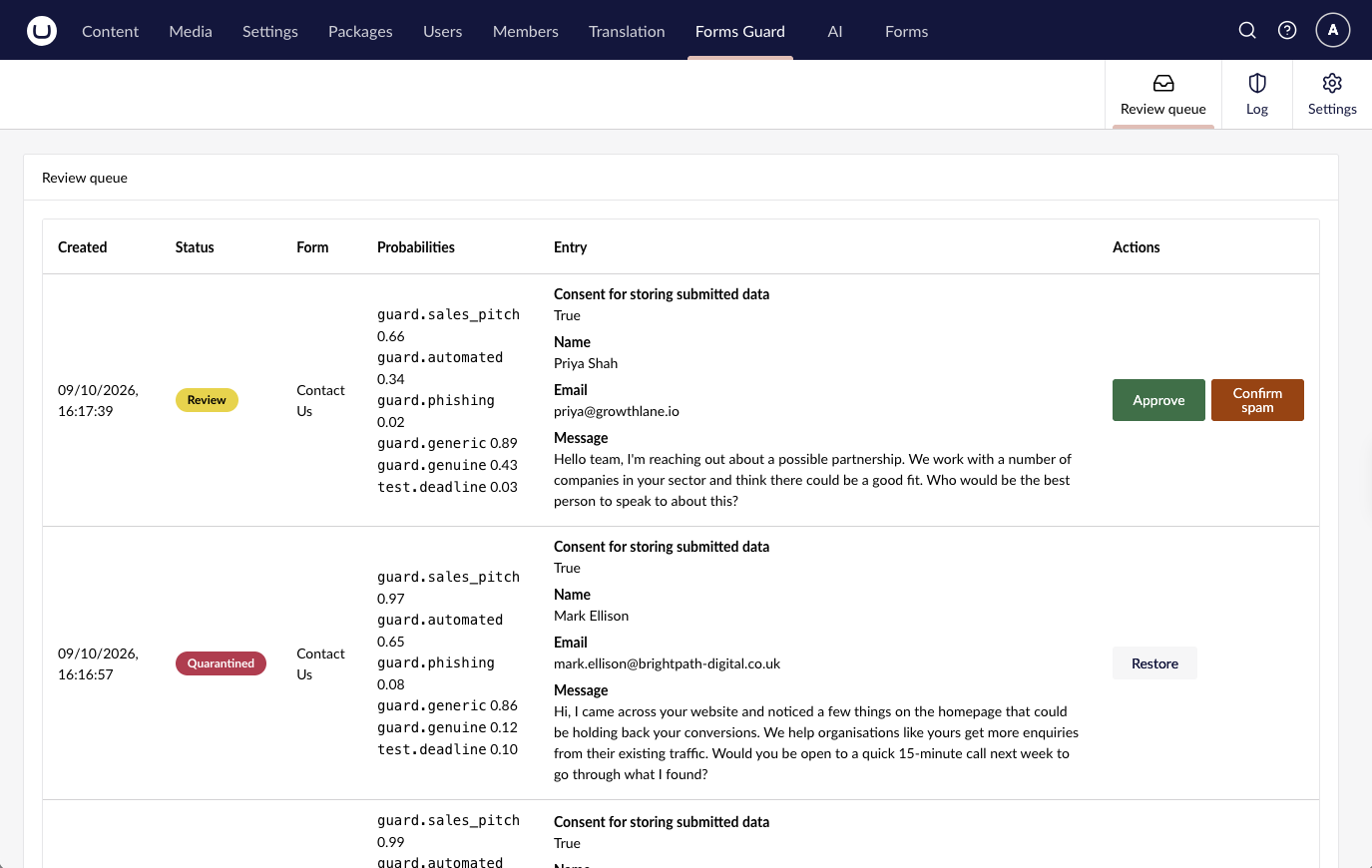
Review queue: entries the checker was unsure about, with their scores and Approve or Confirm spam.
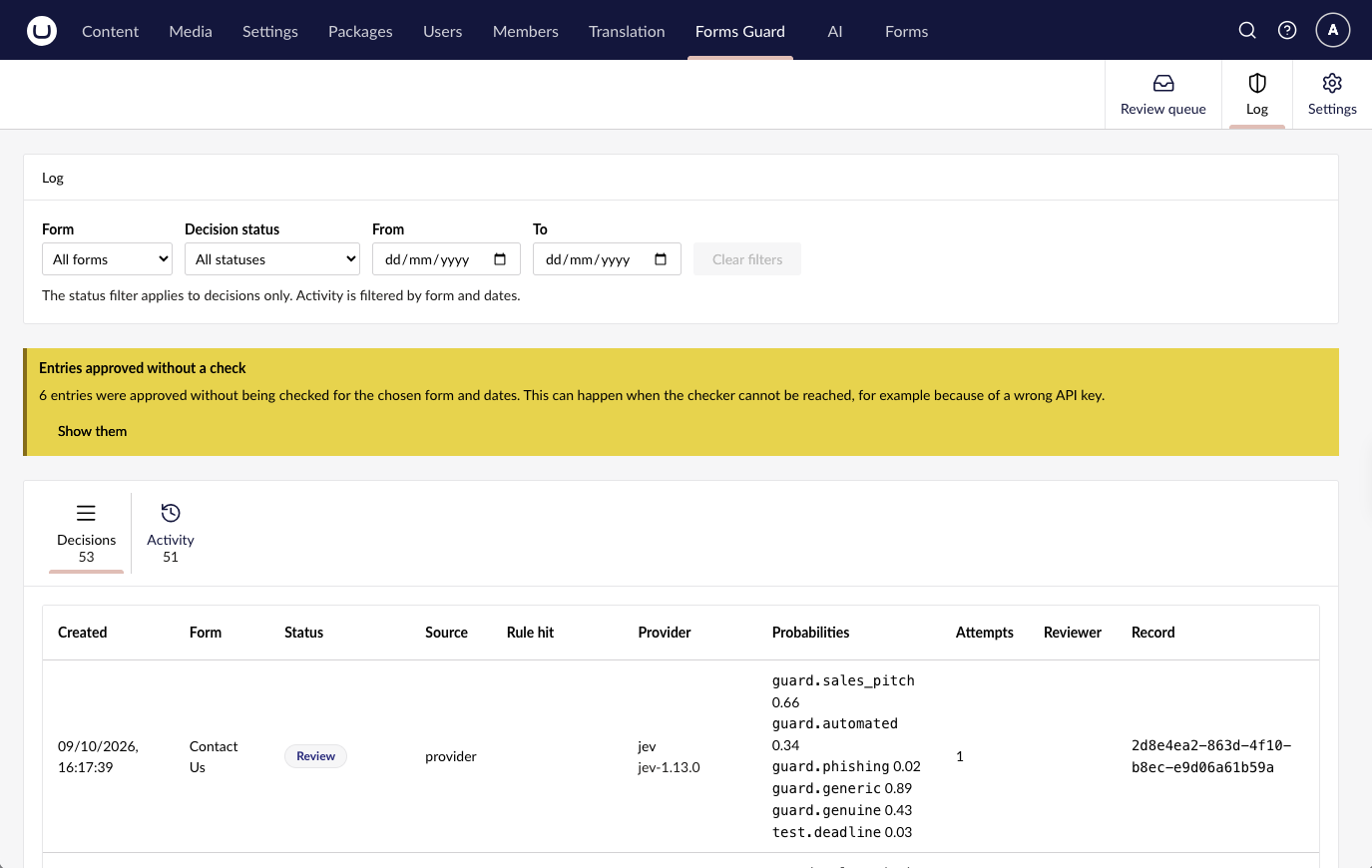
Log: every decision with its status, source, provider and scores, filtered by form, status and date.
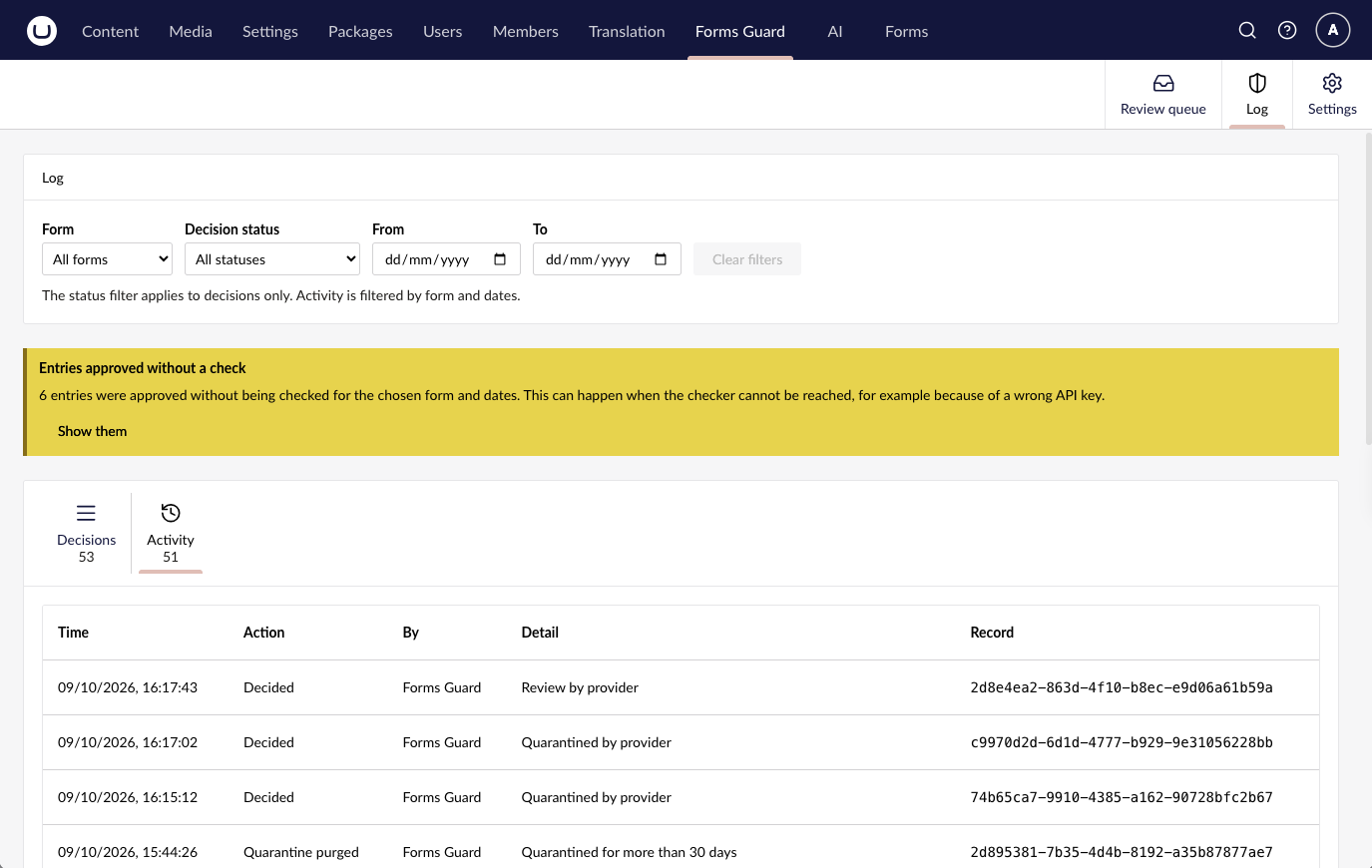
Activity: an audit trail of decisions, reviewer actions, settings changes and retention deletes.
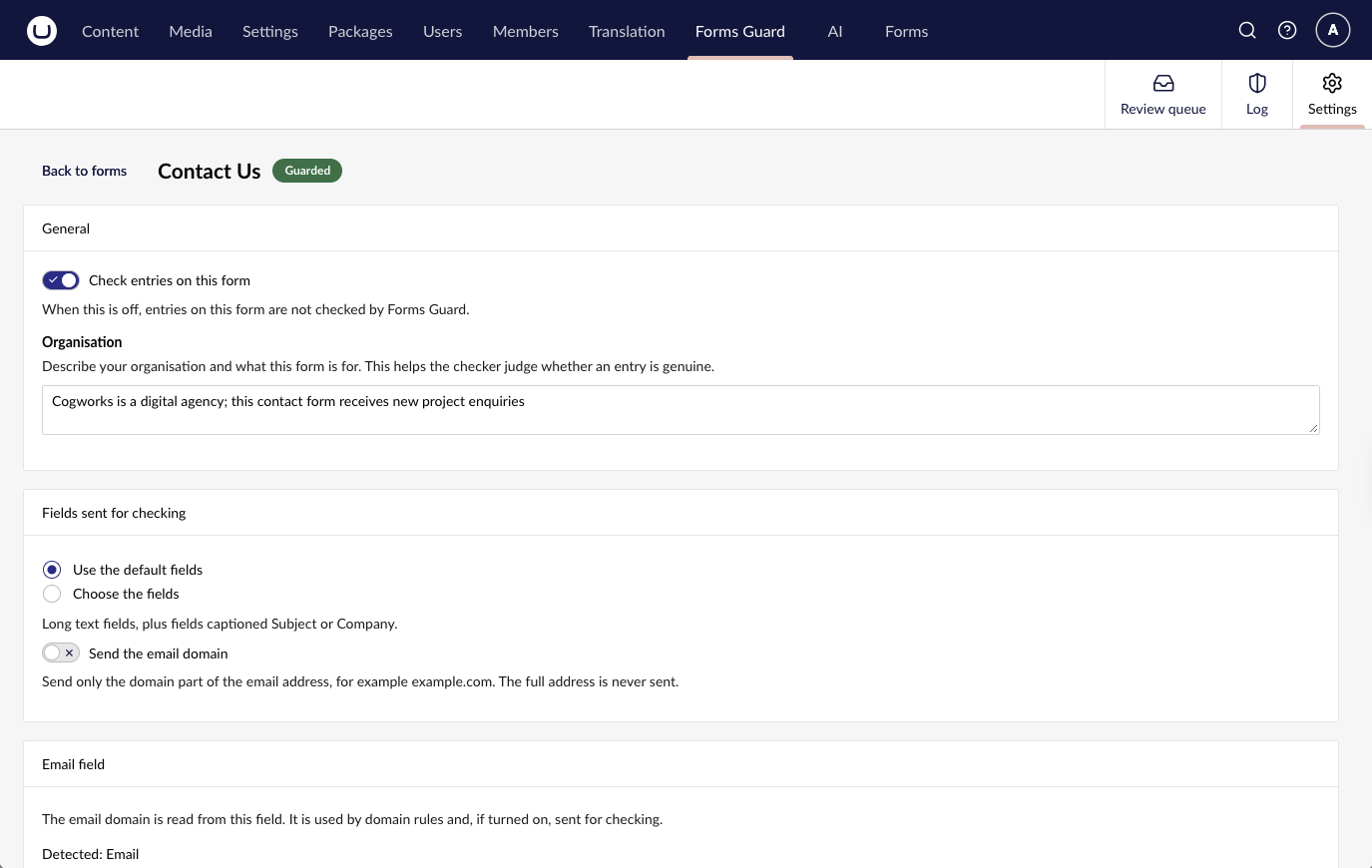
Per-form settings: turn checking on, describe the form, and choose which fields are sent.
Requirements
- Umbraco CMS 17.7 or later (17.x)
- Umbraco Forms 17.5.2 or later (17.x)
- .NET 10
- Manual approval turned on for every guarded form, with notification workflows set to run on approve. Forms Guard approves the entry when it decides it is genuine, which is what sends the email. If manual approval is off, the entry is saved as Approved straight away, Forms Guard logs a warning and skips it.
- For the default provider, a Jev (TypeSafe AI) API key. For the optional Umbraco.AI provider, Umbraco.AI 17.4 or later with a connection and profile instead.
Install
dotnet add package Cogworks.Umbraco.FormsGuard
The composer registers everything. The database tables (cogFormsGuardDecision, cogFormsGuardFormSettings, cogFormsGuardRule, cogFormsGuardAudit) are created by a migration on startup.
How it works
- A visitor submits a guarded form. Forms saves the entry as Submitted and shows the normal thank-you message.
- Forms Guard queues a Pending decision for the entry. No AI call happens on the request.
- A background processor (Single and SchedulingPublisher servers only) claims pending decisions and for each one:
- runs the form's hard rules over the full entry; if a rule decides, no provider call is made;
- otherwise builds a minimal view of the entry (allowed fields only, email local parts masked, no uploads or passwords, values trimmed to 4,000 characters) and sends one request with all questions to the decision provider;
- applies the decision rule and approves the entry (on-approve workflows run), rejects it (Quarantined), or leaves it Submitted for Review.
- Outcome handlers run after the outcome is applied.
Decision rule
Each question is a spam signal, a genuine signal or informational. Per form thresholds (defaults shown):
| Outcome | Condition |
|---|---|
| Quarantined | highest spam-signal probability >= 0.85 |
| Approved | highest spam-signal probability ⇐ 0.15 and genuine-signal probability >= 0.70 |
| Review | anything else |
A form with no enabled questions is left for Review.
Failures
Provider errors and timeouts never lose an entry. A failed attempt is retried with exponential backoff (honouring the provider's Retry-After, capped). After MaxAttempts failed attempts the form's failure policy applies: ApproveNotChecked (default; approved and marked "not checked") or Review. With KillSwitch on, no provider calls are made and entries not decided by a hard rule go straight to the failure policy. Claims are atomic and expire after ClaimStaleSeconds, so restarts and multiple servers are safe.
Privacy
With the default Jev provider, the allowed text of each entry is sent to TypeSafe, the company behind Jev: the form name, the allowed fields' captions and values (masked as described above), the email domain if sendEmailDomain is on, the form's organisation description and the questions. TypeSafe's retention period for this data is not publicly documented. Check TypeSafe's terms and where it processes data before you turn Forms Guard on for forms that collect personal data.
With the Umbraco.AI provider, the same text goes to the model service that the profile's connection uses instead.
Entries decided by a hard rule, or by the failure policy when KillSwitch is on, are not sent anywhere. Forms Guard's own tables hold record and form ids, statuses and probabilities, never field values.
Configure
appsettings.json
{
  "Cogworks": {
    "FormsGuard": {
      "Enabled": true,
      "Provider": "jev",
      "Jev": {
        "ApiKey": "",
        "Model": "jev-1.13.0"
      }
    }
  }
}
| Setting | Default | Effect |
|---|---|---|
Enabled |
true |
Off stops new entries being queued and stops the processor. |
Provider |
"jev" |
Decision provider: jev, stub, or umbracoai with the optional package below. An alias with no registered provider fails every decision without retries, so the form's failure policy applies. |
Jev:ApiKey |
(blank) | Jev API key. Blank falls back to the TYPESAFE_API_KEY environment variable. |
Jev:BaseUrl |
"https://api.typesafe.ai" |
Jev API base URL. |
Jev:Model |
"jev-1.13.0" |
Pinned model version. Never jev-latest. |
Jev:TimeoutSeconds |
10 |
Per-call timeout, 1 to 120. |
StubVerdict |
"Approve" |
What the stub provider decides: Approve or Reject. For testing. |
ProcessorIntervalSeconds |
10 |
How often the processor runs. |
ProcessorBatchSize |
10 |
Pending decisions claimed per run. |
ProcessorMaxConcurrency |
4 |
Decisions processed at once, 1 to 32. |
ClaimStaleSeconds |
300 |
Age after which another server may take over a claim. At least 60; must exceed the longest single decision. |
RetryBaseSeconds |
30 |
Delay before the first retry; doubles with each failure. At least 1. |
RetryMaxSeconds |
1800 |
Longest retry delay, also the cap on a provider's Retry-After. At least RetryBaseSeconds. |
MaxAttempts |
5 |
Failed attempts before the form's failure policy applies. At least 1. |
KillSwitch |
false |
On: no provider calls; entries not decided by a hard rule go to the failure policy. |
QuarantineRetentionDays |
30 |
Days an entry stays Quarantined before its Forms record is deleted. 0 turns the purge off. See Retention. |
Retention
- A daily job (Single and SchedulingPublisher servers, first run 5 minutes after startup) deletes each Forms record whose decision has been Quarantined for longer than
QuarantineRetentionDays. It deletes through Forms and adds aquarantine-purgeaudit entry. It runs whateverEnabledandKillSwitchare set to. The retention clock is the decision's last change, not strictly when it was quarantined. An entry approved in Forms' own Entries screen (no longer Rejected in Forms) is skipped and logged, not deleted. - Approved (including approved "not checked"), Review and Pending entries are never purged by Forms Guard. They follow the form's own retention settings in Forms. Quarantined entries are Rejected in Forms, so the form's own retention setting for rejected records can delete them sooner than
QuarantineRetentionDays. - When a Forms record is deleted (the purge, Forms' own scheduled deletes, or by hand in Forms), its decision row is removed and a
record-deletedaudit entry is added. If a record is deleted outside Forms, for example in SQL, the processor removes its decision row on its next run. A Pending row waits untilEnabledis on. - Audit rows are kept. They hold ids, the actor and the reason only.
Umbraco.AI provider (optional)
To decide entries with a model configured in Umbraco.AI instead of Jev, add the optional package and set Provider to umbracoai. The core package has no Umbraco.AI dependency.
dotnet add package Cogworks.Umbraco.FormsGuard.UmbracoAI
{
  "Cogworks": {
    "FormsGuard": {
      "Provider": "umbracoai",
      "UmbracoAI": {
        "ProfileAlias": "forms-guard",
        "TimeoutSeconds": 30
      }
    }
  }
}
| Setting | Default | Effect |
|---|---|---|
UmbracoAI:ProfileAlias |
"forms-guard" |
Alias of the Umbraco.AI profile (connection, model and settings) used for every call. Required. A missing profile fails without retries. |
UmbracoAI:TimeoutSeconds |
30 |
Per-call timeout, 1 to 120. |
All questions go in one chat call. Logs never contain field values or model output.
Per-form settings
Use Forms Guard > Settings; the table below is the stored shape (cogFormsGuardFormSettings):
| Column | Value |
|---|---|
FormId |
The Forms form id |
Guarded |
1 |
Settings |
JSON, below. {} gives the defaults. |
UpdatedUtc |
Current UTC time |
{
  "organisation": "A UK law firm offering family, employment and property law.",
  "allowedFieldIds": null,
  "sendEmailDomain": false,
  "emailFieldId": null,
  "thresholds": { "quarantineSpamMin": 0.85, "approveSpamMax": 0.15, "approveGenuineMin": 0.70 },
  "failurePolicy": "ApproveNotChecked"
}
organisationlets the provider judge relevance. Write it for each form.allowedFieldIds:nullmeans the default allowlist (long-answer fields plus fields captioned Subject or Company);[]sends no fields. File uploads and passwords are never sent.sendEmailDomainsends the submitter's email domain (never the local part).emailFieldIdpicks the email field;nullauto-detects.questions: leave it out (or use[]) to get the five defaults:guard.sales_pitch,guard.automated,guard.phishing(spam signals),guard.generic(informational) andguard.genuine(genuine signal). A supplied list replaces the defaults entirely, so it must contain every question you want, including at least oneGenuineSignalquestion or nothing can ever be approved. Each item is{ "key", "text", "role", "enabled" }. For example, a form that wants supplier approaches lists all five withguard.sales_pitchset to"enabled": false.- Invalid settings JSON falls back wholly to the defaults and logs a warning.
Hard rules
Add rows to cogFormsGuardRule (FormId, RuleType, Pattern, CreatedUtc). Rules are checked in this order, each in Id order; the first hit decides:
RuleType |
Pattern |
Outcome |
|---|---|---|
BlockedDomain |
example.com (also matches subdomains; @ or *. prefix allowed) |
Quarantined |
BlockedPhrase |
Whole words or phrase, case-insensitive | Quarantined |
AllowedDomain |
example.com |
Approved, if the entry has exactly one email domain |
Backoffice
Forms Guard adds a Forms Guard section with three tabs:
| Tab | What it does | Permission |
|---|---|---|
| Review queue | Lists Review and Quarantined entries with their fields read live from Forms; approve, confirm as spam or restore. | Review entries |
| Log | Decisions (status, source, rule hit, provider, probabilities, attempts; never field values), filterable by form, status and date, and the audit trail, filterable by form and date. | Review entries |
| Settings | Guards a form and edits its settings and hard rules. | Manage settings |
Nothing is granted on install. In Users > User groups, edit a group and:
- add Forms Guard to its allowed sections;
- under Default permissions > Forms Guard, tick Review entries and, if wanted, Manage settings.
Forms Guard adds no form-level permissions of its own; it asks Umbraco Forms:
- Review queue and Log show only forms the user can access in Forms, and only if the user has the Forms view-entries right.
- Approving, confirming as spam or restoring an entry also needs the Forms edit-entries right.
- Settings lists only forms the user can access in Forms.
- Forms gives administrators no fallback for entries. An administrator needs a Forms user-security row granting view and edit entries (or, in Forms user-group security mode, those permissions on one of their groups) to see or act on the review queue.
The API (/umbraco/formsguard/api/v1/..., OpenAPI at /umbraco/swagger/formsguard/swagger.json) requires a backoffice login, the section and the matching permission, otherwise it returns 401 or 403.
Building the client
The TypeScript source lives in Cogworks.Umbraco.FormsGuard/Client. The built bundle goes to Cogworks.Umbraco.FormsGuard/wwwroot (served at /App_Plugins/FormsGuard) and is not committed, so build it before running or packing:
cd Cogworks.Umbraco.FormsGuard/Client
npm ci
npm run build             # or: npm run watch
npm run generate-client   # after API changes, with the test site running on https://localhost:44326
Evaluating providers
Cogworks.Umbraco.FormsGuard.Evaluation is a console tool, not a package. It sends each row of a labelled CSV (label,category,name,email,message, label spam or genuine) through one or more providers on a running site and reports genuine entries wrongly quarantined, spam wrongly approved, entries sent to review, errors and suggested thresholds. With several providers it adds a side-by-side table of accuracy, cost per entry and median latency.
It calls POST /api/forms-guard/evaluate on the test site (AiFormsGuard.TestSite), which uses the site's real provider configuration, default questions and decision rule, and returns 404 unless the site runs in Development. The endpoint is not in the packages.
dotnet run --project Cogworks.Umbraco.FormsGuard.Evaluation -- \
  --provider jev,umbracoai --price umbracoai=1/5 \
  [--csv demo/spam-corpus.csv] [--url https://localhost:44326]
--price <alias>=<input>[/<output>] is USD per million tokens; Jev has a built-in default. Run it on a client's own labelled entries before choosing thresholds: results on the 9-row demo/spam-corpus.csv are a smoke test, not evidence.
Extension points
Register implementations in DI from your own composer. Implementations must be thread-safe: they are called in parallel, from up to ProcessorMaxConcurrency processor decisions (at most 32) and from reviewer actions in the backoffice at the same time.
IQuestionContributor: adds namespaced questions (e.g.triage.team) to each provider request. Theguard.*namespace is reserved. Contributed questions are recorded but do not affect the decision rule.IEnumerable<DecisionQuestion> GetQuestions(Guid formId);IOutcomeHandler: acts after the outcome is applied. Receives the record id, form id, status and the provider's answers (empty when decided by a rule or the failure policy). Exceptions are logged and do not affect other handlers.Task HandleAsync(DecisionOutcome outcome, CancellationToken cancellationToken);
License
MIT. Built by Cogworks. Lead maintainer: Adam Shallcross.
| Product | Versions Compatible and additional computed target framework versions. |
|---|---|
| .NET | net10.0 is compatible. net10.0-android was computed. net10.0-browser was computed. net10.0-ios was computed. net10.0-maccatalyst was computed. net10.0-macos was computed. net10.0-tvos was computed. net10.0-windows was computed. |
-
net10.0
- Cogworks.Umbraco.FormsGuard (>= 1.0.0)
- SQLitePCLRaw.lib.e_sqlite3 (>= 2.1.13)
- Umbraco.AI (>= 17.4.0)
- Umbraco.AI.Persistence.Sqlite (>= 17.4.0)
- Umbraco.Cms.Api.Management (>= 17.7.0)
- Umbraco.Cms.Core (>= 17.7.0)
- Umbraco.Cms.Web.Common (>= 17.7.0)
- Umbraco.Forms.Core (>= 17.5.2)
NuGet packages
This package is not used by any NuGet packages.
GitHub repositories
This package is not used by any popular GitHub repositories.
| Version | Downloads | Last Updated |
|---|---|---|
| 1.0.0 | 33 | 10/9/2026 |