CommentSense 0.3.0

dotnet add package CommentSense --version 0.3.0
                    
NuGet\Install-Package CommentSense -Version 0.3.0
                    
This command is intended to be used within the Package Manager Console in Visual Studio, as it uses the NuGet module's version of Install-Package.
<PackageReference Include="CommentSense" Version="0.3.0" />
                    
For projects that support PackageReference, copy this XML node into the project file to reference the package.
<PackageVersion Include="CommentSense" Version="0.3.0" />
                    
Directory.Packages.props
<PackageReference Include="CommentSense" />
                    
Project file
For projects that support Central Package Management (CPM), copy this XML node into the solution Directory.Packages.props file to version the package.
paket add CommentSense --version 0.3.0
                    
#r "nuget: CommentSense, 0.3.0"
                    
#r directive can be used in F# Interactive and Polyglot Notebooks. Copy this into the interactive tool or source code of the script to reference the package.
#:package CommentSense@0.3.0
                    
#:package directive can be used in C# file-based apps starting in .NET 10 preview 4. Copy this into a .cs file before any lines of code to reference the package.
#addin nuget:?package=CommentSense&version=0.3.0
                    
Install as a Cake Addin
#tool nuget:?package=CommentSense&version=0.3.0
                    
Install as a Cake Tool

CommentSense

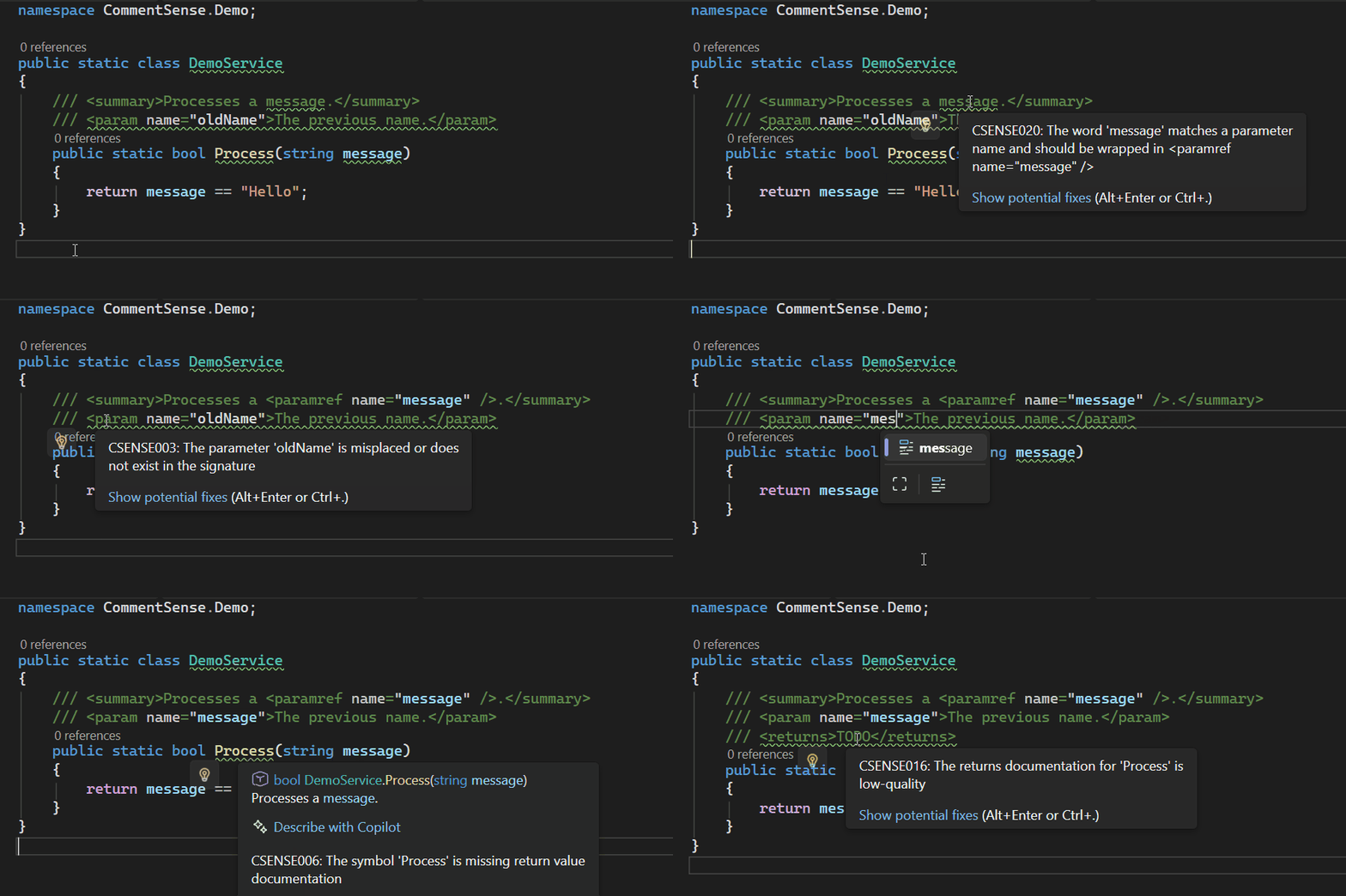
CommentSense is a Roslyn-based diagnostic analyzer for C# designed to ensure that public-facing APIs are consistently and meaningfully documented.

Requirements

For CommentSense to analyze your documentation, your project must have XML documentation generation enabled. Add the following property to your .csproj file:

<PropertyGroup>
  <GenerateDocumentationFile>true</GenerateDocumentationFile>
</PropertyGroup>

Rules

Project Configuration

  • CSENSE000: Warns when XML documentation parsing is disabled for the project. CommentSense relies on the compiler's documentation parsing to analyze your code. Enable it by following the Requirements section above.

General Documentation

  • CSENSE001: Ensures public members have XML documentation (e.g., <summary>, <inheritdoc />, or other content tags).
    • Note: Using <inheritdoc /> (without a cref) on a member that does not override or implement a base member will trigger this warning.
    • Default: Analyzes members according to the visibility_level (default: protected).
    • Configurable: Set the visibility threshold using comment_sense.visibility_level.
  • CSENSE018: Warns when a member that overrides or implements a base member is missing explicit documentation (when configured to require it).
    • Note: By default, these members are allowed to implicitly inherit documentation.
    • Configurable: Set comment_sense.allow_implicit_inheritdoc = false to require explicit documentation (e.g., <inheritdoc />) for all inheriting members.
  • CSENSE016: Flags "low quality" documentation.
    • Default: Flags empty content or content that just repeats the symbol name.
    • Configurable: Add custom terms, minimum length, punctuation requirements, and similarity thresholds.
  • CSENSE007: Validates that cref attributes in documentation point to valid symbols.
  • CSENSE019: Recommends using the <see langword="..." /> tag for C# keywords (e.g., true, false, null, void) instead of plain text.
    • Configurable: Customize the list of keywords using comment_sense.langwords.

Parameters & Type Parameters

Ensures parameters and type parameters are correctly documented and referenced.

  • CSENSE002 / CSENSE004: Flags parameters or type parameters defined in code but missing from documentation.
  • CSENSE003 / CSENSE005: Flags "stray" tags referring to parameters that do not exist.
  • CSENSE008 / CSENSE010: Enforces that the order of parameter tags in documentation matches the method signature.
  • CSENSE009 / CSENSE011: Flags duplicate tags for the same parameter.
  • CSENSE020 / CSENSE021: Flags parameter or type parameter names used in documentation text that are not wrapped in <paramref /> or <typeparamref /> tags.
    • Default: Only flags complex names (camelCase, PascalCase, underscores, or digits).
    • Configurable: Control the strictness using comment_sense.ghost_references.mode.

Return Values

  • CSENSE006: Requires a <returns> tag for members that return a value (i.e., non-void, non-Task, non-ValueTask).
  • CSENSE013: Flags stray <returns> tags on members that do not produce a documented return value (including void, Task, and ValueTask members), as well as on properties and indexers.

Exceptions

  • CSENSE012: Scans the method body for explicitly thrown exceptions (including static guard clauses like ArgumentNullException.ThrowIfNull) and ensures they are documented with <exception> tags.
    • Configurable:
      • Ignore exceptions using comment_sense.ignored_exceptions, comment_sense.ignore_system_exceptions, and comment_sense.ignored_exception_namespaces.
      • Enable scanning of called methods and constructors for their documented exceptions using comment_sense.scan_called_methods_for_exceptions = true.
  • CSENSE017: Validates that the cref attribute in an <exception> tag refers to a valid Exception type.

Properties

  • CSENSE014: Requires a <value> tag for properties.
    • Default: Disabled.
  • CSENSE015: Flags stray <value> tags.

Automatic Suppression

CommentSense automatically suppresses several built-in C# compiler diagnostics that overlap with its own rules. This prevents duplicate warnings and ensures a cleaner "Error List" experience.

The following diagnostics are suppressed globally by default:

  • CS1591: Missing XML comment for publicly visible type or member.
  • CS1573: Parameter has no matching param tag in the XML comment.
  • CS1572: XML comment has a param tag for a non-existent parameter.
  • CS1571: XML comment has a duplicate param tag.
  • CS1584: XML comment has syntactically incorrect cref attribute.
  • CS1574: XML comment has cref attribute that could not be resolved.
  • CS1658: Error in XML comment (e.g. syntax error in cref).

Configuration

You can configure the analyzer behavior using an .editorconfig file in your project root or solution directory.

Conditional Suppression

By default, CommentSense suppresses the above compiler warnings globally for the project. If you want to suppress them only for members that CommentSense is actively analyzing (based on visibility or other exclusions), enable this option.

This is useful if you exclude certain members (e.g. constants) from CommentSense but still want the standard C# compiler warnings to report issues for them.

[*.cs]
# Default: false (global suppression)
comment_sense.enable_conditional_suppression = true

Low Quality Analysis

Specify criteria for what is considered "low quality" documentation.

[*.cs]
# Comma-separated list of terms (case-insensitive)
comment_sense.low_quality_terms = TODO, TBD, FixMe, None, N/A

# Minimum length for summary text (excluding trailing punctuation and whitespace)
comment_sense.min_summary_length = 10

# Whether to require summaries to end with punctuation (. ! ?)
comment_sense.require_ending_punctuation = true

# Threshold (0.0 to 1.0) for similarity between documentation and member name.
# Setting this to 0.0 (default) disables similarity analysis.
# A value of 1.0 only flags documentation identical to the symbol name.
# Recommended: 0.7 to 0.8
comment_sense.similarity_threshold = 0.8

Langword Analysis

Configure which C# keywords should be flagged for replacement with <see langword="..." />.

[*.cs]
# Comma-separated list of keywords (case-insensitive)
# Default: true, false, null, void
comment_sense.langwords = true, false, null, void, async, await

Ghost Reference Analysis

Configure how strictly to detect parameter names mentioned in documentation text without <paramref /> or <typeparamref /> tags.

[*.cs]
# Options: safe, strict, off
# safe: Only flags complex names (camelCase, PascalCase, underscores, or digits). Ignores simple lowercase words (default).
# strict: Flags all matching parameter names regardless of casing or length.
# off: Disables ghost reference detection.
comment_sense.ghost_references.mode = safe

Ignored Exceptions

Configure which exceptions should be ignored by the missing exception documentation rule (CSENSE012).

[*.cs]
# Comma-separated list of exception types (by name or full name)
comment_sense.ignored_exceptions = System.ArgumentNullException, ArgumentOutOfRangeException

# Whether to ignore all exceptions in the System namespace (default: false)
comment_sense.ignore_system_exceptions = true

# Comma-separated list of namespaces. Exceptions in these namespaces (or sub-namespaces) will be ignored.
comment_sense.ignored_exception_namespaces = MyProject.Internal, System.Data

# Whether to scan called methods and constructors for their documented exceptions (default: false).
# When enabled, CSENSE012 will also report exceptions documented in the XML comments of called members.
comment_sense.scan_called_methods_for_exceptions = true

Visibility Level Analysis

Set the visibility threshold for members that should be analyzed.

[*.cs]
# Options: public, protected, internal, private
# public: only public members
# protected: public, protected, and protected internal (default)
# internal: public, protected, internal, and private protected
# private: all members
comment_sense.visibility_level = protected

Constant Field Analysis

Skip documentation requirements for constant fields (disabled by default). Constants like public const string Version = "1.0"; are often self-explanatory.

[*.cs]
comment_sense.exclude_constants = true

Enum Member Analysis

Skip documentation requirements for enum members (disabled by default).

[*.cs]
comment_sense.exclude_enums = true

Implicit Documentation Inheritance

By default, CommentSense allows skipping documentation for methods, properties, and events that override or implement base members, as they implicitly inherit documentation. This does not apply to types (classes, interfaces, etc.), which always require explicit documentation.

To disable this behavior and require explicit documentation (e.g., <inheritdoc />) for these members, set this option to false. This will trigger CSENSE018 when documentation is missing.

[*.cs]
comment_sense.allow_implicit_inheritdoc = false

Contributions

Contributions are welcome! Read the contributing guide to get started.

License

This project is licensed under the MIT License.

There are no supported framework assets in this package.

Learn more about Target Frameworks and .NET Standard.

This package has no dependencies.

NuGet packages

This package is not used by any NuGet packages.

GitHub repositories

This package is not used by any popular GitHub repositories.

Version Downloads Last Updated
0.3.0 31 2/6/2026
0.3.0-rc.2 45 2/6/2026
0.3.0-rc.1 50 2/5/2026
0.2.0 112 2/1/2026
0.2.0-rc.2 43 2/1/2026
0.2.0-rc.1 46 1/31/2026
0.1.0 91 1/30/2026
0.1.0-rc.3 43 1/30/2026
0.1.0-rc.2 42 1/28/2026