ConsoleRenderer 0.9.0
dotnet add package ConsoleRenderer --version 0.9.0
NuGet\Install-Package ConsoleRenderer -Version 0.9.0
<PackageReference Include="ConsoleRenderer" Version="0.9.0" />
<PackageVersion Include="ConsoleRenderer" Version="0.9.0" />
<PackageReference Include="ConsoleRenderer" />
paket add ConsoleRenderer --version 0.9.0
#r "nuget: ConsoleRenderer, 0.9.0"
#:package ConsoleRenderer@0.9.0
#addin nuget:?package=ConsoleRenderer&version=0.9.0
#tool nuget:?package=ConsoleRenderer&version=0.9.0
What is ConsoleRenderer
This is a simple and easy-to-use library to help render images in terminal windows that works on Windows, Linux and MacOs. This allows a developer to easily build cross-platform, retro looking graphical applications for the terminal using C# and .NET.
I learned programming with QBasic on MS-DOS and miss the days where you can get graphics on screen with just a few lines of code, ConsoleRenderer is a bit of an homage to that minimal style of development. Modern graphics libraries tend to have a lot of ceremony to set up a render window and get things on screen, this library aims to be the opposite of that.
Getting started
Simply create a new .NET C# Console application using a provided template, and the IDE of your choice. Then add the ConsoleRenderer NuGet package and instantiate the ConsoleCanvas class, as in the example below.
static int Main(string[] args)
{
	var canvas = new ConsoleCanvas()
		.CreateBorder()
		.Render();

	Console.ReadKey();
	return 0;
}
This example renders an outline around the edges of the screen, regardless of the current size of the terminal window. Once the user presses any key, the application shuts down.
Rendering 'pixels' on screen
To render pixels to the screen, the Set() operation can be used to change the value of any screen pixel in the buffer, which will be rendered to the screen the next time we call Render(). The following snippet renders a diagonal line of asterisks, starting top left and running down until reaching either the right or bottom side of the terminal window.
var canvas = new ConsoleCanvas();
for (int t = 0; t*2 < canvas.Width && t < canvas.Height; t++)
	canvas.Set(t*2, t);

canvas.Render();
Other examples
Please review the example implementations in the Examples project for additional code samples and interesting visual demos.
The Examples project can also be run with one of the following arguments to run each example program.
- BouncingText
- Pong
- Rectangles
- ColorNoise
- ColorMixing
- WhiteNoise
- Horizontal
- Vertical
Notes on encoding
This library doesn't enforce any type of output encoding by design, but I have found that not setting any encoding can cause unexpected results on some terminals (i.e. Windows Terminal).
Unless you have a good reason to do otherwise, it's recommended to set Console.OutputEncoding to UTF8 in your application prior to rendering.
Other projects made with ConsoleRenderer
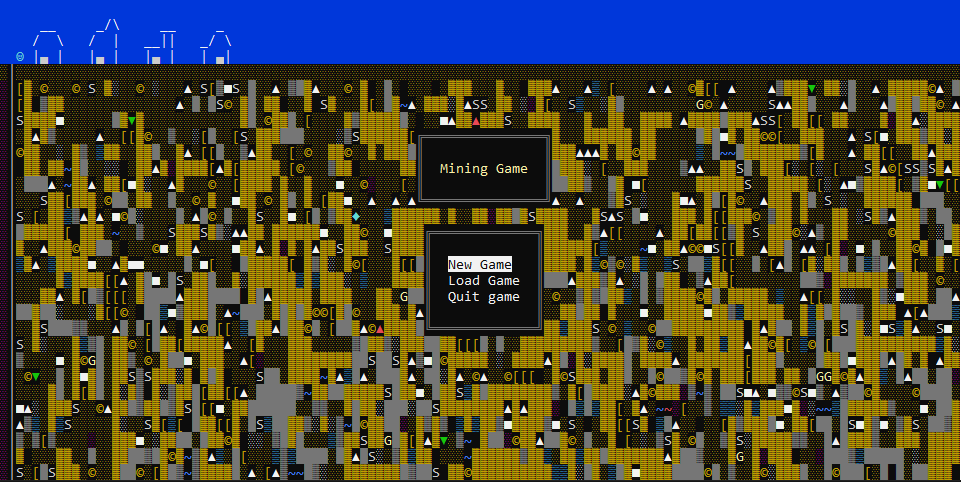 Unreleased mining game, by Nino van der Mark
What's the performance like?
Most examples run north of a couple of thousand FPS on Windows with a size of 120x30 characters. Examples that redraw major portions of the screen tend to clock in a bit lower at around 80fps. Performance on Linux and MacOS seems significantly better than that.
All that said, no rigorous benchmarking has been done with the latest version, though I welcome any effort to do so. The bottomline is that it's plenty fast, and should be suitable for anything you might need for common terminal sizes.
Supplemental
After having done some experiments with the bflat compiler in conjunction with bflata, it seems that native builds produced using these tools perform about 20%-30% better than binaries produced with the ordinary .NET build tooling.
Contributing
If there are changes you'd like to see, feel free to create an issue or a PR.
If you have a project you've built using this library, let me know! I'm always interested to see what people come up with, and I'm eager to include examples of that on this page.
| Product | Versions Compatible and additional computed target framework versions. |
|---|---|
| .NET | net10.0 is compatible. net10.0-android was computed. net10.0-browser was computed. net10.0-ios was computed. net10.0-maccatalyst was computed. net10.0-macos was computed. net10.0-tvos was computed. net10.0-windows was computed. |
-
net10.0
- No dependencies.
NuGet packages
This package is not used by any NuGet packages.
GitHub repositories
This package is not used by any popular GitHub repositories.
| Version | Downloads | Last Updated |
|---|---|---|
| 0.9.0 | 482 | 7/19/2026 |
| 0.8.0 | 256 | 4/11/2026 |
| 0.7.1 | 969 | 7/30/2024 |
| 0.7.0 | 467 | 1/4/2024 |
| 0.6.1 | 319 | 12/14/2023 |
| 0.6.0 | 287 | 12/14/2023 |
| 0.5.0 | 303 | 12/13/2023 |
| 0.4.3 | 323 | 12/11/2023 |
| 0.4.2 | 286 | 10/4/2023 |
| 0.4.1 | 269 | 10/4/2023 |
| 0.4.0 | 272 | 9/24/2023 |
| 0.3.0 | 342 | 7/6/2023 |
| 0.2.0 | 320 | 6/30/2023 |
| 0.1.0 | 326 | 6/15/2023 |
New release produced using GitHub workflow instead of manual action