Cronlight.Quartz.Dashboard
0.5.0
dotnet add package Cronlight.Quartz.Dashboard --version 0.5.0
NuGet\Install-Package Cronlight.Quartz.Dashboard -Version 0.5.0
<PackageReference Include="Cronlight.Quartz.Dashboard" Version="0.5.0" />
<PackageVersion Include="Cronlight.Quartz.Dashboard" Version="0.5.0" />
<PackageReference Include="Cronlight.Quartz.Dashboard" />
paket add Cronlight.Quartz.Dashboard --version 0.5.0
#r "nuget: Cronlight.Quartz.Dashboard, 0.5.0"
#:package Cronlight.Quartz.Dashboard@0.5.0
#addin nuget:?package=Cronlight.Quartz.Dashboard&version=0.5.0
#tool nuget:?package=Cronlight.Quartz.Dashboard&version=0.5.0
<img src="assets/icon.png" alt="" width="64" height="64" align="left">
Cronlight

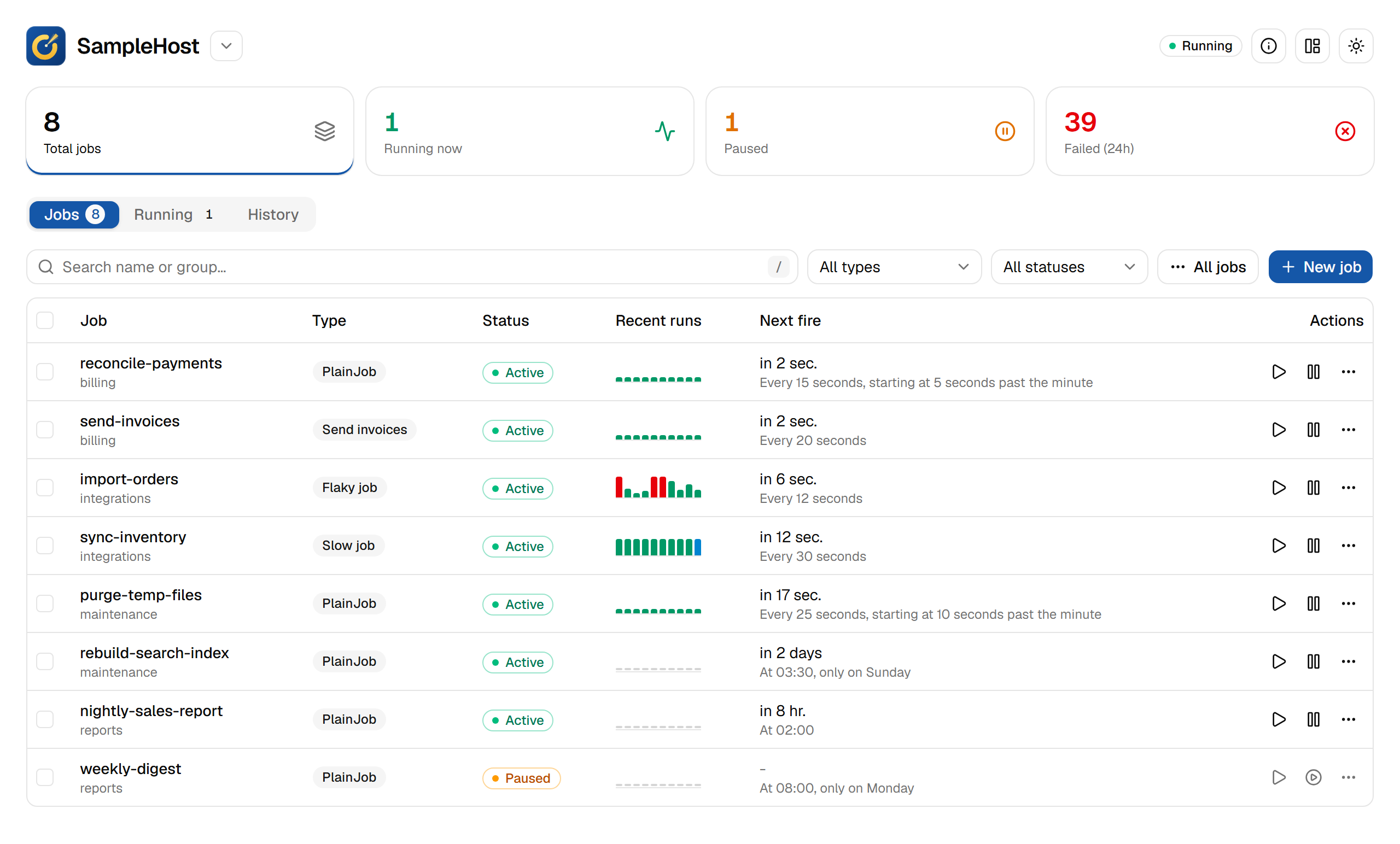
A spotlight on your Quartz.NET jobs. Cronlight is a dashboard and API for Quartz.NET that you add to the ASP.NET Core app already running your scheduler: list, create, edit, pause, resume, run and delete jobs, and see what is running and what failed.
It uses the scheduler you already configured. It needs no connection string or schema of its own and never starts a second scheduler.
Website · Live demo · Documentation
Features
- Jobs: search, filter and page through thousands of jobs; create and edit them with cron, one-time and interval triggers; pause or resume a job, a group or every job; run one now, or once with different data; cancel a run.
- Job types: attributes give your
IJobtypes a name, a form with typed and required parameters, and masked secrets, which can be kept out of the database as references to configuration. - Execution history (optional package): every run with its outcome, error and what it logged, a running job's log so far, misfires and late starts, and run statistics: success rate and average and P95 duration, per job and over a period.
- Retries: failed runs retried automatically, as set per job type or per job.
- Alerts: Slack, Teams, webhook or email when a job fails, recovers or is stopped by Quartz.
- Export and import: jobs as JSON or YAML files, to move them between environments or keep them in source control; an import says what it will change before changing anything.
- Operations: an audit log of every change, OpenTelemetry metrics, a health check, and an OpenAPI description of the API.
- Several schedulers in one app, each with its own permissions.
- AI assistants (optional package): an MCP server, so Claude, Copilot or any MCP client can read jobs, runs and logs, and if you allow it pause, resume and run jobs, under the dashboard's permissions and audit log.
- AI mode (same package): ask about your jobs in plain language in the dashboard ("which jobs failed overnight, and why?"), answered by your app's own AI model with read-only tools, as the signed-in user.
Requirements
| .NET | ASP.NET Core 10 (net10.0). Hosts on .NET 8 can use 0.1.0-beta.2 |
| Quartz.NET | 3.13.1 or a later 3.x, set up with AddQuartz(); tested on 3.22.7. Quartz 4 is not supported yet |
| Job store | Any. Execution history is kept in the Quartz database on SQL Server, PostgreSQL, MySQL or SQLite, and in memory otherwise |
Until 1.0, a minor version (0.2, 0.3) may change options and endpoints, and its release notes say how; a patch version (0.1.1) does not.
Install
dotnet add package Cronlight.Quartz.Dashboard
dotnet add package Cronlight.Quartz.Dashboard.History   # optional: execution history
dotnet add package Cronlight.Quartz.Dashboard.Mcp       # optional: an MCP server for AI assistants, and AI mode
The setup below also calls AddQuartzHostedService(), from Quartz.Extensions.Hosting (or Quartz.AspNetCore).
Cronlight does not install it, since your app owns its scheduler setup.
Quick start
// 1. Your existing Quartz setup stays exactly as it is
builder.Services.AddQuartz(q =>
{
    q.UsePersistentStore(s =>
    {
        s.UseProperties = true;
        s.UseSqlServer(builder.Configuration.GetConnectionString("Quartz")!);
        s.UseNewtonsoftJsonSerializer();
    });
});
builder.Services.AddQuartzHostedService();

// 2. Add Cronlight, and the optional features you want
builder.Services.AddCronlight(o =>
{
    o.ViewPolicy = "QuartzViewers";   // required outside Development
    o.ManagePolicy = "QuartzAdmins";  // create, edit, pause, run and delete
});
builder.Services.AddCronlightHistory();                                                   // execution history
builder.Services.AddCronlightAlerts(o => builder.Configuration.GetSection("CronlightAlerts").Bind(o)); // alerts
builder.Services.AddHealthChecks().AddCronlight();                                       // health check

var app = builder.Build();
app.UseAuthentication();
app.UseAuthorization();

// 3. Map it under any path
app.MapCronlight("/ops/jobs");
Open /ops/jobs/. The API is at /ops/jobs/api/*, described by an OpenAPI document at /ops/jobs/api/openapi.json.
Access: without a
ViewPolicy, the dashboard answers 403 outside the Development environment.Scripts: requests that change jobs must send an
X-Cronlight-Requestheader (any value), which keeps other sites from using a viewer's cookies:curl -X POST -H "X-Cronlight-Request: 1" https://…/ops/jobs/api/jobs/DEFAULT/nightly/triggerJob types: any
IJobin your app can be created from the dashboard. Attributes give one a proper form:[CronlightJob("Send invoices", Description = "Emails pending invoices for a customer")] [JobParameter("customerId", Type = JobParameterType.Int, Required = true)] [JobParameter("smtpPassword", Type = JobParameterType.Secret)] public class InvoiceJob : IJob { ... }
Limitations
- Quartz.NET 3.x only: Quartz 4 is not supported yet.
- The dashboard refreshes by polling (every 10 seconds by default) rather than live. A running job's log so far shows on the node running it; in a cluster, the other nodes show the log once the run has finished.
- Secret values are masked in the dashboard but stored in the Quartz tables as plain text, unless you use secret references.
- A run can be cancelled only from the node running it, and only if the job observes its cancellation token.
- Jobs of other apps sharing the scheduler (types this app cannot load) are read-only.
- Schedulers your app builds in code are read through Quartz's API unless you give Cronlight their properties: that suits hundreds of jobs rather than thousands, and their Running tab shows this node only.
- With the in-memory job store, or a database history does not support, history is kept in memory on each node and lost on restart.
- Alert failure streaks start again when the app restarts. Email alerts need STARTTLS or a plain connection, not implicit TLS on port 465.
Documentation
- Setup and options
- Job types and secrets
- Retries and re-running
- Execution history
- Failure alerts
- Exporting and importing jobs
- AI assistants (MCP server)
- AI mode
- Audit log
- Metrics and health checks
- Several schedulers in one app
- Scheduling API calls (HTTP job)
- Behaviour worth knowing
- Development and the roadmap
License
MIT. See LICENSE.
| Product | Versions Compatible and additional computed target framework versions. |
|---|---|
| .NET | net10.0 is compatible. net10.0-android was computed. net10.0-browser was computed. net10.0-ios was computed. net10.0-maccatalyst was computed. net10.0-macos was computed. net10.0-tvos was computed. net10.0-windows was computed. |
-
net10.0
- Microsoft.AspNetCore.OpenApi (>= 10.0.13)
- Microsoft.Extensions.FileProviders.Embedded (>= 10.0.2)
- Quartz (>= 3.13.1)
- Quartz.Extensions.DependencyInjection (>= 3.13.1)
- YamlDotNet (>= 18.1.0)
NuGet packages (2)
Showing the top 2 NuGet packages that depend on Cronlight.Quartz.Dashboard:
| Package | Downloads |
|---|---|
|
Cronlight.Quartz.Dashboard.History
Execution history for Cronlight: records every Quartz.NET job run in your Quartz database (SQL Server, PostgreSQL, MySQL, SQLite) or in memory. |
|
|
Cronlight.Quartz.Dashboard.Mcp
An MCP server for Cronlight: lets AI assistants (Claude, Copilot, any MCP client) read your Quartz.NET jobs, runs and logs, and, if you allow it, pause, resume and run jobs, through your own ASP.NET Core app. Also AI mode: ask about your jobs in plain language in the dashboard, answered by your app's own AI model (any Microsoft.Extensions.AI IChatClient). |
GitHub repositories
This package is not used by any popular GitHub repositories.
| Version | Downloads | Last Updated |
|---|---|---|
| 0.5.0 | 38 | 10/29/2026 |
| 0.4.0 | 47 | 10/29/2026 |
| 0.3.1 | 55 | 10/28/2026 |
| 0.3.0 | 70 | 10/28/2026 |
| 0.2.0 | 54 | 10/27/2026 |
| 0.1.0 | 69 | 10/27/2026 |
| 0.1.0-beta.7 | 53 | 10/27/2026 |
| 0.1.0-beta.6 | 50 | 10/27/2026 |
| 0.1.0-beta.5 | 54 | 10/26/2026 |
| 0.1.0-beta.4 | 59 | 10/26/2026 |
| 0.1.0-beta.3 | 63 | 10/26/2026 |
| 0.1.0-beta.2 | 63 | 10/26/2026 |
What is new in 0.5.0: https://github.com/mkokkerametla/Cronlight/releases/tag/v0.5.0