DigitalWonderlab.AccessibilityToolkit
1.10.46
dotnet add package DigitalWonderlab.AccessibilityToolkit --version 1.10.46
NuGet\Install-Package DigitalWonderlab.AccessibilityToolkit -Version 1.10.46
<PackageReference Include="DigitalWonderlab.AccessibilityToolkit" Version="1.10.46" />
<PackageVersion Include="DigitalWonderlab.AccessibilityToolkit" Version="1.10.46" />
<PackageReference Include="DigitalWonderlab.AccessibilityToolkit" />
paket add DigitalWonderlab.AccessibilityToolkit --version 1.10.46
#r "nuget: DigitalWonderlab.AccessibilityToolkit, 1.10.46"
#:package DigitalWonderlab.AccessibilityToolkit@1.10.46
#addin nuget:?package=DigitalWonderlab.AccessibilityToolkit&version=1.10.46
#tool nuget:?package=DigitalWonderlab.AccessibilityToolkit&version=1.10.46
Accessibility Toolkit for Umbraco
An Umbraco backoffice package that adds comprehensive WCAG 2.1 accessibility checking to your content workflow. Combines 37 server-side HTML checks with axe-core powered visual analysis — covering colour contrast, ARIA names, landmark structure, and more. Editors can run checks on individual pages or audit entire site sections, with instant scored reports, scan history, and CSV exports.
Screenshots
| Page Scan | Scan History |
|---|---|
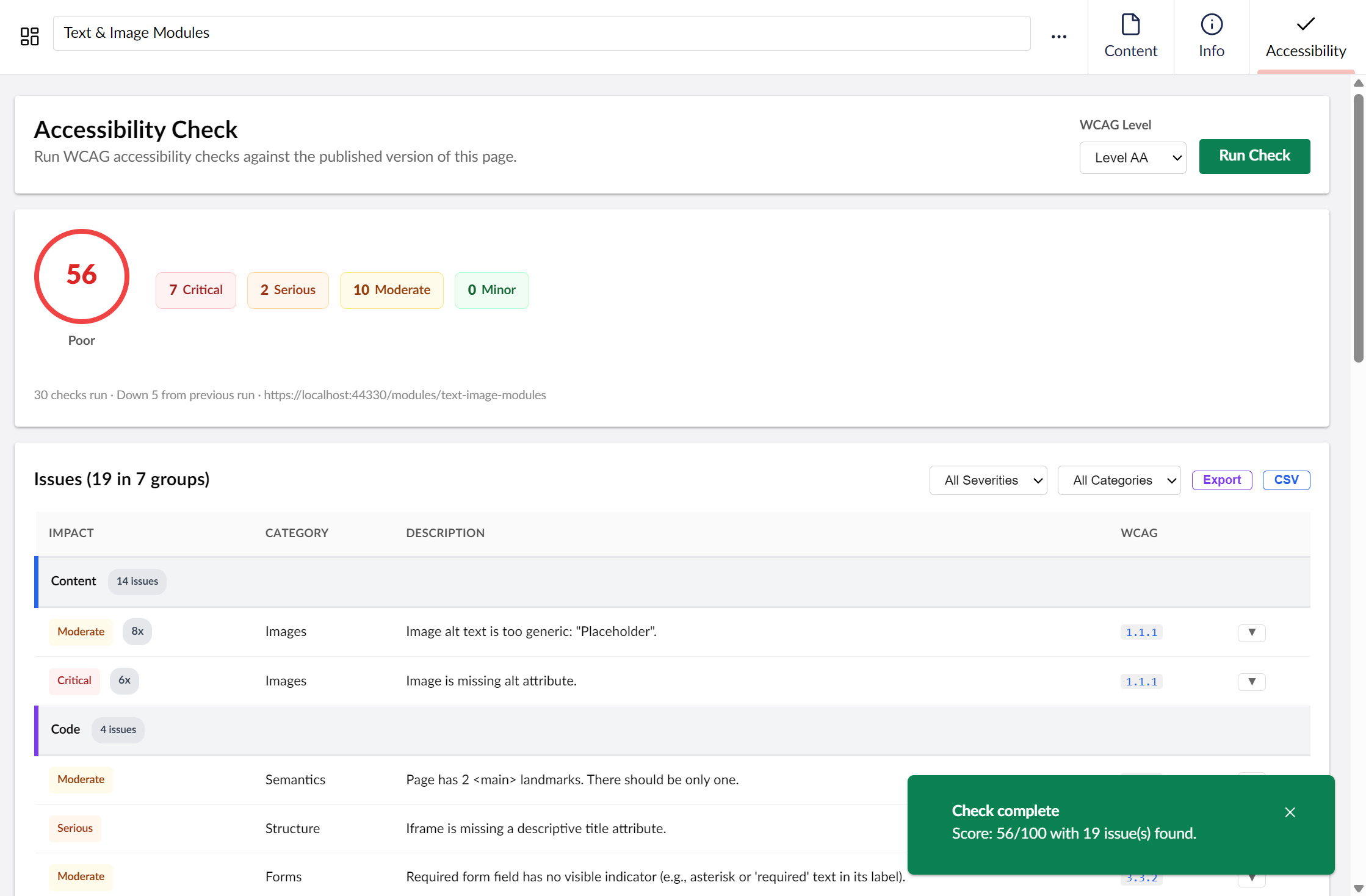 |
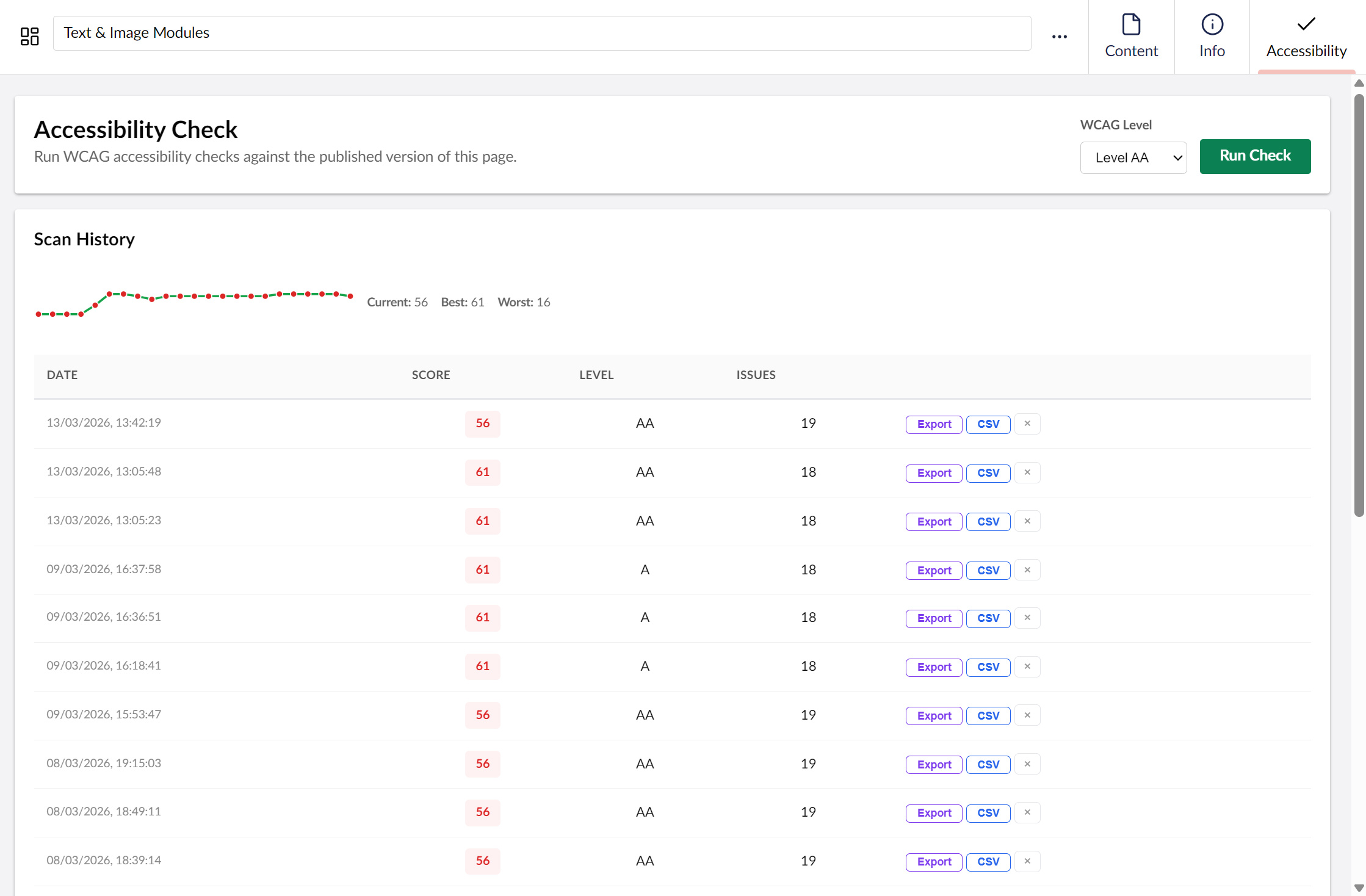 |
| Scan Report | Site Audit History |
|---|---|
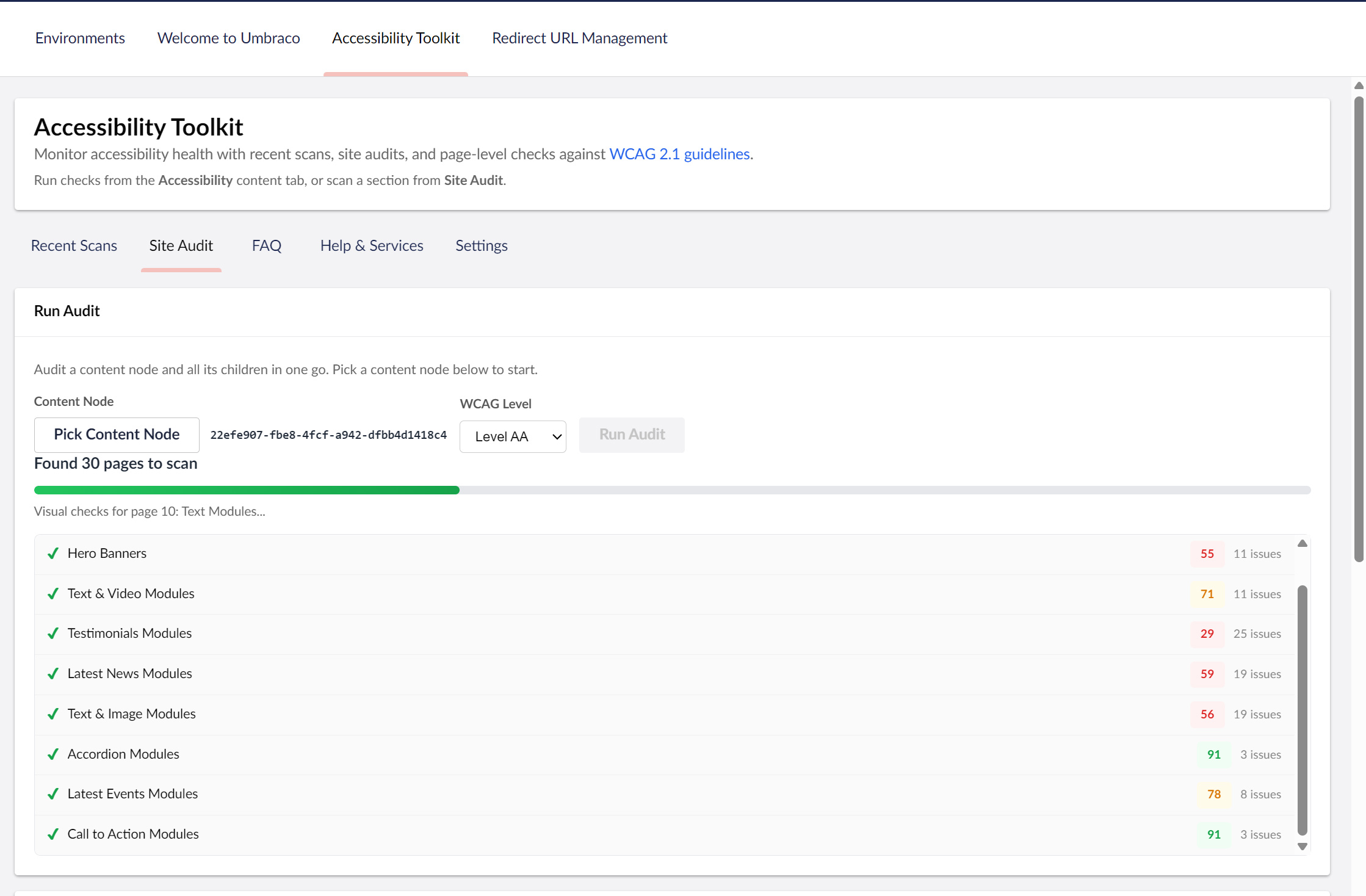 |
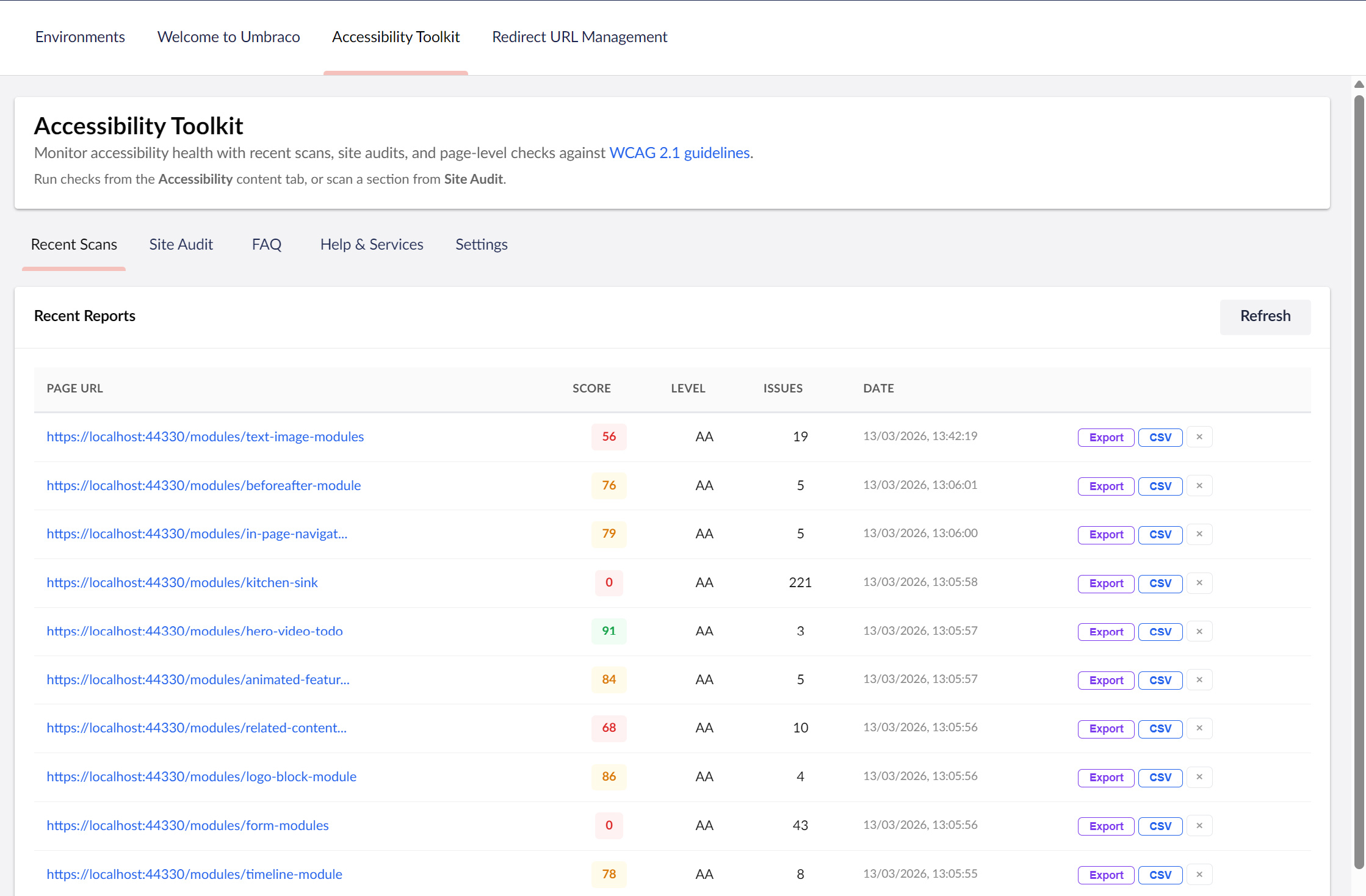 |
| Printable Report |
|---|
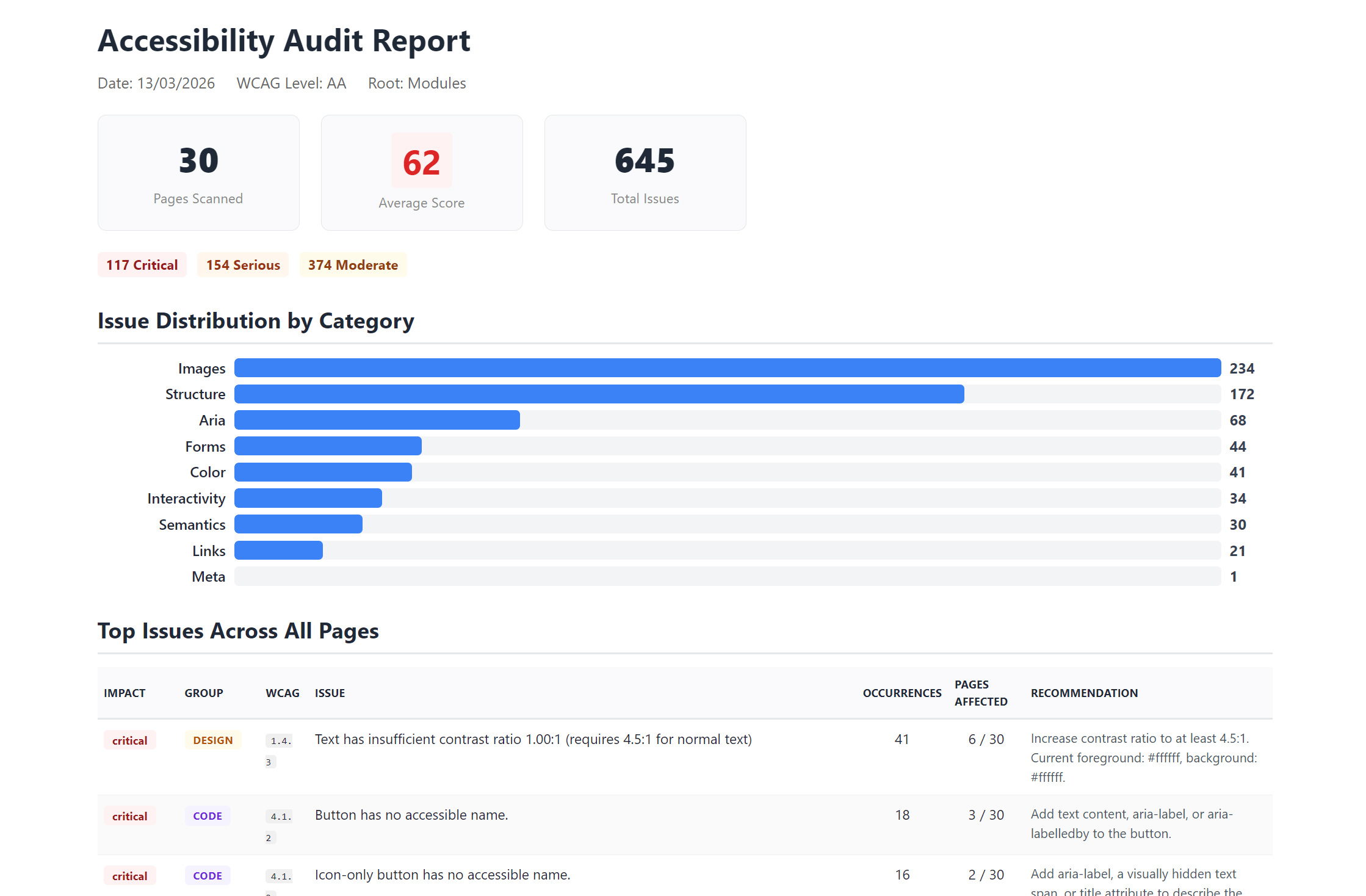 |
Features
Page-Level Checks
- Accessibility tab on every content page in the workspace
- 37 server-side WCAG checks across Level A, AA, and AAA
- Score gauge (0-100) with colour-coded rating
- Issues grouped by Content / Code / Design with impact badges (critical/serious/moderate/minor)
- Expandable detail rows showing element snippets, selectors, and fix recommendations
- axe-core visual checks run automatically — ARIA names, colour contrast, landmark structure, and 30+ additional rules detected against the live rendered DOM
- Element preview snippets generated for visual issues using browser canvas
- Category filtering and impact sorting
- Severity filtering (critical/serious/moderate/minor)
- Score delta indicator compared with previous run
- CSV export for offline review and reporting
- Printable reports with executive summary, category breakdown, and per-issue detail
- Scan history per page showing scores over time
Site Audits
- Site audit tool — pick a content node and scan it plus all descendants in one go
- Summary cards showing pages scanned, average score, and total issues
- Collapsible page list — summary shown up front, per-page details expandable
- Audit history — all past audits stored with full results, re-exportable as CSV at any time
- Delete individual audit records or scan history entries
Dashboard
- Accessibility Toolkit dashboard in the Content section
- Recent Reports — paginated table of all recent page-level scans
- Audit History — table of past site audits with sparkline trend chart, re-export, and delete
- Site Audit form with content node picker and WCAG level selector (visual checks run automatically when enabled)
- FAQ and Help & Services tabs for guidance and expert support
- Settings with visible license status panel, collapsible exclusions, and data management
Visual Checks
- Browser-based analysis powered by axe-core running against the live rendered DOM in a sandboxed iframe
- Detects issues that static HTML analysis cannot: computed colour contrast, missing ARIA names, landmark structure, and more
- 30+ additional rules covering WCAG A, AA, and AAA criteria complementing the 37 server-side checks
- Runs automatically as part of every scan — no separate step or infrastructure required
- Falls back gracefully if axe is unavailable (offline/intranet): colour contrast checks still run via DOM walking
- Element preview snippets are captured inline for visual context in reports
- Site audits use the selected content node picker only (no manual GUID entry)
Compatibility
- Umbraco 17+
- .NET 10.0
- Compatible with Umbraco Cloud, Azure App Service, and all standard hosting environments
- No server-side dependencies — no headless browsers, no server-side binaries, no additional infrastructure required
- Visual checks load axe-core from cdnjs at runtime in the editor's browser; falls back gracefully if unavailable
Installation
Install via NuGet:
dotnet add package DigitalWonderlab.AccessibilityToolkit
Or search for DigitalWonderlab.AccessibilityToolkit in the NuGet Package Manager.
No additional configuration required. The package registers itself automatically via an Umbraco composer and creates its database tables on startup. Install, restart, and start scanning — nothing else to set up.
Usage
Individual Page Check
- Navigate to any content page in the Umbraco backoffice
- Click the Accessibility tab in the content workspace
- Select a WCAG level (A, AA, or AAA)
- Click Run Check
- Review the score, impact summary, and issues
- Click Export CSV to download the report
Site Audit
- Go to the Content section and open the Accessibility Toolkit dashboard
- Click Pick Content Node to select a root node
- Select a WCAG level
- Click Run Audit
- Review the summary cards and expand the page list for per-page results
- Click Export CSV to download the full audit report
Re-Exporting Past Audits and Page Runs
Past audits are stored with their full results. In the Audit History table on the dashboard, click Export on any row to regenerate the CSV.
Page-level run history (in the content workspace Accessibility tab) also includes Export and CSV actions per history row.
WCAG Checks Included (37 checks)
Level A (24 checks)
| Check | WCAG Criterion | Detects |
|---|---|---|
| Heading Hierarchy | 1.3.1 | Skipped heading levels, multiple/missing h1, empty headings |
| Image Alt Text | 1.1.1 | Missing/empty alt attributes, filename-as-alt, generic alt text |
| Form Labels | 1.3.1, 4.1.2 | Form inputs without associated labels |
| Link Text | 2.4.4 | Empty links, generic link text ("click here", "read more") |
| Language Attribute | 3.1.1 | Missing or invalid lang attribute on html element |
| ARIA Attributes | 4.1.2 | Broken aria references, invalid roles, aria-hidden on focusable |
| Semantic HTML | 1.3.1 | Missing landmark elements (main, nav, header, footer) |
| Table Structure | 1.3.1 | Data tables missing headers, scope attributes, or captions |
| Page Title | 2.4.2 | Missing or empty page title |
| Duplicate IDs | 4.1.1 | Duplicate id attributes in the document |
| Interactive Elements | 4.1.2 | Interactive elements missing accessible names |
| Color Contrast (static) | 1.4.3 | Inline styles with insufficient contrast ratios |
| Media | 1.2.1 | Audio/video elements missing captions or descriptions |
| Iframe Title | 2.4.1 | Iframes missing title attributes |
| List Structure | 1.3.1 | Incorrect list nesting and structure |
| Form Grouping | 1.3.1 | Related form controls not grouped with fieldset/legend |
| Target Blank | 2.4.4 | Links opening new windows without warning |
| Bypass Blocks | 2.4.1 | Missing skip navigation links |
| Tabindex | 2.4.3 | Positive tabindex values disrupting natural tab order |
| Keyboard Events | 2.1.1 | Mouse-only event handlers without keyboard equivalents |
| Label in Name | 2.5.3 | Accessible name doesn't contain visible label text |
| Autocomplete | 1.3.5 | Missing or invalid autocomplete attributes on inputs |
| Media Alternatives | 1.2.1 | Media without text alternatives |
| Error Identification | 3.3.1 | Form error messages not programmatically associated |
Level AA (7 checks)
| Check | WCAG Criterion | Detects |
|---|---|---|
| Meta Viewport | 1.4.4 | Zoom disabled via user-scalable=no or restrictive maximum-scale |
| Language of Parts | 3.1.2 | Content in other languages missing lang attribute |
| Status Messages | 4.1.3 | Dynamic status messages missing ARIA live regions |
| Text Spacing | 1.4.12 | Content that may break with adjusted text spacing |
| Reflow | 1.4.10 | Horizontal scrolling at 320px viewport width |
| Input Purpose | 1.3.5 | Common input fields missing autocomplete attributes |
| Focus Not Restricted | 2.4.11 | Focus trapped within components |
Level AAA (6 checks)
| Check | WCAG Criterion | Detects |
|---|---|---|
| Link Purpose (Full) | 2.4.9 | Links not understandable out of context |
| Section Headings | 2.4.10 | Content sections without headings |
| Enhanced Contrast | 1.4.6 | Inline styles below 7:1 contrast ratio |
| Target Size | 2.5.5 | Interactive elements smaller than 44x44px |
| Abbreviations | 3.1.4 | Abbreviations without expansion |
| Reading Level | 3.1.5 | Content readability indicators |
Configuration
No configuration is required. The package works out of the box with all features enabled.
Telemetry
The package collects anonymous usage telemetry to help improve the product. This is opt-out via the Settings tab on the dashboard.
No page URLs, page content, or personally identifiable information is collected. Telemetry events include scan and audit outcomes (scores, durations, pass/fail) with an anonymised site hash.
Audit Exclusions
You can exclude specific document types and individual pages from site audits via the Settings tab on the dashboard. Excluded items are stored in the database and persist across restarts.
How It Works
The tool fetches the published HTML of each page server-side using HttpClient, parses it with HtmlAgilityPack, and runs 37 rule-based checks against the DOM. After the server-side analysis, visual checks run client-side: the page is loaded in a sandboxed iframe in the editor's browser, axe-core is injected to run 30+ additional accessibility rules against the live rendered DOM, and a colour contrast analyser walks the computed styles. Issues from both stages are combined, deduplicated, and scored. Results are stored in the database (dwAccessibilityResults for per-page scans, dwAccessibilityAudits for full site audits) so history and re-exports are always available.
Issues / Suggestions
To report an issue or suggest a feature, please use the GitHub issue tracker: https://github.com/dwlkev/DigitalWonderlab.AccessibilityToolkit/issues
| Product | Versions Compatible and additional computed target framework versions. |
|---|---|
| .NET | net10.0 is compatible. net10.0-android was computed. net10.0-browser was computed. net10.0-ios was computed. net10.0-maccatalyst was computed. net10.0-macos was computed. net10.0-tvos was computed. net10.0-windows was computed. |
-
net10.0
- HtmlAgilityPack (>= 1.12.4)
- Umbraco.Cms.Core (>= 17.0.0 && < 18.0.0)
- Umbraco.Cms.Infrastructure (>= 17.0.0 && < 18.0.0)
- Umbraco.Cms.Web.Common (>= 17.0.0 && < 18.0.0)
NuGet packages
This package is not used by any NuGet packages.
GitHub repositories
This package is not used by any popular GitHub repositories.