DigitalWonderlab.CommunityForum
1.3.1
dotnet add package DigitalWonderlab.CommunityForum --version 1.3.1
NuGet\Install-Package DigitalWonderlab.CommunityForum -Version 1.3.1
<PackageReference Include="DigitalWonderlab.CommunityForum" Version="1.3.1" />
<PackageVersion Include="DigitalWonderlab.CommunityForum" Version="1.3.1" />
<PackageReference Include="DigitalWonderlab.CommunityForum" />
paket add DigitalWonderlab.CommunityForum --version 1.3.1
#r "nuget: DigitalWonderlab.CommunityForum, 1.3.1"
#:package DigitalWonderlab.CommunityForum@1.3.1
#addin nuget:?package=DigitalWonderlab.CommunityForum&version=1.3.1
#tool nuget:?package=DigitalWonderlab.CommunityForum&version=1.3.1
Community Forum for Umbraco
An Umbraco-native discussion forum. Members start threads and reply on the front-end, moderators work either from the front-end or the backoffice, and the whole thing lives inside a standard Umbraco site with no separate app to run.
Boards are first-class Umbraco content; threads, posts, reports and profiles live in the package's own transactional tables. The front-end re-skins from two brand colours, is server-rendered (so it is fully crawlable), and ships the SEO and structured-data markup that lets search and answer engines read a thread as a discussion.
Free to use. The whole forum is free - see the licence below. Every install moderates with an always-on rules engine; optional AI-assisted spam/toxicity review integrates with the official Umbraco.AI and layers on top when you want it.
Part of the Community for Umbraco suite. See the suite overview for page comments, the shared moderation core, and the AI add-on.
Screenshots
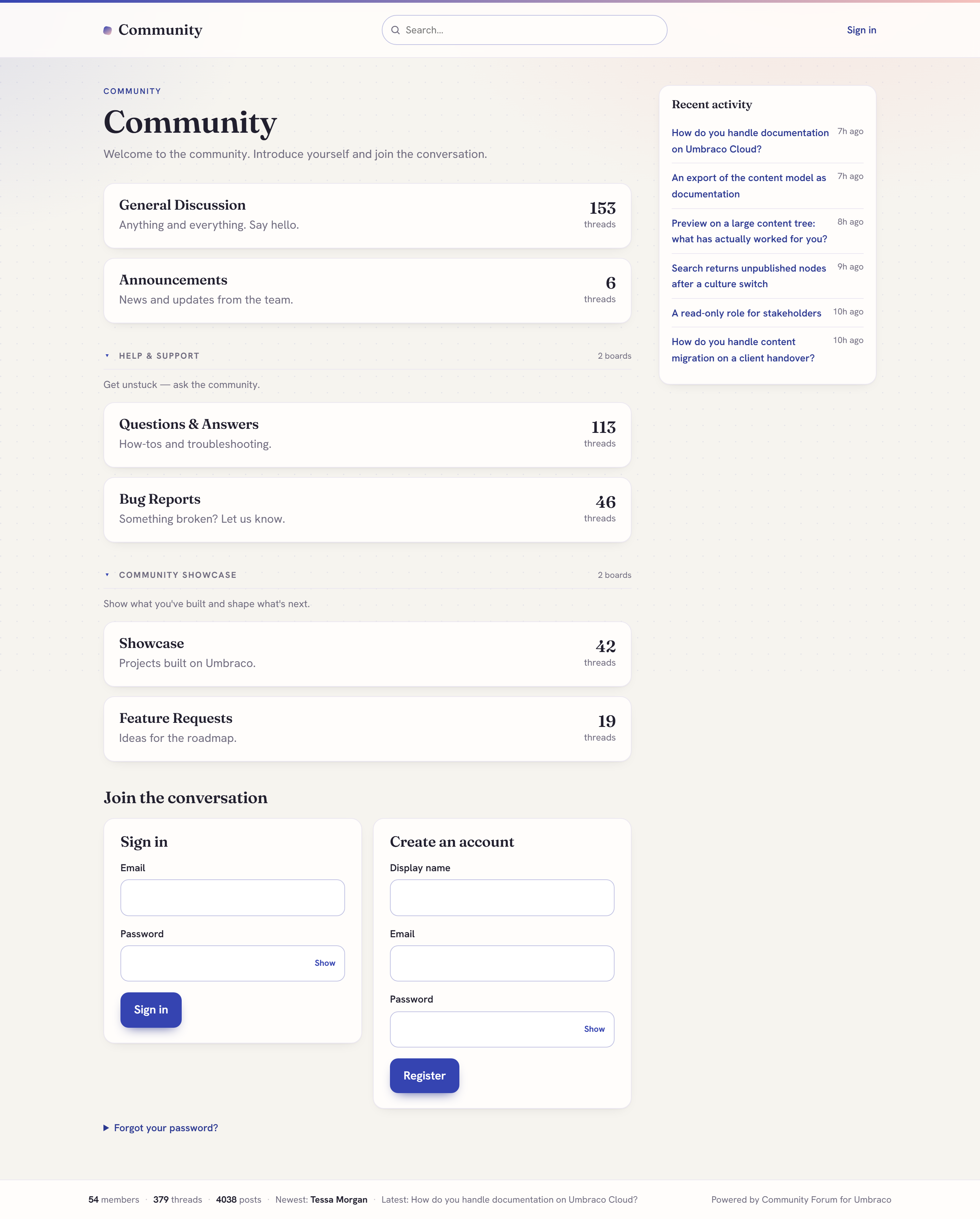
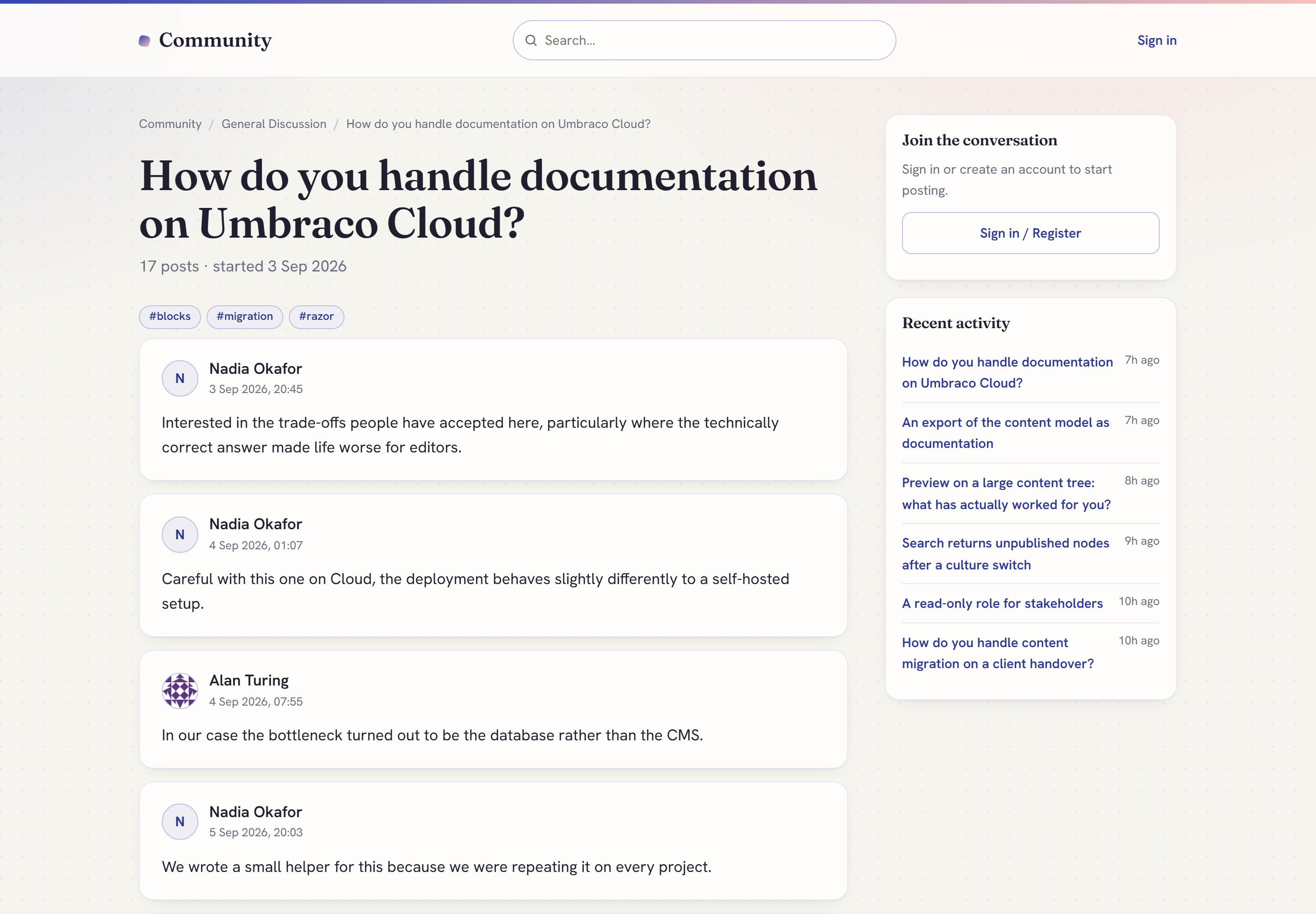
| Threads & replies | Polls |
|---|---|
 |
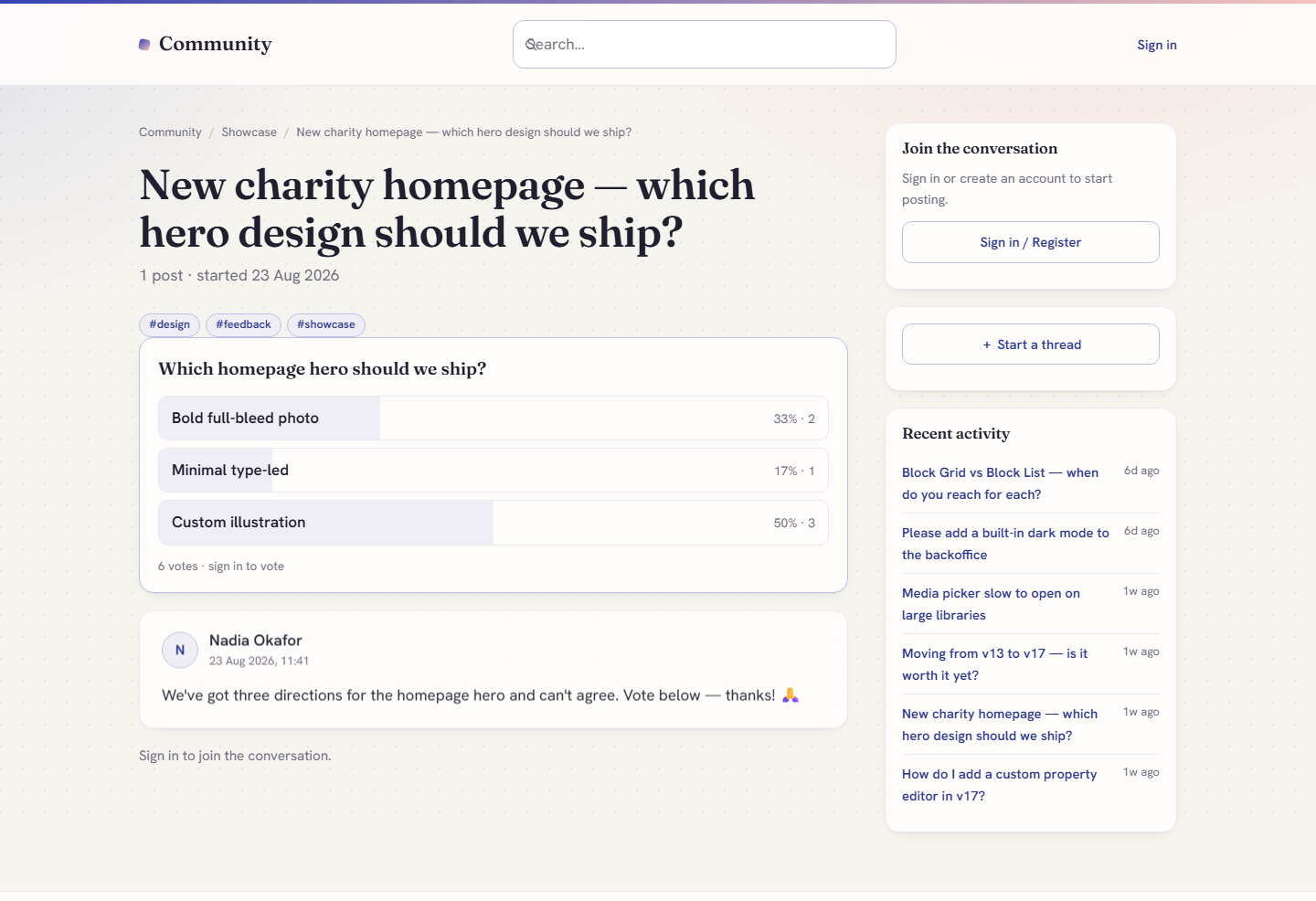 |
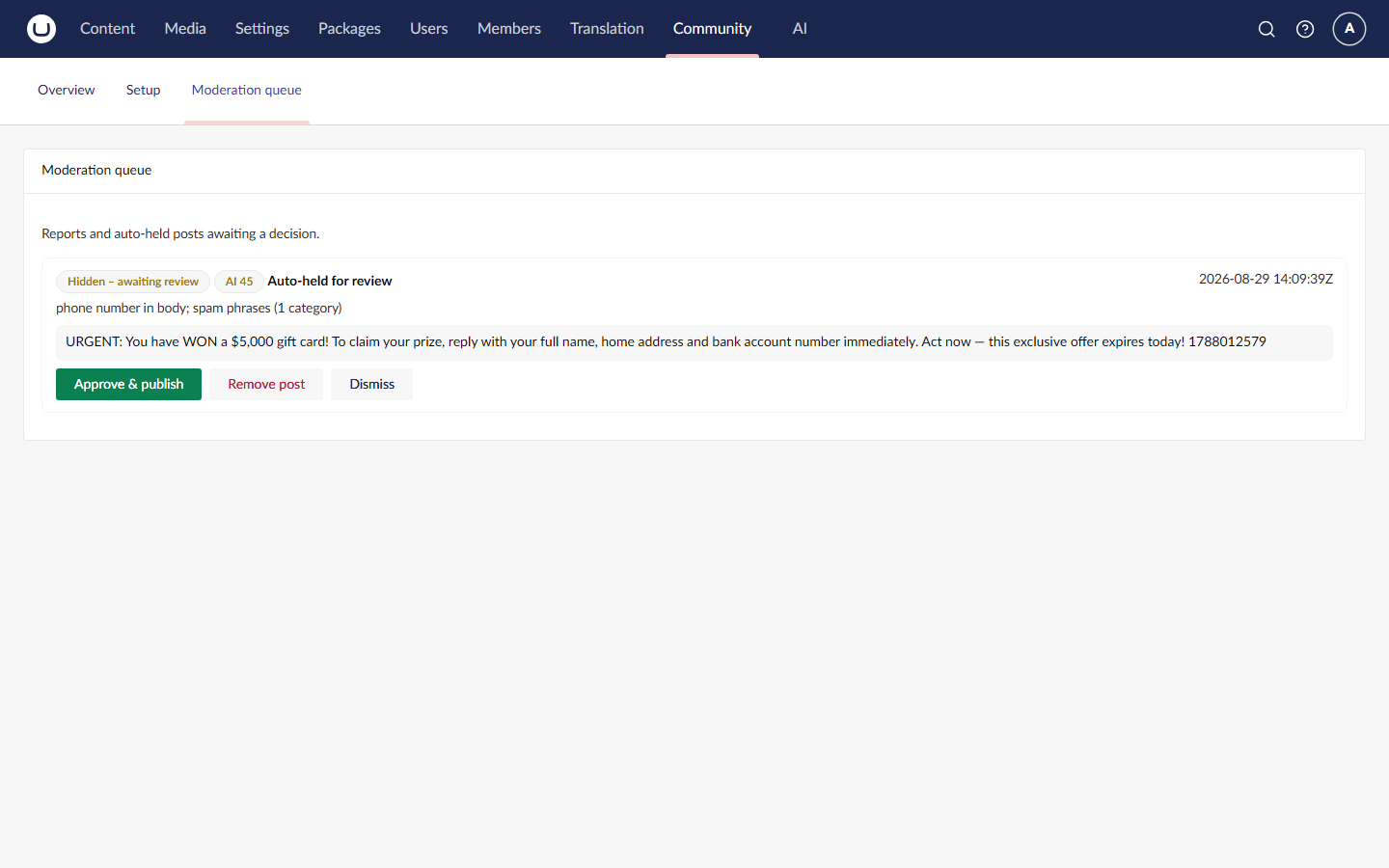
| Q&A boards | Backoffice moderation queue |
|---|---|
 |
 |
Your moderators do not need backoffice accounts
The people who know your community are usually volunteers, subject-matter experts and customer-facing staff, not administrators. Giving each of them an Umbraco backoffice account is both a licensing problem and a security one.
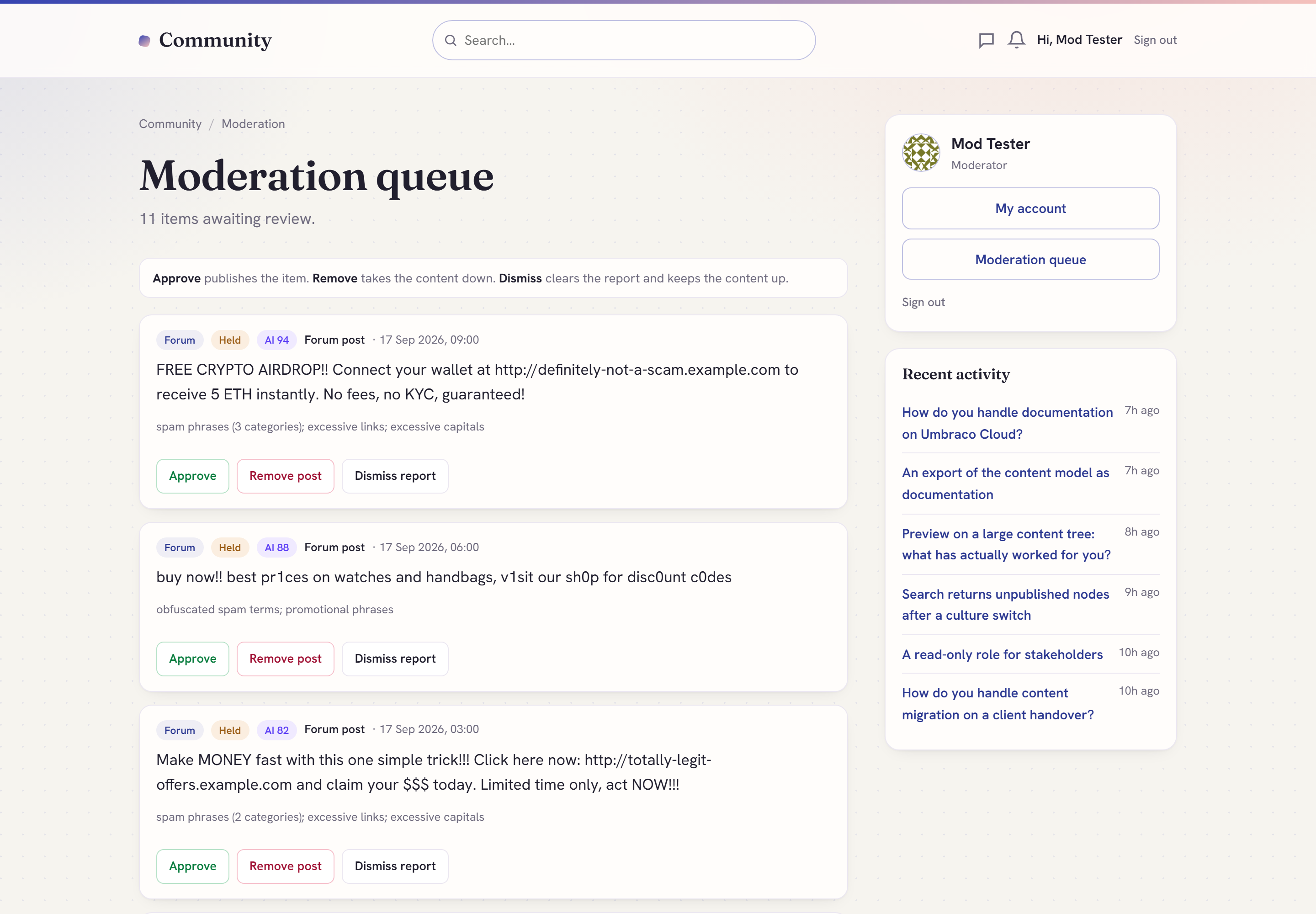
So the forum ships a full moderation queue in the front end. Add a member to the
Moderators member group and they can approve, remove and dismiss from inside the
community itself, at {forum}/moderation - same site, same login, same layout, no
backoffice access of any kind. Administrators still get the unified backoffice queue,
which covers forum posts and page comments together. Both act on the same data.
Why this exists
We wanted a forum for Umbraco 17 that was server-rendered, moderated out of the box, and that did not put every post in the content tree. This is what we built for that.
What it gives you
- Runs on current Umbraco (17 LTS / .NET 10).
- AI-assisted moderation, built on the official Umbraco.AI. An optional add-on layers AI spam/toxicity review on top of the always-on rules engine - provider- agnostic (you bring your own Umbraco.AI connection and keys), covering forum posts and page comments with one toggle.
- Moderated from day one. Every post is sanitised on save, and a rules engine plus a real moderation queue are on with or without the AI add-on.
- SEO markup built in. Clean URLs and
DiscussionForumPosting/QAPagestructured data, so a thread is machine-readable as a discussion. - Two-colour instant branding and dark mode, so the forum picks up your palette without a theme build.
How it is built
The forum is deliberately split in two: structure is Umbraco content, conversation is transactional data.
Structure and configuration are content nodes. The installer creates four document types - Forum (the root of the community, at the root of the content tree), Forum Category (a grouping), Forum Board (where threads live, carrying its own description, SEO fields, access level, new-thread and moderation settings) and Forum Settings (logo and layout inheritance for this forum; suite-wide behaviour lives in the backoffice under Community > Settings). Because they are ordinary content, you get real URLs and routing, the publishing workflow, SEO fields and per-node permissions for free, you manage them in the editor you already know, and they move between environments through Umbraco Deploy or uSync like the rest of your site.
Conversation lives in the package's own tables - fmThread, fmPost, fmProfile,
fmSubscription, fmReport, fmReaction, fmTag, fmThreadTag, fmThreadRead,
fmNotification, fmPoll, fmPollOption, fmPollVote and fmMessage - created
automatically on boot.
That split is the point:
- A busy forum would destroy a content tree. Ten thousand posts is a normal year for a modest community. As content nodes that is an unnavigable tree, a bloated published cache, slower publishes and a backoffice nobody wants to open. The best-known existing Umbraco forum package stores every post as a content node, and that is where it runs out of road. This stays flat and indexed however much people talk.
- The write patterns are different. Umbraco's content APIs are built for a few editors making considered, versioned changes; a forum takes public writes on every request.
- Your environments stay clean. Production conversation does not sync back into your development environment, and a content deployment does not carry members' posts with it.
- The queries are the right shape. "Latest 25 threads in this board by last reply, excluding held posts, plus this viewer's own pending thread" is one indexed SQL query.
- Deleting a member is surgical - a targeted update across a few tables, not a mass re-publish.
- Members are just Umbraco Members. No parallel user store, no second login, and the Moderators group is an ordinary member group.
Features
Structure and content
- Boards as content -
Forum → Category → Boardin the Umbraco content tree, with real URLs, SEO and publishing. Categories collapse on the forum home. - Threads and replies - logged-in members post on the server-rendered front-end; works without JavaScript and is fully crawlable.
- Sort and filter - Latest / Newest / Unanswered / Top tabs on every board, with pagination on both the thread list and long threads.
- Tags - tag a thread on creation or from the first-post editor, with a browsable page per tag.
- Polls - add a multi-option poll to a thread; one vote per member, live results with percentages.
- Gated boards - make a board members-only; gated content is excluded from search, RSS, the sitemap and all public listings, not just hidden from the page.
Posting and engagement
- WYSIWYG composer - bold, italic, quote, lists, links, images by URL, emoji, and YouTube / Vimeo embeds.
- Safe posts - every post is reduced on save to an allow-list of safe tags and attributes before it is stored.
- Reactions, quoting and editing - like a post, quote a reply, edit or delete your own posts.
- Mark as answered - Q&A-style boards can flag the accepted answer, and answered threads carry a Solved badge in listings.
- Unread tracking - new threads and replies are badged per member, with "mark all read".
- @mentions - mention a member and they get notified.
- Direct messages - member-to-member private messages with an inbox. Senders need a verified email and an unrestricted profile (banned and muted members cannot send), and a flood guard caps the rate. DMs are private, so they are not put through the moderation rules engine, and v1 has no recipient-side block or report.
- Notifications - an in-app notification centre and bell (replies, mentions, messages, and a notice when a held post of yours is approved), plus optional reply notification emails (uses your Umbraco SMTP; skips gracefully if not configured).
- Search - full-text thread search backed by a custom Examine/Lucene index, incrementally updated as members post.
Members and accounts
- Member profiles - display name, signature, post count, avatar, "my threads". Forum users are standard Umbraco Members.
- Self-service accounts - register, sign in, sign out, forgot / reset password,
and a My Account page. Email verification gates posting. Provided by the
shared Core, so a neutral
/community/sign-inpage works even on a comments-only install. - Account deletion - a member deletes their own account and the Umbraco member record goes. Their threads and posts stay in place, stripped of identifying data and shown as "[deleted user]", so conversations are not broken; their profile details, messages, notifications, subscriptions, reactions, poll votes and read state are deleted. If Community Comments is installed, their comments are erased in the same pass.
Moderation
- Two ways to moderate. A front-end moderation queue at
{forum}/moderationfor members of the Moderators group (no backoffice account needed), rendered inside your community layout, and the unified backoffice queue in the Community section. - Moderator actions - report a post; lock, pin or delete a thread; edit or remove a post; mute or ban a member; approve, remove or dismiss from either queue.
- Always-on rules engine - spam, profanity, links, contact details and obfuscation scoring, honeypot and rate limiting, with admin-configured blocked words, spam phrases, promotional phrases and a sensitivity level in Community → Settings.
- New-member gate - hold first posts from new accounts until they have a short track record, configurable per install.
- Author visibility - authors can see their own held posts and threads (clearly badged "Pending review") while they stay hidden from everyone else.
- Optional AI review - add
DigitalWonderlab.CommunityAito layer Umbraco.AI spam/toxicity review on top. If it errors or does not answer within 8 seconds, the rules verdict stands.
SEO and setup
- SEO built in - clean slugged URLs, canonical tags,
rel=prev/nexton paginated thread lists, Open Graph / Twitter cards, RSS, an XML sitemap, andDiscussionForumPosting/QAPagestructured data. - Backoffice Community section - Overview, a unified Moderation queue (forum posts and, if installed, page comments in one list), suite-wide Settings, and a guided Setup.
- One-click installer - the Setup dashboard creates the document types, templates, member type and a starter board. Idempotent and non-destructive.
- Runs behind any domain - works at your site root or under a culture/domain
binding. The Forum node itself must sit at the root of the content tree in v1: its
virtual pages (
/search,/account,/tag,/member,/messages,/notifications,/moderation) are resolved from a root Forum and will not resolve if it is nested under another page. One Forum per installation is the supported shape.
Add page comments to the rest of your site
The forum shares its moderation engine, queue and settings with
DigitalWonderlab.CommunityComments,
WordPress-style comments for any Umbraco page. Install both and everything is
moderated from the same Community section.
Optional AI moderation add-on
Install DigitalWonderlab.CommunityAi
to layer AI spam/toxicity review on top of the rules engine via Umbraco.AI
(provider-agnostic; you bring your own connection/profile and keys). Without it,
the forum still moderates with the deterministic rules engine.
Requirements
- Umbraco CMS 17 LTS (17.6.2+), .NET 10
- Standard Umbraco Members enabled
- SMTP only if you want notification emails
Install
dotnet add package DigitalWonderlab.CommunityForum
Then open the Community section in the backoffice and run Setup - it creates the schema, templates, member type and a starter board. Author your boards under Content, and members can start posting on the front-end.
Configuration
Optional. Suite-wide settings live in the backoffice under Community → Settings: brand colours, notification emails, moderation sensitivity and custom blocked/spam/ promotional word lists, and the AI moderation toggle. The Forum Settings content node created by the installer holds the logo and layout-inheritance. Reply notifications use your existing Umbraco SMTP configuration.
A few settings live in appsettings.json under Community:Auth:
{
  "Community": {
    "Auth": {
      "BaseUrl": "https://example.com",
      "ResetPageUrl": "/community"
    }
  }
}
BaseUrl(required in production unless ASP.NET CoreAllowedHostsis set to a real allow-list): the canonical site origin used when building links that are emailed to members. Password reset and email verification carry a security token, so those emails are not sent unless the origin can be trusted, and the reason is logged. Reply notification emails carry no token and fall back to the request host.ResetPageUrl: where the password-reset email link lands. Defaults to the built-in/community/sign-inpage; point it at the forum so resets land on your account page.
Reserved routes
The suite registers a small number of fixed front-end routes: /community/sign-in,
/community/auth/* (login, logout, forgot/reset password), /community/feed/* (RSS)
and /community/sitemap.xml. It also serves virtual paths under the forum root
(account, search, member, messages, notifications, tag). Avoid creating
content pages at those exact paths.
Licence
Free to use, under a proprietary licence (see the LICENSE file in the package):
install and use it in unlimited sites at no charge; redistribution and resale are
not permitted.
Part of the DigitalWonderlab.* family of Umbraco packages. Built by
Digital Wonderlab.
| Product | Versions Compatible and additional computed target framework versions. |
|---|---|
| .NET | net10.0 is compatible. net10.0-android was computed. net10.0-browser was computed. net10.0-ios was computed. net10.0-maccatalyst was computed. net10.0-macos was computed. net10.0-tvos was computed. net10.0-windows was computed. |
-
net10.0
- DigitalWonderlab.CommunityCore (>= 1.3.1)
- Umbraco.Cms.Api.Management (>= 17.6.2 && < 18.0.0)
- Umbraco.Cms.Web.Common (>= 17.6.2 && < 18.0.0)
- Umbraco.Cms.Web.Website (>= 17.6.2 && < 18.0.0)
NuGet packages
This package is not used by any NuGet packages.
GitHub repositories
This package is not used by any popular GitHub repositories.
| Version | Downloads | Last Updated |
|---|
1.3.1 - IMPORTANT: fixes a defect in every previous release where a fresh NuGet install rendered a bare heading instead of the forum. The installer looked for its Razor views only under the site content root, while the package deploys them next to the application binaries, so it installed placeholder templates. It now looks in both places, Razor can resolve the shipped views and partials, and the community layout no longer trips Umbraco's master-template detection. Also in this release, following a pre-release audit: Moderation actions are now ignored when the report has already been resolved, so a stale queue page cannot republish a post that was removed afterwards. A rejected edit can no longer retag a thread. Banned and muted members can no longer send direct messages. Password reset and email verification links are no longer built from an unvalidated Host header: set Community:Auth:BaseUrl (or a real AllowedHosts allow-list) on production or those emails are not sent. Account deletion now erases the member from every installed package in the suite, including page comments. Members-only board titles are kept out of public listings even when the Forum node is not at the content root, and the installer now adopts an existing Forum instead of creating a second one. Documentation and marketplace metadata corrected throughout. See CHANGELOG.md.