Diplo.Translator.Omni
18.0.2
dotnet add package Diplo.Translator.Omni --version 18.0.2
NuGet\Install-Package Diplo.Translator.Omni -Version 18.0.2
<PackageReference Include="Diplo.Translator.Omni" Version="18.0.2" />
<PackageVersion Include="Diplo.Translator.Omni" Version="18.0.2" />
<PackageReference Include="Diplo.Translator.Omni" />
paket add Diplo.Translator.Omni --version 18.0.2
#r "nuget: Diplo.Translator.Omni, 18.0.2"
#:package Diplo.Translator.Omni@18.0.2
#addin nuget:?package=Diplo.Translator.Omni&version=18.0.2
#tool nuget:?package=Diplo.Translator.Omni&version=18.0.2
Diplo Translator Omni for Umbraco
Diplo Translator Omni brings AI translation into the Umbraco 18 backoffice. Translate pages, blocks and Dictionary items, create drafts for review, and see what needs attention as source content changes. It uses Umbraco.AI and your chosen provider.
This release targets Umbraco 18 and .NET 10.
Licensing
The paid Single Site Licence covers one production Umbraco website with up to three active installations in total across its associated development, test, staging and production environments. Each independent installation requires activation. Separate production websites require separate licences; deactivate retired installations to release slots. The free evaluation permits one active installation with no time limit.
Omni is a commercial package licensed for use under the proprietary LICENSE.md included in the NuGet package. A limited free evaluation includes five accepted single-page draft translation runs; the annual subscription unlocks the full package. See pricing and evaluation details. Your Umbraco.AI provider and its model usage are separate costs.
Features
See the Omni features:
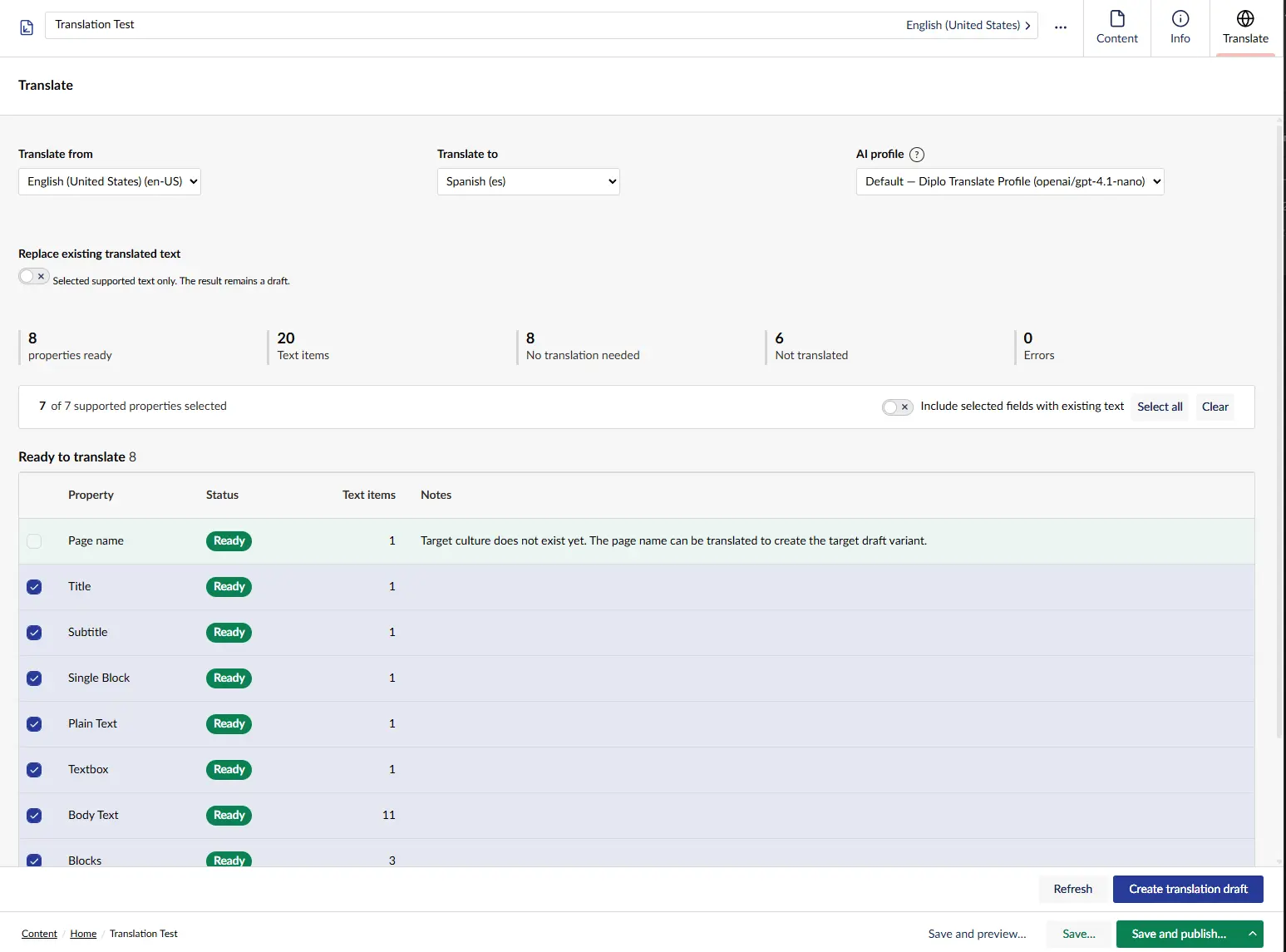
- Adds a document Translate workspace view and document entity action.
- Previews supported content properties before translation.
- Adds Content Overview, Translation Coverage, Missing Variants, Source Changes, Translation Jobs, Glossary, and Help dashboards.
- Adds a Translate action to Dictionary items and the root, plus a button on the Dictionary collection. An item action translates that item and its descendants; the root action and collection button translate the entire Dictionary.
- Translates missing Dictionary values from a selected source language.
- Saves translated content values as draft only; publishing remains manual.
- Skips existing target values unless an authorized user enables overwrite mode.
- Uses Umbraco.AI chat profiles, including the host site's default profile.
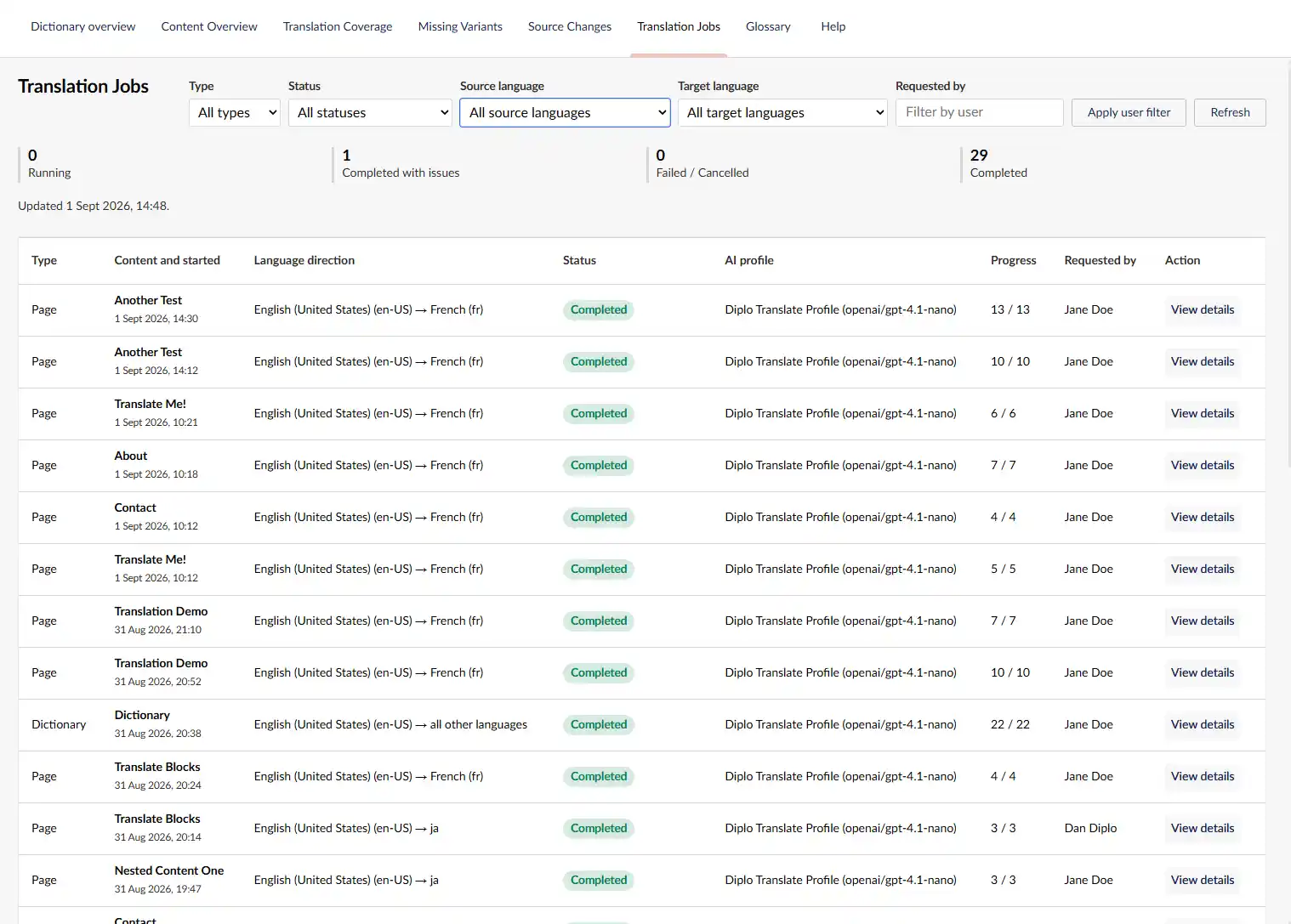
- Runs translations as background jobs with progress polling in the backoffice.
- Uses a lightweight current-version metadata query to count and list missing language variants without running a full content-property scan.
See the Omni documentation for more details.
Translation Work Queues
Content Overview links its headline counts to the relevant work queue. Missing Variants lists each absent target-language variant separately, using the default language as its source. After filtering to one target language, editors can select and preview multiple unrelated pages before sending them to one cancellable batch job. Recycled pages are excluded and normal Umbraco browse/update permissions are enforced before results are returned or queued.
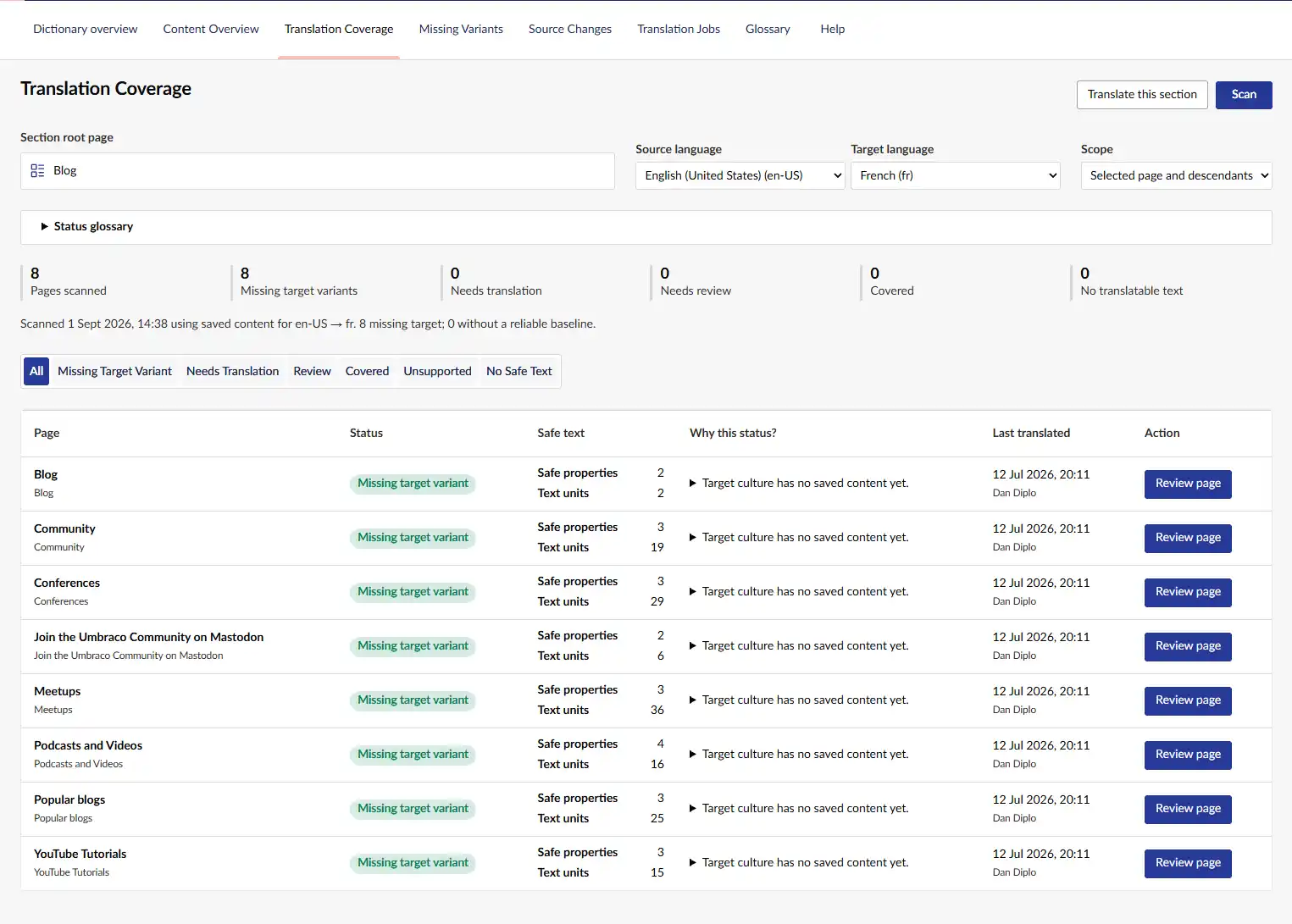
Translation Coverage remains the deeper, scoped audit for a selected page tree. It distinguishes Missing Target Variant, Needs Translation, Needs Review, Covered, Unsupported Only, and No Safe Text states.
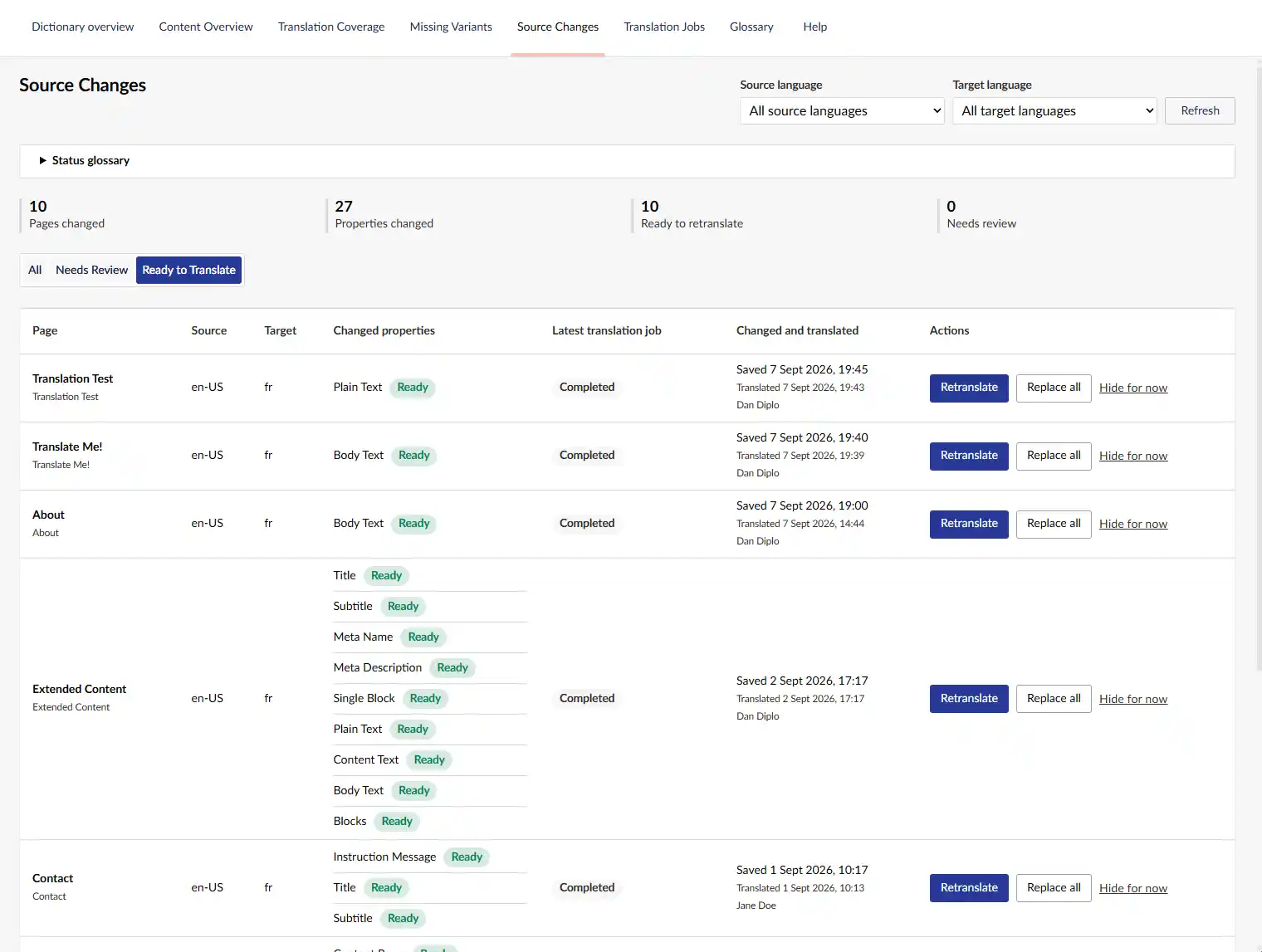
Source Changes is limited to previously translated or tracked pages. Ready to Translate indicates a safe source update; Needs Review indicates target edits, removed units, unsafe structural changes, or unreliable baseline data.
Link titles and setup checks
Multi URL Picker translates populated link titles only, including supported block values. URLs, targets, document/media references, link order and empty titles are preserved.
Use Translation → Support → Check Omni Setup for local licence, default Chat profile, provider configuration and language checks. Setup warnings appear before configuration is complete. Checks send no AI request, consume no evaluation run and change no content; they do not verify provider credentials or model availability. Live licence validation remains in Settings → Translator settings.
Content Translation Safety
The content translation flow is intentionally conservative. It translates known text surfaces only, preserves document and block structure, and leaves values unchanged when parser validation confidence is low.
When a target culture does not yet exist, its page name is translated alongside the selected fields. Invalid name responses fail closed; if other fields are ready to save, the source name is used only as a reported fallback so Umbraco can create the draft variant.
Requirements
- Umbraco CMS 18.2.0 or newer within the Umbraco 18 line
- .NET 10
- Umbraco.AI 18.3.5 or newer within the Umbraco 18 line
- An Umbraco.AI provider installed and configured in the host site, for example
Umbraco.AI.OpenAI - At least two languages configured in Umbraco
The package declares an Umbraco CMS dependency range of [18.2.0, 19.0.0) and a minimum Umbraco.AI dependency of 18.3.5. Its package build tests the pinned Umbraco 18 CMS, backoffice, Umbraco.AI, and OpenAI-provider versions. Provider packages remain host choices and are not dependencies of Omni itself.
See the Omni documentation for more details.
Installation
Install the package into your Umbraco 18 site:
dotnet add package Diplo.Translator.Omni
The package ships its backoffice assets under:
/App_Plugins/DiploTranslatorOmni/
See the Omni documentation for more details.
Umbraco.AI Setup
Configure Umbraco.AI in the host site as normal with at least one provider.
Usage
Open the Umbraco backoffice.
Use the Translate entity action on a Dictionary item to translate that item and its descendants. Use the Dictionary root action or collection button to translate the entire Dictionary. The modal shows the scope and item count before starting.
Open a document and use the Translate workspace view or document entity action to preview and draft-translate supported content properties.
Screenshots
Translation Jobs
Translation Coverage
Source Changes
Links
- Website: https://translator.diplo.co.uk/
- Product and documentation: https://translator.diplo.co.uk/docs
- Videos: https://translator.diplo.co.uk/videos/
- Support and issues: https://github.com/DanDiplo/Diplo.Translator.Omni-Support/issues
- Umbraco.AI docs: https://docs.umbraco.com/ai-in-umbraco
| Product | Versions Compatible and additional computed target framework versions. |
|---|---|
| .NET | net10.0 is compatible. net10.0-android was computed. net10.0-browser was computed. net10.0-ios was computed. net10.0-maccatalyst was computed. net10.0-macos was computed. net10.0-tvos was computed. net10.0-windows was computed. |
-
net10.0
- AngleSharp (>= 1.5.2)
- OpenAI (>= 2.11.0)
- SQLitePCLRaw.lib.e_sqlite3 (>= 2.1.12)
- Umbraco.AI (>= 18.3.5)
- Umbraco.Cms.Api.Management (>= 18.2.0 && < 19.0.0)
- Umbraco.Cms.Core (>= 18.2.0 && < 19.0.0)
- Umbraco.Cms.Infrastructure (>= 18.2.0 && < 19.0.0)
- Umbraco.Cms.Web.Common (>= 18.2.0 && < 19.0.0)
NuGet packages
This package is not used by any NuGet packages.
GitHub repositories
This package is not used by any popular GitHub repositories.
Disable provider response storage by default for supported OpenAI clients. Add privacy and logging guidance and simplify the NuGet README. Host audit settings remain under site-owner control.