Doroudi.ConsoleR
0.5.7
dotnet add package Doroudi.ConsoleR --version 0.5.7
NuGet\Install-Package Doroudi.ConsoleR -Version 0.5.7
This command is intended to be used within the Package Manager Console in Visual Studio, as it uses the NuGet module's version of Install-Package.
<PackageReference Include="Doroudi.ConsoleR" Version="0.5.7" />
For projects that support PackageReference, copy this XML node into the project file to reference the package.
<PackageVersion Include="Doroudi.ConsoleR" Version="0.5.7" />
<PackageReference Include="Doroudi.ConsoleR" />
For projects that support Central Package Management (CPM), copy this XML node into the solution Directory.Packages.props file to version the package.
paket add Doroudi.ConsoleR --version 0.5.7
The NuGet Team does not provide support for this client. Please contact its maintainers for support.
#r "nuget: Doroudi.ConsoleR, 0.5.7"
#r directive can be used in F# Interactive and Polyglot Notebooks. Copy this into the interactive tool or source code of the script to reference the package.
#:package Doroudi.ConsoleR@0.5.7
#:package directive can be used in C# file-based apps starting in .NET 10 preview 4. Copy this into a .cs file before any lines of code to reference the package.
#addin nuget:?package=Doroudi.ConsoleR&version=0.5.7
#tool nuget:?package=Doroudi.ConsoleR&version=0.5.7
The NuGet Team does not provide support for this client. Please contact its maintainers for support.
ConsoleR
ConsoleR is set of utilities to make awesome console apps in .Net
Features
- Colorful output
- Menu
- CheckBox
- AsciiArt
- WriteLine
- Password
- Alert
- Table
How To Use
using ConsoleR;
using ConsoleR.Loading;
using System.Drawing;
using Console = ConsoleR.Console;

var outputText = "Welcome to ConsoleR!";

Console.AsciiArt("Output Color", ConsoleColor.Yellow);
Thread.Sleep(750);
Console.Write("Hello ", "#FFCC00");
Console.Write("World", ConsoleColor.Green);
Console.Write("; \n", Color.BlueViolet);
Console.WriteLine(outputText);
Console.WriteLine(outputText.ToString(), Color.Magenta);
Console.WriteLine(outputText.ToString(), Color.Cyan);
Console.WriteLine(outputText.ToString(), Color.GreenYellow);
Console.WriteLine(outputText.ToString(), "#FFCC00");
Console.WriteLine(outputText.ToString(), "#FF0000");
Console.WriteLine(outputText.ToString(), ConsoleColor.DarkGreen);
Console.WriteLine(outputText.ToString(), Color.Tan);
Console.ReadKey("Press any key to continue");
Console.Clear();
Console.AsciiArt("ALERT", ConsoleColor.Green);
Thread.Sleep(750);
Console.Alert($"Welcome to ConsoleR Test Application {Environment.NewLine} This is a tutorial to show features of this library", " ConsoleR ", MessageType.Info);
Console.Alert($"This is Warning", " Warning ", MessageType.Warning);
Console.Alert($"Error message goes here", " ERROR ", MessageType.Error);
Console.Alert($"It can be a successfull message also :)", "", MessageType.Success);
Console.ReadKey("\nPress any key to continue");
Console.Clear();
Console.AsciiArt("MENU", ConsoleColor.Green);
Thread.Sleep(750);
Console.Menu("Select your favorite programming language:", "C#", "Java", "Python", "JavaScript", "Go", "Rust", "C++", "Kotlin", "Ruby").Select();


var content = Console.ReadInBox("You:");
Console.Info($"Bot: {content}");
content = Console.ReadInBox("You:", ConsoleColor.Yellow);
var spinner = new Spinner();
await spinner.Start(() =>
{
    int x = 0;
    while (x < 10)
    {
        x++;
        Thread.Sleep(100);
    }
    throw new Exception("Something went wrong");
}, "Starting app");

var spinner2 = new Spinner();
await spinner2.Start(() =>
{
    int x = 0;
    while (x < 10)
    {
        x++;
        Thread.Sleep(100);
    }
    spinner2.SetText("Almost done...");
}, "Restart app");

Console.AsciiArt("NEXT TOP ", ConsoleColor.Green);
Console.AsciiArt("ConsoleR", ConsoleColor.Cyan);
Console.WriteLine("\nPress any key to continue");
Console.ReadKey();

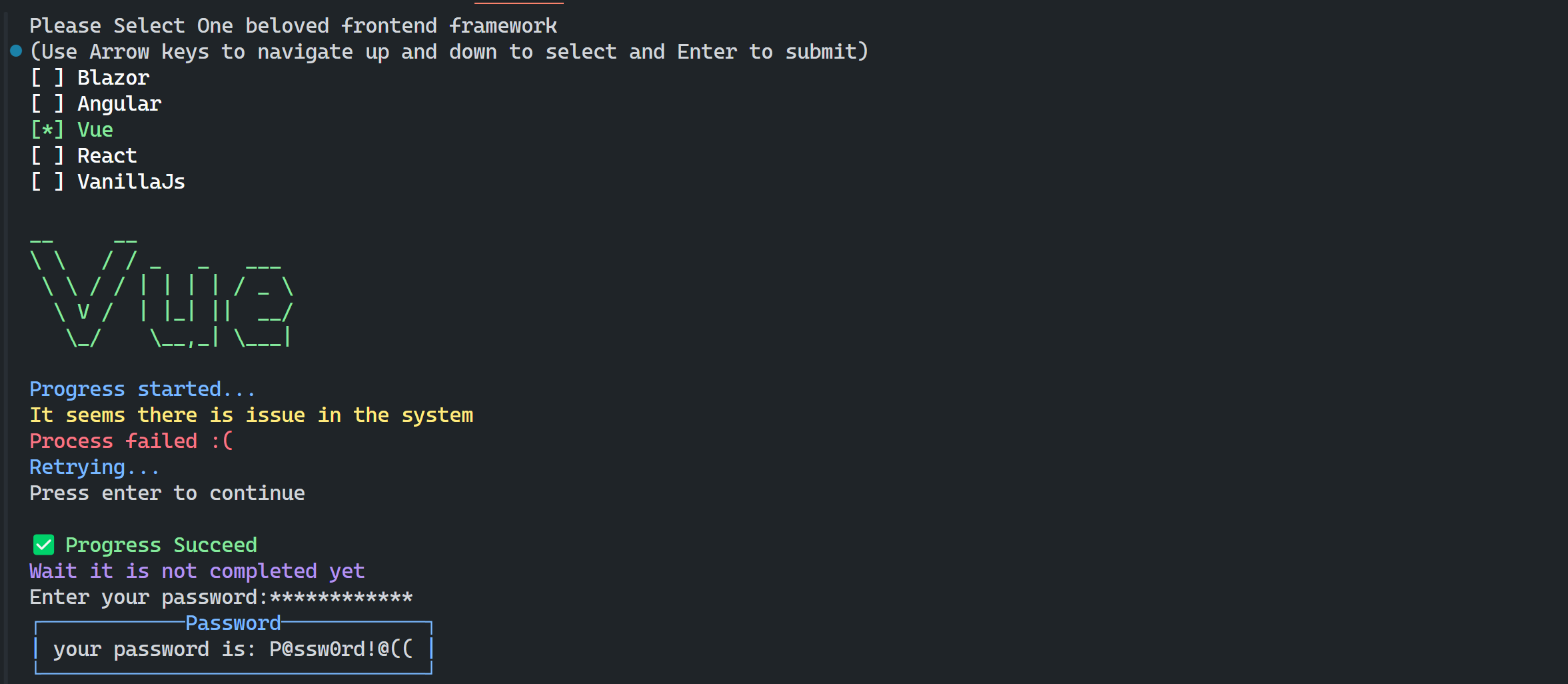
string[] frontEndFrameworks = ["Blazor", "Angular", "Vue", "React", "VanillaJs"];
var selectedItem = Console.Menu("Please Select One beloved frontend framework", true, frontEndFrameworks).Select();

Console.AsciiArt(frontEndFrameworks[selectedItem], GetFrameworkColor(frontEndFrameworks[selectedItem]));

await Task.Delay(2000);
Console.Info("Progress started...", true);
await Task.Delay(1000);
Console.Warning("It seems there is issue in the system", true);
await Task.Delay(1000);
Console.Error("Process failed :(", true);
await Task.Delay(1000);
Console.Info("Retrying...", true);
await Task.Delay(1000);
Console.ReadLine("still working on it");
await Task.Delay(1000);
Console.Success("Progress Succeed", showIcon: true);
await Task.Delay(1000);
Console.WriteLine("Wait it is not completed yet, Check next step", ConsoleColor.Magenta);

Console.WriteLine();
var password = Console.Password("Enter your password:");
Console.Alert($"your password is: {password}", "Password", MessageType.Info);


var result = Console.Confirm("Are you sure to process", true);
if (result)
    Console.Success("Processing", true);
else
    Console.Warning("You cancelled request", true);

Console.ReadKey("Press any key");

string[] plugins = ["TypeScript", "Linter", "Nuxt", "Vite"];
var selectedItems = Console.Checkbox("Select feature that you want to install:", plugins).Select();
for (int i = 0; i < selectedItems.Length; i++)
{
    var plugin = selectedItems[i];
    Console.WriteLine(plugin.Option, (ConsoleColor)i);
}

Console.ReadKey("Press any key" + Environment.NewLine);

// Table
Person[] people2 = [
    new Person("Saeid Doroudi",30, "Dresden", "Lorem Ipsum is simply dummy text of the printing and typesetting industry"),
    new Person("Saman", 25, "Marand", "Lorem Ipsum is simply dummy text of the printing and typesetting industry"),
    new Person("Alice", 35, "Zurich", "Lorem Ipsum is simply dummy text of the printing and typesetting industry"),
    new Person("Alireza", 40, "Tabriz", "Lorem Ipsum is simply dummy text of the printing and typesetting industry")
];
Console.Table(people2, ConsoleColor.DarkCyan, ignoredColumns: [nameof(Person.Age)], maxColumnLength: 25);

Console.ReadKey("Press any key to exit");

ConsoleColor GetFrameworkColor(string framework)
{
    return framework switch
    {
        "Blazor" => ConsoleColor.DarkMagenta,
        "Angular" => ConsoleColor.Red,
        "Vue" => ConsoleColor.Green,
        "React" => ConsoleColor.Blue,
        "JS" => ConsoleColor.Yellow,
        _ => ConsoleColor.White
    };
}


record Person(string Name, int Age, string City, string Description);
Output
| Product | Versions Compatible and additional computed target framework versions. |
|---|---|
| .NET | net5.0 was computed. net5.0-windows was computed. net6.0 was computed. net6.0-android was computed. net6.0-ios was computed. net6.0-maccatalyst was computed. net6.0-macos was computed. net6.0-tvos was computed. net6.0-windows was computed. net7.0 was computed. net7.0-android was computed. net7.0-ios was computed. net7.0-maccatalyst was computed. net7.0-macos was computed. net7.0-tvos was computed. net7.0-windows was computed. net8.0 was computed. net8.0-android was computed. net8.0-browser was computed. net8.0-ios was computed. net8.0-maccatalyst was computed. net8.0-macos was computed. net8.0-tvos was computed. net8.0-windows was computed. net9.0 was computed. net9.0-android was computed. net9.0-browser was computed. net9.0-ios was computed. net9.0-maccatalyst was computed. net9.0-macos was computed. net9.0-tvos was computed. net9.0-windows was computed. net10.0 was computed. net10.0-android was computed. net10.0-browser was computed. net10.0-ios was computed. net10.0-maccatalyst was computed. net10.0-macos was computed. net10.0-tvos was computed. net10.0-windows was computed. |
| .NET Core | netcoreapp3.0 was computed. netcoreapp3.1 was computed. |
| .NET Standard | netstandard2.1 is compatible. |
| MonoAndroid | monoandroid was computed. |
| MonoMac | monomac was computed. |
| MonoTouch | monotouch was computed. |
| Tizen | tizen60 was computed. |
| Xamarin.iOS | xamarinios was computed. |
| Xamarin.Mac | xamarinmac was computed. |
| Xamarin.TVOS | xamarintvos was computed. |
| Xamarin.WatchOS | xamarinwatchos was computed. |
Compatible target framework(s)
Included target framework(s) (in package)
Learn more about Target Frameworks and .NET Standard.
-
.NETStandard 2.1
- No dependencies.
NuGet packages
This package is not used by any NuGet packages.
GitHub repositories
This package is not used by any popular GitHub repositories.
| Version | Downloads | Last Updated |
|---|---|---|
| 0.5.7 | 164 | 12/21/2025 |
| 0.5.6 | 135 | 12/21/2025 |
| 0.5.5 | 284 | 12/17/2025 |
| 0.5.4 | 199 | 12/5/2025 |
| 0.5.3 | 188 | 10/25/2025 |
| 0.5.1 | 135 | 10/11/2025 |
| 0.4.3 | 201 | 9/25/2025 |
| 0.4.2 | 196 | 8/14/2025 |
| 0.4.0 | 170 | 8/11/2025 |
| 0.3.4 | 147 | 8/9/2025 |
| 0.3.3 | 134 | 8/9/2025 |
| 0.3.2 | 445 | 2/18/2025 |
| 0.3.1 | 161 | 1/25/2025 |
| 0.2.3 | 162 | 1/10/2025 |
| 0.2.1 | 160 | 12/26/2024 |
| 0.2.0 | 149 | 12/24/2024 |
| 0.1.4 | 144 | 12/16/2024 |
| 0.1.3 | 149 | 12/11/2024 |
| 0.1.2 | 161 | 12/7/2024 |
| 0.0.1 | 147 | 10/25/2025 |
Loading failed