Driftcheck 0.1.1
{ "inputs": [ { "type": "promptString", "id": "FIGMA_TOKEN", "description": "Figma Personal Access Token (scope File content: Read-only). Optional if you export frames with the Driftcheck Figma plugin.", "password": true }, { "type": "promptString", "id": "DRIFTCHECK_OUTPUT", "description": "Folder for captures, reports and the Figma cache. Default: driftcheck in the temp folder." }, { "type": "promptString", "id": "DRIFTCHECK_EXPORTS", "description": "Folder where Figma plugin exports are looked up. Default: Downloads." } ], "servers": { "Driftcheck": { "type": "stdio", "command": "dnx", "args": ["Driftcheck@0.1.1", "--yes"], "env": { "FIGMA_TOKEN": "${input:FIGMA_TOKEN}", "DRIFTCHECK_OUTPUT": "${input:DRIFTCHECK_OUTPUT}", "DRIFTCHECK_EXPORTS": "${input:DRIFTCHECK_EXPORTS}" } } } }
.vscode/mcp.json settings file.
dotnet tool install --global Driftcheck --version 0.1.1
dotnet new tool-manifest
dotnet tool install --local Driftcheck --version 0.1.1
#tool dotnet:?package=Driftcheck&version=0.1.1
nuke :add-package Driftcheck --version 0.1.1
Driftcheck
Catch UI drift before your users do. Driftcheck is a local MCP server: your AI agent compares the app on an Android device or the iOS Simulator with its Figma design, gets the differences with how to fix them in your framework (.NET MAUI, Android views, Jetpack Compose, UIKit, SwiftUI or Flutter), and fixes them.
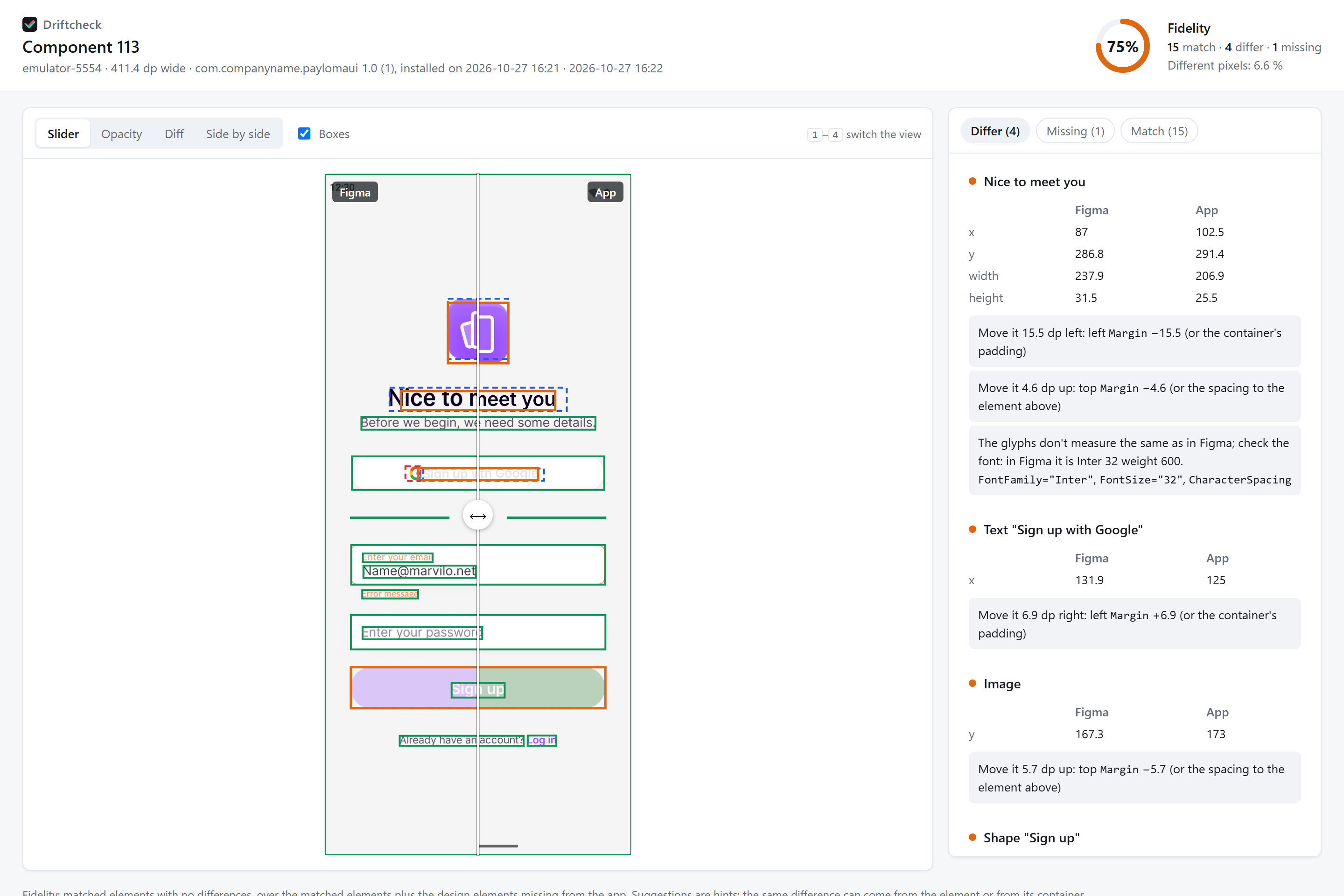
Open the interactive report · Design: Paylo kit by Marvilo (CC BY 4.0)
Quick start
You need the .NET 10 SDK, plus adb for Android or Xcode for the iOS Simulator. Add Driftcheck to your MCP client:
{
  "mcpServers": {
    "driftcheck": {
      "command": "dotnet",
      "args": ["dnx", "Driftcheck", "--yes"],
      "env": { "FIGMA_TOKEN": "<your Figma token>" }
    }
  }
}
With Claude Code:
claude mcp add driftcheck -e FIGMA_TOKEN=<your Figma token> -- dotnet dnx Driftcheck --yes
Then run your app and ask your agent: "Compare the app on the emulator with https://www.figma.com/design/…?node-id=… and fix the differences." Without a Figma token, export the frame with the Driftcheck Figma plugin.
Tools
| Tool | Use |
|---|---|
list_devices |
Connected Android devices and booted iOS simulators |
get_design_specs |
Sizes, colors, texts and fonts of the frame |
capture_screen |
Capture + app elements with their AutomationId |
compare_screen |
Fidelity, differences, how to fix them and an interactive report.html |
import_design |
Imports a .driftcheck.json exported with the Figma plugin |
Documentation, the Figma plugin and the source code are on GitHub.
| Product | Versions Compatible and additional computed target framework versions. |
|---|---|
| .NET | net10.0 is compatible. net10.0-android was computed. net10.0-browser was computed. net10.0-ios was computed. net10.0-maccatalyst was computed. net10.0-macos was computed. net10.0-tvos was computed. net10.0-windows was computed. |
This package has no dependencies.