Esatto.Umbraco.Backoffice.CustomEditors
1.1.6
dotnet add package Esatto.Umbraco.Backoffice.CustomEditors --version 1.1.6
NuGet\Install-Package Esatto.Umbraco.Backoffice.CustomEditors -Version 1.1.6
<PackageReference Include="Esatto.Umbraco.Backoffice.CustomEditors" Version="1.1.6" />
<PackageVersion Include="Esatto.Umbraco.Backoffice.CustomEditors" Version="1.1.6" />
<PackageReference Include="Esatto.Umbraco.Backoffice.CustomEditors" />
paket add Esatto.Umbraco.Backoffice.CustomEditors --version 1.1.6
#r "nuget: Esatto.Umbraco.Backoffice.CustomEditors, 1.1.6"
#:package Esatto.Umbraco.Backoffice.CustomEditors@1.1.6
#addin nuget:?package=Esatto.Umbraco.Backoffice.CustomEditors&version=1.1.6
#tool nuget:?package=Esatto.Umbraco.Backoffice.CustomEditors&version=1.1.6
Esatto.Umbraco.Backoffice.CustomEditors
A library of reusable property editor UIs for the Umbraco backoffice, including an Encrypted Textbox for secure data at rest and a Date Range editor with dual inline calendars.
Editors
Encrypted Textbox — Esatto.Umbraco.Backoffice.CustomEditors.EncryptedTextbox
A text input that encrypts its value at rest using ASP.NET Core Data Protection, and transparently decrypts it in the backoffice editor and in Model.Value(alias) on the front-end (so templates receive plaintext).
The input includes a reveal (👁) toggle that masks the value on screen — masking is on by default, so it's safe to bind to sensitive fields without configuration. On a content data type, a Mask value toggle lets editors turn masking off.
⚠️ Operational requirement: The site must persist and (for multi-server/containers) share its ASP.NET Core Data Protection key ring. If that key ring is lost, encrypted values cannot be recovered. Additionally, encryption protects data at rest in the database — it does not restrict who can read the decrypted value in the backoffice or in templates.
Use on a content Data Type
Create a Data Type using the Encrypted Textbox editor (stores an encrypted string), then assign it to a document type property like any other editor.
Use from code (e.g. a custom settings schema)
Reference the editor UI alias directly:
Esatto.Umbraco.Backoffice.CustomEditors.EncryptedTextbox
For example, an Umbraco.AI provider can point a sensitive field's EditorUiAlias at this
alias so its connection setting renders encrypted and masked.
Read the value in Razor
The value is transparently decrypted on read, so it behaves like an ordinary string — only the database holds ciphertext:
@{
    // Replace "yourPropertyAlias" with your Encrypted Textbox property's alias.
    var secret = Model.Value<string>("yourPropertyAlias");
}
secret is the decrypted plaintext. Treat it as sensitive — it is only protected at rest in the
database, not wherever you render or pass it.
Date Range — Esatto.Umbraco.Backoffice.CustomEditors.DateRange
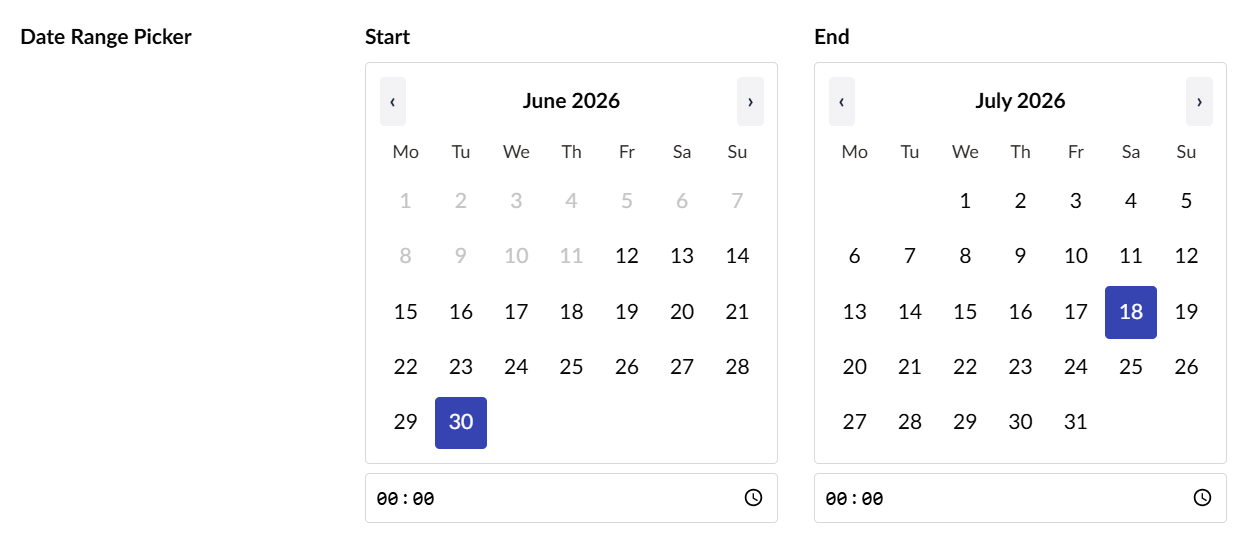
A date range editor that presents two inline calendars — a start and an end — shown side by side with no popups.
- The end calendar is constrained to the start: days earlier than the chosen start are disabled and cannot be selected.
- Moving the start past an already-chosen end clears the end, so the range is never invalid.
- Click the already-selected day to deselect it (clearing the start clears the whole range).
- Configurable date-only vs date+time per data type — when time is enabled, each end gets a time input.
- Optional min/max bounds restrict the selectable dates on both calendars.
- The value is stored as JSON
{ "from": "...", "to": "..." }, where each value is an ISO 8601 string (2026-05-01in date-only mode,2026-05-01T09:00:00in date+time mode), ornullwhen unset.
Use on a Data Type
- Create a new Data Type and choose the Date Range editor.
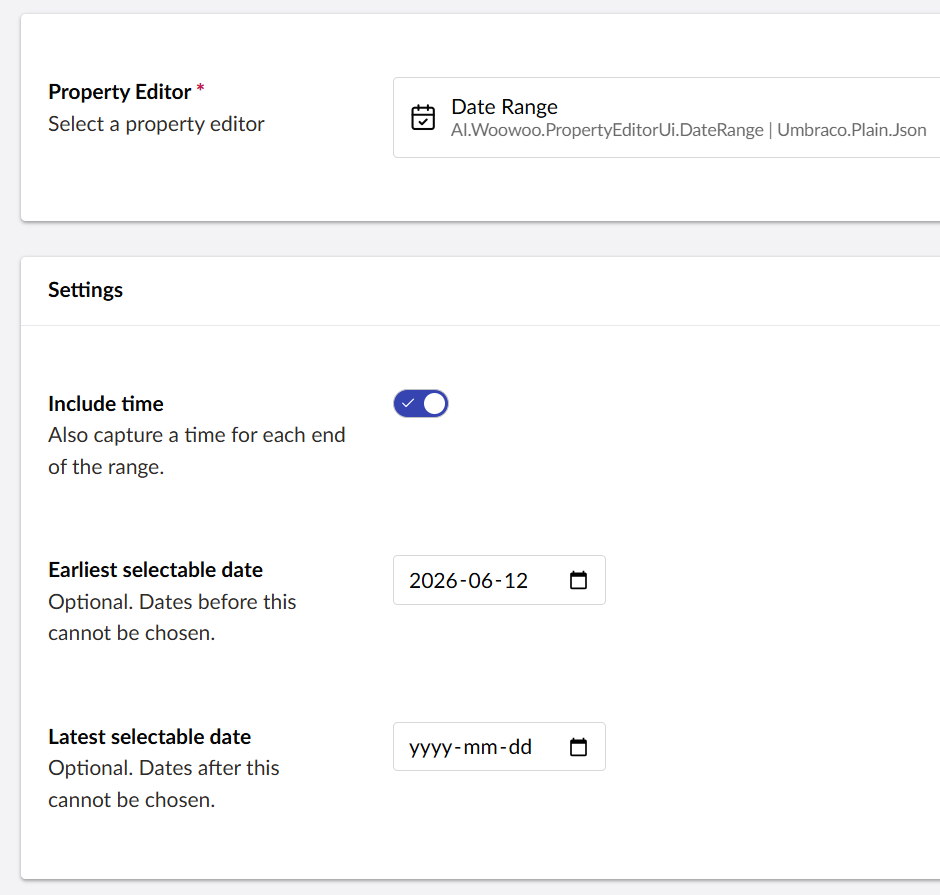
- Configure the available settings:
- Include time — also capture a time for each end of the range (date+time mode).
- Earliest selectable date — optional; dates before this cannot be chosen.
- Latest selectable date — optional; dates after this cannot be chosen.
- Assign the data type to a document type property like any other editor.
Read the value in Razor
The Umbraco.Plain.Json storage schema returns the value as a
System.Text.Json.JsonDocument, e.g. { "from": "2026-05-01", "to": "2026-05-10" }
(with a time component in date+time mode). Parse it with DateTimeStyles.RoundtripKind,
which handles both the date-only and date+time forms:
@using System.Text.Json
@using System.Globalization
@{
// Replace "yourPropertyAlias" with the alias of your Date Range property.
var range = Model.Value<JsonDocument>("yourPropertyAlias");
string? fromRaw = null;
string? toRaw = null;
if (range is not null && range.RootElement.ValueKind == JsonValueKind.Object)
{
if (range.RootElement.TryGetProperty("from", out var fromEl)
&& fromEl.ValueKind == JsonValueKind.String)
{
fromRaw = fromEl.GetString();
}
if (range.RootElement.TryGetProperty("to", out var toEl)
&& toEl.ValueKind == JsonValueKind.String)
{
toRaw = toEl.GetString();
}
}
// RoundtripKind parses BOTH "2026-05-01" and "2026-05-01T09:00:00".
DateTime? from = DateTime.TryParse(fromRaw, CultureInfo.InvariantCulture,
DateTimeStyles.RoundtripKind, out var f) ? f : null;
DateTime? to = DateTime.TryParse(toRaw, CultureInfo.InvariantCulture,
DateTimeStyles.RoundtripKind, out var t) ? t : null;
}
@if (from.HasValue && to.HasValue)
{
<p><strong>@from.Value.ToString("d MMM yyyy")</strong> –
<strong>@to.Value.ToString("d MMM yyyy")</strong></p>
}
else
{
<p><em>No date range set.</em></p>
}
The property alias (
yourPropertyAliasabove) is whatever you named the property when you added the Date Range data type to your document type.
Install
dotnet add package Esatto.Umbraco.Backoffice.CustomEditors
Develop
The backoffice client lives in Client/ (TypeScript + Lit + Vite). dotnet build runs the
client build automatically; the compiled assets are emitted to
wwwroot/App_Plugins/Esatto.Umbraco.Backoffice.CustomEditors/.
cd Client
npm install
npm run build      # or: npm run watch
npm test           # runs the Date Range logic tests (vitest)
| Product | Versions Compatible and additional computed target framework versions. |
|---|---|
| .NET | net8.0 is compatible. net8.0-android was computed. net8.0-browser was computed. net8.0-ios was computed. net8.0-maccatalyst was computed. net8.0-macos was computed. net8.0-tvos was computed. net8.0-windows was computed. net9.0 was computed. net9.0-android was computed. net9.0-browser was computed. net9.0-ios was computed. net9.0-maccatalyst was computed. net9.0-macos was computed. net9.0-tvos was computed. net9.0-windows was computed. net10.0 was computed. net10.0-android was computed. net10.0-browser was computed. net10.0-ios was computed. net10.0-maccatalyst was computed. net10.0-macos was computed. net10.0-tvos was computed. net10.0-windows was computed. |
-
net8.0
- Umbraco.Cms.Web.Common (>= 14.0.0)
NuGet packages
This package is not used by any NuGet packages.
GitHub repositories
This package is not used by any popular GitHub repositories.