Esatto.Umbraco.Backoffice.DictionaryLocalization
1.1.0
dotnet add package Esatto.Umbraco.Backoffice.DictionaryLocalization --version 1.1.0
NuGet\Install-Package Esatto.Umbraco.Backoffice.DictionaryLocalization -Version 1.1.0
<PackageReference Include="Esatto.Umbraco.Backoffice.DictionaryLocalization" Version="1.1.0" />
<PackageVersion Include="Esatto.Umbraco.Backoffice.DictionaryLocalization" Version="1.1.0" />
<PackageReference Include="Esatto.Umbraco.Backoffice.DictionaryLocalization" />
paket add Esatto.Umbraco.Backoffice.DictionaryLocalization --version 1.1.0
#r "nuget: Esatto.Umbraco.Backoffice.DictionaryLocalization, 1.1.0"
#:package Esatto.Umbraco.Backoffice.DictionaryLocalization@1.1.0
#addin nuget:?package=Esatto.Umbraco.Backoffice.DictionaryLocalization&version=1.1.0
#tool nuget:?package=Esatto.Umbraco.Backoffice.DictionaryLocalization&version=1.1.0
Esatto.Umbraco.Backoffice.DictionaryLocalization
Bridges Umbraco 17 & 18 content Dictionary items into the backoffice UI localization system. After install, any #Key in a content-type property label or description resolves to the current backoffice user's culture value from the Dictionary section — for every existing and future dictionary key, with no per-key manifest wiring.
Resolution is surface-aware (see Where tokens resolve): tokens translate in the Content section (where editors work) and show as the raw #Label.Name everywhere else (Settings, etc.), so admins configuring doctypes see the actual dictionary keys.
Screenshots
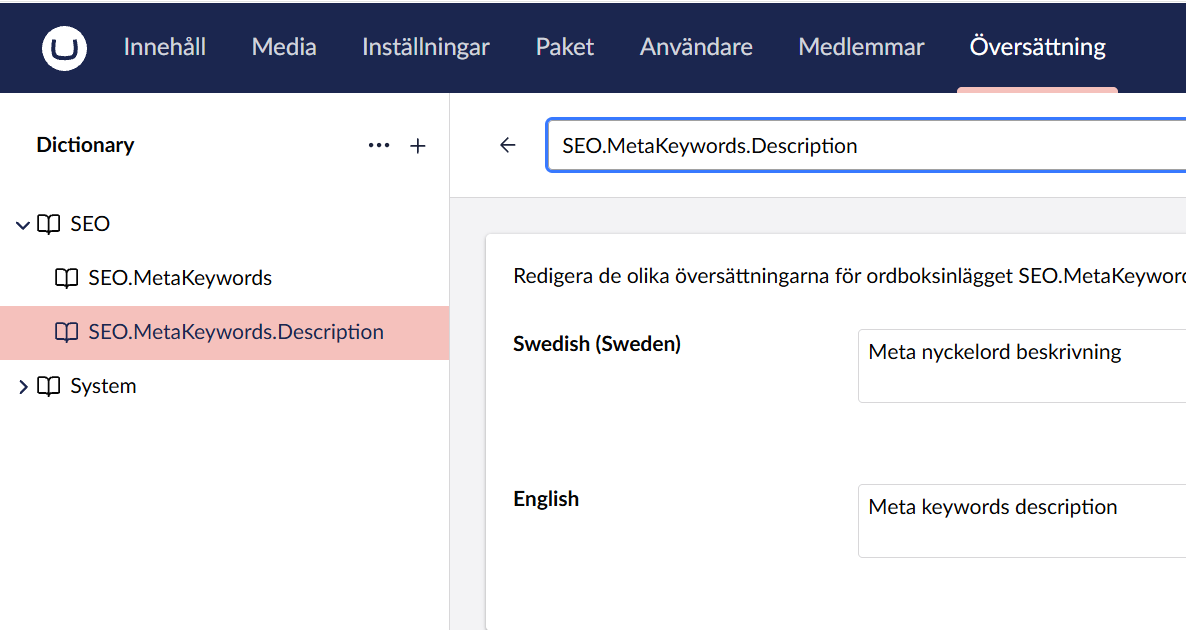
1. Define dictionary items — one entry per key in the Translation section, translated per culture:
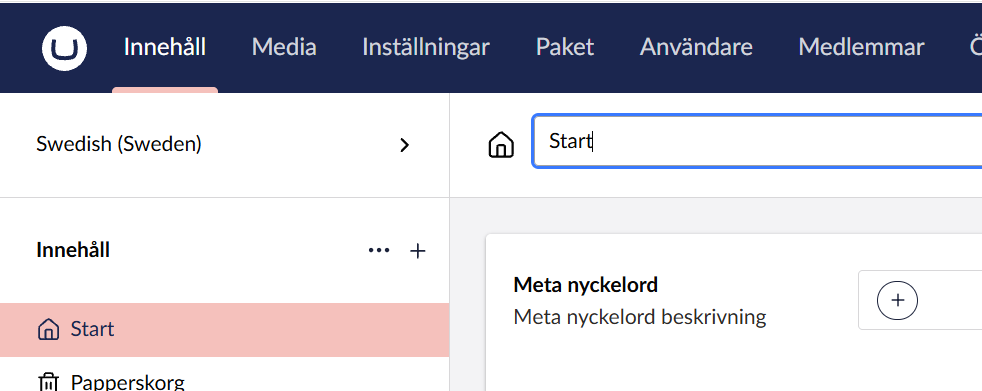
2. Content section (Innehåll) — property labels and descriptions resolve to the translated value:
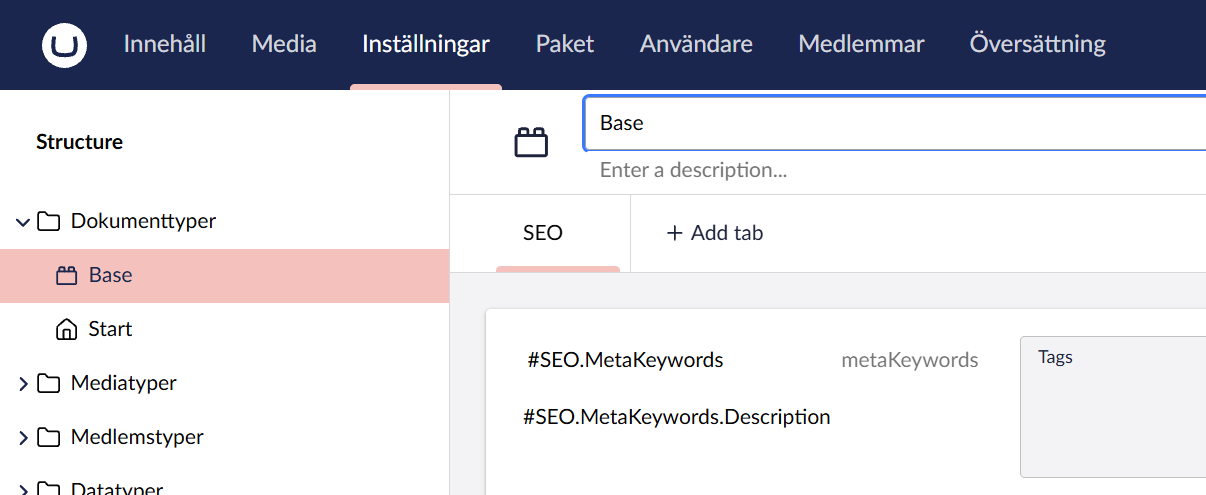
3. Settings section (Inställningar) — the same properties show the raw #Key tokens, so admins see exactly which dictionary keys are wired up:
Why
Umbraco has two independent translation systems that look interchangeable but aren't:
- Content Dictionary (
Translationsection) — for use on the front end via@Umbraco.GetDictionaryValue("Key")in Razor. - Backoffice UI localization — for backoffice strings, consumed by
localize.string()when a property label contains#Key.
The #Key prefix in a property label only reads from system 2. Add TestTag to the content Dictionary, put #TestTag in a property label, save — the label still shows literally #TestTag. Two completely different stores.
This package registers every content Dictionary item into umbLocalizationManager on backoffice startup, so #Key labels resolve as editors intuitively expect.
Install
dotnet add package Esatto.Umbraco.Backoffice.DictionaryLocalization
Restart the site / hard-refresh the backoffice. It activates automatically — no configuration. The composer, Management API controller, and backoffice entry point are auto-discovered.
How it works
On backoffice load, a small entry point calls a single authenticated Management API endpoint that returns the whole content Dictionary grouped by culture. It transforms the payload into UmbLocalizationSetBase objects (one per culture) and calls umbLocalizationManager.registerManyLocalizations(sets). From then on, localize.string("#Key") and localize.term("Key") find your dictionary value in the current backoffice user's culture — with the manager's built-in region → language → en fallback, and gated to the Content section (see Where tokens resolve).
The server endpoint reads from an in-memory cache of the whole dictionary, built once via a single bulk IDictionaryItemService.GetDescendantsAsync(null) call. The cache invalidates automatically on DictionaryItemSavedNotification / DictionaryItemDeletedNotification, so edits show up after a browser reload.
Dotted / hyphenated keys. Umbraco's built-in localize.string() tokenizes with /#\w+/g, which stops at the first . or - — so out of the box #SEO.MetaKeywords.Description would only ever capture #SEO. On backoffice load this package replaces UmbLocalizationController.prototype.string with a resolver that captures the whole dotted/hyphenated run and resolves the longest matching key, keeping any unconsumed remainder as literal text. Unknown tokens are left untouched, exactly like Umbraco's own fallback. The result: you write labels with your dictionary key verbatim — #SEO.MetaKeywords.Description — no underscores, no renaming.
Each key is still also registered under an underscore-normalized alias (e.g. SEO_MetaKeywords_Description) for backward compatibility, and the original dotted alias round-trips for front-end use, so existing @Umbraco.GetDictionaryValue("SEO.MetaKeywords.Description") is untouched.
The
string()replacement is a strict superset of Umbraco's behaviour (flat keys and unknown tokens behave identically) and was verified against the byte-identicalstring()/term()/regex in both 17.3.0 and 18.0.0. A future major that changes that contract would need a revisit.
Property descriptions
A content-type property has two localizable texts, and Umbraco renders them through different pipelines:
| Field | Rendered by | Umbraco's native token |
|---|---|---|
| Label (property name) | localize.string() |
#Key |
| Description | <umb-ufm-render> — UFM (Umbraco Flavored Markdown) |
{#Key} |
Out of the box a description is not passed through localize.string(), so a bare #Key there is never resolved — it renders as literal markdown text. Umbraco's own UFM localize component needs the brace form {#Key} instead. So the same key an editor writes in a label (#Key) would silently fail in a description.
This package removes that inconsistency: on backoffice load it wraps <umb-ufm-render> so that a bare #Key in a description resolves too — write it exactly as you would in a label:
#SEO.MetaKeywords.Description
How it works: the wrapper rewrites a bare #Key to the {#Key} UFM token only when the key resolves to a real dictionary entry, then lets Umbraco's built-in localize component render it (via localize.term(), an exact-key lookup — so dotted / hyphenated keys work verbatim). Guard rails keep it safe:
- Literal
#text that is not a dictionary key —#123,#hashtag,C#— is left untouched. - An existing
{#Key}is never double-wrapped, and a Markdown heading (# Heading, with a space) is never treated as a token.
The result: one syntax everywhere. Write
#Keyin both labels and descriptions. (The explicit{#Key}form still works too, unchanged.)This wraps the
<umb-ufm-render>element'smarkdownaccessor; it degrades to a no-op (descriptions keep needing{#Key}) if a future Umbraco version changes that element's shape. The bare-#Keyrewrite is gated to the Content section (see below); the explicit{#Key}form is Umbraco-native and resolves wherever Umbraco renders UFM.
Where tokens resolve
Umbraco resolves every #token through one global function that has no idea which screen called it — and the same function resolves Umbraco's own UI (#buttons_save, …). So the package gates only the keys it registered, by backoffice section:
| Section | Your content-dictionary tokens | Umbraco's own UI tokens |
|---|---|---|
| Content (Innehåll) | translated | translated |
| Everything else (Settings, Media, Members, …) | shown raw as #Label.Name |
translated |
Rationale: editors work in Content and want to read the translated labels/descriptions; admins and developers work in Settings (document types, data types) and want to see the actual dictionary keys they're wiring up. Umbraco's own chrome is never shown raw, because keys this package did not register always resolve.
Detection is by route (/umbraco/section/content/…); if a future Umbraco changes section routing, it degrades to showing the raw token rather than breaking. To translate additional sections (e.g. Media, Members), widen the check in surface.logic.ts.
Culture fallback (language vs. region)
Umbraco resolves a backoffice UI culture as region → language → en, never language → region. So a dictionary value stored under a region code (sv-SE) is invisible to a bare-language UI (sv), which only checks sv then en — even though the same user's en-GB/en-US UI happily resolves an en value (that's the language step working in your favour).
To remove that asymmetry, when this package registers a region culture like sv-SE it also registers a language-only sv alias carrying the same entries. The result: a region-coded dictionary resolves for both sv and sv-SE UI users, matching how a language-coded en dictionary already resolves for en, en-GB and en-US. You don't have to make the content language's culture match each user's chosen UI variant.
- An explicit language bucket in your dictionary (
sv) is never overwritten by the alias. - If one language has several regions (
sv-SEandsv-FI), their entries are merged into the singlesvalias — last region wins on a shared key. Give a key an explicitsvvalue if you need to pin which one shows.
Endpoint
GET /umbraco/management/api/v1/backoffice/dictionary-localization/all- Authenticated as a backoffice user (
AuthorizationPolicies.BackOfficeAccess); called from inside the backoffice with the bearer token attached automatically. - Returns
{ cultures: { "sv-se": { "Key": "Value", ... }, "en": { ... } } }— culture ISO codes lowercased to matchumbLocalizationManager's normalization.
Compatibility
| Umbraco | Status |
|---|---|
| 17.x | Verified |
| 18.x | Verified |
The umbLocalizationManager API and Management API auth model are specific to the Umbraco (Bellissima) backoffice; majors before 17 are not supported. A single build serves both 17 and 18: they both target net10.0, the backoffice localization contract (localize.string(), the #\w+ token regex, umbLocalizationManager.registerManyLocalizations) is identical across them, and the shared umbHttpClient supplies the credentials: 'include' that 18's Management API requires.
Trade-offs
- One HTTP round-trip on backoffice startup (small payload — a few tens of KB for typical dictionaries).
- Doubles the localization map size by registering underscore variants for dotted / hyphenated keys. Both variants point to the same string, so no per-lookup cost.
- Live updates require a browser reload. The server cache invalidates immediately; the client re-registers on next backoffice load. If you need real-time updates on save, patch the entry point to listen for
UmbRequestReloadStructureForEntityEventondictionary-item.
License
MIT.
| Product | Versions Compatible and additional computed target framework versions. |
|---|---|
| .NET | net10.0 is compatible. net10.0-android was computed. net10.0-browser was computed. net10.0-ios was computed. net10.0-maccatalyst was computed. net10.0-macos was computed. net10.0-tvos was computed. net10.0-windows was computed. |
-
net10.0
- MessagePack (>= 3.1.7)
- Microsoft.OpenApi (>= 2.7.5)
- Umbraco.Cms.Api.Management (>= 17.0.0)
- Umbraco.Cms.Core (>= 17.0.0)
- Umbraco.Cms.Web.Common (>= 17.0.0)
NuGet packages
This package is not used by any NuGet packages.
GitHub repositories
This package is not used by any popular GitHub repositories.