Esatto.Umbraco.Backoffice.SharedPreviewLink
1.0.4
dotnet add package Esatto.Umbraco.Backoffice.SharedPreviewLink --version 1.0.4
NuGet\Install-Package Esatto.Umbraco.Backoffice.SharedPreviewLink -Version 1.0.4
<PackageReference Include="Esatto.Umbraco.Backoffice.SharedPreviewLink" Version="1.0.4" />
<PackageVersion Include="Esatto.Umbraco.Backoffice.SharedPreviewLink" Version="1.0.4" />
<PackageReference Include="Esatto.Umbraco.Backoffice.SharedPreviewLink" />
paket add Esatto.Umbraco.Backoffice.SharedPreviewLink --version 1.0.4
#r "nuget: Esatto.Umbraco.Backoffice.SharedPreviewLink, 1.0.4"
#:package Esatto.Umbraco.Backoffice.SharedPreviewLink@1.0.4
#addin nuget:?package=Esatto.Umbraco.Backoffice.SharedPreviewLink&version=1.0.4
#tool nuget:?package=Esatto.Umbraco.Backoffice.SharedPreviewLink&version=1.0.4
Esatto.Umbraco.Backoffice.SharedPreviewLink
Shareable preview links for Umbraco 17.
Editors click Share preview in any document workspace; a tokenized URL is minted; recipients open the link in any browser (no backoffice login) and see the current draft for that exact page.
- 7-day token validity (data-protected, tampering-proof)
- 5-minute recipient cookie scoped to the specific page path
- Works on never-published drafts, not just published-with-edits
- Multilingual-aware — mints the link for the exact culture/variant you're currently viewing
- No save dialog — the link reflects the current saved draft; the button stays hidden until the viewed variant has been saved (so you never mint a link to a not-yet-created page)
- Three friendly error pages: expired (410), invalid (400), not-found (404)
How it works
In any document workspace, click Share preview. The button appears only once the variant you're viewing has been saved (it's hidden on a brand-new document or a not-yet-created language variant):

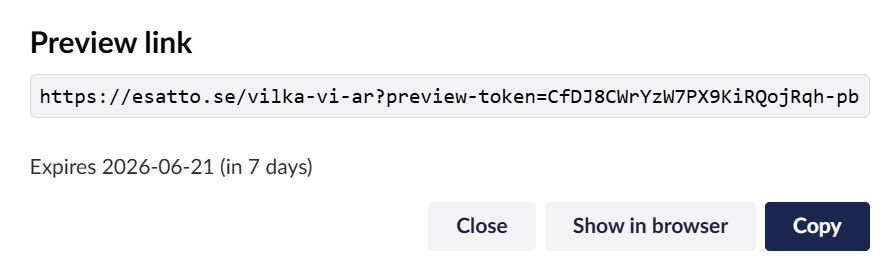
A tokenized preview link is minted for the variant you're currently viewing — no save dialog, no forced save; the link reflects that variant's last saved draft. Copy it, or open it directly:
Install
dotnet add package Esatto.Umbraco.Backoffice.SharedPreviewLink
Then add ONE line to your Program.cs, before app.UseUmbraco():
app.UsePreviewLink();
app.UseUmbraco()
    // ...
That's it. The Management API endpoint (POST /umbraco/management/api/v1/backoffice/preview-link), the workspace action button, the error page, and the validating middleware are all wired in automatically.
Requirements: persistent DataProtection keys
Tokens are valid for 7 days, so they must stay decryptable across app restarts. That requires the consuming app to persist its ASP.NET Core DataProtection keys to durable storage. ASP.NET Core's default key ring is not reliably retained across restarts on many hosts — when it resets, every link minted before the restart fails to decrypt and the recipient sees "This preview link has expired" (even seconds after minting). The same reset also logs Umbraco out of the backoffice ("Failed to decrypt back-office token cookie").
Configure a durable key store in Program.cs (service registration, before builder.Build()):
builder.Services.AddDataProtection()
    .SetApplicationName("YourApp")
    .PersistKeysToFileSystem(new DirectoryInfo(
        Path.Combine(builder.Environment.ContentRootPath, "umbraco", "Data", "DataProtectionKeys")));
Keep the keys folder out of source control. For multi-instance / cloud hosting, persist to shared storage (Azure Blob, database) and protect the keys (e.g. Key Vault) so every instance shares one ring. This is standard Umbraco DataProtection guidance; it also keeps backoffice sessions stable across restarts.
If a token ever fails, the middleware now logs the reason at Warning (key-ring mismatch vs. genuine expiry) instead of silently rendering "expired".
Architecture
- Mint (
PreviewLinkController) —[Authorize(SectionAccessContent)]Management API endpoint. Takes{ contentKey }, usesITimeLimitedDataProtectorto protect the GUID for 7 days, appends?preview-token=...to the content's absolute URL, returns{ url, expiresAt }. - Verify (
PreviewLinkMiddleware) — runs beforeapp.UseUmbraco()so the cookie it sets takes effect on the redirected request. Validates the token, ensures the token matches the request path (so a token for page A can't preview page B), generates an Umbraco preview cookie viaIPreviewTokenGenerator, sets the cookie scoped to the canonical page path, then 302-redirects to the same URL minus the token param. - Workspace action (
share-preview-action.js+share-preview-button.js) — mints a link for the variant currently being viewed (sending its culture so multilingual URLs resolve to the right language), then shows a modal with Copy + Show-in-browser buttons. It does not save or open a save dialog — it mints for the variant's last saved draft. The button hides until the viewed variant has been created/saved: it reads the workspace'spersistedData(server-saved state), notvariantOptions(in-memory edits), so typing an unsaved name does not reveal it. - Error page (
Views/PreviewLinkError/Index.cshtml) — self-contained, inline CSS, no design-system dependency. Adapts toprefers-color-scheme: dark. Consumer can override by placing a view at the same path in their app.
Customizing the error page
Razor view discovery checks the consumer's project first, then referenced assemblies. To override the bundled error page, create /Views/PreviewLinkError/Index.cshtml (or /Views/Shared/Index.cshtml) in the consuming project with your own markup.
Endpoint security
The mint endpoint requires SectionAccessContent (any backoffice user with Content access can mint links). The verify middleware is anonymous because the token IS the authentication — the data-protection signature is what proves a recipient was authorized.
Compatibility
| Umbraco | Status |
|---|---|
| 17.x | Verified |
| 18.x | Verified |
Depends on Umbraco.Cms.Core, Umbraco.Cms.Api.Management, and Umbraco.Cms.Web.Common — all 17.x.
License
MIT.
| Product | Versions Compatible and additional computed target framework versions. |
|---|---|
| .NET | net10.0 is compatible. net10.0-android was computed. net10.0-browser was computed. net10.0-ios was computed. net10.0-maccatalyst was computed. net10.0-macos was computed. net10.0-tvos was computed. net10.0-windows was computed. |
-
net10.0
- Umbraco.Cms.Api.Management (>= 17.0.0)
- Umbraco.Cms.Core (>= 17.0.0)
- Umbraco.Cms.Web.Common (>= 17.0.0)
NuGet packages
This package is not used by any NuGet packages.
GitHub repositories
This package is not used by any popular GitHub repositories.