FlatXlsx 1.1.1
dotnet add package FlatXlsx --version 1.1.1
NuGet\Install-Package FlatXlsx -Version 1.1.1
<PackageReference Include="FlatXlsx" Version="1.1.1" />
<PackageVersion Include="FlatXlsx" Version="1.1.1" />
<PackageReference Include="FlatXlsx" />
paket add FlatXlsx --version 1.1.1
#r "nuget: FlatXlsx, 1.1.1"
#:package FlatXlsx@1.1.1
#addin nuget:?package=FlatXlsx&version=1.1.1
#tool nuget:?package=FlatXlsx&version=1.1.1
FlatXlsx
Convert object to Excel file (.xlsx) [Open XML SpreadsheetML File Format]
Getting Started
Supported platforms: .NET Standard 2.0 / 2.1 (.NET Framework 4.6.2+, .NET 5/6/7), .NET 8, and .NET 10.
PM> Install-Package FlatXlsx
Usage
You can use XlsxSerializer.ToFile to create .xlsx file. Options are optional; the defaults
just work.
XlsxSerializer.ToFile(Users, "test.xlsx");
Every entry point is named after its destination: ToFile, ToStream (any Stream, seekable
or not), ToBufferWriter (any IBufferWriter<byte>), and ToPipeWriterAsync. Output is fully
streamed; no temporary files or working folder are used.
// Stream
XlsxSerializer.ToStream(Users, stream);

// ASP.NET Core: write directly to the response without buffering a file
app.MapGet("/users.xlsx", (HttpResponse response) =>
{
    response.ContentType = "application/vnd.openxmlformats-officedocument.spreadsheetml.sheet";
    XlsxSerializer.ToBufferWriter(GetUsers(), response.BodyWriter, XlsxSerializerOptions.Default);
    return Task.CompletedTask;
});
Async variants are available: ToFileAsync, ToStreamAsync, and ToPipeWriterAsync.
The PipeWriter overload flushes as data is produced, so pipe backpressure is honored.
ToStreamAsync never writes the stream synchronously (the zip container's few synchronous
tail writes are buffered and forwarded asynchronously), so an ASP.NET Core response body is a
valid destination for either overload.
An IAsyncEnumerable<T> source is accepted by the same three async entry points
(on .NET 8+, .NET 10 and .NET Standard 2.1), so a query's AsAsyncEnumerable() or a streaming
service response exports directly - rows are awaited as they arrive, never materialized first:
await XlsxSerializer.ToFileAsync(db.Users.AsAsyncEnumerable(), "users.xlsx", cancellationToken: ct);
await XlsxSerializer.ToFileAsync(Users, "test.xlsx", XlsxSerializerOptions.Default, cancellationToken);

// ASP.NET Core, fully async
app.MapGet("/users.xlsx", async (HttpResponse response, CancellationToken ct) =>
{
    response.ContentType = "application/vnd.openxmlformats-officedocument.spreadsheetml.sheet";
    await XlsxSerializer.ToPipeWriterAsync(GetUsers(), response.BodyWriter, XlsxSerializerOptions.Default, ct);
});
Supported types
| Category | Types | Available on |
|---|---|---|
| Numeric primitives | bool byte sbyte short ushort int uint long ulong float double decimal |
all targets |
| Native-size integers | nint (IntPtr) / nuint (UIntPtr) |
all targets |
| System.Numerics | BigInteger Complex |
all targets |
| Text | string char |
all targets |
| Common structs/classes | Guid Enum DateTime DateTimeOffset TimeSpan Uri Version |
all targets |
| .NET Core 3.0+ types | Rune |
.NET 8+ |
| .NET 5+ types | Half |
.NET 8+ |
| .NET 6+ types | DateOnly TimeOnly |
.NET 8+ |
| .NET 7+ types | Int128 UInt128 |
.NET 8+ |
Nullable<T> of any supported struct, tuples, and object graphs (classes/records with public properties/fields) are also supported.
Values of BigInteger / Int128 / UInt128 exceeding 15 significant digits are stored in full in the cell,
but Excel displays numbers with at most 15 digits of precision.
Out of scope
FlatXlsx converts one flat sequence of rows into one worksheet, fast. The following are out of scope by design — if the export needs them, reach for a full spreadsheet library such as ClosedXML instead of looking for a hidden option here:
- Multiple worksheets per workbook
- Styling beyond the built-in number/date formats, wrap and header freeze (fonts, colors, borders, merged cells)
- Formulas, charts, images, pivot tables
- Reading or editing existing workbooks (FlatXlsx is write-only)
- Column layouts for .NET's built-in types — member expansion is inferred for application-defined types only; a built-in type without a serializer fails naming the type instead of guessing at a layout
Notice
Output is streamed directly to the destination; no working folder is used.
SheetNamenames the (single) worksheet; Excel's naming rules are enforced at write time, so an invalid name fails with a clear message instead of a workbook Excel repairs.- An empty source writes nothing — unless
HeaderTitlesis set, in which case a header-only workbook is written so downstream consumers still receive a file. - A null source throws
ArgumentNullException; silence there would only hide a caller bug. - Applications targeting .NET 5–7 or Unity receive the netstandard build, which has no built-in
serializers for
DateOnly,TimeOnly,Half,Int128orRune. Writing one fails with a message naming the type; target net8.0+ or register a serializer viaCustomSerializers.
Message languages
Exception messages follow CultureInfo.CurrentUICulture. English is built into the main
assembly; other languages ship as satellite assemblies (ja/FlatXlsx.resources.dll) that NuGet
restores alongside it.
- Nothing to configure: on a Japanese system the messages are Japanese.
- An untranslated language falls back to English, as does an application that trims or omits the satellite assemblies.
- This is separate from
XlsxSerializerOptions.CultureInfo, which affects only the types whose text is culture-defined (DateTimeOffset,Complex) and itself defaults to the invariant culture. Numbers, dates and times are always stored invariantly, so the same code produces the same file on every machine.
To add a language, copy FlatXlsx/Resources/Strings.resx to Strings.<culture>.resx, translate
the <value> elements, and rebuild - the satellite assembly is produced automatically.
Trimming and native AOT
Working out which columns a row type produces means reflecting over its members and compiling an expression tree for them. A trimmer may have removed those members, and native AOT cannot generate code for a type it never saw — so an export that works in development can fail once the application is published trimmed or AOT.
Every entry point is annotated, so the build that introduces the problem reports it rather than the deployment that runs into it:
warning IL2026: Using member 'FlatXlsx.XlsxSerializer.ToFile<T>(...)' which has
'RequiresUnreferencedCodeAttribute' can break functionality when trimming application code.
This matters beyond PublishAot: trimming is on by default for Blazor WebAssembly and
.NET MAUI release builds.
To export from such an application, register a serializer for every row type. That path resolves by type test and reflects over nothing, so it is safe to suppress the warning once every row type is covered:
sealed class OrderXlsxSerializer : IXlsxSerializer<Order>
{
    public void WriteTitle(XlsxCellWriter writer, Order value, XlsxSerializerOptions options, string name = "value")
    {
        writer.Write("Id");
        writer.Write("Quantity");
    }

    public void Serialize(XlsxCellWriter writer, Order value, XlsxSerializerOptions options)
    {
        writer.Write(value.Id);
        writer.Write(value.Quantity);
    }
}

var options = new XlsxSerializerOptions { CustomSerializers = [new OrderXlsxSerializer()] };
Writing that by hand is the price of AOT today; a source generator that emits it is the obvious next step and is not implemented yet.
Handling untrusted data
Values are frequently outside the caller's control, so the writer is built to keep any input from producing a broken or dangerous workbook:
| Concern | Behaviour |
|---|---|
Markup in values (<, &, </t></is></c>) |
Escaped as XML text; it can never become elements. Header titles included. |
Control characters (\0 and other C0 codes) |
Dropped. XML 1.0 forbids them even escaped, and Excel rejects a file that contains them. |
Formula injection (=cmd\|...) |
Not applicable: values are written as string or number cells, never as <f> formulas, so Excel does not evaluate them. Re-exporting the sheet to CSV is a separate matter. |
| Circular references / deep nesting | MaxDepth (default 64) aborts with a clear exception. |
| Collections expanding across columns | Excel's 16,384-column limit is enforced with an exception instead of silently emitting a corrupt file. Row (1,048,576) and cell-length (32,767) limits likewise. |
| High-cardinality strings | The shared-string table is capped by MaxSharedStrings (default 1,000,000); beyond it, values are written as inline strings, so memory stays bounded. |
Failures caused by the data itself throw XlsxDataException, carrying Kind, Row, Column,
Limit and Actual as structured properties — handlers can aggregate or report them without
parsing localized messages, and the message names the location ("row 4,832, column 7").
The export deliberately stops at the first data error: a workbook with rows silently missing
would look complete without being complete. To collect every data problem in one pass —
before exporting, with nothing written — use the validation scan:
IReadOnlyList<XlsxDataError> errors = XlsxSerializer.Validate(rows);
// each entry: Kind, Row, Column, Limit, Actual, localized Message
ValidateAsync does the same for an IAsyncEnumerable<T> source. Configuration mistakes
(an invalid sheet name, a bad format code, a missing serializer) still throw immediately:
their fix is in code, not in the data.
The row source is enumerated exactly once, so a query or forward-only reader can be passed
directly. With AutoFitColumns the first AutoFitSampleRows rows (default 200) are buffered to
measure widths — bounded, never the whole sequence.
XlsxCellWriter instances are not thread-safe; serializer providers and their caches are.
Benchmark
FlatXlsx 1.0.1 vs ClosedXML 0.105.0, .NET 10 (BenchmarkDotNet 0.15.8, ShortRun), all three suites measured in one session on the same machine.
The data. 19 columns per row, built by Benchmark/SampleData.cs: three numbers, fifteen
text columns drawn from small pools the way a status or a branch code repeats across an export,
and one key column. How many distinct values that key column takes is an argument, because it
is the property that decides how large the shared-string table grows — the tables below vary it
deliberately. Nothing is random, so a run reproduces.
The variants. Three, so the comparison is fair to ClosedXML:
- ClosedXmlNaive — beginner-style code: cell-by-cell writes, per-cell number formats,
ColumnsUsed().AdjustToContents()column sizing. - ClosedXmlOptimized — tuned code: bulk
InsertData, column-level number formats set once, noAdjustToContents(its per-cell measurement is ClosedXML's slowest feature). - FlatXlsx — header row + approximate column auto-fit enabled (
AutoFitColumns = true), so its feature set is comparable to the naive variant.
Here the key is unique on every row, as it is in a real export:
| Method | Rows | Mean | Ratio | Allocated | Alloc Ratio |
|---|---|---|---|---|---|
| ClosedXmlNaive | 100 | 26.10 ms | 1.00 | 5,455.2 KB | 1.000 |
| ClosedXmlOptimized | 100 | 7.36 ms | 0.29 | 1,410.5 KB | 0.259 |
| FlatXlsx | 100 | 1.10 ms | 0.04 | 61.2 KB | 0.011 |
| ClosedXmlNaive | 1,000 | 103.10 ms | 1.00 | 49,262.8 KB | 1.000 |
| ClosedXmlOptimized | 1,000 | 36.34 ms | 0.36 | 9,874.7 KB | 0.200 |
| FlatXlsx | 1,000 | 4.98 ms | 0.05 | 138.1 KB | 0.003 |
| ClosedXmlNaive | 10,000 | 778.72 ms | 1.000 | 479,425.2 KB | 1.000 |
| ClosedXmlOptimized | 10,000 | 356.83 ms | 0.458 | 87,563.7 KB | 0.183 |
| FlatXlsx | 10,000 | 41.27 ms | 0.053 | 1,182.6 KB | 0.002 |
Against well-tuned ClosedXML that is ~9x faster with ~74x less allocated; against the
straightforward version, ~19x faster with ~400x less. For large data sets,
XlsxSerializerOptions.CompressionLevel = CompressionLevel.Fastest trades a slightly larger
file for even faster serialization.
Large exports
FlatXlsx on its own, up to the neighbourhood of Excel's own 1,048,576-row limit. ClosedXML is not measured here: at the top of this range a library that holds the whole workbook in memory needs several gigabytes, which measures the machine rather than the library.
The key column is unique on every row, as an order number is. That matters because every distinct string is interned in the shared-string table, and the table is the only part of an export that grows with the data — so these are the numbers to budget for:
| Rows | Mean | Allocated | Mean (capped) | Allocated (capped) |
|---|---|---|---|---|
| 100 | 1.24 ms | 61 KB | 1.22 ms | 61 KB |
| 1,000 | 5.21 ms | 138 KB | 5.35 ms | 122 KB |
| 10,000 | 41.31 ms | 1.18 MB | 37.52 ms | 122 KB |
| 100,000 | 446.85 ms | 10.31 MB | 365.86 ms | 122 KB |
| 1,000,000 | 4.58 s | 87.95 MB | 3.72 s | 122 KB |
A million rows costs about 4.6 s and 88 MB. Nearly all of that 88 MB is the table holding a million distinct keys; writing the rows themselves does not grow with the row count.
The "capped" columns are the same export with the table bounded, so values that no longer fit are written into the cell instead:
var options = XlsxSerializerOptions.Default with { MaxSharedStrings = 1_000 };
Allocation then stops growing entirely — 122 KB whether the export is a thousand rows or a million — and from 10,000 rows up it is also faster. It costs no file size either: interning only pays off when values repeat, because a value unique to one row ends up stored twice, once in the table and once as the index pointing at it. On the million-row file the capped output is in fact smaller, 29.3 MB against 31.3 MB.
Rule of thumb: keep the default when columns repeat (statuses, categories, names); lower it when most rows carry values of their own.
For reference, an export whose key column takes only 100 distinct values allocates a flat 61 KB at every size in the table above. That figure is the writer's own cost with the shared-string table held constant — useful for understanding where the memory goes, but not a number to plan an export around.
Examples
Every example below is runnable:
dotnet run --project FlatXlsx.Console
writes each one to an output/ folder — one workbook per example, plus a kitchen-sink
workbook that exercises every supported type at once.
Example-1
If you pass an object, it will be converted to an Excel file.
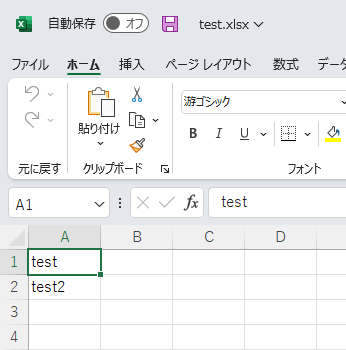
XlsxSerializer.ToFile(new string[] { "test", "test2" }, "test.xlsx");
Example-2
Passing a class expands the property into a column.
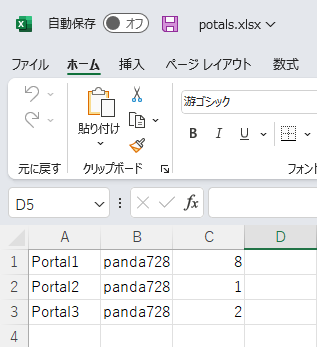
public class Portal
{
    public string Name { get; set; }
    public string Owner { get; set; }
    public int Level { get; set; }
}

var potals = new Portal[] {
    new Portal { Name = "Portal1", Owner = "panda728", Level = 8 },
    new Portal { Name = "Portal2", Owner = "panda728", Level = 1 },
    new Portal { Name = "Portal3", Owner = "panda728", Level = 2 },
};

XlsxSerializer.ToFile(potals, "potals.xlsx", XlsxSerializerOptions.Default);
Example-3
To add a header row with your own titles, set HeaderTitles — that one setting is the whole ask.
To use the member names as titles instead, set HasHeaderRow = true.
XlsxSerializer.ToFile(potals, "potals.xlsx",
    new XlsxSerializerOptions { HeaderTitles = new[] { "Name", "Owner", "Level" } });
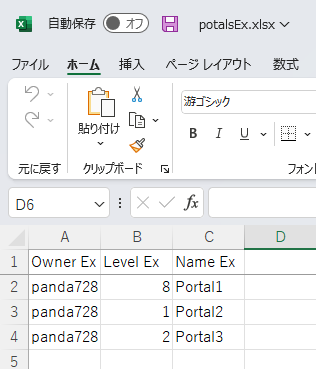
Column titles and order can also live on the class itself, next to the members they describe.
[DataMember] is honored too, for types already annotated for other serializers.
public class Portal
{
    [XlsxColumn("Name Ex", Order = 3)]
    public string Name { get; set; }
    [XlsxColumn("Owner Ex", Order = 1)]
    public string Owner { get; set; }
    [XlsxColumn("Level Ex", Order = 2)]
    public int Level { get; set; }
    [XlsxIgnore]
    public string InternalNote { get; set; }
}

XlsxSerializer.ToFile(potals, "potalsEx.xlsx",
    new XlsxSerializerOptions { HasHeaderRow = true });
Example-4
Options can be set to display a title line and automatically adjust column widths.
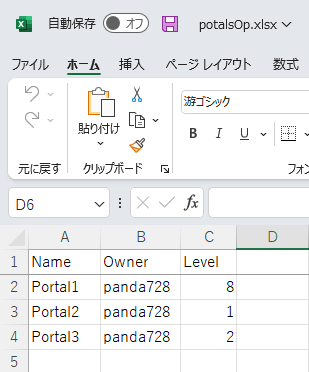
var newConfig = XlsxSerializerOptions.Default with
{
    HeaderTitles = new[] { "Name", "Owner", "Level" },
    AutoFitColumns = true,
};
XlsxSerializer.ToFile(potals, "potalsOp.xlsx", newConfig);
Example-5
Optionally supports Autofilter.
var newConfig = XlsxSerializerOptions.Default with
{
    HeaderTitles = new[] { "Name", "Owner", "Level" },
    AutoFilter = true,
};
XlsxSerializer.ToFile(potals, "potalsOp.xlsx", newConfig);
Example-6
To change how one type is written, set CustomSerializers — matched by value type, consulted
before the built-in serializers, no provider wiring needed. The shipped
EnumNumberXlsxSerializer<T> (numeric enums) plugs in the same way.
class YesNoSerializer : IXlsxSerializer<bool>
{
    public void WriteTitle(XlsxCellWriter writer, bool value, XlsxSerializerOptions options, string name = "value")
        => writer.Write(name);
    public void Serialize(XlsxCellWriter writer, bool value, XlsxSerializerOptions options)
        => writer.Write(value ? "YES" : "NO");
}

XlsxSerializer.ToFile(rows, "yesno.xlsx",
    new XlsxSerializerOptions { CustomSerializers = new IXlsxSerializer[] { new YesNoSerializer() } });
Example-7
One column can have its own number format without touching the sheet-wide ones: pass the Excel format code with the value. Nothing to register — each distinct code is declared in the workbook automatically, and the stored value stays a real number.
class PercentSerializer : IXlsxSerializer<double>
{
    public void WriteTitle(XlsxCellWriter writer, double value, XlsxSerializerOptions options, string name = "value")
        => writer.Write(name);
    public void Serialize(XlsxCellWriter writer, double value, XlsxSerializerOptions options)
        => writer.Write(value, "0.0%");
}
Scope it to a single member with the attribute — the double next to it keeps the sheet-wide
format — or to every double via CustomSerializers:
public class ServerLoad
{
    public string Name { get; set; }

    [XlsxSerializer(typeof(PercentSerializer))]
    public double Load { get; set; }      // shown as 12.5%

    public double Uptime { get; set; }    // sheet-wide number format
}

XlsxSerializer.ToFile(rows, "servers.xlsx");
Acknowledgements
FlatXlsx's serialization pipeline is a direct descendant of
Cysharp/WebSerializer.
The original FakeExcelSerializer ported WebSerializer's architecture —
provider-based serializer resolution and compiled member accessors over IEnumerable<T> —
and swapped the output layer to SpreadsheetML. If you need the same zero-allocation
approach for query strings or form data on the web side, check out WebSerializer itself.
License
This library is licensed under the MIT License. Copyright notices and license terms for the third-party code it derives from are reproduced in THIRD-PARTY-NOTICES.txt, which also ships inside the NuGet package.
| Product | Versions Compatible and additional computed target framework versions. |
|---|---|
| .NET | net5.0 was computed. net5.0-windows was computed. net6.0 was computed. net6.0-android was computed. net6.0-ios was computed. net6.0-maccatalyst was computed. net6.0-macos was computed. net6.0-tvos was computed. net6.0-windows was computed. net7.0 was computed. net7.0-android was computed. net7.0-ios was computed. net7.0-maccatalyst was computed. net7.0-macos was computed. net7.0-tvos was computed. net7.0-windows was computed. net8.0 is compatible. net8.0-android was computed. net8.0-browser was computed. net8.0-ios was computed. net8.0-maccatalyst was computed. net8.0-macos was computed. net8.0-tvos was computed. net8.0-windows was computed. net9.0 was computed. net9.0-android was computed. net9.0-browser was computed. net9.0-ios was computed. net9.0-maccatalyst was computed. net9.0-macos was computed. net9.0-tvos was computed. net9.0-windows was computed. net10.0 is compatible. net10.0-android was computed. net10.0-browser was computed. net10.0-ios was computed. net10.0-maccatalyst was computed. net10.0-macos was computed. net10.0-tvos was computed. net10.0-windows was computed. |
| .NET Core | netcoreapp2.0 was computed. netcoreapp2.1 was computed. netcoreapp2.2 was computed. netcoreapp3.0 was computed. netcoreapp3.1 was computed. |
| .NET Standard | netstandard2.0 is compatible. netstandard2.1 is compatible. |
| .NET Framework | net461 was computed. net462 was computed. net463 was computed. net47 was computed. net471 was computed. net472 was computed. net48 was computed. net481 was computed. |
| MonoAndroid | monoandroid was computed. |
| MonoMac | monomac was computed. |
| MonoTouch | monotouch was computed. |
| Tizen | tizen40 was computed. tizen60 was computed. |
| Xamarin.iOS | xamarinios was computed. |
| Xamarin.Mac | xamarinmac was computed. |
| Xamarin.TVOS | xamarintvos was computed. |
| Xamarin.WatchOS | xamarinwatchos was computed. |
-
.NETStandard 2.0
- System.IO.Pipelines (>= 10.0.10)
- System.Memory (>= 4.6.3)
-
.NETStandard 2.1
- System.IO.Pipelines (>= 10.0.10)
-
net10.0
- No dependencies.
-
net8.0
- System.IO.Pipelines (>= 10.0.10)
NuGet packages
This package is not used by any NuGet packages.
GitHub repositories
This package is not used by any popular GitHub repositories.
License compliance: the package now carries THIRD-PARTY-NOTICES.txt, reproducing the MIT license and copyright notice of Cysharp/WebSerializer, from which the serialization pipeline is derived. No code or API changes.