Hlibz.Redoc.AspNetCore.Extensions
1.0.0
dotnet add package Hlibz.Redoc.AspNetCore.Extensions --version 1.0.0
NuGet\Install-Package Hlibz.Redoc.AspNetCore.Extensions -Version 1.0.0
<PackageReference Include="Hlibz.Redoc.AspNetCore.Extensions" Version="1.0.0" />
<PackageVersion Include="Hlibz.Redoc.AspNetCore.Extensions" Version="1.0.0" />
<PackageReference Include="Hlibz.Redoc.AspNetCore.Extensions" />
paket add Hlibz.Redoc.AspNetCore.Extensions --version 1.0.0
#r "nuget: Hlibz.Redoc.AspNetCore.Extensions, 1.0.0"
#:package Hlibz.Redoc.AspNetCore.Extensions@1.0.0
#addin nuget:?package=Hlibz.Redoc.AspNetCore.Extensions&version=1.0.0
#tool nuget:?package=Hlibz.Redoc.AspNetCore.Extensions&version=1.0.0
Hlibz.Redoc.AspNetCore.Extensions
Add-ons for Redoc.AspNetCore's ReDoc UI middleware:
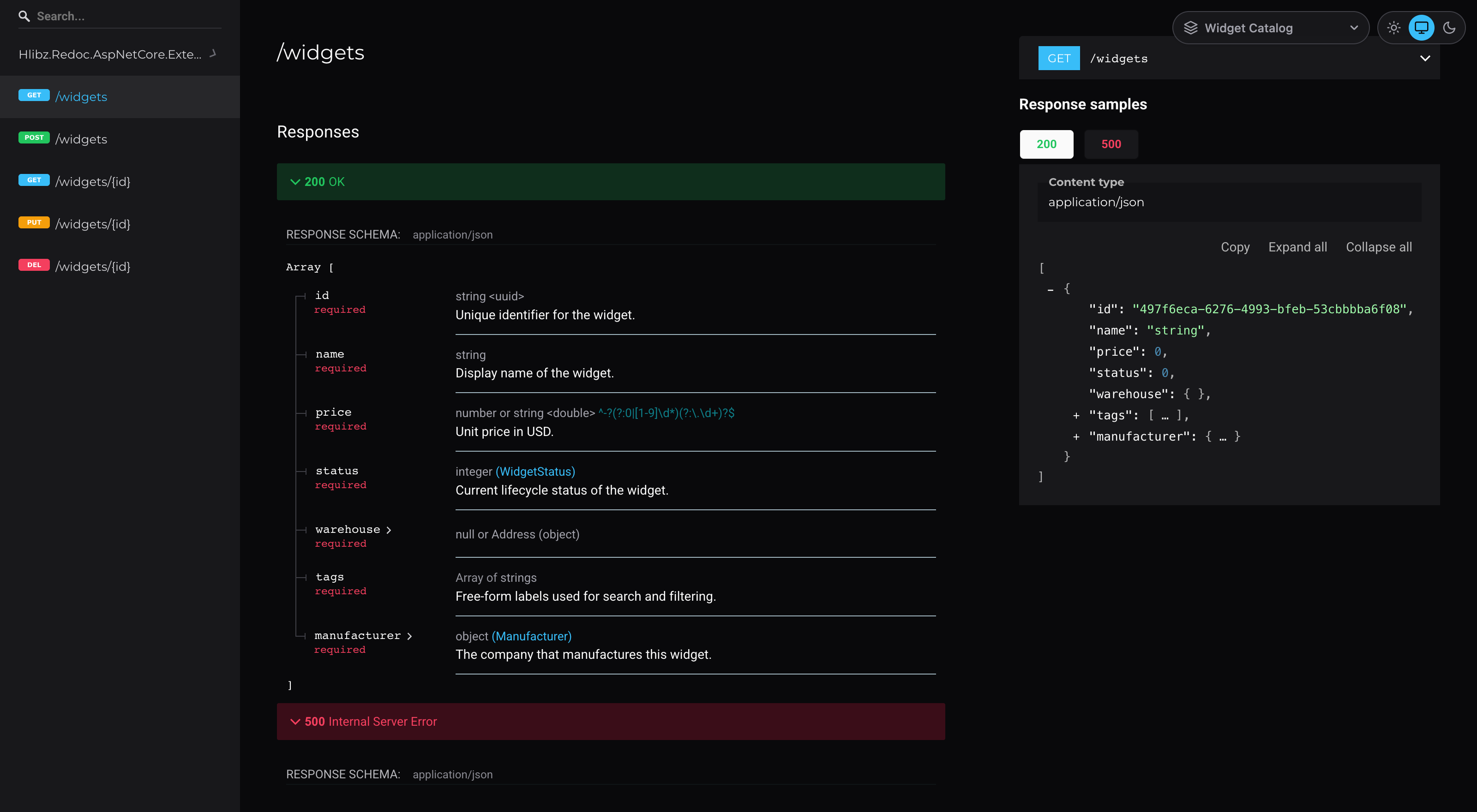
- Dark theme. One line fixes the colors ReDoc hardcodes outside its own theme config (scrollbar, selection, section captions, nested-schema backgrounds, sample-tab text) and adds a full dark color palette.
- Light/System/Dark selector. Viewers pick a theme, or follow their OS setting.
- Document picker. Several OpenAPI documents, each on its own ReDoc page, with a dropdown to switch between them, like Swagger UI's definition selector.


Why
When I started using ReDoc, the first thing I wanted was a dark theme. The original Redoc.AspNetCore package doesn't ship one, and I couldn't find another NuGet package that did.
So I asked Claude Code to build one for my private project. That worked because the authors of
Redoc.AspNetCore made its API very configurable: the theme config and HeadContent hooks were
all the AI needed to produce a proper dark ReDoc page.
Then I figured I'm probably not the only one who wants dark API docs. So I moved the theme into this public repo and NuGet package for the community to use.
Next I needed several OpenAPI documents in one app. Swagger UI has a dropdown for that, but ReDoc
shows one spec per page. So the package got a document picker, and a broader name to go with it:
it used to be Hlibz.Redoc.AspNetCore.DarkTheme.
What it fixes
ReDoc's own theme config object covers most of its UI.
A few things are hardcoded to light-theme colors outside it, though, and stay light no matter what
the theme config says:
- The scrollbar, text selection, and the small section captions above "Query Parameters" / "Request Body schema" / "Response Schema".
- Every other level of a nested schema (e.g. an object nested inside an object nested inside an
object). ReDoc alternates nested-schema backgrounds between the theme's
schema.nestedBackgroundand a hardcoded#ffffff, so a deeply nested request/response schema flashes white partway down. - The selected tab in the request/response sample panel (e.g. "Payload"). Its selected-state style pairs the theme's own light foreground color with a light background, so the label is invisible.
This package fixes all of those with a small <style> override, on top of a full dark theme
config (colors, sidebar, right panel, code blocks, typography, schema). You get a proper dark
ReDoc page with one method call instead of hand-rolling both.
Quick start
app.UseReDoc(options =>
{
    options.SpecUrl("/openapi/v1.json");
    options.UseDarkTheme();
});
That's it for the zero-config path. To customize the accent color:
app.UseReDoc(options =>
{
    options.SpecUrl("/openapi/v1.json");
    options.UseDarkTheme(theme =>
    {
        theme.PrimaryColor = "#a78bfa"; // used for links, active sidebar items, the GET badge, etc.
        // theme.PrimaryColorLight / theme.PrimaryColorDark — optional, computed automatically if omitted
        // theme.AdditionalCss = ".my-rule { ... }"; // appended after the built-in overrides
    });
});
Everything outside the accent color (success/warning/error colors, grays, backgrounds, etc.) is intentionally fixed — this is a themed package, not a general theming engine.
Let viewers choose: Light/System/Dark theme selector
Not everyone on your team wants dark docs. Enable the selector and each viewer gets a small
Light/System/Dark toggle in the top-right corner. Light is ReDoc's stock theme, exactly as it
renders without this package. System follows the viewer's OS setting (prefers-color-scheme) and
switches live when the OS setting changes:
app.UseReDoc(options =>
{
    options.SpecUrl("/openapi/v1.json");
    options.UseDarkTheme(theme => theme.EnableThemeSelector(defaultTheme: ReDocTheme.System));
});
defaultTheme (defaults to Dark) is what viewers see until they pick one. Their choice is then
remembered in the browser's localStorage. Switching re-renders ReDoc in place and keeps the
scroll position.
With the selector enabled, the dark CSS overrides are scoped under html[data-redoc-theme="dark"].
AdditionalCss is not scoped and applies to both themes, so prefix your rules with that selector
if they should be dark-only.
Multiple OpenAPI documents
UseReDocDocuments serves one ReDoc page per OpenAPI document, each with a picker in the top-right
corner for switching between them. It works on its own, and alongside the dark theme and the theme
selector:
builder.Services.AddOpenApi("widgets");
builder.Services.AddOpenApi("manufacturers");

// ...

app.MapOpenApi();
app.UseReDocDocuments(
    [
        new ReDocDocument("widgets", "Widget Catalog"),
        new ReDocDocument("manufacturers", "Manufacturers"),
    ],
    docs =>
    {
        docs.ConfigureReDoc = (redoc, _) =>
            redoc.UseDarkTheme(theme => theme.EnableThemeSelector(defaultTheme: ReDocTheme.System));
    });

app.MapGet("/widgets", GetWidgets).WithGroupName("widgets");
app.MapGet("/manufacturers", GetManufacturers).WithGroupName("manufacturers");
This serves /api-docs/widgets/ and /api-docs/manufacturers/, and /api-docs redirects to the
first one. Each document reads its spec from /openapi/{documentName}.json, which is where
MapOpenApi() serves it.
Tag every endpoint with .WithGroupName(...). By default, an endpoint without a group name appears
in every document.
ReDocDocument |
|
|---|---|
Name |
The OpenAPI document name, as passed to AddOpenApi(name). |
DisplayName |
Label in the picker and the browser tab. Defaults to Name. |
SpecUrl |
This document's spec URL, if it isn't at SpecUrlTemplate. |
Route |
The page's path, e.g. "reference/v2/taxes". Defaults to {RoutePrefix}/{Name}. |
ReDocDocumentsOptions |
|
|---|---|
RoutePrefix |
Where pages go by default. Defaults to "api-docs". |
RedirectToFirstDocument |
Redirect /{RoutePrefix} to the first document. Defaults to true. |
SpecUrlTemplate |
Defaults to "/openapi/{documentName}.json". |
Links |
Plain entries listed after the documents, e.g. new ReDocLink("Swagger UI", "~/swagger"). |
ConfigureReDoc |
Runs for every page's ReDocOptions: theme, extra HeadContent, and so on. |
Picker links are relative, so they keep working under a PathBase or behind a reverse proxy. A
link URL that starts with ~/ is resolved the same way, against the app's base path. Other URLs
are used as-is.
To move a page, set its Route. Don't change RoutePrefix inside ConfigureReDoc: the pickers on
the other pages would link to the old path, so UseReDocDocuments throws if you do.
Install
dotnet add package Hlibz.Redoc.AspNetCore.Extensions
Running the sample locally
dotnet run --project samples/Hlibz.Redoc.AspNetCore.Extensions.Sample
This opens http://localhost:5299/api-docs in your browser automatically. It redirects to
/api-docs/widgets/, the page in the screenshot above, and the picker switches between the
sample's three documents.
Compatibility
| Library target | net8.0 |
| Works in host apps targeting | net8.0, net9.0, net10.0 (NuGet TFM compatibility) |
| Requires | Redoc.AspNetCore ≥ 1.0.0 |
Content Security Policy (CSP)
If your site doesn't send a strict Content-Security-Policy header, skip this section.
This package adds inline tags through ReDocOptions.HeadContent: a <style> for the dark theme,
a <style> and <script> for the theme selector, and a <style> and <script> for the document
picker on every UseReDocDocuments page. A strict policy blocks inline tags that don't carry a
nonce. The nonce recipe in the Redoc.AspNetCore README doesn't reach these tags, because it
rewrites the IndexStream template, and the middleware only fills in %(HeadContent) after that.
That recipe also misses Redoc.AspNetCore's own <script type="text/javascript"> that calls
Redoc.init, so under a strict policy the page stays blank even without this package.
This variant covers everything. It fills in HeadContent itself, adds the nonce to every inline
tag, and hands the nonce to ReDoc for the styles it injects at runtime:
builder.Services.AddHttpContextAccessor();
// ...
IHttpContextAccessor accessor = app.Services.GetRequiredService<IHttpContextAccessor>();

app.UseReDoc(options =>
{
    options.SpecUrl("/openapi/v1.json");
    options.UseDarkTheme();

    Func<Stream> original = options.IndexStream;
    options.IndexStream = () =>
    {
        string nonce = GetNonce(accessor.HttpContext!); // however your app issues its CSP nonce
        using StreamReader reader = new(original());

        // Fill in HeadContent before the middleware does, so its tags get the nonce too.
        string html = reader.ReadToEnd().Replace(
            "%(HeadContent)",
            $"<script>window.__webpack_nonce__ = '{nonce}';</script>\n{options.HeadContent}");

        // Add the nonce to every inline <script>/<style>. Tags with src= are covered by 'self'.
        html = Regex.Replace(
            html, @"<(script|style)\b(?![^>]*\bsrc=)", m => $"{m.Value} nonce=\"{nonce}\"");

        return new MemoryStream(Encoding.UTF8.GetBytes(html));
    };
});
With UseReDocDocuments, put the same code in ConfigureReDoc. The picker's tags are appended
to HeadContent after ConfigureReDoc runs, but the IndexStream above reads HeadContent per
request, so they get the nonce too.
ReDoc's bundle (2.0.0) also injects two static styles as it loads, and those can't take a nonce.
Allow them by hash in style-src: 'sha256-47DEQpj8HBSa+/TImW+5JCeuQeRkm5NMpJWZG3hSuFU=' and
'sha256-DLDPR1ic47WIdK2WyeLkblb/tm2mQH+Jt/NNhZWu1k0='. ReDoc also loads fonts from Google Fonts
(fonts.googleapis.com / fonts.gstatic.com) and the Redocly logo from cdn.redoc.ly, so allow
those hosts too or accept them being blocked.
Contributing
Found a bug or have an idea for a feature? Feel free to open an issue or a pull request. You can also reach me on LinkedIn.
License
MIT — see LICENSE.
| Product | Versions Compatible and additional computed target framework versions. |
|---|---|
| .NET | net8.0 is compatible. net8.0-android was computed. net8.0-browser was computed. net8.0-ios was computed. net8.0-maccatalyst was computed. net8.0-macos was computed. net8.0-tvos was computed. net8.0-windows was computed. net9.0 was computed. net9.0-android was computed. net9.0-browser was computed. net9.0-ios was computed. net9.0-maccatalyst was computed. net9.0-macos was computed. net9.0-tvos was computed. net9.0-windows was computed. net10.0 was computed. net10.0-android was computed. net10.0-browser was computed. net10.0-ios was computed. net10.0-maccatalyst was computed. net10.0-macos was computed. net10.0-tvos was computed. net10.0-windows was computed. |
-
net8.0
- Redoc.AspNetCore (>= 1.0.0)
NuGet packages
This package is not used by any NuGet packages.
GitHub repositories
This package is not used by any popular GitHub repositories.
| Version | Downloads | Last Updated |
|---|---|---|
| 1.0.0 | 127 | 9/18/2026 |