Html2Text.Net
0.2.0
dotnet add package Html2Text.Net --version 0.2.0
NuGet\Install-Package Html2Text.Net -Version 0.2.0
<PackageReference Include="Html2Text.Net" Version="0.2.0" />
<PackageVersion Include="Html2Text.Net" Version="0.2.0" />
<PackageReference Include="Html2Text.Net" />
paket add Html2Text.Net --version 0.2.0
#r "nuget: Html2Text.Net, 0.2.0"
#:package Html2Text.Net@0.2.0
#addin nuget:?package=Html2Text.Net&version=0.2.0
#tool nuget:?package=Html2Text.Net&version=0.2.0
Html2Text.Net





Just fast HTML → plain text.
Lightweight, hand rolled, high-performance HTML to plain text conversion for .NET.
Check out the LIVE DEMO!
Use cases
- Search / indexing pipelines: Strip HTML down to text for full-text search, indexing, classification, or deduping.
- Example: convert HTML to text before indexing in Elasticsearch / OpenSearch
- Batch processing: Convert large archives of HTML (docs, KB articles, CMS exports) into text efficiently.
- Email & notification processing: Get a readable text version of HTML emails for previews, logs, or plain-text fallbacks.
- LLM / NLP preprocessing: Normalize HTML into clean text before chunking, embedding, or extraction.
- Logging / auditing: Store a text representation of HTML content for review or compliance.
Usage
Simple as possible:
using Html2Text;

string html = "<h1>Hello</h1><p>World</p>";

string text = Html2Text.Convert(html);
Output:
Hello

World
Install, build, test, contribute
Install using NuGet (recommended):
dotnet add package Html2Text.Net
Supported frameworks
- .Net 8+
- .Net Framework 4.6.2+
- .Net Standard 2.0 for compatibility with other frameworks, including .Net 5/6/7
For .Net Framework users, PackageReference style dependencies are recommended. Also ensure binding redirects are enabled.
Contributing
Contributions and pull requests are welcome! With .Net 10 SDK installed, to build locally:
dotnet build
To run unit and regression tests:
(windows): dotnet test
(linux/mac): dotnet test -f net10.0
To run the example console app:
dotnet build
dotnet run --project Html2Text.Example Samples/scottallen.html
How it works
Pipeline
HTML document -> Lexer (tokens) -> Parser (AST nodes) -> Renderer (string text)
- Text nodes are emitted in document order.
- Basic block separation is preserved (e.g., paragraphs/headings insert newlines).
- Whitespace is normalized to produce readable plain text.
Minimal formatting is added to make the plain text output readable in only 4 cases:
- HTML tables are given cell separators
|and horizontal lines---under column headers:
| Chart                  | Record Holder     | Record       |
| ---------------------- | ----------------- | ------------ |
| Opening Days           | Avengers: Endgame | $157,461,641 |
| Top Single Day Grosses | Avengers: Endgame | $157,461,641 |
- Lists and nested lists are indented and given a leading
-like so:
 - 1 Early life
 - 2 Enigma machine
 - 3 Solving the wiring
 - Toggle Solving the wiring subsection
   - 3.1 French help
 - 4 Solving daily settings
 - Toggle Solving daily settings subsection
   - 4.1 Early methods
   - 4.2 Bomba and sheets
   - 4.3 Allies informed
- In preformatted areas
<pre>whitespace is preserved:
private int GetSmallestNonNegative(int x, int y) {
    return x < 0 && y < 0 ? 0
        : x < 0 ? y
        : y < 0 ? x
        : Math.Min(x, y);
}
- The
<hr/>element adds a horizontal line of dashes---.
Goals
This project is focused on:
- High performance: designed for low allocations and fast throughput.
- Text extraction only: get the words from the page/document.
- No dependencies: Lightweight, not an embedded browser engine. No dependencies other than .NET itself.
Non-goals (by design)
The following are intentionally out of scope so the library can excel at the goals above:
- Respecting CSS, computed styles,
display:none, or visibility. - Pixel-accurate layout, whitespace mirroring, or browser-equivalent rendering.
- Executing JavaScript or loading remote resources.
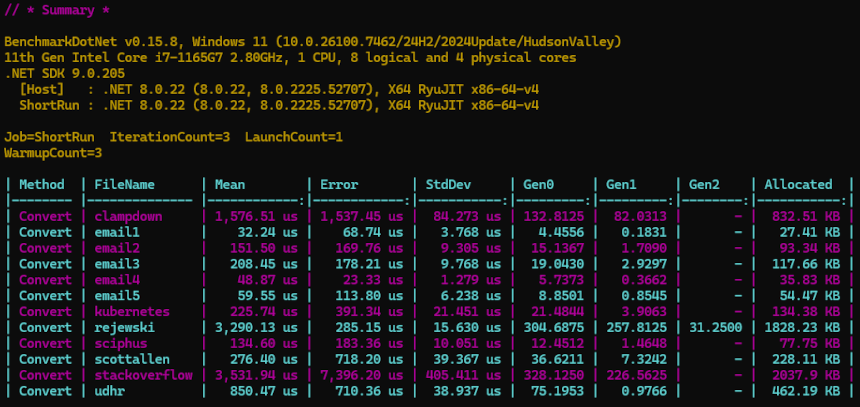
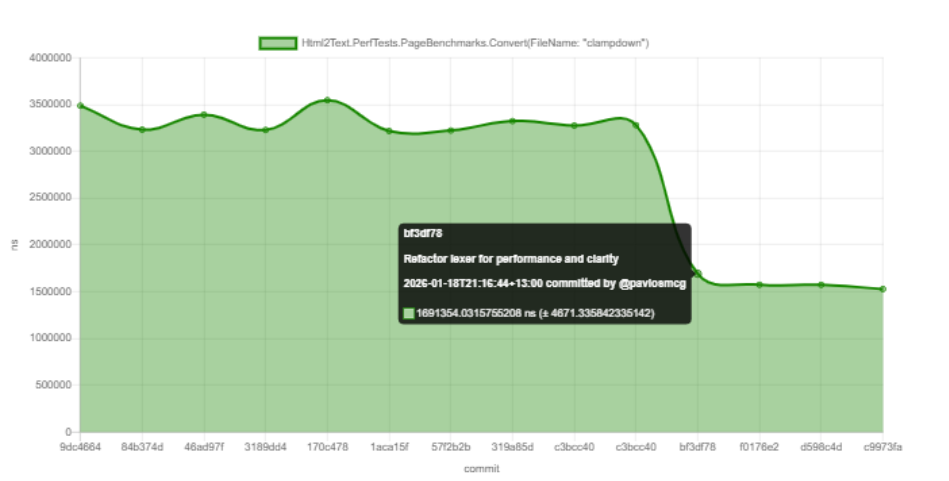
Performance notes
High performance is a goal of this project. This library:
- designed for converting many documents quickly (batch processing, indexing, search pipelines).
- avoids DOM dependencies.
- uses a lightweight, hand rolled lexer/parser/renderer pipeline.
Benchmarks are in Html2Text.PerfTests and can be run locally with:
dotnet run -c Release --project Html2Text.PerfTests
Or check out the latest automated perf test results here: https://pavlosmcg.github.io/Html2Text.Net/dev/bench/
Regression tests
Each file in the Samples/ directory acts as an acceptance/regression test. The results of converting these HTML files to plain text are saved in Html2Text.RegressionTests/*.verified.txt:
Samples/<file-name>.html -> Html2Text.Convert(<file-contents>) -> <file-name>.verified.txt
For example scottallen.html → scottallen.verified.txt
Html2Text.RegressionTests uses Verify to make test assertions against verified output snapshots. If you need to update the outputs please see the Verify docs for snapshot management.
Projects in this repository
Html2Text/: core libraryHtml2Text.Example/: small example appHtml2Text.Tests/: unit testsHtml2Text.RegressionTests/: regression/acceptance testsHtml2Text.PerfTests/: performance benchmarking console appSamples/: sample HTML files used during development and automated regression testing
Distributed under MPL-2.0 see LICENSE.txt
| Product | Versions Compatible and additional computed target framework versions. |
|---|---|
| .NET | net5.0 was computed. net5.0-windows was computed. net6.0 was computed. net6.0-android was computed. net6.0-ios was computed. net6.0-maccatalyst was computed. net6.0-macos was computed. net6.0-tvos was computed. net6.0-windows was computed. net7.0 was computed. net7.0-android was computed. net7.0-ios was computed. net7.0-maccatalyst was computed. net7.0-macos was computed. net7.0-tvos was computed. net7.0-windows was computed. net8.0 is compatible. net8.0-android was computed. net8.0-browser was computed. net8.0-ios was computed. net8.0-maccatalyst was computed. net8.0-macos was computed. net8.0-tvos was computed. net8.0-windows was computed. net9.0 was computed. net9.0-android was computed. net9.0-browser was computed. net9.0-ios was computed. net9.0-maccatalyst was computed. net9.0-macos was computed. net9.0-tvos was computed. net9.0-windows was computed. net10.0 is compatible. net10.0-android was computed. net10.0-browser was computed. net10.0-ios was computed. net10.0-maccatalyst was computed. net10.0-macos was computed. net10.0-tvos was computed. net10.0-windows was computed. |
| .NET Core | netcoreapp2.0 was computed. netcoreapp2.1 was computed. netcoreapp2.2 was computed. netcoreapp3.0 was computed. netcoreapp3.1 was computed. |
| .NET Standard | netstandard2.0 is compatible. netstandard2.1 was computed. |
| .NET Framework | net461 was computed. net462 is compatible. net463 was computed. net47 was computed. net471 was computed. net472 was computed. net48 was computed. net481 was computed. |
| MonoAndroid | monoandroid was computed. |
| MonoMac | monomac was computed. |
| MonoTouch | monotouch was computed. |
| Tizen | tizen40 was computed. tizen60 was computed. |
| Xamarin.iOS | xamarinios was computed. |
| Xamarin.Mac | xamarinmac was computed. |
| Xamarin.TVOS | xamarintvos was computed. |
| Xamarin.WatchOS | xamarinwatchos was computed. |
-
.NETFramework 4.6.2
- System.Memory (>= 4.6.3)
-
.NETStandard 2.0
- System.Memory (>= 4.6.3)
-
net10.0
- No dependencies.
-
net8.0
- No dependencies.
NuGet packages
This package is not used by any NuGet packages.
GitHub repositories
This package is not used by any popular GitHub repositories.