HubDocs 0.0.9
dotnet add package HubDocs --version 0.0.9
NuGet\Install-Package HubDocs -Version 0.0.9
<PackageReference Include="HubDocs" Version="0.0.9" />
<PackageVersion Include="HubDocs" Version="0.0.9" />
<PackageReference Include="HubDocs" />
paket add HubDocs --version 0.0.9
#r "nuget: HubDocs, 0.0.9"
#:package HubDocs@0.0.9
#addin nuget:?package=HubDocs&version=0.0.9
#tool nuget:?package=HubDocs&version=0.0.9
HubDocs
A Swagger-like UI for exploring and documenting SignalR hubs in ASP.NET Core applications.
Features
- 🔍 Automatic discovery of SignalR hubs and strongly-typed client interfaces
- 📝 Method documentation with parameters and return types
- 🎨 Beautiful Swagger-inspired dark theme UI
- 🔌 Easy integration with minimal configuration
- 📡 Live view of client method invocations from server (via strongly-typed interfaces)
🎥 Live Demo
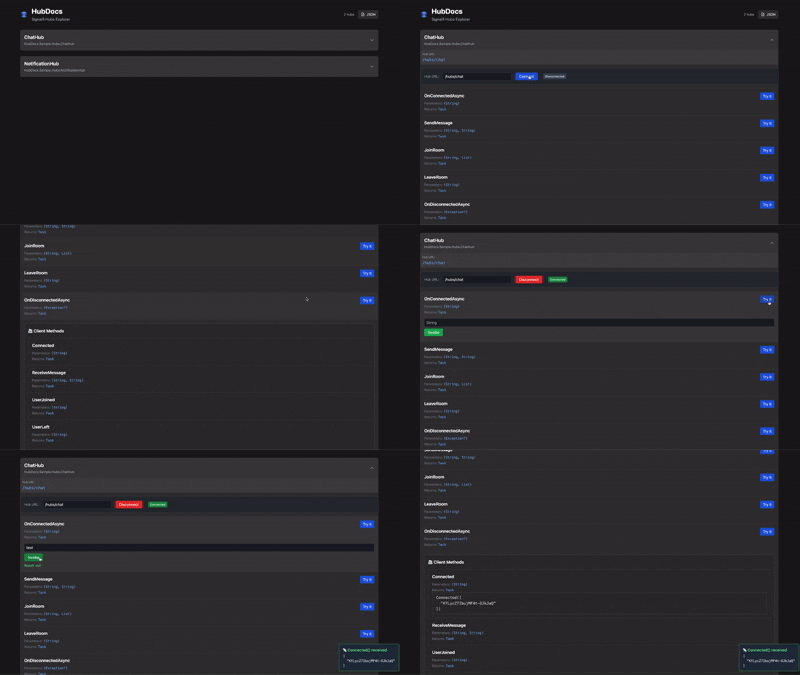
The HubDocs UI in action — exploring hubs, invoking methods, and seeing real-time client logs.
🖼️ Screenshots
<p align="center"> <img src="https://raw.githubusercontent.com/mberrishdev/HubDocs/main/docs/screenshots/screenshot1.png" alt="HubDocs Screenshot 1" width="800"/> <br/><em>📌 SignalR Hub list</em> </p>
<p align="center"> <img src="https://raw.githubusercontent.com/mberrishdev/HubDocs/main/docs/screenshots/screenshot2.png" alt="HubDocs Screenshot 2" width="800"/> <br/><em>🔍 Interactive method parameter inputs with "Try it" support</em> </p>
<p align="center"> <img src="https://raw.githubusercontent.com/mberrishdev/HubDocs/main/docs/screenshots/screenshot4.png" alt="HubDocs Screenshot 4" width="800"/> <br/><em>📡 Live client method logging with JSON preview</em> </p>
<p align="center"> <img src="https://raw.githubusercontent.com/mberrishdev/HubDocs/main/docs/screenshots/screenshot3.png" alt="HubDocs Screenshot 3" width="800"/> <br/><em>📭 No methods found — HubDocs will show helpful instructions if a hub is registered without a route.</em> </p>
Installation
dotnet add package HubDocs
Quick Start
- Mark your SignalR hubs with the
[HubDocs]attribute:
using HubDocs;

[HubDocs]
public class ChatHub : Hub<IChatClient>
{
    // ... your hub methods
}
- Register your hubs and add HubDocs in your ASP.NET Core application:
var builder = WebApplication.CreateBuilder(args);
builder.Services.AddSignalR();

var app = builder.Build();

// Register your SignalR hubs
app.MapHub<ChatHub>("/hubs/chat");

// Add HubDocs - discovers hubs with [HubDocs] attribute
app.AddHubDocs();

app.Run();
- Access the HubDocs UI at
/hubdocs/index.htmlor/hubdocs/in your browser.
Example
public interface IChatClient
{
    Task ReceiveMessage(string user, string message);
    Task Connected(string connectionId);
}

[HubDocs]  // Mark for documentation
public class ChatHub : Hub<IChatClient>
{
    public async Task SendMessage(string user, string message)
    {
        await Clients.All.ReceiveMessage(user, message);
    }

    public override async Task OnConnectedAsync()
    {
        await Clients.Caller.Connected(Context.ConnectionId);
    }
}
Note: To fully leverage HubDocs, your hubs should implement
Hub<T>with a strongly-typed client interface (T) that defines the client-callable methods. HubDocs will automatically extract and render both hub and client method metadata in the UI.
HubDocs will automatically discover and display:
- Hub name and full type name
- Route where the hub is registered
- All public methods with parameters and return types
- Client methods from strongly-typed interface
- Interactive UI for exploring the hub
Configuration
Basic Configuration
// Register hubs with MapHub
app.MapHub<ChatHub>("/hubs/chat");

// Add HubDocs
app.AddHubDocs();
Custom Assemblies
Scan specific assemblies for hubs:
app.AddHubDocs(typeof(ExternalHub).Assembly);
Document Metadata Options
You can configure project metadata (Swagger-like info) for HubDocs JSON and UI:
app.AddHubDocs(options =>
{
  options.Title = "My SignalR API";
  options.Version = "1.0.0";
  options.Description = "Realtime messaging API docs.";
  options.ProjectUrl = "https://example.com/project";
  options.TermsOfService = "https://example.com/terms";

  options.Contact.Name = "API Support";
  options.Contact.Email = "support@example.com";
  options.Contact.Url = "https://example.com/support";

  options.License.Name = "MIT";
  options.License.Url = "https://example.com/license";
});
You can also combine metadata options with explicit assemblies:
app.AddHubDocs(options =>
{
  options.Title = "External Hubs API";
  options.Version = "2.0.0";
}, typeof(ExternalHub).Assembly);
Opt-in with Attribute
Only hubs marked with [HubDocs] attribute are documented. This provides control over which hubs appear in the UI.
Links
| Product | Versions Compatible and additional computed target framework versions. |
|---|---|
| .NET | net10.0 is compatible. net10.0-android was computed. net10.0-browser was computed. net10.0-ios was computed. net10.0-maccatalyst was computed. net10.0-macos was computed. net10.0-tvos was computed. net10.0-windows was computed. |
-
net10.0
- No dependencies.
NuGet packages
This package is not used by any NuGet packages.
GitHub repositories
This package is not used by any popular GitHub repositories.