IntptrMax.SamSharp
0.1.3
dotnet add package IntptrMax.SamSharp --version 0.1.3
NuGet\Install-Package IntptrMax.SamSharp -Version 0.1.3
This command is intended to be used within the Package Manager Console in Visual Studio, as it uses the NuGet module's version of Install-Package.
<PackageReference Include="IntptrMax.SamSharp" Version="0.1.3" />
For projects that support PackageReference, copy this XML node into the project file to reference the package.
<PackageVersion Include="IntptrMax.SamSharp" Version="0.1.3" />
<PackageReference Include="IntptrMax.SamSharp" />
For projects that support Central Package Management (CPM), copy this XML node into the solution Directory.Packages.props file to version the package.
paket add IntptrMax.SamSharp --version 0.1.3
The NuGet Team does not provide support for this client. Please contact its maintainers for support.
#r "nuget: IntptrMax.SamSharp, 0.1.3"
#r directive can be used in F# Interactive and Polyglot Notebooks. Copy this into the interactive tool or source code of the script to reference the package.
#:package IntptrMax.SamSharp@0.1.3
#:package directive can be used in C# file-based apps starting in .NET 10 preview 4. Copy this into a .cs file before any lines of code to reference the package.
#addin nuget:?package=IntptrMax.SamSharp&version=0.1.3
#tool nuget:?package=IntptrMax.SamSharp&version=0.1.3
The NuGet Team does not provide support for this client. Please contact its maintainers for support.
SamSharp
Run SAM(Segment-Anything) in C# with TorchSharp. </br> With the help of this project you won't have to transform .pth model to onnx.
Feature
- Written in C# only.
- Support Vit-b, Vit-l and Vit-h and MobileSam now.
- Support Load PreTrained models from SAM.
- Support .Net6 or higher.
- Support CPU and CUDA.
- Support Float32 and Float16 data type.
- Support Automatic Mask Generator.
- Support Predict with points and boxes.
Models
You can download pre-trained models here.
| model | Download Link |
|---|---|
| vit-h | ViT-H SAM model |
| vit-l | ViT-L SAM model |
| vit-b | ViT-B SAM model |
| vit-t | ViT-T Mobile Sam model |
How to use
You can download the code or add it from nuget.
dotnet add package IntptrMax.SamSharp
Please add one of libtorch-cpu, libtorch-cuda-12.1, libtorch-cuda-12.1-win-x64 or libtorch-cuda-12.1-linux-x64 version 2.5.1.0 to execute.
In your code you can use it as below.
Predict
string checkpointPath = @"..\..\..\Assets\Weights\MobileSam.pt";
SamDevice device = SamDevice.CUDA; // or SamDevice.Cpu if you want to run on CPU
SamScalarType dtype = SamScalarType.Float32;
int imageSize = 512; // The maximum size of the image to process, can be adjusted based on your GPU memory

SKBitmap image = SKBitmap.Decode(@"..\..\..\Assets\Images\truck.jpg");

// Use predictor
SamSharp.Utils.SamPredictor predictor = new SamSharp.Utils.SamPredictor(checkpointPath, device, dtype);
List<SamPoint> points = new List<SamPoint>
{
	new SamPoint(500, 375, false),
	new SamPoint(1524,675, false),
};
List<SamBox> boxes = new List<SamBox>
{
	new SamBox(75, 275, 1725, 850),
	new SamBox(425, 600, 700, 875),
	new SamBox(1375, 550, 1650, 800),
	new SamBox(1240, 675, 1400, 750),
};

predictor.SetImage(image);
List<PredictOutput> outputs = predictor.Predict(null, boxes);

Console.WriteLine("The predictions are :");

using (SKCanvas canvas = new SKCanvas(image))
{
	canvas.Clear(SKColors.Transparent);
	var random = new Random();

	for (int i = 0; i < outputs.Count; i++)
	{
		PredictOutput output = outputs[i];
		Console.WriteLine($"Mask {i}: Precision: {output.Precision * 100:F2}%");
		bool[,] mask = output.Mask;

		SKColor color = new SKColor((byte)random.Next(256), (byte)random.Next(256), (byte)random.Next(256));
		using (var paint = new SKPaint { Color = color, BlendMode = SKBlendMode.Src })
		{
			int width = mask.GetLength(0);
			int height = mask.GetLength(1);

			using (var path = new SKPath())
			{
				for (int y = 0; y < height; y++)
				{
					for (int x = 0; x < width; x++)
					{
						if (mask[x, y])
						{
							path.AddRect(new SKRect(x, y, x + 1, y + 1));
						}
					}
				}
				canvas.DrawPath(path, paint);
			}
		}
	}
}
SKData data = image.Encode(SKEncodedImageFormat.Png, 100);
using (var stream = File.OpenWrite($"mask.png"))
{
	data.SaveTo(stream);
}
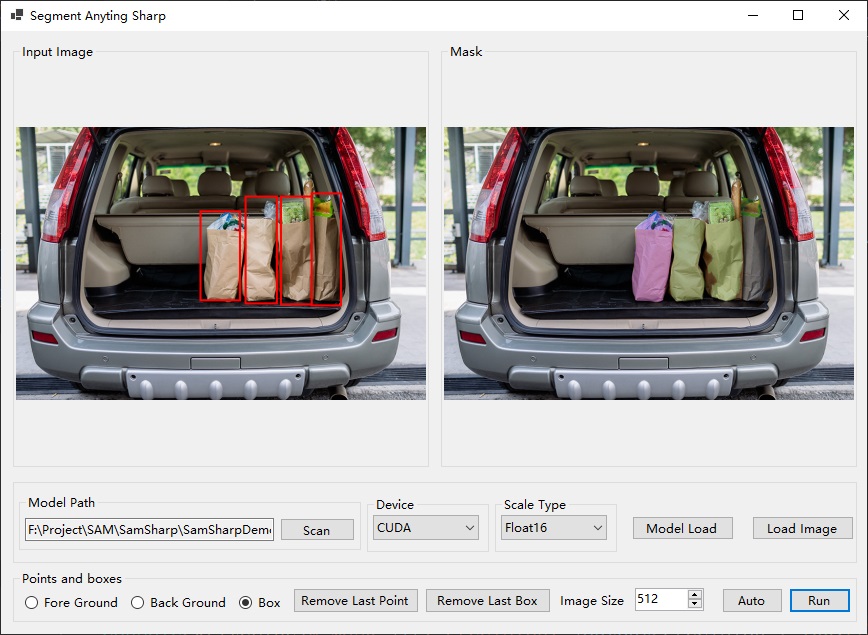
And there is also a WinForm Demo.
Automatic Mask Generator
string checkpointPath = @".\Assets\sam_vit_h_4b8939.pth";
SamDevice device = SamDevice.CUDA; // or SamDevice.Cpu if you want to run on CPU
SamScalarType dtype = SamScalarType.Float32;
int imageSize = 512; // The maximum size of the image to process, can be adjusted based on your GPU memory

SKBitmap image = SKBitmap.Decode(@"..\..\..\Assets\dog.jpg");

// Use Automatic Mask Generator
SamSharp.Utils.SamAutomaticMaskGenerator generator = new SamSharp.Utils.SamAutomaticMaskGenerator(checkpointPath, device: device, dtype: dtype);
List<PredictOutput> outputs = generator.generate(image, maxImageSize: imageSize);

Console.WriteLine("The predictions are :");

using (SKCanvas canvas = new SKCanvas(image))
{
	canvas.Clear(SKColors.Transparent);
	var random = new Random();

	for (int i = 0; i < outputs.Count; i++)
	{
		PredictOutput output = outputs[i];
		Console.WriteLine($"Mask {i}: Precision: {output.Precision * 100:F2}%");
		bool[,] mask = output.Mask;

		SKColor color = new SKColor((byte)random.Next(256), (byte)random.Next(256), (byte)random.Next(256));
		using (var paint = new SKPaint { Color = color, BlendMode = SKBlendMode.Src })
		{
			int width = mask.GetLength(0);
			int height = mask.GetLength(1);

			using (var path = new SKPath())
			{
				for (int y = 0; y < height; y++)
				{
					for (int x = 0; x < width; x++)
					{
						if (mask[x, y])
						{
							path.AddRect(new SKRect(x, y, x + 1, y + 1));
						}
					}
				}
				canvas.DrawPath(path, paint);
			}
		}
	}
}
SKData data = image.Encode(SKEncodedImageFormat.Png, 100);
using (var stream = File.OpenWrite($"mask.png"))
{
	data.SaveTo(stream);
}
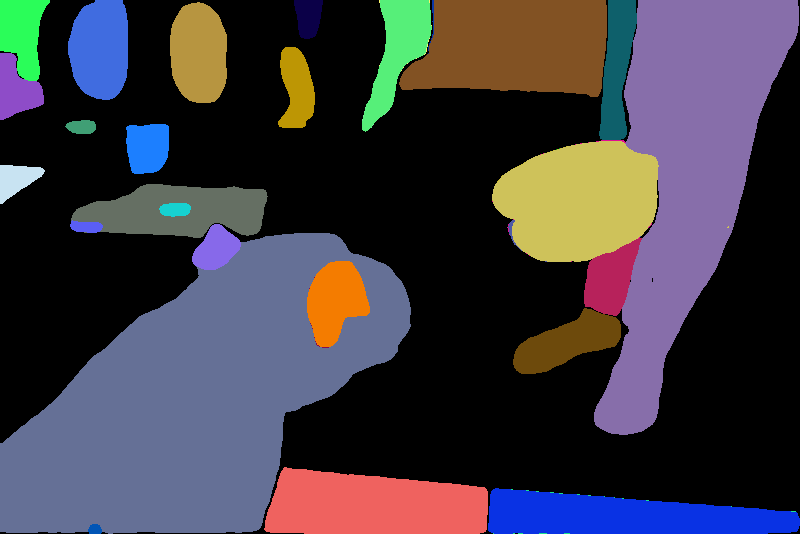
The result mask is.
Work to do
- Speed up.
- Use less VRAM.
- Use less RAM.
| Product | Versions Compatible and additional computed target framework versions. |
|---|---|
| .NET | net6.0 is compatible. net6.0-android was computed. net6.0-ios was computed. net6.0-maccatalyst was computed. net6.0-macos was computed. net6.0-tvos was computed. net6.0-windows was computed. net7.0 was computed. net7.0-android was computed. net7.0-ios was computed. net7.0-maccatalyst was computed. net7.0-macos was computed. net7.0-tvos was computed. net7.0-windows was computed. net8.0 was computed. net8.0-android was computed. net8.0-browser was computed. net8.0-ios was computed. net8.0-maccatalyst was computed. net8.0-macos was computed. net8.0-tvos was computed. net8.0-windows was computed. net9.0 was computed. net9.0-android was computed. net9.0-browser was computed. net9.0-ios was computed. net9.0-maccatalyst was computed. net9.0-macos was computed. net9.0-tvos was computed. net9.0-windows was computed. net10.0 was computed. net10.0-android was computed. net10.0-browser was computed. net10.0-ios was computed. net10.0-maccatalyst was computed. net10.0-macos was computed. net10.0-tvos was computed. net10.0-windows was computed. |
Compatible target framework(s)
Included target framework(s) (in package)
Learn more about Target Frameworks and .NET Standard.
-
net6.0
- TorchSharp (>= 0.105.0)
- TorchVision (>= 0.105.0)
NuGet packages
This package is not used by any NuGet packages.
GitHub repositories
This package is not used by any popular GitHub repositories.
| Version | Downloads | Last Updated |
|---|---|---|
| 0.1.3 | 270 | 6/24/2025 |