IzzyBlazor 0.1.0-alpha.19
dotnet add package IzzyBlazor --version 0.1.0-alpha.19
NuGet\Install-Package IzzyBlazor -Version 0.1.0-alpha.19
<PackageReference Include="IzzyBlazor" Version="0.1.0-alpha.19" />
<PackageVersion Include="IzzyBlazor" Version="0.1.0-alpha.19" />
<PackageReference Include="IzzyBlazor" />
paket add IzzyBlazor --version 0.1.0-alpha.19
#r "nuget: IzzyBlazor, 0.1.0-alpha.19"
#:package IzzyBlazor@0.1.0-alpha.19
#addin nuget:?package=IzzyBlazor&version=0.1.0-alpha.19&prerelease
#tool nuget:?package=IzzyBlazor&version=0.1.0-alpha.19&prerelease
IzzyBlazor
Rich Blazor components. No circuit required.
IzzyBlazor is a component library for .NET 10 Blazor Web Apps, built for static SSR. Components render as HTML on the server, gain browser behavior through lightweight custom elements, and support C# bindings and events when you choose an interactive render mode.
Build forms, tables, dialogs, and complete app layouts without requiring a SignalR circuit or WebAssembly runtime for static pages.
Explore the components · Get started
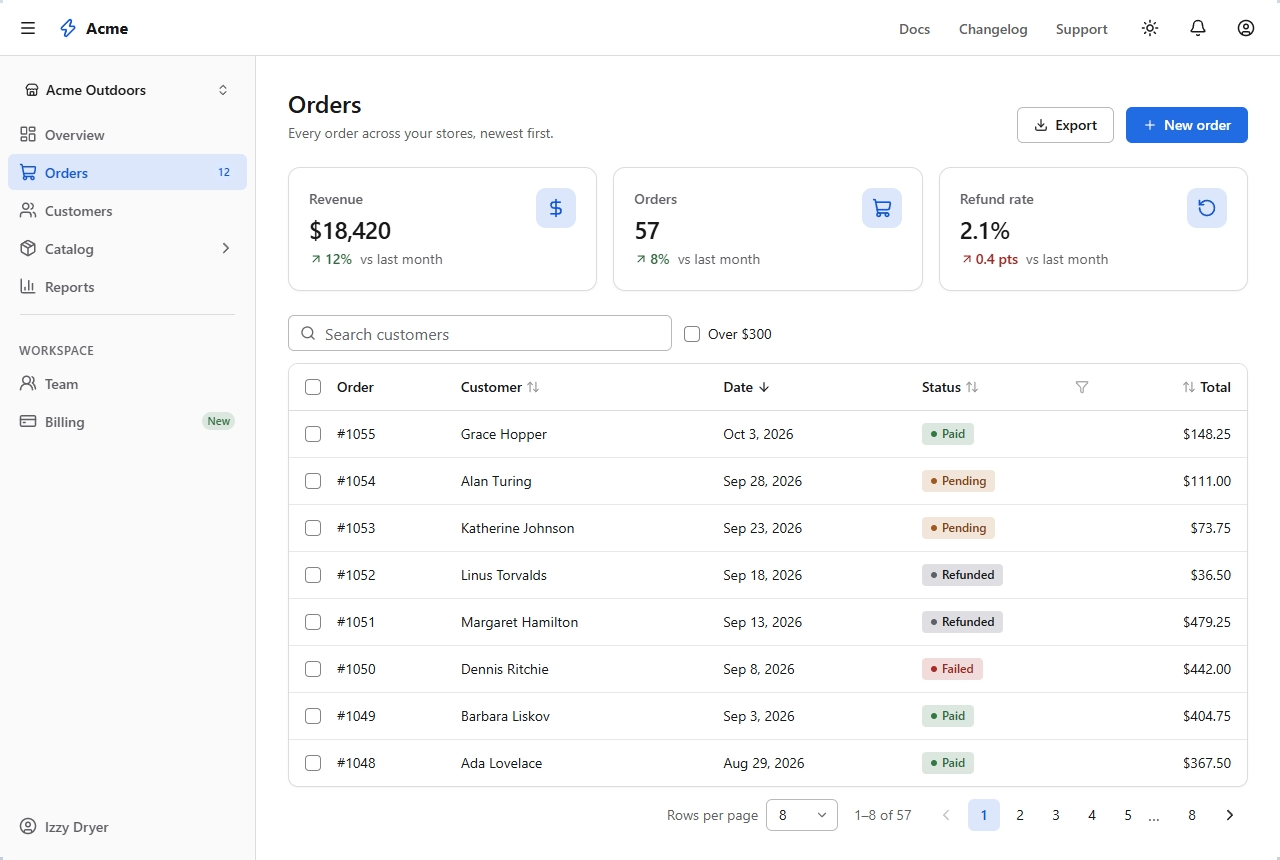
Preview:
0.1.0-alpha.19. APIs may change during preview.
Progressive by design
Start with server-rendered HTML. Add lightweight browser behavior. Bring in C# interactivity where you need it.
The same components support each layer, so you can add interactivity without replacing your UI.
| Component | HTML and CSS | With JavaScript | With Blazor interactivity |
|---|---|---|---|
| Dialog | Opens from a trigger or a ?dialog=id link, with browser-managed focus trapping |
Promotes server-opened dialogs to modal dialogs | Bind open state with @bind-Open |
| Table | Sort, filter, and page through URL parameters | Select all rows and apply filters as you type | Bind sorting, paging, filters, and selection to C# |
| Tabs | Switch panels with radio buttons and CSS | Adds ARIA tab semantics and arrow-key navigation | Bind the selected tab with @bind-Selected |
| Combobox | Uses a native select that submits with the form | Adds filtering and keyboard navigation | Search on the server as you type |
| FileUpload | Submits files through a Multipart form as IFormFile |
Adds drag and drop with file type and size checks | Stream IBrowserFile instances through OnChange |
Getting started
Install the package in your server project:
dotnet add package IzzyBlazor --prerelease
Add the stylesheet in App.razor:
@* Inside <head> *@
<link rel="stylesheet" href="@Assets["_content/IzzyBlazor.Core/izzyblazor.css"]" />
Add the namespace in _Imports.razor:
@using IzzyBlazor
Register the services and map the endpoints in Program.cs:
builder.Services.AddIzzyBlazor();

// After app.MapRazorComponents<App>():
app.MapIzzyBlazor();
IzzyBlazor loads its JavaScript automatically. To display toasts, add <ToastRegion /> to your layout.
For WebAssembly and Auto render modes, reference IzzyBlazor.Core in your .Client project and call AddIzzyBlazorCore(). See the WebAssembly and Auto setup guide for details.
Documentation
Visit izzyblazor.com for live component examples, render-mode guidance, and API documentation.
- Getting started: installation and setup
- Components: examples, supported modes, and APIs
- Style props: typed, responsive styling
- Theming: colors, fonts, and theme configuration
- Source and issues: browse the code and report bugs
Browser support
Requires a modern browser with support for CSS :has(), light-dark(), and the Popover API.
License
IzzyBlazor is MIT licensed.
Bundled Lucide icons use the ISC license. Brand logos from Tabler Icons and those drawn for IzzyBlazor use the MIT license. The bundled Inter font uses the SIL Open Font License. See third-party notices for details.
IzzyBlazor is an independent project and is not affiliated with Microsoft.
| Product | Versions Compatible and additional computed target framework versions. |
|---|---|
| .NET | net10.0 is compatible. net10.0-android was computed. net10.0-browser was computed. net10.0-ios was computed. net10.0-maccatalyst was computed. net10.0-macos was computed. net10.0-tvos was computed. net10.0-windows was computed. |
-
net10.0
- IzzyBlazor.Core (>= 0.1.0-alpha.19)
NuGet packages
This package is not used by any NuGet packages.
GitHub repositories
This package is not used by any popular GitHub repositories.
| Version | Downloads | Last Updated |
|---|---|---|
| 0.1.0-alpha.19 | 50 | 10/27/2026 |
| 0.1.0-alpha.18 | 46 | 10/27/2026 |
| 0.1.0-alpha.17 | 56 | 10/26/2026 |
| 0.1.0-alpha.16 | 53 | 10/26/2026 |
| 0.1.0-alpha.15 | 55 | 10/25/2026 |
| 0.1.0-alpha.14 | 56 | 10/25/2026 |
| 0.1.0-alpha.13 | 58 | 10/25/2026 |
| 0.1.0-alpha.12 | 58 | 10/21/2026 |
| 0.1.0-alpha.11 | 63 | 10/20/2026 |
| 0.1.0-alpha.10 | 57 | 10/18/2026 |
| 0.1.0-alpha.9 | 53 | 10/18/2026 |
| 0.1.0-alpha.8 | 53 | 10/18/2026 |
| 0.1.0-alpha.7 | 55 | 10/18/2026 |
| 0.1.0-alpha.6 | 57 | 10/18/2026 |
| 0.1.0-alpha.5 | 56 | 10/17/2026 |
| 0.1.0-alpha.4 | 58 | 10/17/2026 |
| 0.1.0-alpha.3 | 55 | 10/16/2026 |
| 0.1.0-alpha.2 | 63 | 10/15/2026 |
| 0.1.0-alpha.1 | 54 | 10/14/2026 |
First preview. The API will change before 0.1.