JetPack.Wpf
0.6.1
dotnet add package JetPack.Wpf --version 0.6.1
NuGet\Install-Package JetPack.Wpf -Version 0.6.1
<PackageReference Include="JetPack.Wpf" Version="0.6.1" />
<PackageVersion Include="JetPack.Wpf" Version="0.6.1" />
<PackageReference Include="JetPack.Wpf" />
paket add JetPack.Wpf --version 0.6.1
#r "nuget: JetPack.Wpf, 0.6.1"
#:package JetPack.Wpf@0.6.1
#addin nuget:?package=JetPack.Wpf&version=0.6.1
#tool nuget:?package=JetPack.Wpf&version=0.6.1
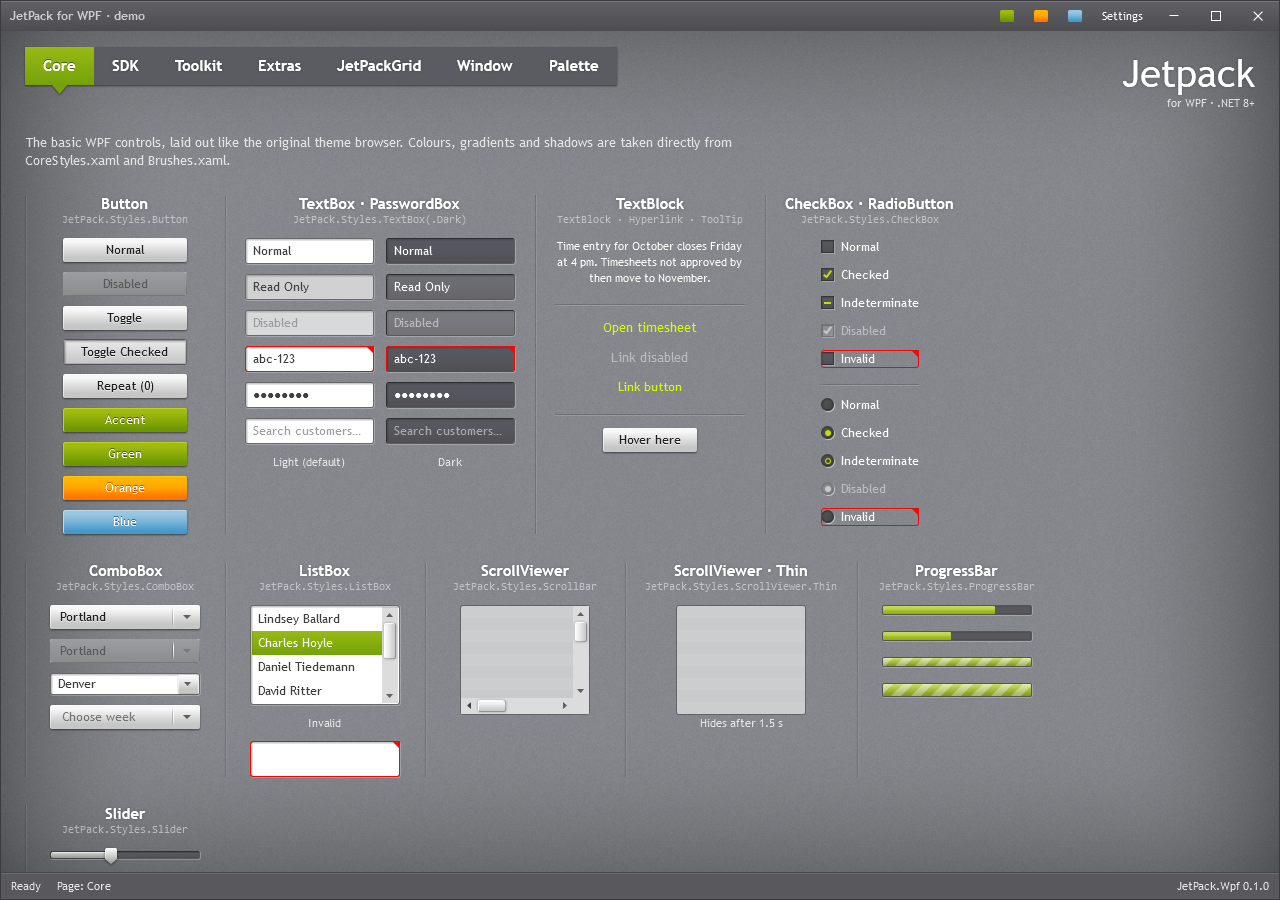
JetPack for WPF
The JetPack theme from Microsoft's Silverlight 4 Application Themes, rebuilt as a complete controls
library for WPF on .NET 8 and later. One resource dictionary gives every standard WPF control the
JetPack look, and the library adds the controls a desktop app usually needs: JetPackWindow, in-window
dialogs, ToggleSwitch, NumericUpDown, Flyout, HamburgerMenu, InfoBar, RangeSlider,
TimePicker, ColorPicker, AutoSuggestBox, SearchComboBox, JetPackGrid, BusyIndicator and more.
Highlights
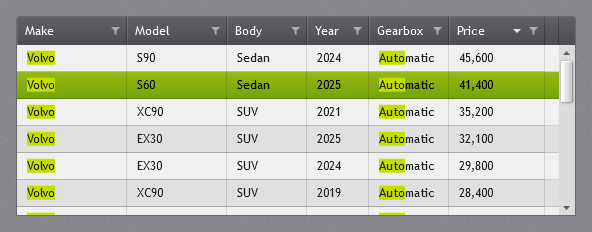
JetPackGrid: a free data grid for large lists. It brings the features that usually send WPF
developers to a commercial grid such as Telerik's RadGridView, in a free, MIT-licensed DataGrid:
- Search across all columns, with every hit marked in the cells (
volvo "dark blue" automatic) - A filter in every column header: tick values from a list with row counts, or type them with
*wildcards - Grouping with headers that fold up, three-state sorting and paging
- Virtualized rows and columns, also while grouping, for thousands of rows in tens of columns
It does not try to match everything a commercial suite offers, such as hierarchical child grids or built-in export. Documentation
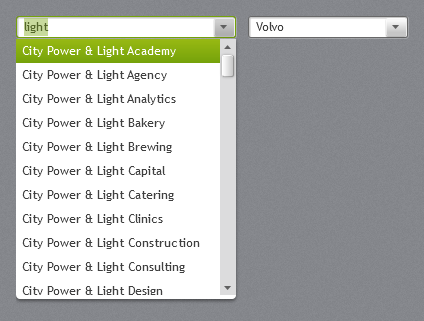
SearchComboBox: a light alternative to RadComboBox. A combo box you can type in, for long lists
such as customers or products. Typing filters the virtualized drop-down (Contains or StartsWith)
and completes the first match. It binds like a ComboBox (ItemsSource, SelectedItem,
SelectedValue, DisplayMemberPath, ItemTemplate) and works fully from the keyboard.
Documentation
Mica backdrop on Windows 11. EnableMica="True" lets the Mica material show through the
JetPack ground, so the window picks up a soft tint from the wallpaper and keeps its texture and title
bar. GroundOpacity sets the balance (about 0.75 keeps the classic look). The compositor draws it,
so it costs next to nothing; on Windows 10 the window stays opaque.
Documentation
Telerik, RadGridView and RadComboBox are trademarks of Progress Software Corporation. JetPack for WPF is not affiliated with or endorsed by Progress.
Getting started
dotnet add package JetPack.Wpf
Merge the theme in App.xaml:
<Application.Resources>
    <ResourceDictionary>
        <ResourceDictionary.MergedDictionaries>
            <ResourceDictionary Source="pack://application:,,,/JetPack.Wpf;component/Styles/JetPack.xaml" />
        </ResourceDictionary.MergedDictionaries>
    </ResourceDictionary>
</Application.Resources>
Derive your window from JetPackWindow:
<jp:JetPackWindow x:Class="MyApp.MainWindow"
                  xmlns="http://schemas.microsoft.com/winfx/2006/xaml/presentation"
                  xmlns:x="http://schemas.microsoft.com/winfx/2006/xaml"
                  xmlns:jp="urn:jetpack-wpf"
                  Title="My app">
    ...
</jp:JetPackWindow>
public partial class MainWindow : JetPack.Wpf.Controls.JetPackWindow { ... }
Switch accent at runtime:
JetPack.Wpf.Theming.ThemeManager.ChangeAccent(JetPack.Wpf.Theming.JetPackAccent.Orange);
Documentation
Every control, the theme and accents, typography and all resource keys: https://montago.github.io/JetPackTheme/
Source, demo app and issues: https://github.com/Montago/JetPackTheme
License
MIT. See NOTICE.md in the package for where the look comes from.
| Product | Versions Compatible and additional computed target framework versions. |
|---|---|
| .NET | net8.0-windows7.0 is compatible. net9.0-windows was computed. net10.0-windows was computed. |
-
net8.0-windows7.0
- No dependencies.
NuGet packages
This package is not used by any NuGet packages.
GitHub repositories
This package is not used by any popular GitHub repositories.