Juknum.Windows.ContextMenu
0.0.4
dotnet add package Juknum.Windows.ContextMenu --version 0.0.4
NuGet\Install-Package Juknum.Windows.ContextMenu -Version 0.0.4
<PackageReference Include="Juknum.Windows.ContextMenu" Version="0.0.4" />
<PackageVersion Include="Juknum.Windows.ContextMenu" Version="0.0.4" />
<PackageReference Include="Juknum.Windows.ContextMenu" />
paket add Juknum.Windows.ContextMenu --version 0.0.4
#r "nuget: Juknum.Windows.ContextMenu, 0.0.4"
#:package Juknum.Windows.ContextMenu@0.0.4
#addin nuget:?package=Juknum.Windows.ContextMenu&version=0.0.4
#tool nuget:?package=Juknum.Windows.ContextMenu&version=0.0.4
Juknum.Windows.ContextMenu




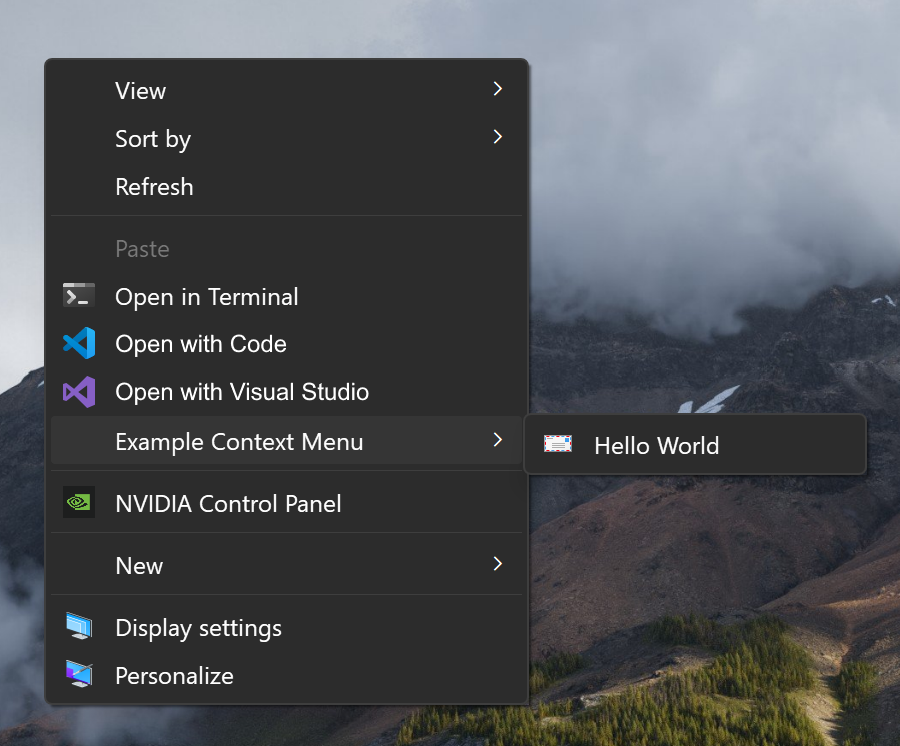
A .NET library for building Windows Explorer context menu handlers with IExplorerCommand. This library is intended for .NET developers who want to add custom commands to the Windows Explorer context menu without having to implement the COM plumbing themselves.
Targets & Dependencies


The library depends on Vanara.PInvoke.Shell32 for the Explorer COM interfaces and shell types.
Overview
The library focuses on three pieces:
- Single commands through
ExplorerCommand - Submenu / grouped commands through
ExplorerCommandMenu - Registry registration helpers through
RegistrationHelper
ExplorerCommand
Handles the COM-facing IExplorerCommand implementation and maps it to a simpler override-based API.
| Member | Purpose | Notes |
|---|---|---|
Guid |
Identifies the command handler | Used as the COM CLSID for the command. Should be the same as the Guid() Attribute on top of the implementing class. |
Title |
Name shown in Explorer | This is the text users see in the context menu |
Icon |
Optional shell icon reference | Return null to omit an icon |
ToolTip |
Optional informational text | The base type exposes it, but Explorer does not use it directly |
IsEnabled(...) |
Determines whether the command is enabled | Return false to disable the item for the current selection |
Execute(...) |
Runs the command action | Return true when the command succeeds |
Example
[ComVisible(true)]
[ClassInterface(ClassInterfaceType.None)]
[Guid("...")]
internal class ContextMenuCommandHelloWorld : ExplorerCommand {
	public override Guid Guid => new("...");
	public override string Title => "Hello World";

	public override bool Execute(IShellItemArray psiItemArray, IBindCtx? pbc) {
		MessageBox.Show("Hello, World!");
		return true;
	}
}
The GUID is used as the COM CLSID for the command. It is recommended to generate a new GUID for the main registered class (e.g: E3629D56-49C1-41F8-B7EF-0057EE60126C) and use derived GUIDs (e.g: E3629D56-0001-0001-0001-000000000001) for any child commands/menus.
ExplorerCommandMenu
Builds on top of ExplorerCommand, this class is useful when you want to create a submenu in the Explorer context menu. It exposes a Commands array and uses the internal command enumerator to surface child items to Explorer.
| Member | Purpose | Notes |
|---|---|---|
Guid |
Identifies the command handler | Used as the COM CLSID for the command. Should be the same as the Guid() Attribute on top of the implementing class. |
Title |
Name shown in Explorer | This is the text users see in the context menu |
Icon |
Optional shell icon reference | Return null to omit an icon |
ToolTip |
Optional informational text | The base type exposes it, but Explorer does not use it directly |
IsEnabled(...) |
Determines whether the command is enabled | Return false to disable the item for the current selection |
Commands |
Child commands shown under the menu | Return an array of IExplorerCommand instances |
Example
[ComVisible(true)]
[ClassInterface(ClassInterfaceType.None)]
[Guid("...")]
internal class ContextMenuExample : ExplorerCommandMenu {

	public override Guid Guid => new("...");
	public override string Title => "Example Context Menu";
	public override IExplorerCommand[] Commands => [
		new ContextMenuCommandHelloWorld(),
	];
}
RegistrationHelper
A static helper class that writes the registry entries that Explorer uses to discover a command handler. It supports registration for:
- All files
- Directories
- Directory background
- Optional extension-specific verbs
Use RegistrationHelper.RegisterCommand(...) from your COM registration hook to create the Explorer registry entries for your command handler.
The helper takes a verb name, display label, and CLSID, plus optional scope flags:
allFiles: trueregisters under*\shellallFolders: trueregisters underDirectory\shellandDirectory\Background\shellextension: ".txt"registers for a specific file type
UnregisterCommand(...) removes the same verb from the common locations.
[ComRegisterFunction]
public static void Register(Type type) {
	RegistrationHelper.RegisterCommand(
		verbName: "ExampleContextMenu",
		menuLabel: "Example Context Menu",
		clsid: type.GUID.ToString("B"),
		allFiles: true,
		allFolders: true
	);
}
Only the top-level command or menu class should define the static Register and Unregister methods. Child commands that are returned from ExplorerCommandMenu.Commands should stay as plain command implementations and should not register themselves separately.
Registering In Explorer
The sample projects register the built assembly from their build scripts, but the mechanism differs by target framework:
- .NET Framework uses
RegAsm.exeto register the DLL and to remove it. - .NET Core / .NET 8+ uses the generated
.comhost.dlland registers it withregsvr32.exeinstead.
If you want to mirror the examples, look at the build hooks in examples/net481/Scripts and examples/net10.0-windows/Scripts. Both registration paths require elevated permissions because they write to Explorer-related registry locations.
Example Project
The sample project in examples/ shows one concrete way to wire the library together.
Notes
- The runtime behavior is Windows-only because the API is built around Explorer COM interfaces.
Iconshould return a shell-compatible icon reference, such as an assembly resource path, e.g.@"C:\Path\To\MyAssembly.dll,-123". The-123is the resource ID of the icon in the DLL. You can also reference a.icofile or other shell-supported icon formats on disk. If you returnnull, the command will not have an icon in the context menu.
| Product | Versions Compatible and additional computed target framework versions. |
|---|---|
| .NET | net8.0-windows7.0 is compatible. net9.0-windows was computed. net9.0-windows7.0 is compatible. net10.0-windows was computed. net10.0-windows7.0 is compatible. |
| .NET Framework | net462 is compatible. net463 was computed. net47 was computed. net471 was computed. net472 is compatible. net48 was computed. net481 is compatible. |
-
.NETFramework 4.6.2
- Vanara.PInvoke.Shell32 (>= 5.0.5)
-
.NETFramework 4.7.2
- Vanara.PInvoke.Shell32 (>= 5.0.5)
-
.NETFramework 4.8.1
- Vanara.PInvoke.Shell32 (>= 5.0.5)
-
net10.0-windows7.0
- Vanara.PInvoke.Shell32 (>= 5.0.5)
-
net8.0-windows7.0
- Vanara.PInvoke.Shell32 (>= 5.0.5)
-
net9.0-windows7.0
- Vanara.PInvoke.Shell32 (>= 5.0.5)
NuGet packages
This package is not used by any NuGet packages.
GitHub repositories
This package is not used by any popular GitHub repositories.