KsSettingsView.Maui
0.1.0-beta.3
dotnet add package KsSettingsView.Maui --version 0.1.0-beta.3
NuGet\Install-Package KsSettingsView.Maui -Version 0.1.0-beta.3
<PackageReference Include="KsSettingsView.Maui" Version="0.1.0-beta.3" />
<PackageVersion Include="KsSettingsView.Maui" Version="0.1.0-beta.3" />
<PackageReference Include="KsSettingsView.Maui" />
paket add KsSettingsView.Maui --version 0.1.0-beta.3
#r "nuget: KsSettingsView.Maui, 0.1.0-beta.3"
#:package KsSettingsView.Maui@0.1.0-beta.3
#addin nuget:?package=KsSettingsView.Maui&version=0.1.0-beta.3&prerelease
#tool nuget:?package=KsSettingsView.Maui&version=0.1.0-beta.3&prerelease
KsSettingsView
Overview and key features
KsSettingsView is a cross-platform UI library for building list-style settings screens on iOS, Android, and .NET MAUI. Native iOS and Android implementations provide the rendering and interaction model, while the MAUI layer exposes the same screens through XAML and C#.
- Declarative APIs for SwiftUI and Jetpack Compose, plus UIKit and Android View hosts
- Built-in cell types for labels, switches, text entry, pickers, and more, plus
CustomCellfor application-defined content - Live structural and content updates through a store, with two-way values on editable cells
ThemeandCellStylecustomization with Classic and Modern list styles- Native rendering on both platforms, including when used through .NET MAUI
The public API may introduce breaking changes while the project remains on 0.x versions.
Screenshots
| Modern | Classic |
|---|---|
iOS — Modern<br>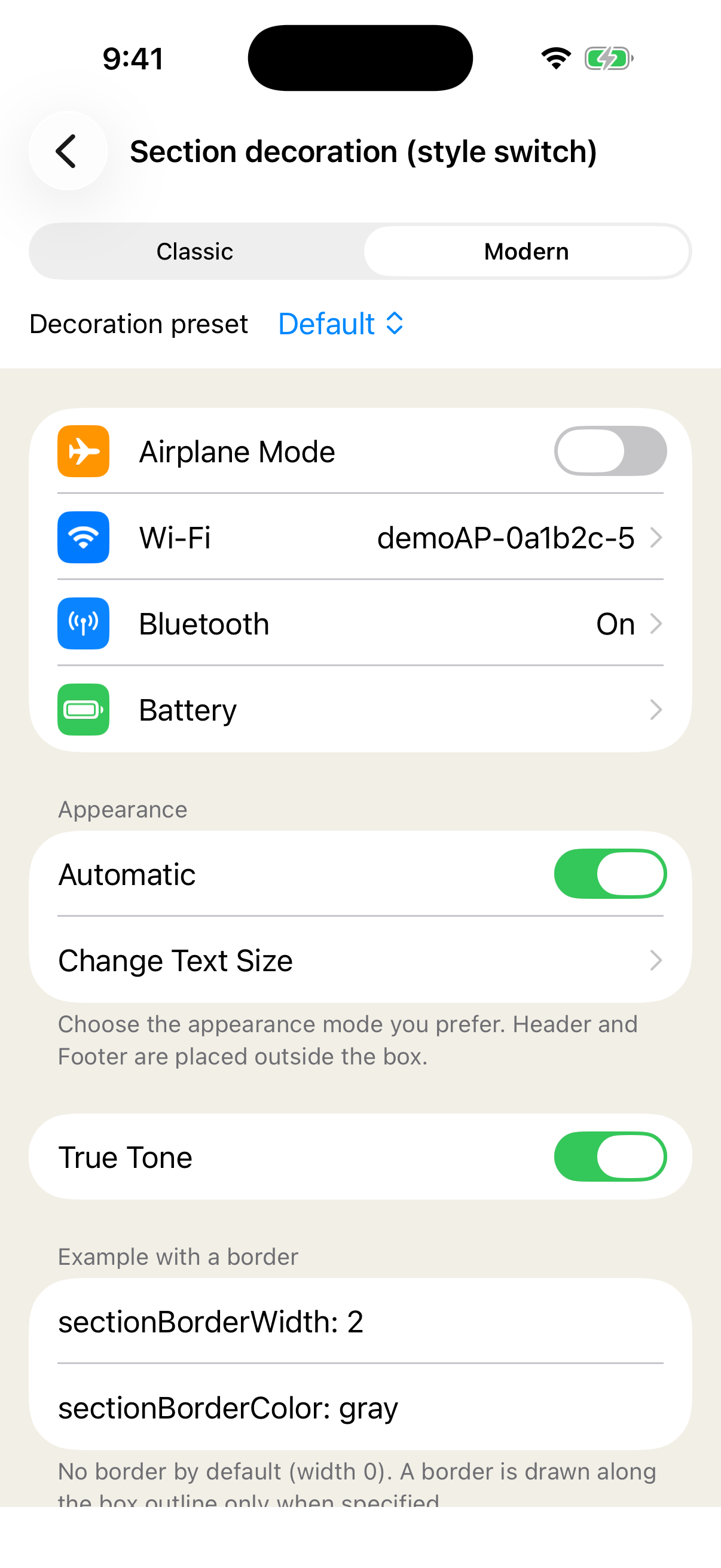 |
iOS — Classic<br>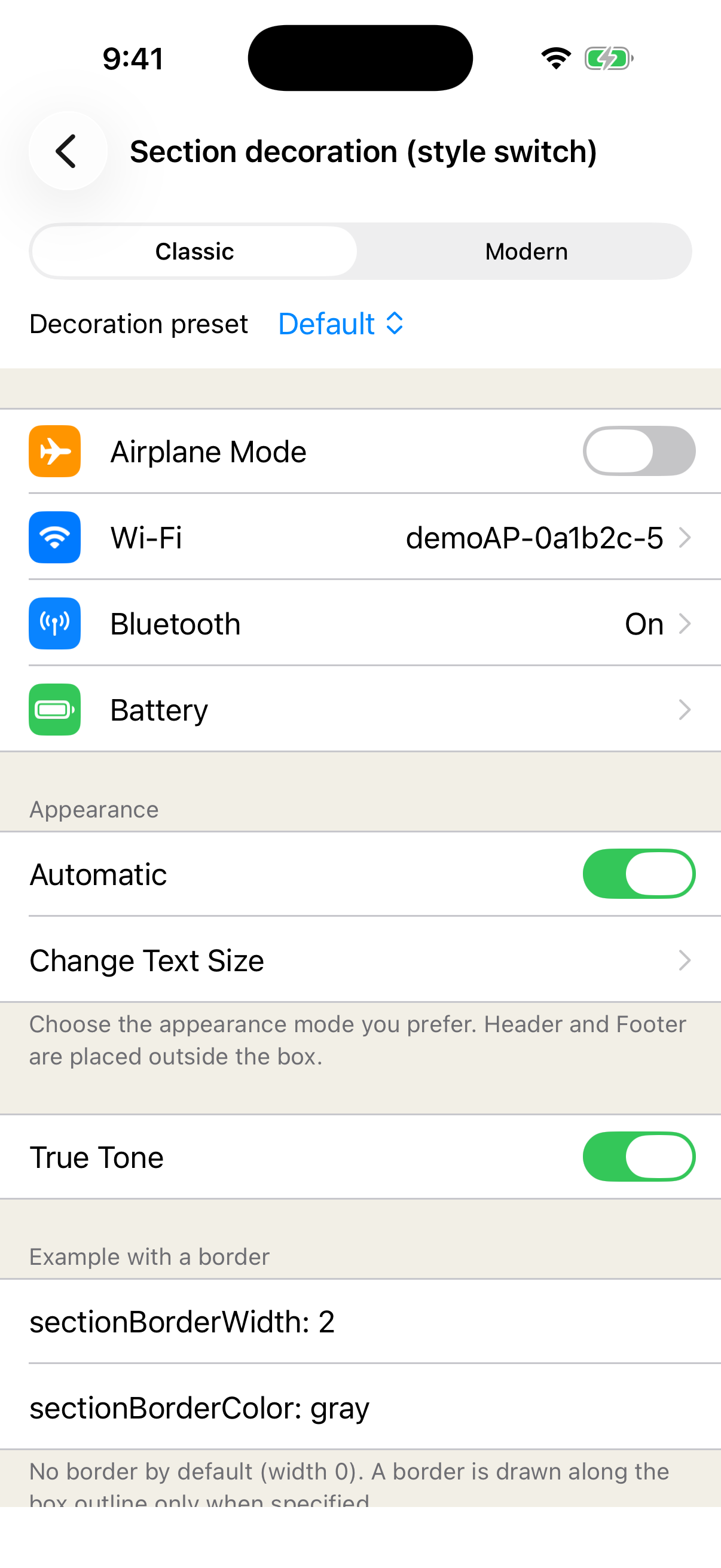 |
Android — Modern<br>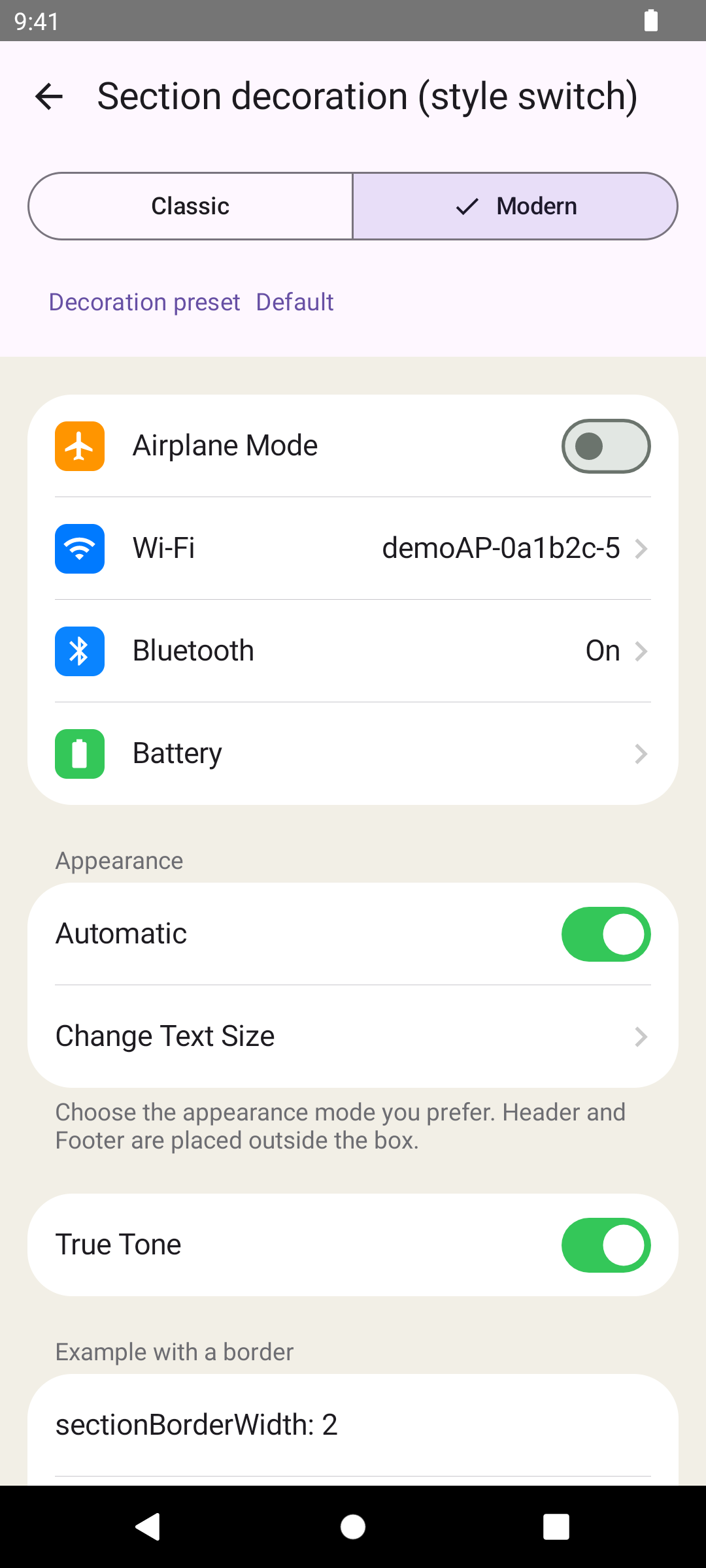 |
Android — Classic<br>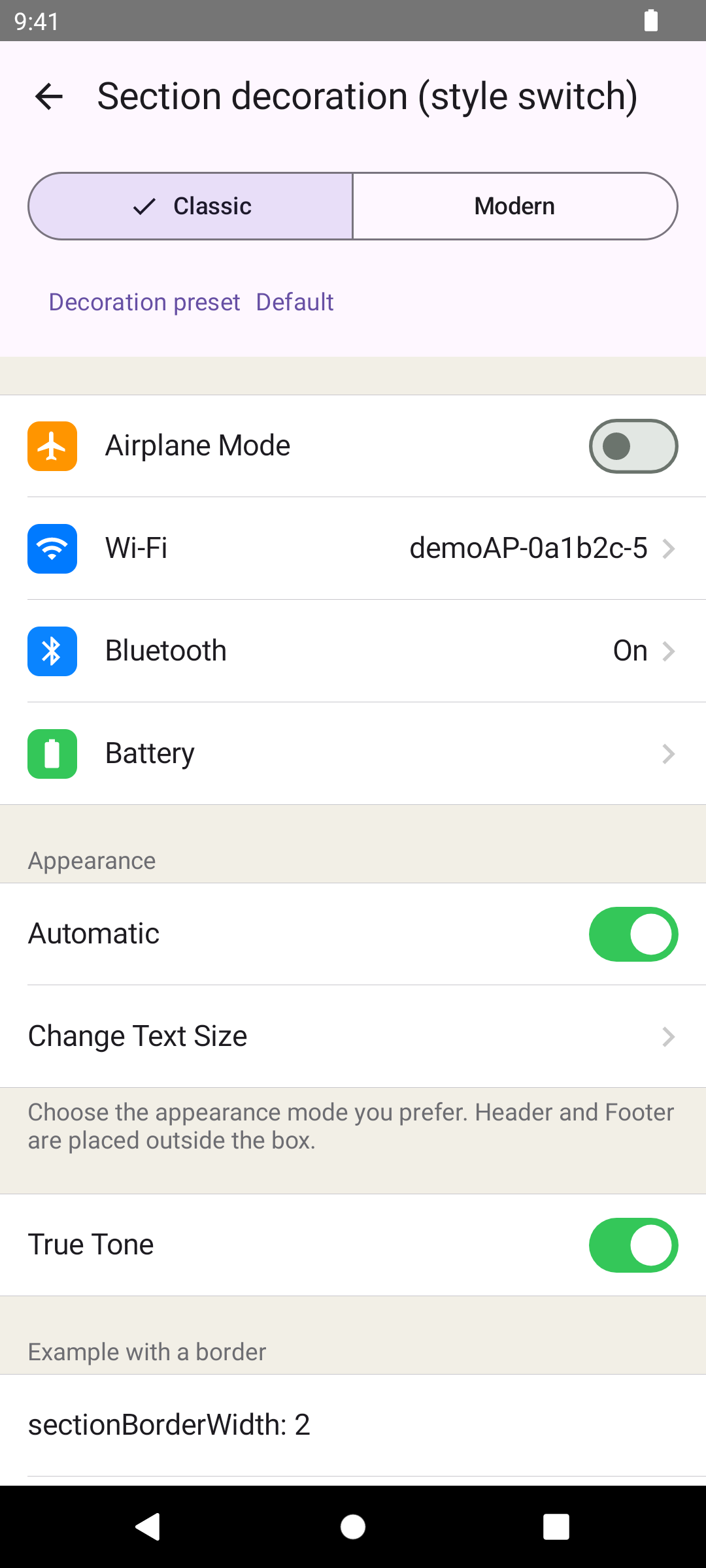 |
.NET MAUI wraps the Native implementations, so it renders the same screens shown above.
Supported platforms
| Platform | Minimum platform | Toolchain used by the library |
|---|---|---|
| iOS Native | iOS 16.0 | Swift tools 5.10 |
| Android Native | Android API 29; compileSdk 35 | Kotlin 2.4.10; AGP 8.13.2; Gradle 9.5.0; JDK 17 |
| .NET MAUI | iOS 16.0; Android API 29 | .NET SDK 10.0.300; net10.0-ios / net10.0-android; Microsoft.Maui.Controls 10.0.70 |
Android is distributed as the single Maven artifact jp.kamusoft:kssettingsview. Its Core, UI, and Compose layers remain separated by the Kotlin packages jp.kamusoft.kssettingsview.core, .ui, and .compose. Android consumers need Kotlin 2.3 or later, minSdk 29, and compileSdk 35. Kotlin 2.4.10 in the table is the toolchain used to build the library, not the minimum consumer Kotlin version.
Installation
The platform Agent Skills contain the detailed setup guidance. This section contains only dependency declarations and prerelease version selection.
The declarations below write the version as the placeholder {version}. Replace it with the version you want to use; left as it is, dependency resolution fails. To find the current version, open the latest release page, which always resolves to the most recent release.
iOS — Swift Package Manager
dependencies: [
    .package(url: "https://github.com/kamusoft/KsSettingsView-SPM", exact: "{version}")
]
Reference the product as .product(name: "KsSettingsView", package: "KsSettingsView-SPM"). The declaration uses exact: so that it resolves to exactly the version you write, prerelease or not. from: "X.Y.Z-beta.N" also resolves prereleases — a prerelease lower bound admits later prereleases of the same version — but its upper bound stays open up to the next major version, so it does not pin anything. Use exact: whenever you want one specific version.
Publication status: the package is served from the KsSettingsView-SPM distribution repository, where each release is published as a semantic version tag.
Android — Maven
dependencies {
    implementation("jp.kamusoft:kssettingsview:{version}")
}
To select a prerelease, use a version such as X.Y.Z-alpha.N, X.Y.Z-beta.N, or X.Y.Z-rc.N in the dependency declaration. Maven Central presents prereleases alongside stable releases, so explicitly choose the version you intend to use.
.NET MAUI — NuGet
<ItemGroup>
  <PackageReference Include="KsSettingsView.Maui" Version="{version}" />
</ItemGroup>
To select a prerelease, set Version to a value such as X.Y.Z-beta.N. When searching without an exact version, enable prerelease results (--prerelease with the .NET CLI).
The public .NET namespace is KsSettingsView; in XAML, use clr-namespace:KsSettingsView;assembly=KsSettingsView.Maui as shown below.
Compatibility requirements: Microsoft.Maui.Controls (MauiVersion) 10.0.70 or later, and a minimum OS version of iOS 16.0 / Android API 29. Pinning Microsoft.Maui.Controls below 10.0.70 causes a package downgrade error (NU1605); update MauiVersion to 10.0.70 or later. The package ships a build-time guard; if the consuming project's SupportedOSPlatformVersion is lower than these values, the build fails with error KSSV0001. The following fragment shows the same form used by the Sample application.
<PropertyGroup>
  <MauiVersion>10.0.70</MauiVersion>
</PropertyGroup>

<PropertyGroup Condition=" $([MSBuild]::GetTargetPlatformIdentifier('$(TargetFramework)')) == 'ios' ">
  <SupportedOSPlatformVersion>16.0</SupportedOSPlatformVersion>
</PropertyGroup>

<PropertyGroup Condition=" $([MSBuild]::GetTargetPlatformIdentifier('$(TargetFramework)')) == 'android' ">
  <SupportedOSPlatformVersion>29</SupportedOSPlatformVersion>
</PropertyGroup>
Use the API-unversioned TFMs net10.0-android and net10.0-ios for the normal configuration. If you explicitly pin platform API versions, use net10.0-android36.0 and net10.0-ios26.0 or later. With lower pinned versions, restore can succeed without warnings while silently falling back to lib/net10.0; the two native binding packages are then omitted. This resolution behavior was verified with .NET SDK 10.0.300.
Name collision: KsSettingsView.SwitchCell and KsSettingsView.EntryCell share their names with types in Microsoft.Maui.Controls. In C#, combining using KsSettingsView; with the MAUI implicit usings makes these two names ambiguous (CS0104). The XAML ks: prefix is not affected. Use the fully qualified name (KsSettingsView.SwitchCell) or a using alias (using SwitchCell = KsSettingsView.SwitchCell;) in C#.
Minimal code examples
iOS
import SwiftUI
import KsSettingsViewCore
import KsSettingsViewUI
import KsSettingsViewSwiftUI

struct SettingsScreen: View {
    @State private var notifications = true

    var body: some View {
        KsSettingsView {
            ksSection("General") {
                LabelCell(title: "Version", valueText: "1.0.0")
                SwitchCell(
                    title: "Push notifications",
                    isOn: notifications,
                    onValueChanged: { notifications = $0 }
                )
            }
        }
    }
}
Android
import androidx.compose.runtime.Composable
import androidx.compose.runtime.mutableStateOf
import androidx.compose.runtime.remember
import jp.kamusoft.kssettingsview.compose.KsSettingsView
import jp.kamusoft.kssettingsview.compose.LabelCell
import jp.kamusoft.kssettingsview.compose.SwitchCell

@Composable
fun SettingsScreen() {
    val notifications = remember { mutableStateOf(true) }

    KsSettingsView {
        Section(header = "General") {
            LabelCell(title = "Version", valueText = "1.0.0")
            SwitchCell(title = "Push notifications", isOn = notifications)
        }
    }
}
.NET MAUI
<ContentPage xmlns="http://schemas.microsoft.com/dotnet/2021/maui"
             xmlns:x="http://schemas.microsoft.com/winfx/2009/xaml"
             xmlns:ks="clr-namespace:KsSettingsView;assembly=KsSettingsView.Maui"
             x:Class="MyApp.SettingsPage">
  <ks:SettingsView>
    <ks:Section HeaderText="General">
      <ks:LabelCell Title="Version" ValueText="1.0.0" />
      <ks:SwitchCell Title="Push notifications" On="True" />
    </ks:Section>
  </ks:SettingsView>
</ContentPage>
Register the handler once in MauiProgram before use.
using KsSettingsView;
using Microsoft.Maui.Hosting;

namespace MyApp;

public static class MauiProgram
{
    public static MauiApp CreateMauiApp()
    {
        MauiAppBuilder builder = MauiApp.CreateBuilder();

        builder
            .UseMauiApp<App>()
            .AddKsSettingsView();

        return builder.Build();
    }
}
See the .NET MAUI Skill for the setup.
Skills
Agent Skills provide task-oriented guidance and API recipes for iOS, Android, .NET MAUI, and migration from AiForms.Maui.SettingsView. See the Skills index for English and Japanese editions.
Repository structure
| Directory | Purpose |
|---|---|
ios/ |
iOS Native library and Swift package |
android/ |
Android Native library |
maui/ |
.NET MAUI facade and Native bindings |
samples/ |
Sample applications for the supported platforms |
skills/ |
User-facing Agent Skills in English and Japanese |
scripts/ |
Repository lint scripts and the SwiftPM snapshot tooling |
assets/ |
Images used by the root documentation |
kasane/ |
Kasane change artifacts, decisions, and concepts |
openspec/ |
Frozen historical artifacts from the previous OpenSpec workflow; not the current specification |
Agent development rules · Kasane concepts
Contributing
We do not accept external pull requests. Please report bugs and propose improvements through GitHub Issues. Use the provided Issue template so the report contains the information needed for review. See the contribution guidelines before submitting an Issue.
License
KsSettingsView is available under the MIT License.
Third-party notices
The sample applications use vector drawable icons derived from Google's Material Symbols Outlined icon set (Copyright Google LLC), distributed under the Apache License 2.0. The icon source is Google Fonts Icons.
This notice applies only to icons used by the sample applications; it does not describe a dependency of the KsSettingsView library itself.
| Product | Versions Compatible and additional computed target framework versions. |
|---|---|
| .NET | net10.0 is compatible. net10.0-android was computed. net10.0-android36.0 is compatible. net10.0-browser was computed. net10.0-ios was computed. net10.0-ios26.0 is compatible. net10.0-maccatalyst was computed. net10.0-macos was computed. net10.0-tvos was computed. net10.0-windows was computed. |
-
net10.0
- Microsoft.Maui.Controls (>= 10.0.70)
-
net10.0-android36.0
- KsSettingsView.Binding.Android (>= 0.1.0-beta.3)
- Microsoft.Maui.Controls (>= 10.0.70)
-
net10.0-ios26.0
- KsSettingsView.Binding.iOS (>= 0.1.0-beta.3)
- Microsoft.Maui.Controls (>= 10.0.70)
NuGet packages
This package is not used by any NuGet packages.
GitHub repositories
This package is not used by any popular GitHub repositories.
| Version | Downloads | Last Updated |
|---|---|---|
| 0.1.0-beta.3 | 40 | 9/12/2026 |
| 0.1.0-beta.2 | 60 | 9/6/2026 |
| 0.1.0-beta.1 | 56 | 9/4/2026 |