Ldx12 0.3.0
MSVC Tools 14.44 force
See the version list below for details.
dotnet add package Ldx12 --version 0.3.0
NuGet\Install-Package Ldx12 -Version 0.3.0
<PackageReference Include="Ldx12" Version="0.3.0" />
<PackageVersion Include="Ldx12" Version="0.3.0" />
<PackageReference Include="Ldx12" />
paket add Ldx12 --version 0.3.0
#r "nuget: Ldx12, 0.3.0"
#:package Ldx12@0.3.0
#addin nuget:?package=Ldx12&version=0.3.0
#tool nuget:?package=Ldx12&version=0.3.0

Ldx12 0.3.0
Prototype Direct3D 12 bindless renderers quickly with a compact C++20 API.
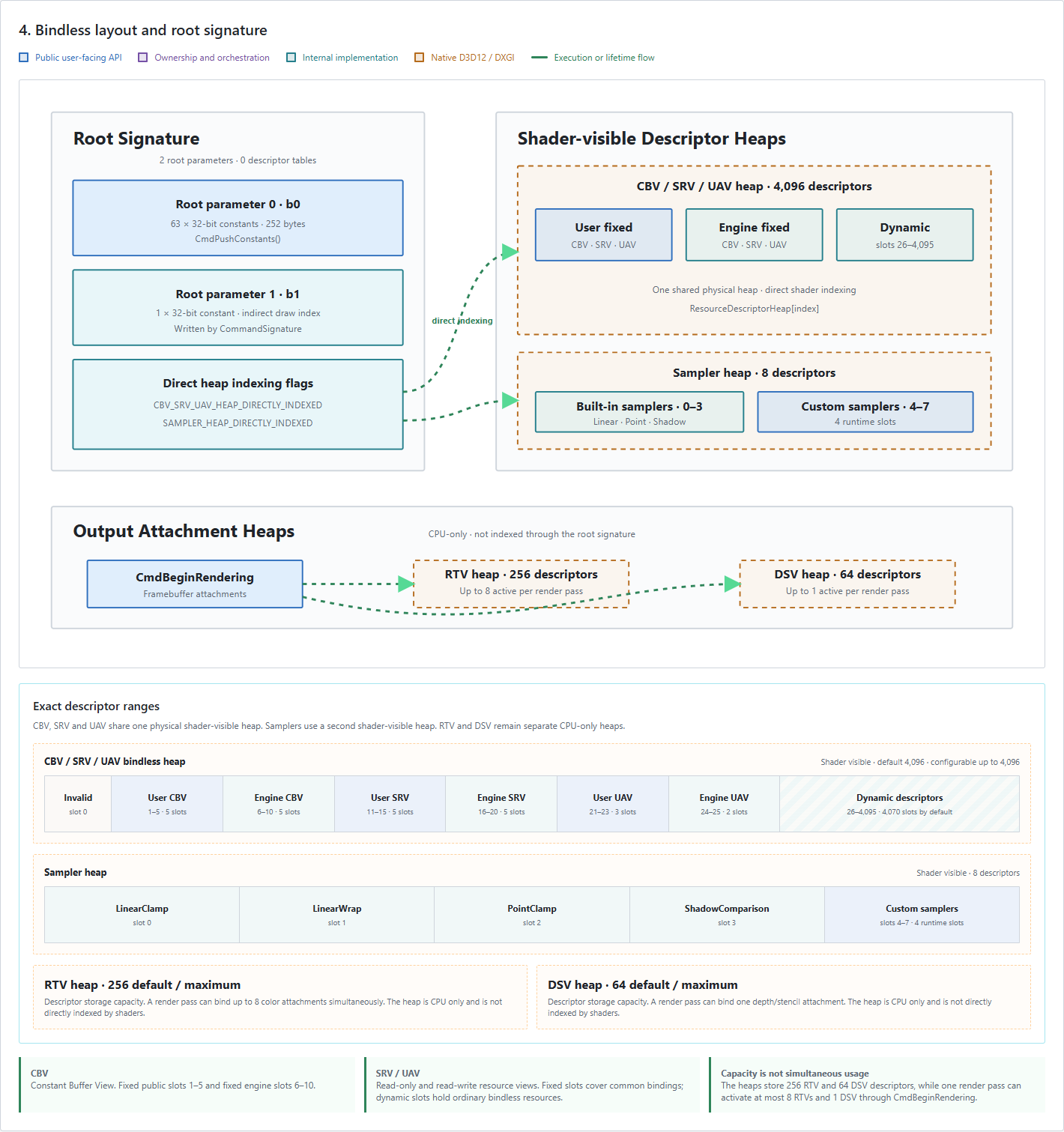
Ldx12 removes repetitive Direct3D 12 setup while keeping rendering explicit. It manages the device, swapchain, descriptor heaps, bindless root signature, command-list reuse, fences, resource states and deferred GPU-safe destruction.
It is intended for graphics experiments, tools and renderer prototypes rather than as a complete game engine.
Install
From the Visual Studio Package Manager Console:
Install-Package Ldx12 -Version 0.3.0
The package configures include paths automatically and selects the correct x64 static libraries for Debug or Release.
A frame at a glance
With a device and render pipeline already initialized:
TextureHandle backbuffer = device.GetCurrentSwapchainTexture();

RenderPass renderPass{};
renderPass.color[ 0 ].loadOp = LoadOp::Clear;
renderPass.color[ 0 ].clearColor = { 0.03f, 0.04f, 0.08f, 1.0f };

Framebuffer framebuffer{};
framebuffer.color[ 0 ].texture = backbuffer;

CommandBuffer& commands = device.AcquireCommandBuffer();
commands.CmdBeginRendering( renderPass, framebuffer );
commands.CmdBindRenderPipeline( pipeline );
commands.CmdDraw( 3 );
commands.CmdEndRendering();

device.Submit( commands, backbuffer );
Bindless: pass indices instead of binding tables
In native D3D12, changing a texture and buffer commonly means preparing compatible descriptor tables and binding them to matching root parameters:
commandList->SetGraphicsRootDescriptorTable( 0, textureDescriptor );
commandList->SetGraphicsRootDescriptorTable( 1, bufferDescriptor );
With Ldx12, resources already live in a shared descriptor heap. Pass their indices through push constants:
struct Resources
{
    uint32_t textureIndex;
    uint32_t bufferIndex;
};

const Resources resources = {
    device.GetBindlessIndex( texture ),
    device.GetBindlessIndex( buffer )
};

commands.CmdPushConstants( resources );
The shader accesses the resources directly:
cbuffer Resources : register(b0)
{
    uint textureIndex;
    uint bufferIndex;
};

float4 PSMain(float2 uv : TEXCOORD0) : SV_Target0
{
    Texture2D<float4> texture = ResourceDescriptorHeap[textureIndex];
    StructuredBuffer<float4> colors = ResourceDescriptorHeap[bufferIndex];
    SamplerState linearClamp = SamplerDescriptorHeap[0];

    return texture.Sample(linearClamp, uv) * colors[0];
}
Changing a resource means changing an index. Ldx12 owns the heaps and bindless root signature; the application still controls pipelines, commands and synchronization points.
Multiple render targets in 0.3.0
Each pipeline color attachment declares its own format. The formats can be obtained directly from the framebuffer textures:
RenderPipelineDesc pipelineDesc{};
pipelineDesc.color[ 0 ].format = device.GetTextureFormat( colorTexture );
pipelineDesc.color[ 1 ].format = device.GetTextureFormat( normalTexture );
pipelineDesc.color[ 2 ].format = device.GetTextureFormat( materialTexture );

Framebuffer framebuffer{};
framebuffer.color[ 0 ].texture = colorTexture;
framebuffer.color[ 1 ].texture = normalTexture;
framebuffer.color[ 2 ].texture = materialTexture;
When a pipeline is bound, Ldx12 reports a debugger warning if its attachment formats do not match the active framebuffer.
Load glTF and GLB scenes with Ldx12Utils
Version 0.3.0 updates the bundled Ldx12Utils library with a static glTF 2.0 scene loader powered by the vendored cgltf parser. Loading is CPU-only and does not require a D3D12 device:
#include <Ldx12Utils/GltfLoader.hpp>

ldx12::utils::GltfScene scene =
    ldx12::utils::LoadGltfScene( "scene.glb" );

for( const ldx12::utils::GltfPrimitive& primitive : scene.primitives )
{
    // Upload primitive.vertices, primitive.indices and its material textures.
}
The loader supports .gltf and .glb, scene-node transforms, indexed and non-indexed triangle geometry, generated normals, metallic/roughness materials, external or embedded images and per-texture glTF samplers. Node transforms are baked into vertices and converted to left-handed coordinates.
Complete examples are available in the repository:
- 18_GltfScene uploads a complete scene and renders its material textures with GGX PBR, HDR environment lighting and optional MSAA.
- 19_DrawIndirectGltf loads glTF scenes and renders their primitives through bindless material buffers and indexed indirect draws.
The loader intentionally targets static demo scenes in 0.3.0; animation, skinning, compression, alpha blending and glTF extensions are outside its current scope.
What is new in 0.3.0
- Updated
Ldx12Utilswith cgltf-based static glTF/GLB scene loading, including transforms, geometry, materials and metallic/roughness textures. - Bindless UAV access for GPU-local structured and raw buffers.
- Explicit buffer transitions and UAV barriers for compute-to-render workflows.
- Batched submission fixups for tracked buffer and texture states.
- Multiple render targets with independent formats and framebuffer validation.
- Typed
CmdPushConstants(const T&)with a clear 252-byte compile-time limit. RenderDevice::Discard()for abandoning an acquired command buffer safely.RenderDevice::GetTextureFormat()for pipeline attachment configuration.- Improved deferred destruction and Win32/OLE application initialization.
Included in the package
Ldx12: device, swapchains, resources, pipelines, command buffers and submission.Ldx12Utils: Win32 application setup, cameras, geometry, depth targets, texture loading and glTF loading.- Public headers and native x64 static libraries for Debug and Release.
- MSBuild integration for Visual Studio 2022.
- MIT license and third-party notices.
Normal rendering uses:
#include <Ldx12/Ldx12.hpp>
Optional utilities use:
#include <Ldx12Utils/Ldx12Utils.hpp>
Advanced integrations can include Ldx12Native.hpp to access borrowed native D3D12 objects.
Requirements
- Windows 10 or Windows 11, x64.
- Visual Studio 2022 with C++20 support.
- Windows SDK and DXC for runtime shader compilation.
- Direct3D feature level 12.0 or newer.
- Shader Model 6.6.
- Resource Binding Tier 3.
Learn more
| Product | Versions Compatible and additional computed target framework versions. |
|---|---|
| native | native is compatible. |
-
native 0.0
- No dependencies.
NuGet packages
This package is not used by any NuGet packages.
GitHub repositories
This package is not used by any popular GitHub repositories.
| Version | Downloads | Last Updated | |
|---|---|---|---|
| 0.3.1-local | 107 | 9/15/2026 | |
| 0.3.0 | 141 | 9/15/2026 | |
| 0.2.0 | 145 | 8/30/2026 | |
| 0.1.0 | 155 | 8/23/2026 |
Ldx12 0.3.0 adds cgltf-based static glTF/GLB scene loading to Ldx12Utils, bindless structured/raw UAVs, compute synchronization, multiple render-target format validation and safer command-buffer/resource lifetimes. Examples: https://github.com/alfonsmagd/LightDX12/tree/v0.3.0/samples/GltfScene and https://github.com/alfonsmagd/LightDX12/tree/v0.3.0/samples/DrawIndirectGltf