LicenseManagerClient.12noon
1.3.0
dotnet add package LicenseManagerClient.12noon --version 1.3.0
NuGet\Install-Package LicenseManagerClient.12noon -Version 1.3.0
<PackageReference Include="LicenseManagerClient.12noon" Version="1.3.0" />
<PackageVersion Include="LicenseManagerClient.12noon" Version="1.3.0" />
<PackageReference Include="LicenseManagerClient.12noon" />
paket add LicenseManagerClient.12noon --version 1.3.0
#r "nuget: LicenseManagerClient.12noon, 1.3.0"
#:package LicenseManagerClient.12noon@1.3.0
#addin nuget:?package=LicenseManagerClient.12noon&version=1.3.0
#tool nuget:?package=LicenseManagerClient.12noon&version=1.3.0
License Manager by 12noon LLC



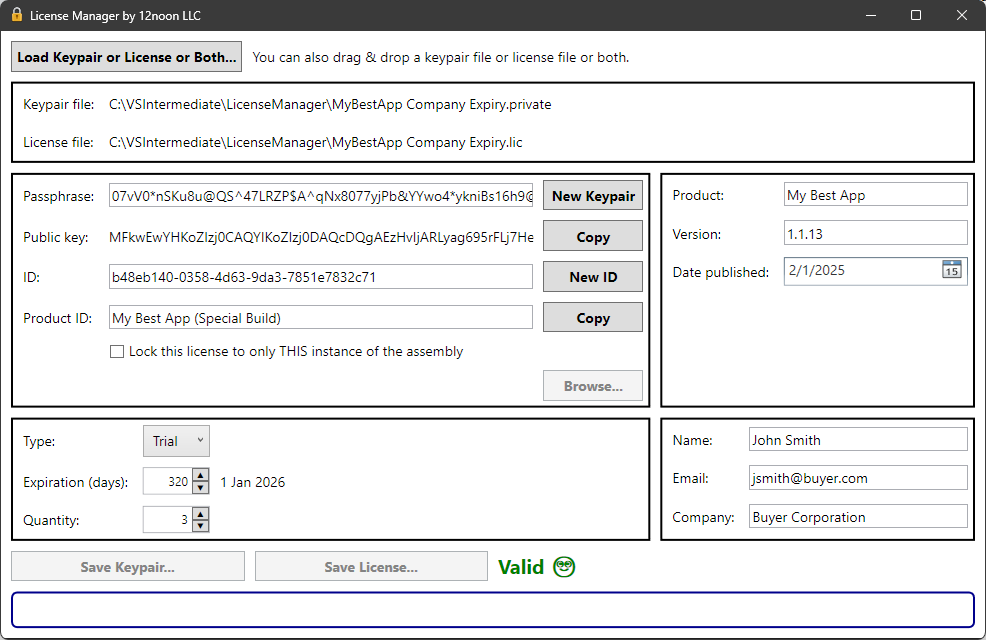
This is a graphical front-end for the Standard.Licensing project.
Description
License Manager is a graphical front-end application designed to create and manage licenses for software applications. It leverages the Standard.Licensing project to handle license generation and validation.
This project ensures that software licenses are securely generated and validated, providing a robust mechanism for software protection.
Key Features
Key Management
- Passphrase: Used to generate a public/private keypair and create a license.
- Public Key: Used by the licensed application to validate the license.
- ID: An optional identifier for the license.
- Product ID: Used to verify the executable and public key.
- Lock to Assembly: Optionally ensures the license is associated only with a specific build of the application.
Product Information
- Name: The product name.
- Version: The product version.
- Date Published: The date the product was published.
License Details
- Type: Specifies whether the license is standard or trial.
- Expiration: Number of days until the license expires (zero means no expiry).
- Quantity: Minimum value is one.
Licensee Information
- Name: Name of the licensee.
- Email: Email of the licensee.
- Company: Optional company name of the licensee.
Usage
- Creating a New License: Involves generating a keypair, entering product and license information, and saving the keypair and license files.
- Creating a License Based on an Existing License: Involves loading existing keypair or license files, validating them, updating information, and saving the new license. Integration with Licensed Applications:
- The licensed application can use the Standard.Licensing NuGet package or the LicenseFile class from this project to validate licenses.
- The application must pass the Product ID and Public Key to the license validation API to check the license's validity.
Additional Notes
- The project includes files like
LicenseFile.cs,SecureHash.cs, andMyNow.csfor license validation. - A NuGet package for clients is planned for release in February 2025.
Features
Keys
| Property | Usage |
|---|---|
| Passphrase | Secret used to generate public/private keypair and to create a license |
| Public key | Used by the licensed application to validate the license |
| ID | License ID (You can use it any way you want or not at all) |
| Product ID | Used by the licensed application to verify the executable and public key. |
| Lock to assembly | This ensures the license is associated ONLY with THIS build of the licensed application. |
The application maintains the private key in the .private file but does not display it.
Product
| Property | Usage |
|---|---|
| Name | The product name |
| Version | The product version |
| Date published | The date of publishing |
These values can be displayed by the licensed application.
The publish date can represent any date you want.
License
| Property | Usage |
|---|---|
| Type | Standard or trial license |
| Expiration | The number of days in which the license expires. Zero means no expiry. |
| Quantity | Minimum value is one (1) |
The licensed application can check the type to permit only certain features.
If the expiration is set to zero, there is no expiry.
The quantity is not enforced.
Licensee
This information can be displayed by the licensed application.
| Property | Usage |
|---|---|
| Name | Name of the licensee |
| Email of the licensee | |
| Company | Company of the licensee (optional) |
Usage
Create a New License
Note that the public key and product ID are passed by the licensed application to validate the license, so you only want to create a new keypair or change the product ID if you want to change them in the licensed application, rebuild it, and create new licenses for anyone who will use the new build.
- Create a keypair by entering a value for Passphrase and pressing Create Keypair button.
- Enter a Product ID.
- Optionally, lock the license to a specific build of the licensed application.
- Fill in the product information, license information, and licensee information.
- Press the Save Keypair... button. This will prompt you for where to save the
.privatefile. - Press the Save License... button. This will prompt you for where to save the
.licfile.
The .private file contains all of the information used to create the license, including the secrets.
Do keep the .private file somewhere safe.
Do NOT add the .private file to source control.
You will need it to create more licenses for your licensed application
(unless you want to update the application to use a new public key).
Create a License Based on an Existing License
- Press the Load Keypair or License or Both... button to select a
.privateor.licfile (or both of them). Alternatively, you can drag/drop a.privateand/or.licfile. - After loading both files, License Manager will validate the license file.
If the license is invalid (e.g., it expired or the assembly has changed), you can create a new (valid) license.
- Now you can update the product, license, or licensee information as needed.
- Press the Save Keypair... button to save the keypair file. This will
prompt you for where to save the
.privatefile. - Press the Save License... button to create a new license. This will
prompt you for where to save the
.licfile.
The Licensed Application
You can use the Standard.Licensing NuGet package to validate the license in your application.
Alternatively, you can use the LicenseFile class in this project to validate the license.
This means that it will also need to include the following NuGet packages:
Standard.Licensing
You will also need to copy the following files from this project:
LicenseFile.csSecureHash.csMyNow.cs
Note: I am working on publishing a NuGet package for clients. (Hopefully, in Feb 2025.)
The licensed application must pass the Product ID and the Public Key to the license validation API.
LicenseFile license = new();
bool isValid = license.IsLicenseValid(productID: "My Product ID", publicKey: "The Public Key", out string messages);
if (!isValid)
{
	// INVALID
	MessageBox.Show("The license is invalid. " + messages);
	return;
}

// VALID
if (license.StandardOrTrial == LicenseType.Trial)
{
	// Example: LIMIT FEATURES FOR TRIAL
}
If the license is valid, you can use any of the properties (e.g., for display or to limit features).
Note: Of course, the hash of Product ID and Public Key will not prevent a determined hacker from working around the license. However, it will prevent a simple text substitution of the public key.
You could also do something more involved, such as prompting the licensee the first time they run the application to enter some secret text (e.g., a password or GUID) and storing a hash of it and the public key in protected storage. Then the application could use the hash as the Product ID. Of course, the licensee would have to keep that text as secret as they should keep the license file.
| Product | Versions Compatible and additional computed target framework versions. |
|---|---|
| .NET | net9.0 is compatible. net9.0-android was computed. net9.0-browser was computed. net9.0-ios was computed. net9.0-maccatalyst was computed. net9.0-macos was computed. net9.0-tvos was computed. net9.0-windows was computed. net10.0 was computed. net10.0-android was computed. net10.0-browser was computed. net10.0-ios was computed. net10.0-maccatalyst was computed. net10.0-macos was computed. net10.0-tvos was computed. net10.0-windows was computed. |
-
net9.0
- Standard.Licensing (>= 1.2.1)
NuGet packages
This package is not used by any NuGet packages.
GitHub repositories
This package is not used by any popular GitHub repositories.
| Version | Downloads | Last Updated |
|---|