MakroFlexGrid 1.0.7
dotnet add package MakroFlexGrid --version 1.0.7
NuGet\Install-Package MakroFlexGrid -Version 1.0.7
<PackageReference Include="MakroFlexGrid" Version="1.0.7" />
<PackageVersion Include="MakroFlexGrid" Version="1.0.7" />
<PackageReference Include="MakroFlexGrid" />
paket add MakroFlexGrid --version 1.0.7
#r "nuget: MakroFlexGrid, 1.0.7"
#:package MakroFlexGrid@1.0.7
#addin nuget:?package=MakroFlexGrid&version=1.0.7
#tool nuget:?package=MakroFlexGrid&version=1.0.7
English
MakroFlexGrid
High-performance WPF DataGrid with row virtualization, multi-level headers, filtering, sorting, aggregates and a wide range of cell types.
MakroFlexGrid is built on top of the standard DataGrid and is designed for displaying large amounts of data with support for complex hierarchical headers, frozen columns (left and right), multi-level filtering and automatic calculation of aggregates in the bottom panel.
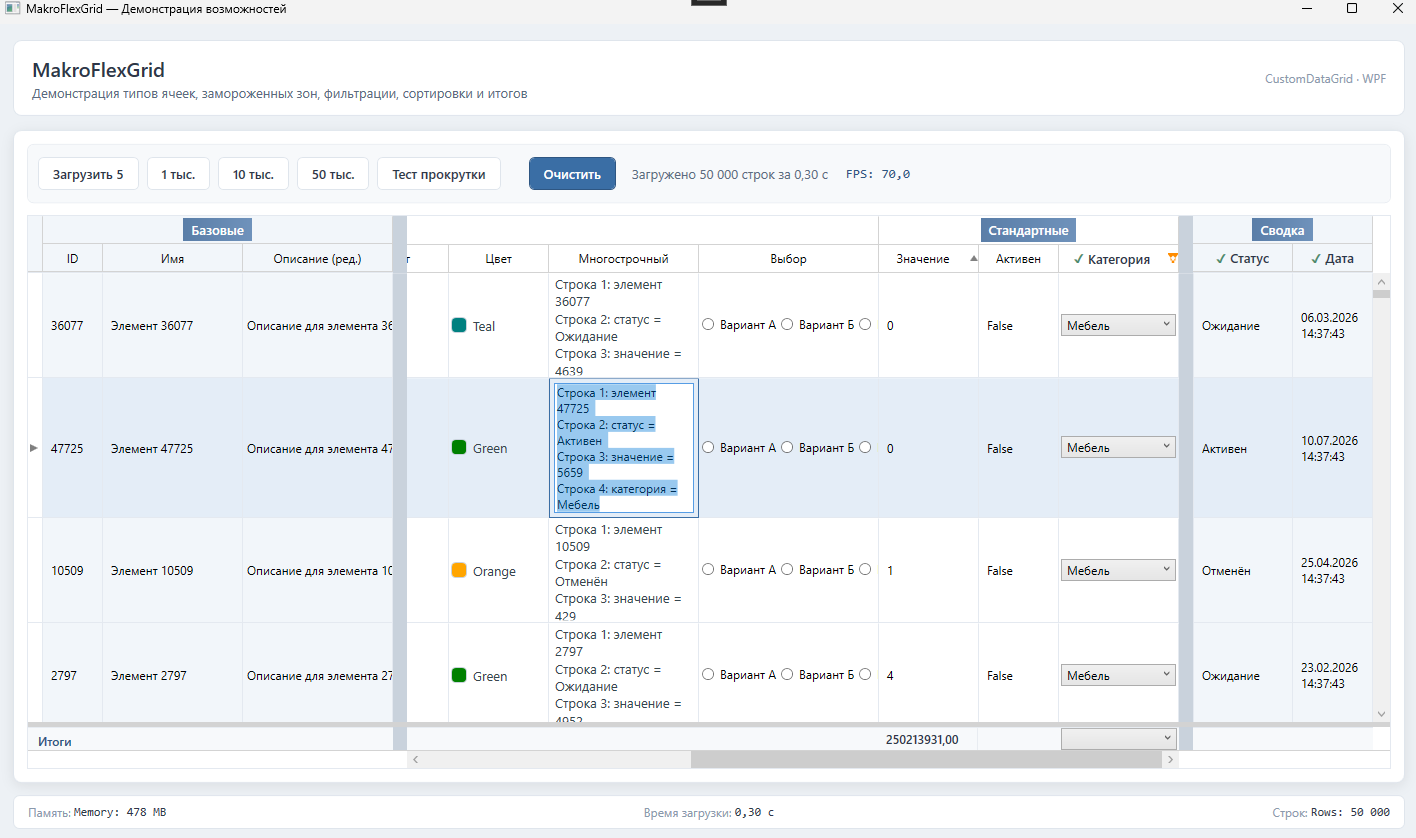
🚀 Features
- Row virtualization — efficient work with large datasets (
UnifiedRowsPresenter). - Hierarchical headers — grouping columns into multiple levels (
ColumnHeaderGroup→ColumnHeaderLeaf). - Column freezing — independent zones: left, the main scrollable area, and right.
- Filtering — built-in filter system: text, numeric (ranges), by date and time.
- Sorting — click on the header with optimized typed comparators.
- Bottom aggregate panel — automatic calculation of
Sum,Average,Min,Max,Count. - Column Drag-and-Drop — column reordering with visual indicators.
- Wide range of cell types — text, numbers, dates, images, checkboxes, radio buttons, combo boxes, ratings, progress, hyperlinks and more.
- Deep customization — via
DataTemplatefor cells, headers and totals. - Localization — support for multiple resource languages.
📦 Installation
dotnet add package MakroFlexGrid
Target platform Windows and WPF are required: net8.0-windows, net9.0-windows or net10.0-windows.
📖 Documentation
The full documentation is organized in docs/:
- Overview & Quick Start — features, installation and first steps.
- Reference — events, selection modes,
CustomDataGridproperty reference, column settings and cell types. - Customization —
CellViewModel/Config, behaviors, custom cell types and 19 examples. - Filtering, Sorting & Aggregates — data operations reference.
- Requirements & License — system requirements and license.
🛠 Requirements
- Windows
- .NET 8, .NET 9 or .NET 10 (with WPF support)
- Visual Studio 2022 or a current version of the
dotnetCLI
📄 License
The project is distributed under the MIT license. See the LICENSE file of the package for details.
Русский
MakroFlexGrid
Высокопроизводительный WPF DataGrid с виртуализацией строк, многоуровневыми заголовками, фильтрацией, сортировкой, агрегатами и широким набором типов ячеек.
MakroFlexGrid построен поверх стандартного DataGrid и предназначен для отображения больших объемов данных с поддержкой сложных иерархических заголовков, замороженных колонок (слева и справа), многоуровневой фильтрации и автоматического расчета агрегатов в нижней панели.
🚀 Возможности
- Виртуализация строк — эффективная работа с большими наборами данных (
UnifiedRowsPresenter). - Иерархические заголовки — группировка колонок в несколько уровней (
ColumnHeaderGroup→ColumnHeaderLeaf). - Заморозка колонок — независимые зоны: слева, основная прокручиваемая область и справа.
- Фильтрация — встроенная система фильтров: текстовые, числовые (диапазоны), по дате и времени.
- Сортировка — клик по заголовку с оптимизированными типизированными компараторами.
- Нижняя панель агрегатов — автоматический расчет
Sum,Average,Min,Max,Count. - Drag-and-Drop колонок — перестановка колонок с визуальными индикаторами.
- Широкий набор типов ячеек — текст, числа, даты, изображения, чекбоксы, радиокнопки, комбобоксы, рейтинги, прогресс, гиперссылки и др.
- Глубокая кастомизация — через
DataTemplateдля ячеек, заголовков и итогов. - Локализация — поддержка нескольких языков ресурсов.
📦 Установка
dotnet add package MakroFlexGrid
Требуется целевая платформа Windows и использование WPF: net8.0-windows, net9.0-windows или net10.0-windows.
📖 Документация
Полная документация организована в docs/:
- Обзор и быстрый старт — возможности, установка и первые шаги.
- Справочник — события, режимы выбора, справочник свойств
CustomDataGrid, настройки колонок и типы ячеек. - Кастомизация —
CellViewModel/Config, поведения, собственные типы ячеек и 19 примеров. - Фильтрация, сортировка и агрегаты — справочник операций с данными.
- Требования и лицензия — системные требования и лицензия.
🛠 Требования
- Windows
- .NET 8, .NET 9 или .NET 10 (с поддержкой WPF)
- Visual Studio 2022 или актуальная версия
dotnetCLI
📄 Лицензия
Проект распространяется под лицензией MIT. Подробности см. в LICENSE-файле пакета.
| Product | Versions Compatible and additional computed target framework versions. |
|---|---|
| .NET | net8.0-windows7.0 is compatible. net9.0-windows was computed. net9.0-windows7.0 is compatible. net10.0-windows was computed. net10.0-windows7.0 is compatible. |
-
net10.0-windows7.0
- No dependencies.
-
net8.0-windows7.0
- No dependencies.
-
net9.0-windows7.0
- No dependencies.
NuGet packages
This package is not used by any NuGet packages.
GitHub repositories
This package is not used by any popular GitHub repositories.
Публикация в NuGet Gallery переведена на Trusted Publishing (OIDC)
через GitHub Actions. Добавлен рабочий процесс publish-nuget.yml,
публикующий пакет при пуше в ветку main.