ModernDataGridView.WinForms
2.0.0
dotnet add package ModernDataGridView.WinForms --version 2.0.0
NuGet\Install-Package ModernDataGridView.WinForms -Version 2.0.0
<PackageReference Include="ModernDataGridView.WinForms" Version="2.0.0" />
<PackageVersion Include="ModernDataGridView.WinForms" Version="2.0.0" />
<PackageReference Include="ModernDataGridView.WinForms" />
paket add ModernDataGridView.WinForms --version 2.0.0
#r "nuget: ModernDataGridView.WinForms, 2.0.0"
#:package ModernDataGridView.WinForms@2.0.0
#addin nuget:?package=ModernDataGridView.WinForms&version=2.0.0
#tool nuget:?package=ModernDataGridView.WinForms&version=2.0.0
ModernDataGridView.WinForms





Stop fighting the legacy DataGridView. Upgrade to a blazing-fast, hardware-accelerated data table with built-in Pagination, Sparklines, Conditional Formatting, and PDF/CSV Export.
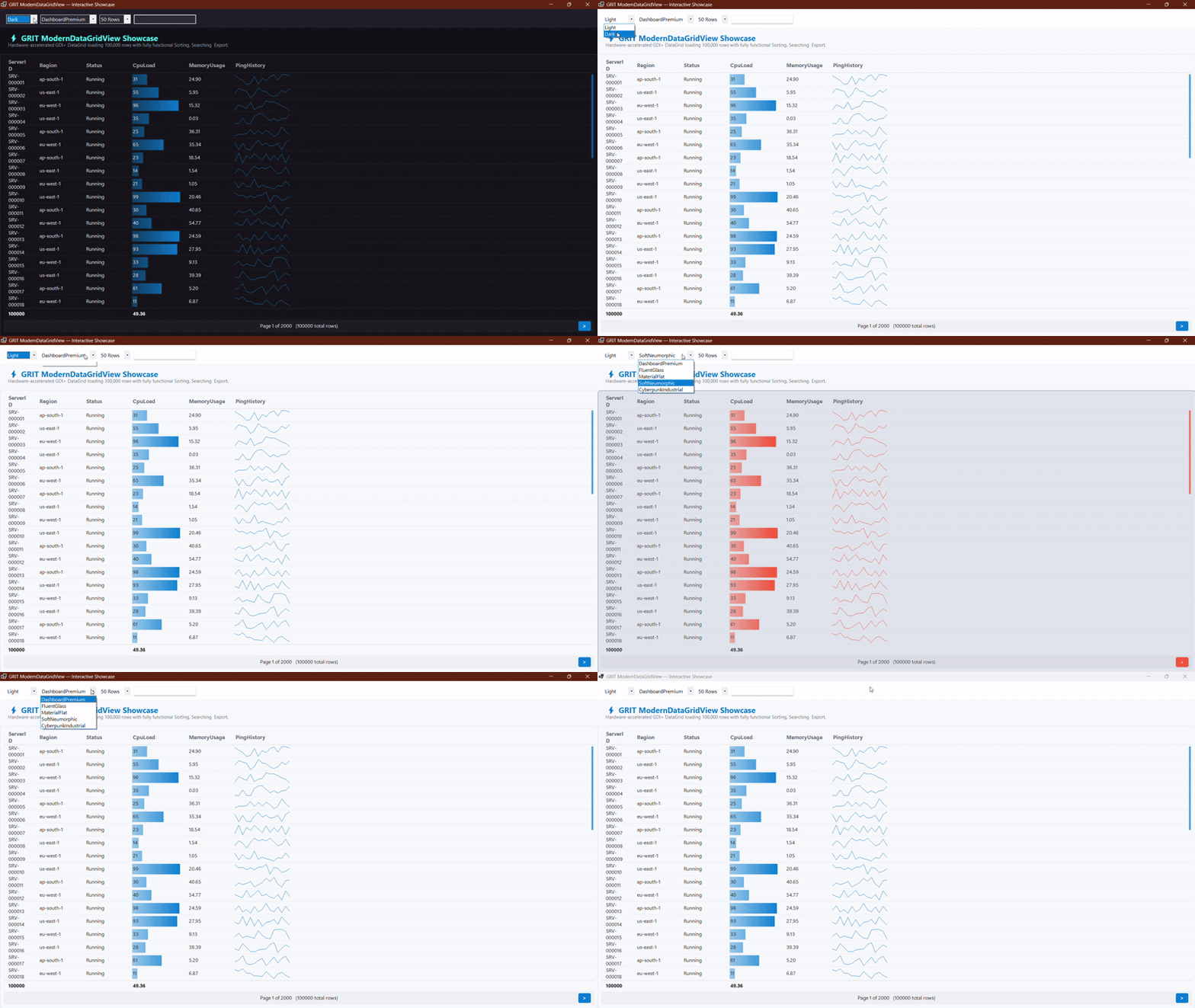
ModernDataGridView Demo (Theme And Style)
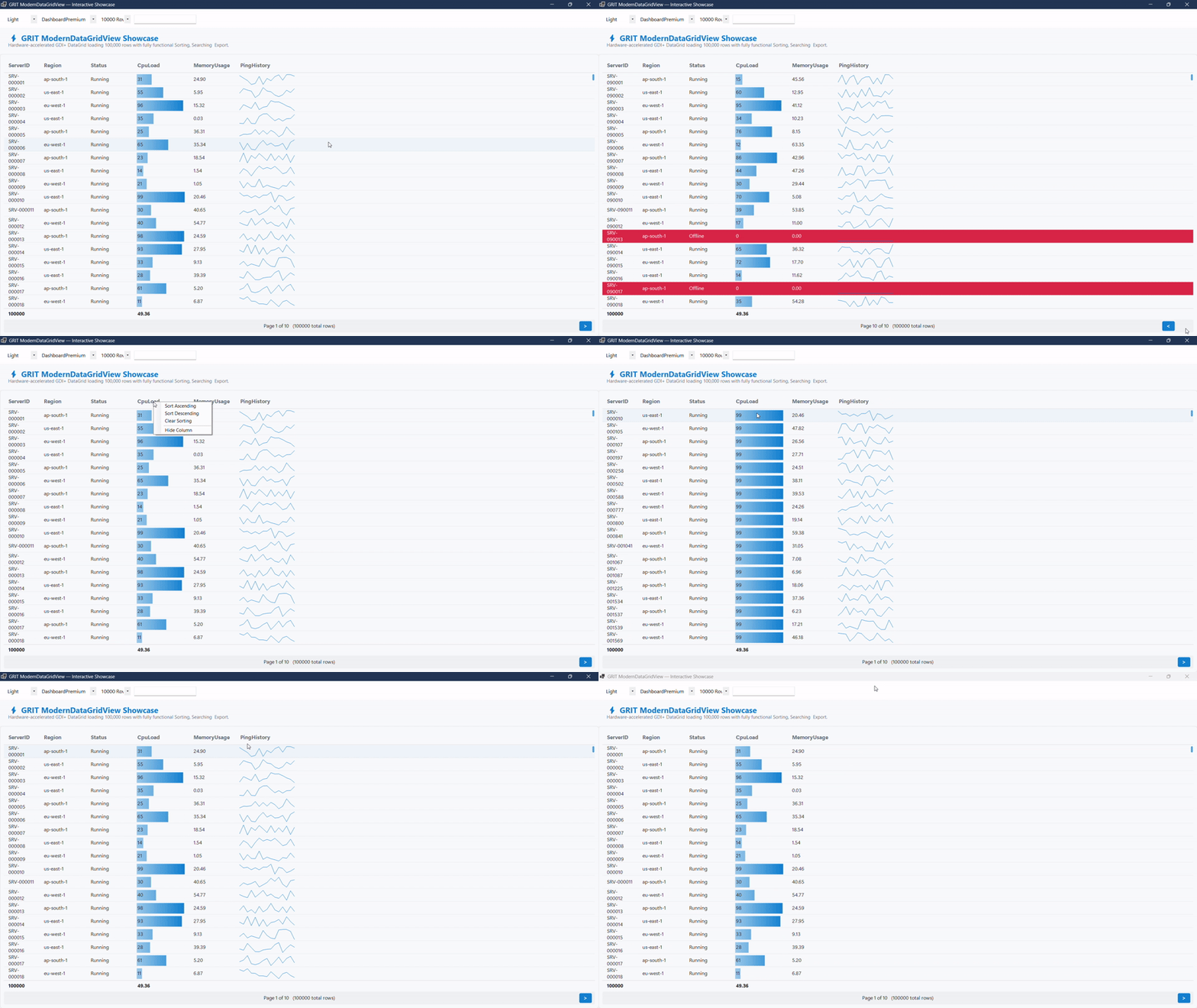
ModernDataGridView Demo (Pagination Features)
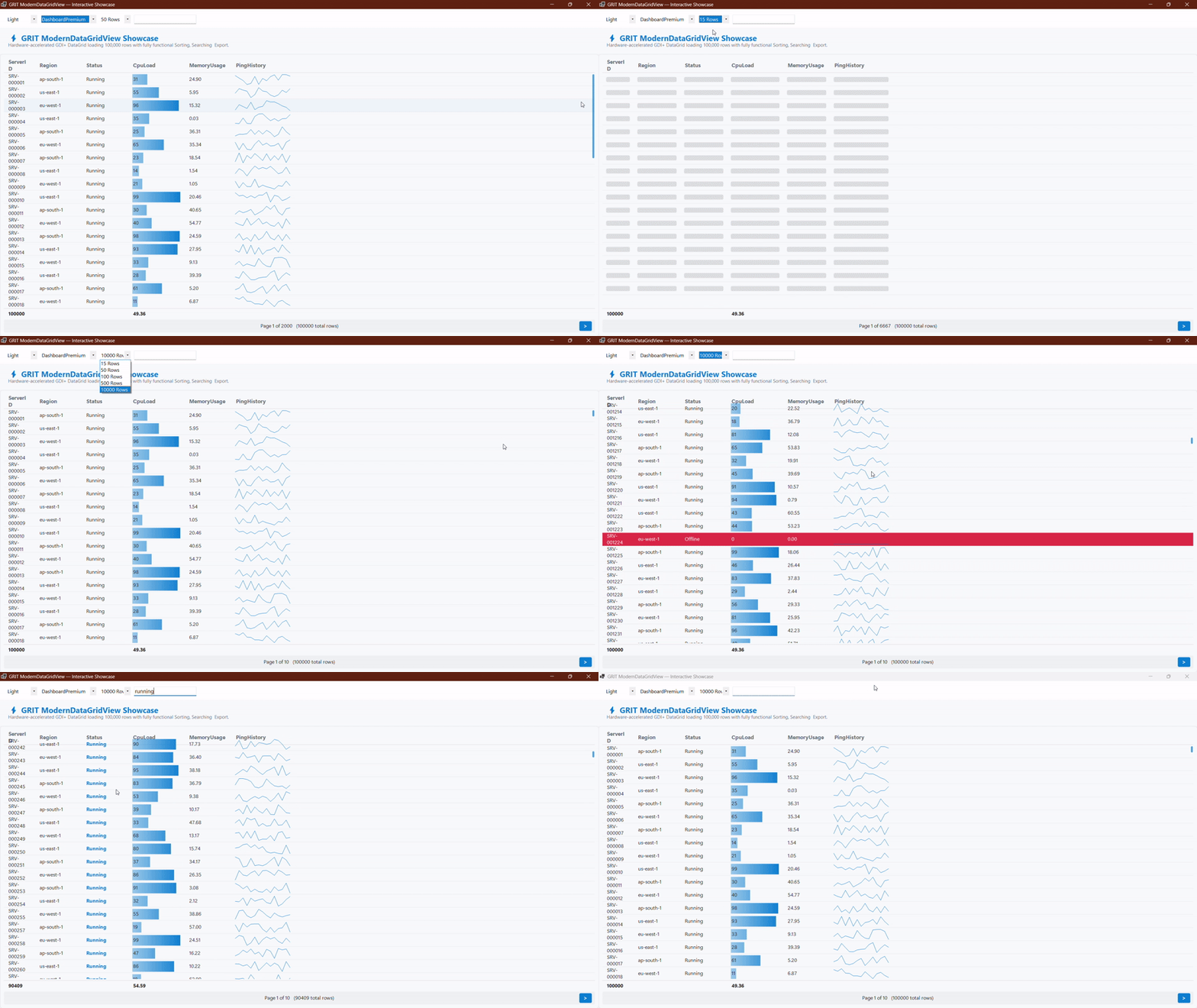
ModernDataGridView Demo (Pagination And Search)
🛑 The Problem with the Standard DataGridView
The default WinForms DataGridView was built over 20 years ago. It flickers constantly, freezes the UI with large datasets, looks terrible on modern OS themes, and requires massive commercial libraries just to add basic features like Pagination, Footer Summaries, or Data Export.
🟢 The Podargus Solution
ModernDataGridView.WinForms is a complete, zero-dependency rewrite of the data table. Engineered from the ground up using pure GDI+ vector graphics, it delivers an enterprise-grade presentation layer that is incredibly fast, visually stunning, and highly functional out of the box.
📦 Installation
Package Manager Console
Install-Package ModernDataGridView.WinForms
.NET CLI
dotnet add package ModernDataGridView.WinForms
📖 Comprehensive Feature Guide & API
1. Async Data Binding & Pagination
Bind to any IEnumerable, List<T>, or DataTable. It uses heavily optimized, thread-safe reflection (compatible with .NET 6/8 AOT Trimming) to load 100,000+ rows asynchronously without freezing your UI.
using Podargus.UI.Controls.WinForms.DataGrid;
using Podargus.UI.Controls.WinForms.DataGrid.Enums;

var grid = new ModernDataGridView
{
    Dock = DockStyle.Fill,
    Theme = ThemeMode.Dark,
    Style = DataGridStyle.DashboardPremium,
    AllowPagination = true,
    PageSize = 50
};

// Bind directly to a list of objects; background threads handle the rest!
grid.DataSource = myServerDataList;
this.Controls.Add(grid);
2. In-Cell Analytics (Sparklines & DataBars)
Turn standard numeric columns into beautiful in-cell graphics without writing custom CellPainting events.
using Podargus.UI.Controls.WinForms.DataGrid.Enums;

// Convert a numeric column into a smooth DataBar
var cpuCol = grid.Columns.FirstOrDefault(c => c.Name == "CpuLoad");
cpuCol.ColType = ColumnType.DataBar;
cpuCol.MinValue = 0;
cpuCol.MaxValue = 100;

// Convert a comma-separated string column ("10,45,20,90") into a vector Sparkline graph
var pingCol = grid.Columns.FirstOrDefault(c => c.Name == "PingHistory");
pingCol.ColType = ColumnType.Sparkline;
3. Conditional Formatting
Highlight critical rows automatically based on cell values:
using Podargus.UI.Controls.WinForms.DataGrid.Models;
using System.Drawing;

// If "Status" equals "Offline", make the whole row Crimson Red
grid.FormatRules.Add(new FormatRule
{
    ColumnName = "Status",
    Operator = "==",
    Value = "Offline",
    BackColor = Color.FromArgb(230, 57, 70),
    ForeColor = Color.White
});
4. Automated Footer Summaries
Instantly calculate aggregates (Sum, Avg, Min, Max, Count) at the bottom of the grid.
grid.Summaries.Add(new ColumnSummary { ColumnName = "CpuLoad", SummaryType = SummaryType.Avg });
grid.Summaries.Add(new ColumnSummary { ColumnName = "ServerID", SummaryType = SummaryType.Count });
5. Multi-Column Header Bands
Group related columns under a shared parent header (Band).
grid.Bands.Add(new Band
{
    Name = "Hardware Metrics",
    Columns = new List<string> { "CpuLoad", "MemoryUsage" }
});
6. Master-Detail Row Expansion
Allow users to right-click a row and select "Expand Details" to reveal a custom sub-panel for charts or extra data.
// 1. Reserve 80 pixels of vertical space when a row is expanded
grid.GetRowDetailsHeight += (rowIndex) => 80;

// 2. Draw your custom UI inside that reserved space
grid.DrawRowDetails += (Graphics g, Rectangle rect, int rowIndex) =>
{
    var rowData = grid.GetRowData(rowIndex);
    g.FillRectangle(Brushes.DarkSlateGray, rect);
    g.DrawString($"Detailed analytics for {rowData[0]}", grid.Font, Brushes.White, rect.X + 10, rect.Y + 10);
};
7. Frozen Columns
Pin columns to the left side so they remain visible during horizontal scrolling.
// Freeze the first column (e.g., Server ID)
grid.FrozenColumnCount = 1;
8. Built-In Export Engine (PDF, CSV, JSON, XML)
Zero dependencies required. Users can right-click to export, or you can trigger it programmatically.
// Opens a Save File dialog to let the user export the current view
grid.ShowExportDialog(DataFormat.PDF);

// Or export silently in the background
grid.ExportData("C:\\reports\\data.csv", DataFormat.CSV);
9. Native Clipboard, Context Menus & Keyboard Shortcuts
Your users expect standard spreadsheet controls. The grid natively handles:
- Right-Click Menus: Sort Ascending/Descending, Hide Columns, Expand Details, Export Data.
- Shortcuts:
Ctrl + C(Copy),Ctrl + V(Paste),Ctrl + Z(Undo),Ctrl + Y(Redo). - Navigation: Arrow Keys for fluid row scrolling.
🎨 Theme & Style Matrix
| Design Style | Aesthetic Concept | Key Visual Characteristics |
|---|---|---|
DashboardPremium |
Modern Executive Suite | Sleek rounded slate surfaces with subtle blue/cyan highlights (Default). |
FluentGlass |
Windows 11 Fluent | Translucent glass container with electric cyan accents and smooth hover states. |
MaterialFlat |
Elevated Material Flat | Sharp, minimalist grid lines with deep purple/indigo selection tokens. |
SoftNeumorphic |
Soft Embossed Surfaces | Organic, borderless data rows with warm coral/orange accent colors. |
Cyberpunk |
High-Voltage Industrial | Stealth black table with high-contrast glowing neon emerald and cyan focus rectangles. |
⚙️ Specifications
| Technical Metric | Underlying Architecture Profile |
|---|---|
| Package Identity | ModernDataGridView.WinForms |
| Component Type | Hardware-Accelerated Custom DataGrid Control |
| Language Target | C# (Optimized for .NET Framework 4.7.2+ & .NET 6.0/8.0+) |
| Rendering Engine | Anti-Aliased Surface Vector Paint Mapping (GDI+) |
| Target Platforms | Microsoft Windows Desktop Environment (WinForms) |
| Dependencies | None (System.Windows.Forms Base Assembly Only) |
📄 License
Distributed under the MIT License. See the repository LICENSE file for details.
📝 Release Notes
v2.0.0
- Rebrand: Transitioned under Podargus (formerly GRIT).
- Namespace: Root namespace updated to
Podargus.UI.WinForms. - Performance: Performance and rendering pipeline stability enhancements.
Developed under the Podargus
Building zero-dependency, ultra-performance developer workflows and premium component layouts.
📢 Brand Notice: This package has officially transitioned from GRIT to Podargus. All future updates, performance enhancements, and developer tooling are maintained under the official Podargus.
| Product | Versions Compatible and additional computed target framework versions. |
|---|---|
| .NET | net6.0-windows7.0 is compatible. net7.0-windows was computed. net8.0-windows was computed. net8.0-windows7.0 is compatible. net9.0-windows was computed. net10.0-windows was computed. |
| .NET Framework | net472 is compatible. net48 is compatible. net481 was computed. |
-
.NETFramework 4.7.2
- No dependencies.
-
.NETFramework 4.8
- No dependencies.
-
net6.0-windows7.0
- No dependencies.
-
net8.0-windows7.0
- No dependencies.
NuGet packages
This package is not used by any NuGet packages.
GitHub repositories
This package is not used by any popular GitHub repositories.
v2.0.0 Release:
- Rebrand:Transitioned under Podargus (formerly GRIT).
- Namespace: Root namespace updated to `Podargus.UI.WinForms`.
- Performance and rendering pipeline stability enhancements.