NuGetUtilities.Core
0.1.6
dotnet add package NuGetUtilities.Core --version 0.1.6
NuGet\Install-Package NuGetUtilities.Core -Version 0.1.6
<PackageReference Include="NuGetUtilities.Core" Version="0.1.6" />
<PackageVersion Include="NuGetUtilities.Core" Version="0.1.6" />
<PackageReference Include="NuGetUtilities.Core" />
paket add NuGetUtilities.Core --version 0.1.6
#r "nuget: NuGetUtilities.Core, 0.1.6"
#:package NuGetUtilities.Core@0.1.6
#addin nuget:?package=NuGetUtilities.Core&version=0.1.6
#tool nuget:?package=NuGetUtilities.Core&version=0.1.6
NuGet Utilities
Powerful cross-platform NuGet Utilities library and Summarizer app


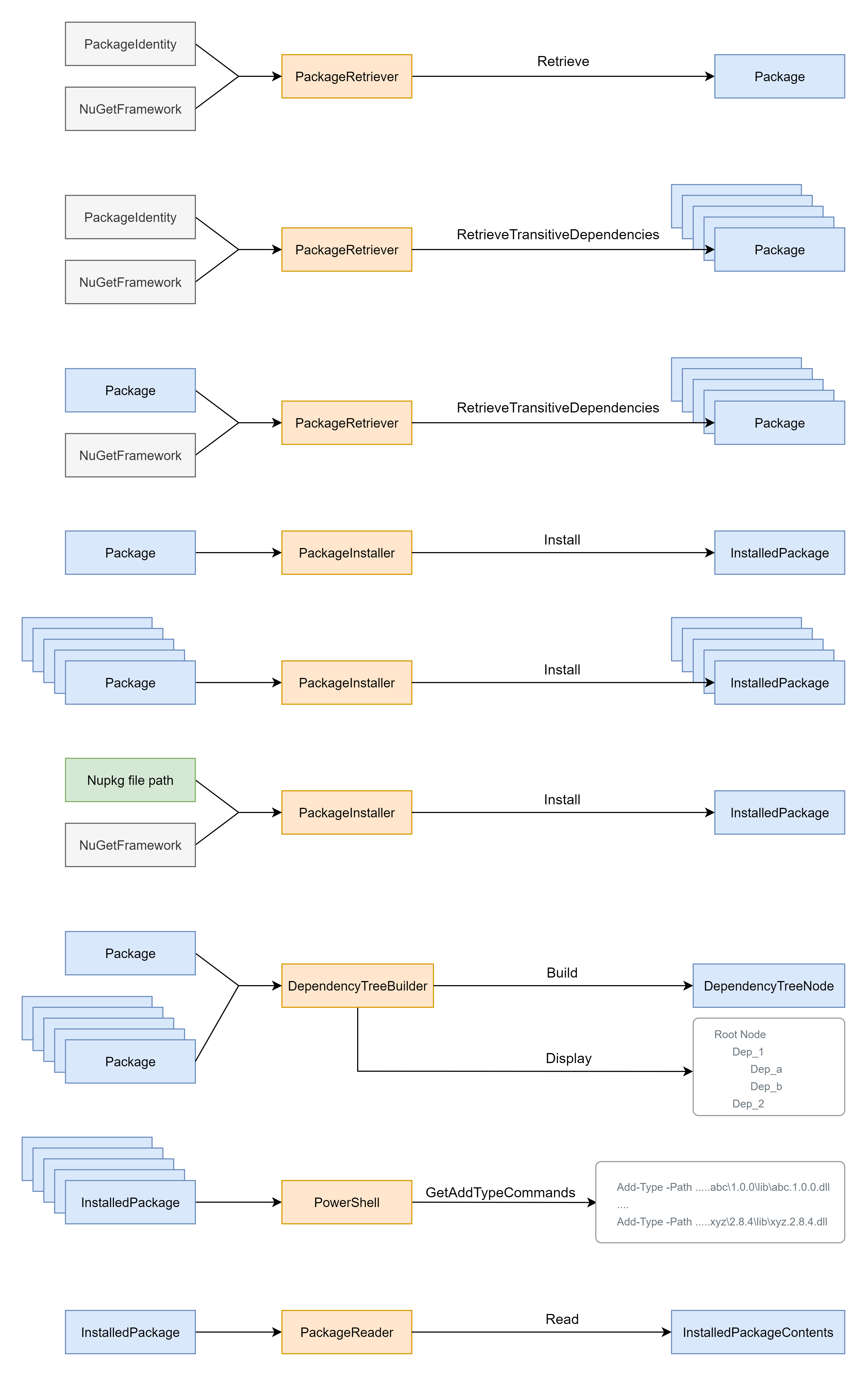
Use the Core library to programmatically retrieve, install and read NuGet packages, determine transitive dependencies, and build the entire dependency tree. The Summarizer console app demonstrates how to use the library and makes it simple to ascertain any of this information without writing code. I used various packages from the NuGet.Client repo. While there is plenty of documentation on how to use the resulting tool(s), there is very little documentation on how to use the libraries.
Motivation
PowerShell lacks the ability to use a NuGet package with transitive dependencies. It can be done, but only if you add each of the transitive dependencies to the PowerShell session as well. There isn't a good solution to this problem, so I set out to create one and give back to the community. The NuGetUtilities.Core library will be used in a PowerShell module to make all of this as easy as possible.
Features
- Full package dependency tree with parent/child relationships
- Formatted summary of a package and its transitive dependencies
- Complete set of assembly file paths for all transitive dependencies
- PowerShell commands needed to import a package (and its required dependencies)
- Retrieve, install and read a package
Getting Started
Clone the repo
git clone https://github.com/KyleKolander/nuget-utilities
cd nuget-utilities
Restore, build, test, pack and publish
scripts\build.ps1 -Runtime win-x64 -Version 0.0.2
Run the Summarizer project
cd src\Summarizer\bin\Release\net5.0\win-x64

.\NuGetUtilities.Summarizer.exe --id MailKit `
                                --version 2.15.0 `
                                --framework net5.0 `
                                --install `
                                --transitive `
                                --tree `
                                --contents `
                                --assemblies `
                                --powerShell
Summarizer output
Transitive Dependencies
============
Microsoft.NETCore.Platforms.2.0.0
Portable.BouncyCastle.1.8.10
System.Buffers.4.5.1
System.Reflection.TypeExtensions.4.4.0
System.Security.Cryptography.Cng.4.7.0
System.Security.Cryptography.Pkcs.4.7.0 : System.Security.Cryptography.Cng [4.7.0, )
System.Text.Encoding.CodePages.4.4.0 : Microsoft.NETCore.Platforms [2.0.0, )
MimeKit.2.15.0 : Portable.BouncyCastle [1.8.10, ), System.Buffers [4.5.1, ), System.Reflection.TypeExtensions [4.4.0, ), System.Security.Cryptography.Pkcs [4.7.0, ), System.Text.Encoding.CodePages [4.4.0, )
MailKit.2.15.0 : MimeKit [2.15.0, )

Dependency Tree
============
mailkit.2.15.0  {net5.0}
    mimekit.2.15.0  [2.15.0, )
        system.security.cryptography.pkcs.4.7.0  [4.7.0, )
            system.security.cryptography.cng.4.7.0  [4.7.0, )
        system.reflection.typeextensions.4.4.0  [4.4.0, )
        system.text.encoding.codepages.4.4.0  [4.4.0, )
            microsoft.netcore.platforms.2.0.0  [2.0.0, )
        system.buffers.4.5.1  [4.5.1, )
        portable.bouncycastle.1.8.10  [1.8.10, )

PowerShell Commands to use NuGet Package: mailkit.2.15.0
================================================================================
Add-Type -Path 'c:\users\kyle\.nuget\packages\portable.bouncycastle\1.8.10\lib\netstandard2.0\BouncyCastle.Crypto.dll'
Add-Type -Path 'c:\users\kyle\.nuget\packages\system.security.cryptography.cng\4.7.0\lib\netcoreapp3.0\System.Security.Cryptography.Cng.dll'
Add-Type -Path 'c:\users\kyle\.nuget\packages\system.security.cryptography.pkcs\4.7.0\lib\netcoreapp3.0\System.Security.Cryptography.Pkcs.dll'
Add-Type -Path 'c:\users\kyle\.nuget\packages\system.text.encoding.codepages\4.4.0\lib\netstandard2.0\System.Text.Encoding.CodePages.dll'
Add-Type -Path 'c:\users\kyle\.nuget\packages\mimekit\2.15.0\lib\net50\MimeKit.dll'
Add-Type -Path 'c:\users\kyle\.nuget\packages\mailkit\2.15.0\lib\net50\MailKit.dll'

*** not all output shown
Code Example
You can accomplish most of these tasks with a single line of code.
var identity               = new PackageIdentity("MailKit", NuGetVersion.Parse("2.15.0"));
var targetFramework        = NuGetFramework.ParseFolder("net5.0");

var retrievedPackage       = await packageRetriever.Retrieve(identity, targetFramework);

var transitiveDependencies = await packageRetriever.RetrieveTransitiveDependencies(retrievedPackage
                                                                                 , targetFramework);

var installedPackages      = await packageInstaller.Install(transitiveDependencies);

var rootNode               = dependencyTreeBuilder.Build(retrievedPackage, transitiveDependencies);
var display                = dependencyTreeBuilder.Display;

var commands               = PowerShell.GetAddTypeCommands(installedPackages);

var authors                = installedPackageContents.NuspecReader.GetAuthors();
API Reference
| Product | Versions Compatible and additional computed target framework versions. |
|---|---|
| .NET | net5.0 is compatible. net5.0-windows was computed. net6.0 was computed. net6.0-android was computed. net6.0-ios was computed. net6.0-maccatalyst was computed. net6.0-macos was computed. net6.0-tvos was computed. net6.0-windows was computed. net7.0 was computed. net7.0-android was computed. net7.0-ios was computed. net7.0-maccatalyst was computed. net7.0-macos was computed. net7.0-tvos was computed. net7.0-windows was computed. net8.0 was computed. net8.0-android was computed. net8.0-browser was computed. net8.0-ios was computed. net8.0-maccatalyst was computed. net8.0-macos was computed. net8.0-tvos was computed. net8.0-windows was computed. net9.0 was computed. net9.0-android was computed. net9.0-browser was computed. net9.0-ios was computed. net9.0-maccatalyst was computed. net9.0-macos was computed. net9.0-tvos was computed. net9.0-windows was computed. net10.0 was computed. net10.0-android was computed. net10.0-browser was computed. net10.0-ios was computed. net10.0-maccatalyst was computed. net10.0-macos was computed. net10.0-tvos was computed. net10.0-windows was computed. |
-
net5.0
- Microsoft.Extensions.Logging.Abstractions (>= 5.0.0)
- NuGet.DependencyResolver.Core (>= 5.11.0)
- NuGet.Frameworks (>= 5.11.0)
- NuGet.PackageManagement (>= 5.11.0)
- NuGet.Packaging (>= 5.11.0)
NuGet packages
This package is not used by any NuGet packages.
GitHub repositories
This package is not used by any popular GitHub repositories.