Our.Umbraco.LoginBranding
1.0.0
dotnet add package Our.Umbraco.LoginBranding --version 1.0.0
NuGet\Install-Package Our.Umbraco.LoginBranding -Version 1.0.0
<PackageReference Include="Our.Umbraco.LoginBranding" Version="1.0.0" />
<PackageVersion Include="Our.Umbraco.LoginBranding" Version="1.0.0" />
<PackageReference Include="Our.Umbraco.LoginBranding" />
paket add Our.Umbraco.LoginBranding --version 1.0.0
#r "nuget: Our.Umbraco.LoginBranding, 1.0.0"
#:package Our.Umbraco.LoginBranding@1.0.0
#addin nuget:?package=Our.Umbraco.LoginBranding&version=1.0.0
#tool nuget:?package=Our.Umbraco.LoginBranding&version=1.0.0
Umbraco Login Branding
White-label the Umbraco backoffice login screen (/umbraco) without touching appsettings.json or writing code.
Editors open Content → Login Branding, pick images from the Media library, set greeting copy, preview desktop/mobile, and Save.
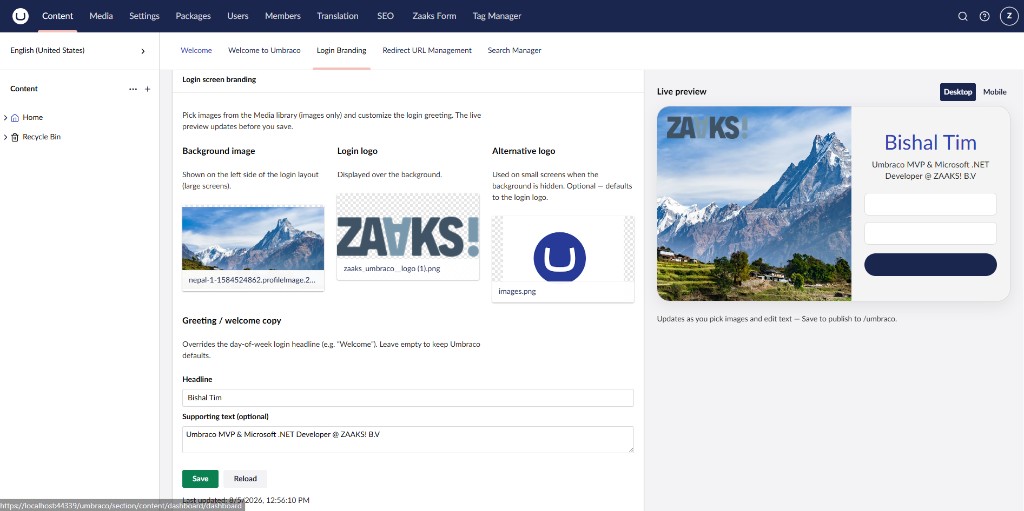
Features
- Background + logo from the Media library (images only — same picker UI as Media Picker)
- Alternative logo for small screens (optional)
- Custom greeting and supporting text under the headline
- Live preview (desktop / mobile) before you save
- No Node / npm — plain JS App_Plugins + Razor Class Library
- Applies on the public login screen via an
appEntryPoint, and maps into UmbracoContentSettingson restart
Requirements
- Umbraco CMS 17.4+ (built against 17.4.0)
- .NET 10
Install
dotnet add package Our.Umbraco.LoginBranding
Restart the site after install. Open Content → Login Branding.
How editors use it
- Open Content → Login Branding
- Choose background, login logo, and optional alternative logo
- Set headline / supporting text (or leave empty for Umbraco defaults)
- Check the live preview → Save
- Open
/umbraco(private window) to verify
What gets stored
| Location | Purpose |
|---|---|
App_Data/UmbracoLoginBranding/settings.json |
Persisted media keys, URLs, greeting |
wwwroot/media/umbraco-login-branding/ |
Generated CSS + branding.json for the login entrypoint |
wwwroot/App_Plugins/UmbracoLoginBrandingRuntime/ |
Generated localization overrides (greeting; picked up after restart) |
License
MIT — see LICENSE.
Repository: github.com/BishalTimalsina12/Umbraco.LoginBranding
<img src="https://raw.githubusercontent.com/BishalTimalsina12/Umbraco.LoginBranding/main/assets/login_branding_package_icon_umbraco.png" alt="Package icon" width="72" />
| Product | Versions Compatible and additional computed target framework versions. |
|---|---|
| .NET | net10.0 is compatible. net10.0-android was computed. net10.0-browser was computed. net10.0-ios was computed. net10.0-maccatalyst was computed. net10.0-macos was computed. net10.0-tvos was computed. net10.0-windows was computed. |
-
net10.0
- Umbraco.Cms.Api.Common (>= 17.4.0)
- Umbraco.Cms.Api.Management (>= 17.4.0)
- Umbraco.Cms.Web.Common (>= 17.4.0)
- Umbraco.Cms.Web.Website (>= 17.4.0)
NuGet packages
This package is not used by any NuGet packages.
GitHub repositories
This package is not used by any popular GitHub repositories.
| Version | Downloads | Last Updated |
|---|---|---|
| 1.0.0 | 307 | 8/5/2026 |
Initial release: Media-picker login branding dashboard with live preview, custom greeting/supporting text, Image-only picks, and public login entrypoint.