PackCheck 4.2.2
dotnet tool install --global PackCheck --version 4.2.2
dotnet new tool-manifest
dotnet tool install --local PackCheck --version 4.2.2
#tool dotnet:?package=PackCheck&version=4.2.2
nuke :add-package PackCheck --version 4.2.2

PackCheck


Check for newer versions of installed NuGet Packages in your Terminal.
PackCheck is a dotnet tool for checking versions of installed NuGet packages in your .NET projects in your terminal.
The check command (default) shows you all NuGet packages in a nice table with the current, latest stable and latest versions of each package.
You can upgrade the .csproj (or Directory.Packages.props if you use Central Package Management) file with the upgrade command to your desired target versions. Whether to the latest stable or latest version, only a specific
package or all at once.
Installation
You can install PackCheck as a dotnet tool via NuGet:
# Install
dotnet tool install --global PackCheck

# Update
dotnet tool update --global PackCheck
Usage
In your terminal cd into a .NET project or .NET solution and run:
packcheck

# or

packcheck c

# or

packcheck check
This should give you something like this:
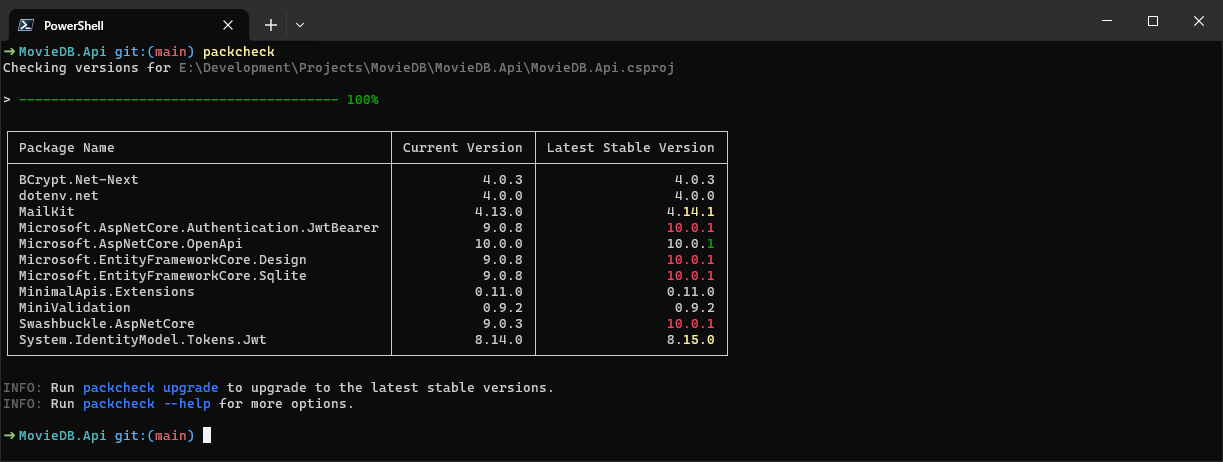
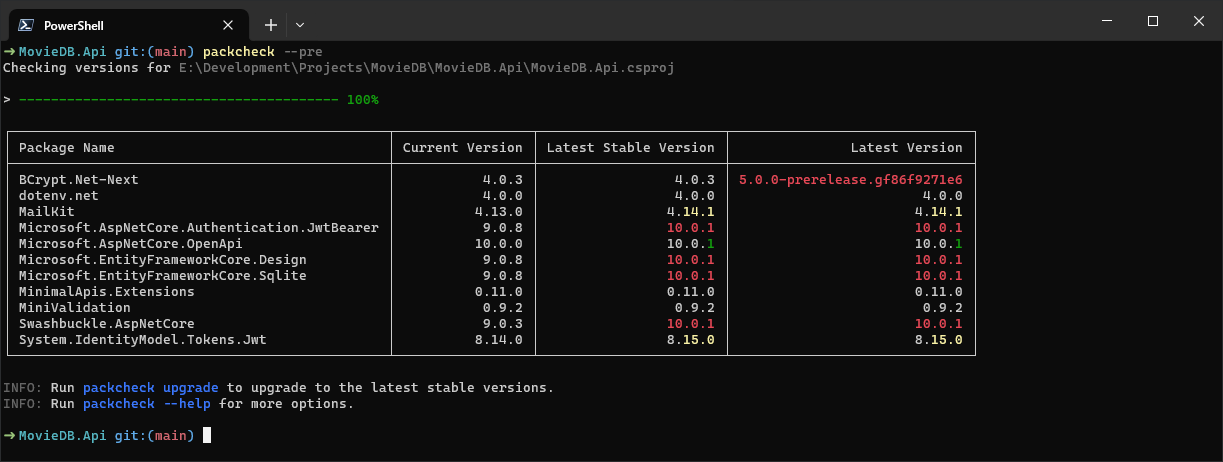
If you also want to see the latest version, which includes prereleases, use the --pre flag:
packcheck --pre
This should give you something like this:
To check versions of a file-based app you need to provide the path to the file:
packcheck --fbaFile app.cs
After that you can upgrade the package versions in the .csproj file (or .csproj files in a solution, the Directory.Packages.props file or the given file-based app file) to their corresponding stable versions by running:
This changes your .csproj file(s) or the Directory.Packages.props or the provided file-based app file!
packcheck upgrade

# or

packcheck u

# For file-based app you need to provide the path to the file
packcheck u --fbaFile app.cs
To upgrade to the latest versions run:
packcheck upgrade --target latest

# or

packcheck u --target latest
For a dry-run, which outputs the .csproj file (or the Directory.Packages.props, or the changes of a file-based app file) into the terminal without actually changing the file, run:
packcheck upgrade --dry-run

# or

packcheck u --dry-run
To use interactive mode, where you can select each package you want to upgrade, run:
packcheck upgrade -i

# or

packcheck u -i

# or to upgrade to the latest versions

packcheck u --target latest -i
To select packages which should be checked or upgraded, run:
packcheck --filter "NuGet.Version" -f "Microsoft.Logging"

# or use a wildcard

packcheck --filter "Microsoft.*"
To exclude packages which should not be checked or upgraded, run:
packcheck --exclude "NuGet.Version" -x "Microsoft.Logging"

# or use a wildcard

packcheck --exclude "Microsoft.*"
To format the output of the check command, use the --format option. Currently only group is supported, which groups the packages by patch, minor and major versions.
packcheck --format group
To show the latest versions in the output of the check command, use the --pre option, otherwise only the current and latest stable columns will be shown.
packcheck --pre
If the installed version is a prerelease and there is no newer stable version yet, the latest stable column shows the newest prerelease. That is the version packcheck upgrade upgrades to.
Output for scripts and LLM agents
With --output json or --output markdown, check and upgrade print only the result, as one document: no progress bar, no status lines and no hints. This makes PackCheck easy to use from scripts, CI jobs and LLM agents.
packcheck --output json
{
  "command": "check",
  "files": [
    {
      "path": "src/App/App.csproj",
      "packages": [
        {
          "name": "NuGet.Protocol",
          "currentVersion": "6.2.1",
          "latestStableVersion": "7.6.0",
          "latestVersion": "7.6.0",
          "upgradeType": "major"
        }
      ]
    }
  ],
  "error": null
}
checklists the outdated packages of each file.upgradeTypeismajor,minororpatchand follows--preand--target, like the table.upgradelists the upgraded packages withcurrentVersionandnewVersion, plustargetanddryRun. With--dry-run, no file is changed and the document shows what would change.--interactivecannot be combined with--output jsonormarkdown.- Paths are relative to the current directory. A file without anything to do has an empty
packageslist. - On an error,
errorcontains the message and the exit code is-1. Otherwiseerrorisnulland the exit code is0. --output markdownprints the same as Markdown tables, one section per file, e.g. for pull request comments or job summaries.--format groupalso groups the Markdown output, with a### Patch/### Minor/### Majorsection per file. It does not change the JSON document, where each package already has itsupgradeType.
Configuration
You can configure PackCheck via a .packcheckrc.{json} file. Example:
{
  "CsProjFile": "path/to/Project.csproj",
  "SlnFile": "path/to/Project.sln",
  "SlnxFile": "path/to/Project.slnx",
  "CpmFile": "path/to/Directory.Packages.props",
  "FbaFile": "path/to/file-based-app.cs",
  "Filter": ["NuGet.Version", "Microsoft.*"],
  "Exclude": ["Microsoft.Logging", "Telerik.*"],
  "Format": "group",
  "Pre": true,
  "Output": "json"
}
Filter supports wildcard patterns via * or %, for example "Microsoft.*" to include all Microsoft packages.
Exclude supports wildcard patterns via * or %, for example "Telerik.*" to exclude all Telerik packages.
Both ignore case, like NuGet package IDs.
For help run:
packcheck -h
Color Highlighting
| Color | Description |
|---|---|
| red | Major (Breaking changes) |
| yellow | Minor (New features, but backwards compatible) |
| green | Patch (Backwards compatible bug fixes only) |
LICENSE
MIT
| Product | Versions Compatible and additional computed target framework versions. |
|---|---|
| .NET | net8.0 is compatible. net8.0-android was computed. net8.0-browser was computed. net8.0-ios was computed. net8.0-maccatalyst was computed. net8.0-macos was computed. net8.0-tvos was computed. net8.0-windows was computed. net9.0 is compatible. net9.0-android was computed. net9.0-browser was computed. net9.0-ios was computed. net9.0-maccatalyst was computed. net9.0-macos was computed. net9.0-tvos was computed. net9.0-windows was computed. net10.0 is compatible. net10.0-android was computed. net10.0-browser was computed. net10.0-ios was computed. net10.0-maccatalyst was computed. net10.0-macos was computed. net10.0-tvos was computed. net10.0-windows was computed. |
This package has no dependencies.
| Version | Downloads | Last Updated |
|---|---|---|
| 4.2.2 | 86 | 10/19/2026 |
| 4.2.1 | 75 | 10/19/2026 |
| 4.2.0 | 88 | 10/18/2026 |
| 4.1.0 | 81 | 10/18/2026 |
| 4.0.1 | 81 | 10/18/2026 |
| 4.0.0 | 80 | 10/18/2026 |
| 3.2.0 | 288 | 7/23/2026 |
| 3.1.5 | 170 | 4/17/2026 |
| 3.1.4 | 213 | 2/8/2026 |
| 3.1.3 | 156 | 1/29/2026 |
| 3.1.2 | 207 | 12/21/2025 |
| 3.1.1 | 218 | 12/13/2025 |
| 3.1.0 | 166 | 12/13/2025 |
| 3.0.3 | 298 | 11/14/2025 |
| 3.0.2 | 223 | 10/12/2025 |
| 3.0.1 | 210 | 9/12/2025 |
| 3.0.0 | 198 | 9/12/2025 |
| 2.4.1 | 212 | 9/12/2025 |
| 2.4.0 | 284 | 6/7/2025 |
| 2.3.1 | 264 | 6/3/2025 |