Polhem.Markdown.Blazor
0.3.1
dotnet add package Polhem.Markdown.Blazor --version 0.3.1
NuGet\Install-Package Polhem.Markdown.Blazor -Version 0.3.1
<PackageReference Include="Polhem.Markdown.Blazor" Version="0.3.1" />
<PackageVersion Include="Polhem.Markdown.Blazor" Version="0.3.1" />
<PackageReference Include="Polhem.Markdown.Blazor" />
paket add Polhem.Markdown.Blazor --version 0.3.1
#r "nuget: Polhem.Markdown.Blazor, 0.3.1"
#:package Polhem.Markdown.Blazor@0.3.1
#addin nuget:?package=Polhem.Markdown.Blazor&version=0.3.1
#tool nuget:?package=Polhem.Markdown.Blazor&version=0.3.1
Polhem.Markdown.Blazor
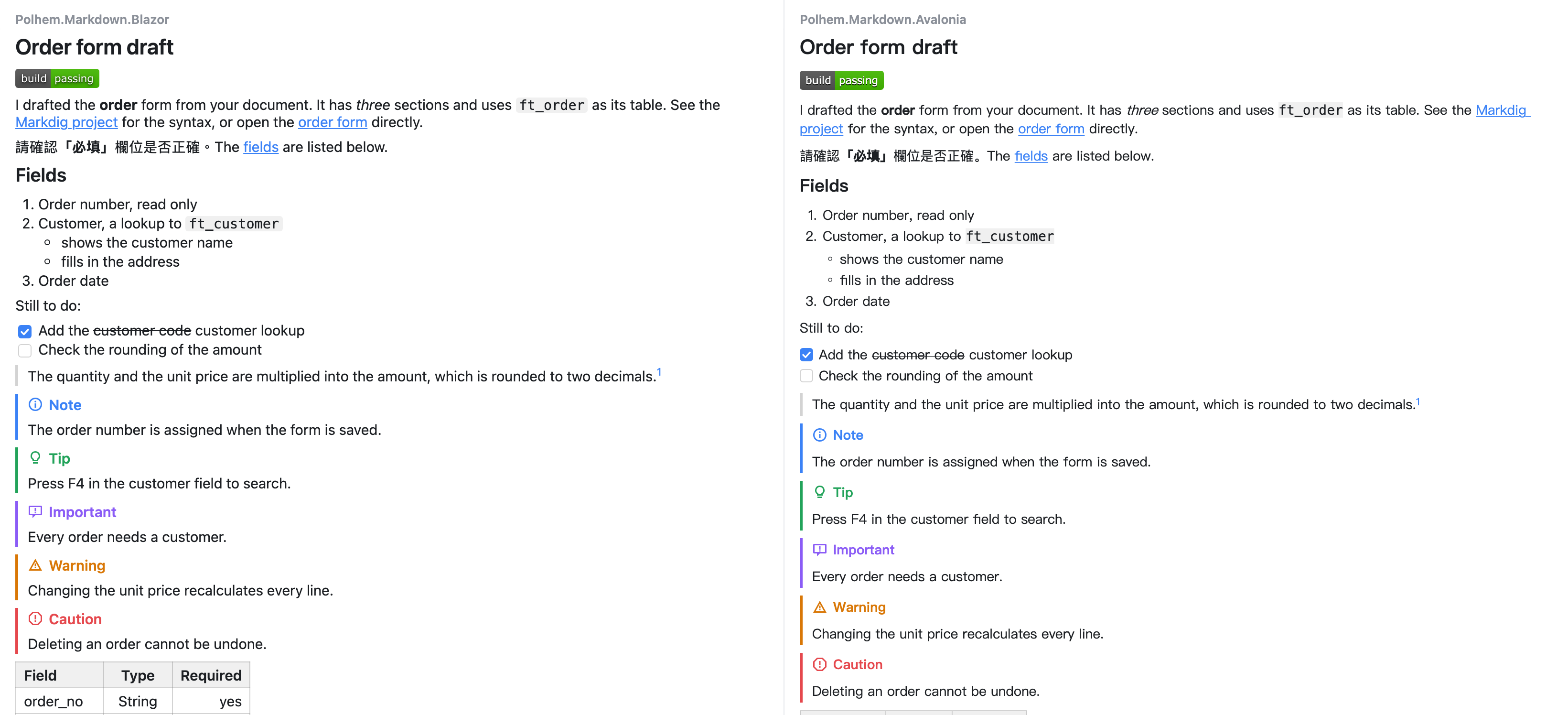
A Markdown viewer component that renders semantic HTML styled with CSS variables, and a Markdown source editor
component, for Blazor. The viewer renders the same model as Polhem.Markdown.Avalonia, so a Blazor and an Avalonia
front end show the same text the same way.
Link the stylesheet in the host page:
<link rel="stylesheet" href="_content/Polhem.Markdown.Blazor/polhem-markdown.css" />
MarkdownViewer
Shows Markdown: GitHub Flavored Markdown, highlighted code, math as MathML, Mermaid diagrams as SVG and the HTML that README files use, all drawn without a script. Raw HTML is never added as markup, and only links and images with an allowed scheme become links and images.
@using Polhem.Markdown
@using Polhem.Markdown.Blazor
@inject NavigationManager Navigation

<MarkdownViewer Markdown="@reply" Options="options" OnLinkActivated="OpenLink" />

@code {
    private string reply = "# Hello";

    // Resolve relative links and images against the document's address.
    private readonly MarkdownOptions options = new() { BaseUri = new Uri("https://example.com/docs/") };

    // With OnLinkActivated set, a click does not navigate; without it, the link opens in a new tab.
    private void OpenLink(MarkdownLinkActivatedEventArgs e) => Navigation.NavigateTo(e.Uri.ToString());
}
The viewer inherits the font and the text color of the page. The other colors and fonts are CSS variables; their list
and defaults are at the top of polhem-markdown.css:
.pmd {
  --pmd-link: #0969da;
  --pmd-code-font: "JetBrains Mono", monospace;
}
MarkdownEditor
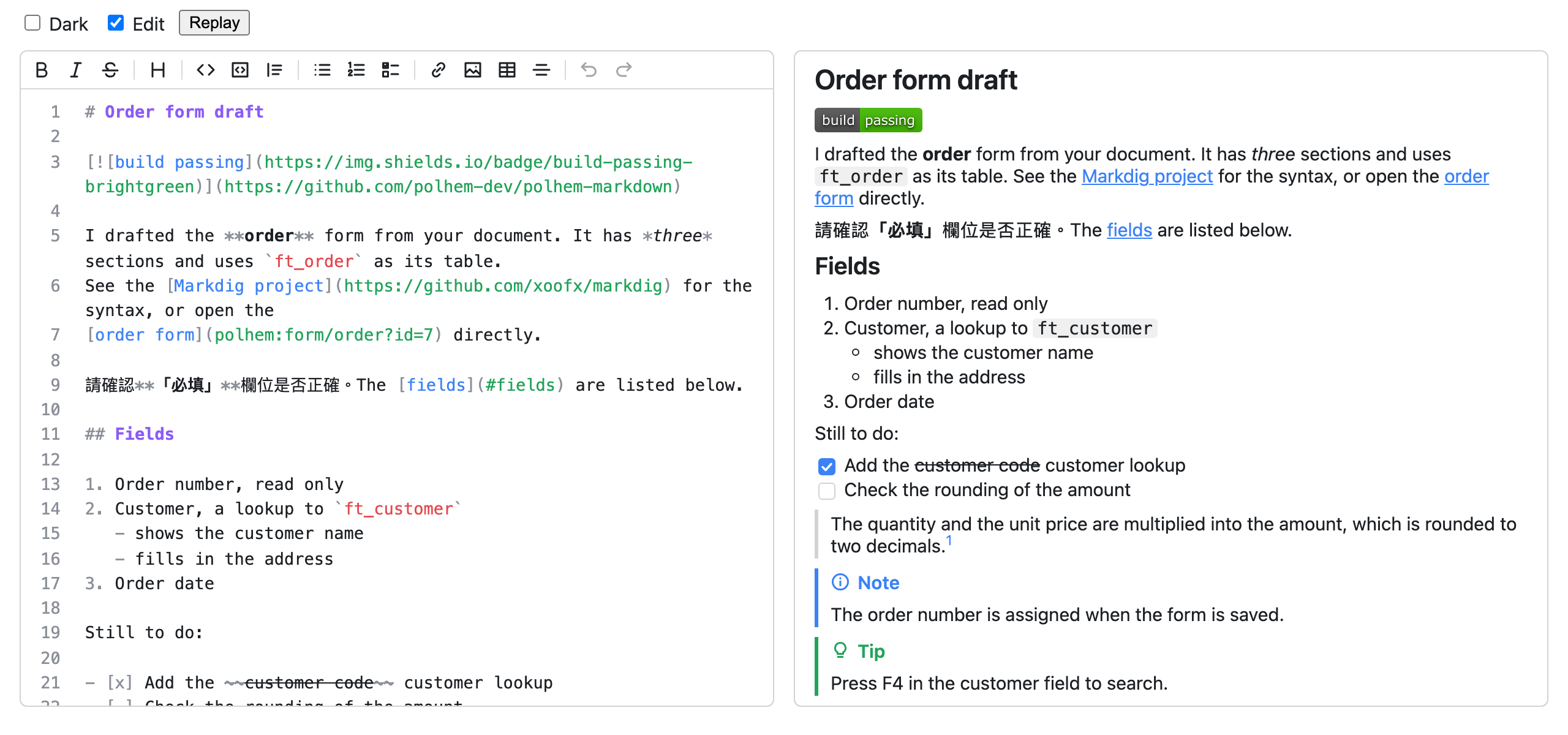
Edits Markdown as source in a native <textarea>, colored the way the viewer reads it, with a toolbar, line numbers,
format commands and list keys. It works under interactive server, WebAssembly and auto rendering. Put a MarkdownViewer beside it for a live
preview:
<div style="display: grid; grid-template-columns: 1fr 1fr; height: 30rem">
    <MarkdownEditor @ref="editor" @bind-Markdown="text" aria-label="Markdown source" />
    <MarkdownViewer Markdown="@text" />
</div>

@code {
    private MarkdownEditor editor = default!;
    private string text = "# Hello";

    // Toggles bold on the selection, as Ctrl+B or Command+B does.
    private Task Bold() => editor.ApplyFormatAsync(MarkdownFormat.Bold);
}
The toolbar's labels are English; give your own, or null to keep one. Set ShowToolbar="false" to lay out buttons of
your own instead:
<MarkdownEditor @bind-Markdown="text" ToolbarLabels="Label" />

@code {
    private static string? Label(MarkdownToolbarItem item) => item switch
    {
        MarkdownToolbarItem.Bold => "粗體",
        MarkdownToolbarItem.Italic => "斜體",
        _ => null,
    };
}
The editor fills the height its host gives it, and loads its own script module. Keep --pmd-code-font monospaced: the
colors are drawn behind the textarea and must line up with it. The gallery in the repository keeps the editor and the
viewer scrolling together.
Each member's XML documentation has the details. The package is at 0.x: a minor version may still change the API. See the repository.
| Product | Versions Compatible and additional computed target framework versions. |
|---|---|
| .NET | net10.0 is compatible. net10.0-android was computed. net10.0-browser was computed. net10.0-ios was computed. net10.0-maccatalyst was computed. net10.0-macos was computed. net10.0-tvos was computed. net10.0-windows was computed. |
-
net10.0
- Microsoft.AspNetCore.Components.Web (>= 10.0.1)
- Polhem.Markdown (= 0.3.1)
NuGet packages
This package is not used by any NuGet packages.
GitHub repositories
This package is not used by any popular GitHub repositories.