PureLogicTek.DapperPipeline
1.12.0
dotnet add package PureLogicTek.DapperPipeline --version 1.12.0
NuGet\Install-Package PureLogicTek.DapperPipeline -Version 1.12.0
<PackageReference Include="PureLogicTek.DapperPipeline" Version="1.12.0" />
<PackageVersion Include="PureLogicTek.DapperPipeline" Version="1.12.0" />
<PackageReference Include="PureLogicTek.DapperPipeline" />
paket add PureLogicTek.DapperPipeline --version 1.12.0
#r "nuget: PureLogicTek.DapperPipeline, 1.12.0"
#:package PureLogicTek.DapperPipeline@1.12.0
#addin nuget:?package=PureLogicTek.DapperPipeline&version=1.12.0
#tool nuget:?package=PureLogicTek.DapperPipeline&version=1.12.0
DapperPipeline
SQL orchestration layer for Dapper. A string cannot reach your SQL — plus fluent multi-command transactions, auto-parameterization, bulk inserts, retry and multi-result-set mapping.
SQL injection, deleted at compile time
builder.Append($"...") is not string interpolation. It is a custom
[InterpolatedStringHandler]
whose overloads accept safe types only. There is no AppendFormatted(string) — so a bare string
in an interpolation hole has nothing to bind to, and the code does not build.
// ✅ Compiles. Auto-parameterized — never concatenated.
builder.Append($"WHERE Id = {orderId} AND Status = {status.SqlParam()}");
//  emits:  WHERE Id = @p001_OrderId AND Status = @p001_Status
//  bound:  @p001_OrderId = 4711, @p001_Status = "shipped"
// ❌ Does not compile. `status` is a bare string in a hole — there is no overload that takes one.
builder.Append($"WHERE Status = '{status}'");
//                               ^^^^^^^^
//        error CS1503: cannot convert from 'string' to 'DapperPipeline.Interpolation.SqlText'
This is not a lint rule, an analyzer, or a runtime check you can forget to enable. It is the type system. The unsafe version has no meaning to the compiler, so it cannot ship, cannot be code-reviewed past, and cannot be reintroduced by someone in a hurry at 5pm.
Both blocks above are compiled by the test suite on every build — the good one must build, the bad one must fail. If that ever stopped being true, the tests break. See
ReadmeCompilationTests.
Why a string, and only a string, has to say what it is
int, Guid, DateTime, and any ISqlBindable go straight into a hole — there is nothing to ask,
because none of them could ever be a table name. A string could be either:
builder.Append($"WHERE Name = {status}");   // a value?
builder.Append($"ORDER BY {status}");       // ...or a column name?
Same type, opposite meanings, and getting it wrong is how injections happen. So the compiler makes you
answer — and both answers are one keystroke away in IntelliSense, the moment you type status.:
| Need | Write | Result |
|---|---|---|
| A string value | name.SqlParam() |
bound as a parameter — this is what you want, almost always |
| A table/column name | table.SqlIdentifier() |
validated against [A-Za-z_][A-Za-z0-9_]*, then emitted raw |
| Genuinely raw SQL | builder.AppendRaw(sql) |
verbatim — explicit, greppable, reviewable |
Sql.Identifier(x) is the same identifier door spelled as a static call. (Sql.Text(x) was the old
name for .SqlParam() — it still works, but it is deprecated: Text describes the input, which you
already knew, where SqlParam describes what happens to it.)
The identifier door is validated, not raw: a payload like name'; DROP TABLE orders-- throws at the
boundary, before any SQL is built. That is why it is safe to have it sit next to the value door in
autocomplete — the alternative is a developer who needs a dynamic column name reaching for AppendRaw,
which validates nothing at all.
And it is not slower
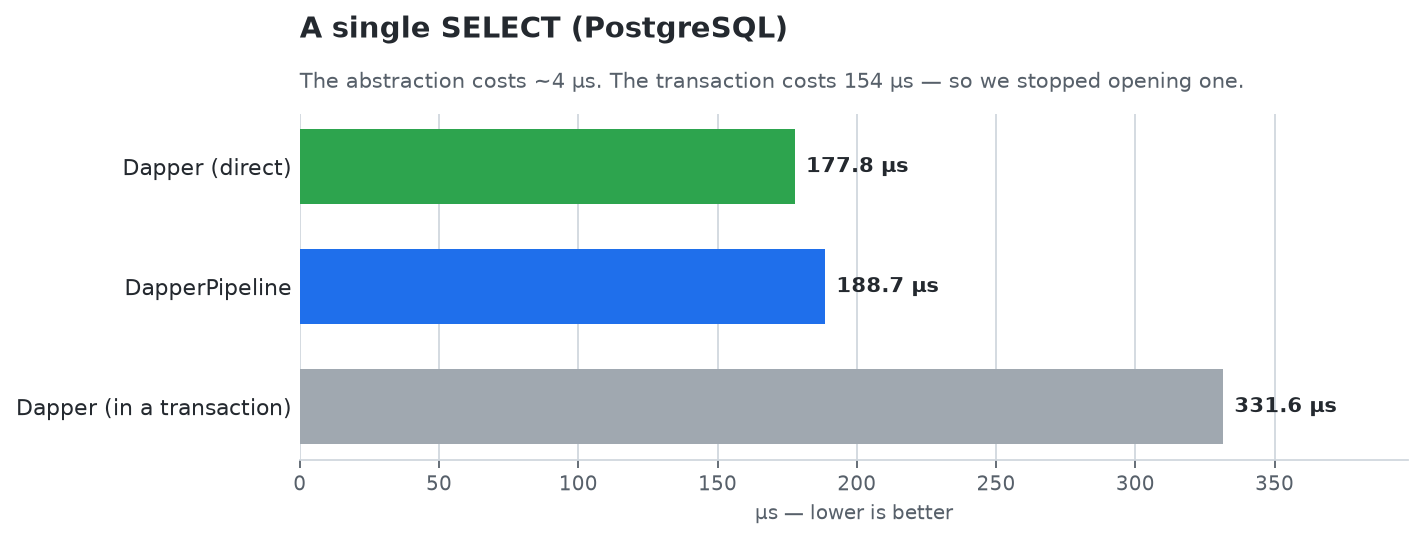
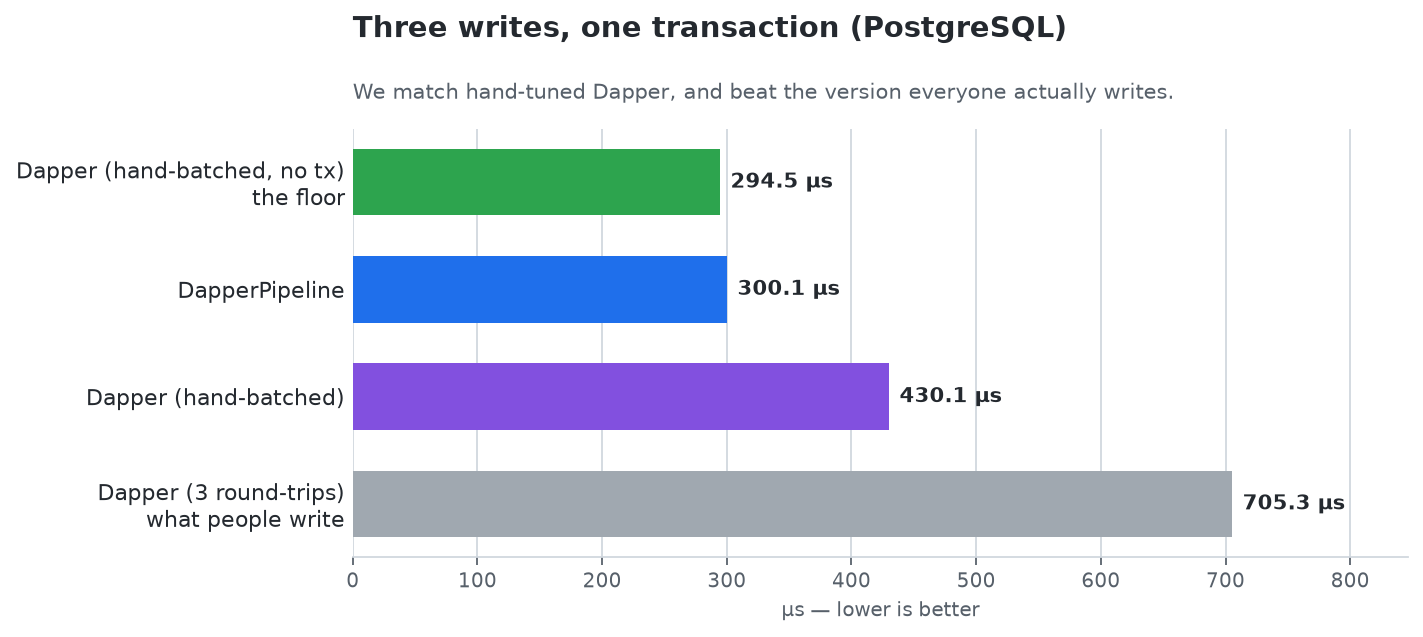
Safety usually costs something. Here it costs about 4 μs — which a single network round-trip outweighs twenty-five times over. Every number below is BenchmarkDotNet against a real PostgreSQL over TCP, and the competitor is not naive Dapper but hand-optimized Dapper, because beating code its author didn't tune proves nothing.
One SELECT. The pipeline is within 6% of raw Dapper:
Three writes. N commands become one round-trip, so we land on the floor — and comfortably beat the three-round-trip version most people actually write:
A thousand-row insert. RowSet binds one parameter per column, not per row, so 10,000 rows
cost the same parameters as 10. Ten times the rows costs RowSet 1.24× the time. The same calling
code renders as unnest, OPENJSON or json_each per dialect:
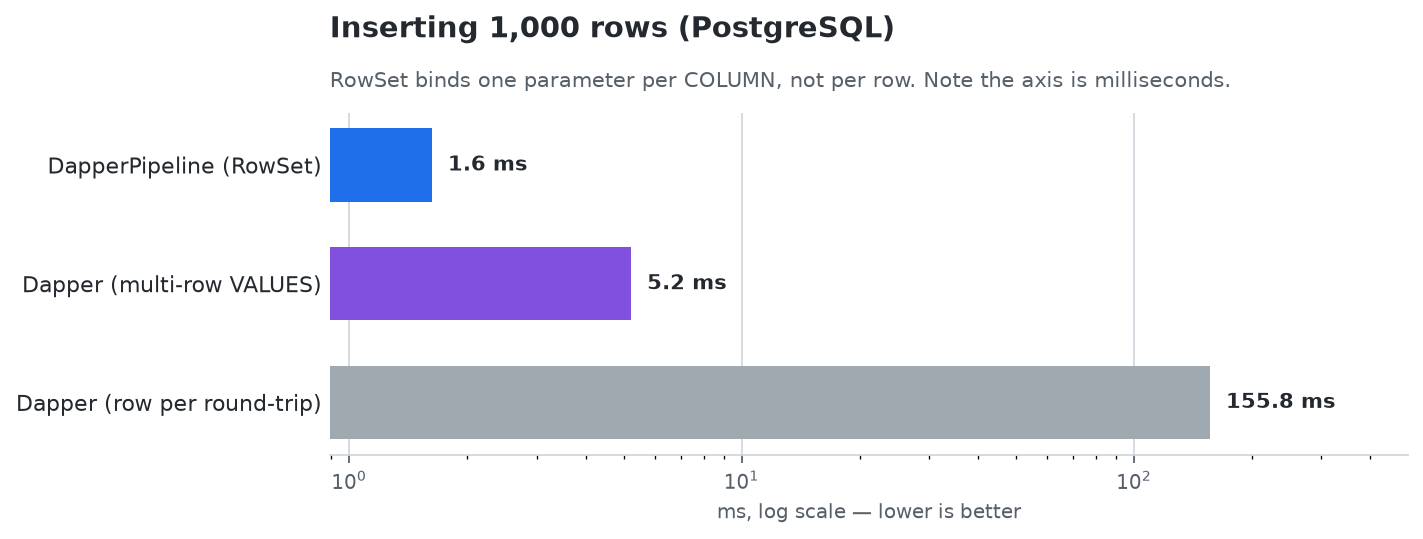
We are not faster than Dapper — nothing is, it is the floor. We are as fast as Dapper written by someone who already knew every trick below, which is the only comparison worth making. Full results, including where we lose →
The other half: N commands, one round-trip
Each command owns its SQL, its parameters and its own result sets, and delivers results by callback — no shared mutable state, no silently-dropped rows:
Order? order = null;

await pipeline
    .SetState(new UserSession { BranchId = branchId, UserId = userId })
    .Bind("Now", DateTime.UtcNow)
    .ResolveAndRegister<IGetOrderCommand>(cmd => {
        cmd.OrderId = orderId;
        cmd.OnResult(o => order = o);
    })
    .ResolveAndRegister<ILogOrderViewCommand>(cmd => cmd.OrderId = orderId)
    .RunAsync(token);
Two commands, one round-trip. Whether that batch is wrapped in a transaction is decided by the dialect, because the right answer is a property of the engine — see Transactions.
Installation
Install the dialect package for your database — it pulls in the DapperPipeline core automatically:
dotnet add package PureLogicTek.DapperPipeline.SqlServer     # SQL Server / Azure SQL
dotnet add package PureLogicTek.DapperPipeline.Sqlite        # SQLite
dotnet add package PureLogicTek.DapperPipeline.PostgreSql    # PostgreSQL
The core PureLogicTek.DapperPipeline package carries no database driver, so you only ever pull
in the one you use. To support a custom database, reference PureLogicTek.DapperPipeline directly and
implement IDatabaseDialect.
Package ID vs. namespaces. The NuGet IDs are prefixed
PureLogicTek., but the assemblies and namespaces areDapperPipeline.*. There is no singleusing DapperPipeline;that brings in everything — see Writing a Command for the usings a command file needs.
| Package | Depends on |
|---|---|
PureLogicTek.DapperPipeline |
Dapper, Polly, MS logging/DI abstractions — no DB driver |
PureLogicTek.DapperPipeline.SqlServer |
core + Microsoft.Data.SqlClient |
PureLogicTek.DapperPipeline.Sqlite |
core + Microsoft.Data.Sqlite |
PureLogicTek.DapperPipeline.PostgreSql |
core + Npgsql |
Target frameworks: net8.0, net9.0, net10.0
Setup
Register the pipeline with your database dialect at startup:
// SQL Server
services.AddDapperPipeline(new SqlServerDialect(connectionString));

// PostgreSQL
services.AddDapperPipeline(new PostgreSqlDialect(connectionString));

// SQLite
services.AddDapperPipeline(new SqliteDialect(connectionString));

// Custom database — implement IDatabaseDialect
services.AddDapperPipeline(new MyDialect(connectionString));
Logging is optional. The pipeline logs through ILogger<T> if your app provides one (any web host
does), and falls back to a no-op logger if not — so AddDapperPipeline works in a bare
ServiceCollection, a console runner, or a test fixture with no extra setup. Calling
services.AddLogging(...) before or after AddDapperPipeline works as you'd expect.
Then register your commands. You can register them individually or let the library scan an assembly and register all implementations automatically:
// Manual — explicit control over which commands are registered
services.AddTransient<IGetOrderCommand, GetOrderCommand>();
services.AddTransient<ILogOrderViewCommand, LogOrderViewCommand>();

// Auto-scan — registers every IQueryCommand implementation in the assembly
// against its consumer-defined interface (skips the base IQueryCommand / IQueryCommand<T>)
services.AddDapperPipelineCommands(typeof(GetOrderCommand).Assembly);

// Multiple assemblies — duplicates are allowed (DI returns all registrations via GetServices)
services.AddDapperPipelineCommands(assemblyA, assemblyB);
Writing a Command
Commands implement two methods: Build (compose SQL via interpolation) and Process (register result readers).
A command file needs two usings:
using DapperPipeline.Abstractions;   // IQueryBuilder, IPipelineState, Append, ISqlBindable, ISqlIdentifier
using DapperPipeline.Commands;       // BaseQueryCommand, BaseQueryCommand<T>
Append lives alongside IQueryBuilder, so it's in scope wherever you can name the builder — no
third using to discover. (Add using static DapperPipeline.Interpolation.Sql; only if you need
Identifier(...).)
public sealed class GetOrderCommand : BaseQueryCommand<Order?>, IGetOrderCommand
{
    public long OrderId { get; set; }

    public override void Build(IQueryBuilder builder, IPipelineState state)
    {
        var session = state.Require<UserSession>();

        builder.Append($"""
            SELECT o.*, ol.ProductId, ol.Qty
            FROM Orders o
            JOIN OrderLines ol ON ol.OrderId = o.Id
            WHERE o.Id = {OrderId}
              AND o.BranchId = {session.BranchId}
            """);
    }

    public override void Process(IDapperResultProcessor processor)
    {
        processor.ReadGrouped<Order, OrderLine, long>(
            o => o.Id,                          // identifies the parent
            (o, line) => o.Lines.Add(line),     // folds each line into it
            rows => EmitResult(rows.FirstOrDefault()),
            "ProductId");                       // splitOn — where OrderLine begins
    }
}
Commands that only write (no result set) extend BaseQueryCommand without a type parameter:
public sealed class LogOrderViewCommand : BaseQueryCommand, ILogOrderViewCommand
{
    public long OrderId { get; set; }

    public override void Build(IQueryBuilder builder, IPipelineState state)
    {
        builder.Append($"""
            INSERT INTO OrderViewLog (OrderId, ViewedAt)
            VALUES ({OrderId}, GETUTCDATE())
            """);
    }

    public override void Process(IDapperResultProcessor processor) { }
}
Compile-Time SQL Injection Prevention
builder.Append($"...") uses a custom [InterpolatedStringHandler] that only accepts safe types at interpolation holes. Raw string interpolation is a compile error.
// ✅ Compiles — typed value, auto-parameterized
builder.Append($"WHERE Id = {orderId}");
// Emits:  WHERE Id = @p001_OrderId
// Bound:  { "@p001_OrderId" = <orderId value> }

// ❌ Compile error CS1503 — no overload accepts string
string userInput = Request.Form["search"];
builder.Append($"WHERE Name = '{userInput}'");
//                                ^^^^^^^^^
//                                cannot bind string in interpolation hole
What's allowed in interpolation holes
| Type | Behavior |
|---|---|
Primitives (int, long, bool, Guid, DateTime, DateTimeOffset, decimal, etc.) |
Auto-bound as @p{NNN}_{Name} where {Name} is derived from the caller expression |
ISqlBindable (consumer's typed wrappers) |
Auto-bound, same naming as primitives |
ISqlIdentifier (consumer's typed identifier wrappers, e.g., TableName) |
Emitted as raw SQL identifier |
SqlIdentifier (from x.SqlIdentifier() / Sql.Identifier(x)) |
Validates the string, emits raw |
BoundParam<T> (returned from state.Bound<T>(name)) |
Emits the registered name (@MyName) directly |
SqlText (from x.SqlParam()) |
Binds the string as a parameter — the safe door for string values |
bare string |
Compile error — use x.SqlParam() for a value, or x.SqlIdentifier() for a name |
Identifier position — x.SqlIdentifier()
For SQL identifiers (table names, schemas) determined at runtime as a raw string:
using static DapperPipeline.Interpolation.Sql;

string tableName = config.GetSection("Tables")["Orders"];
builder.Append($"INSERT INTO {Identifier(tableName)} VALUES (...)");
//                            ^^^^^^^^^^^^^^^^^^^^^
//                            validated against [A-Za-z_][A-Za-z0-9_]* — throws if invalid
Typed identifier wrappers don't need Identifier(...):
public sealed record TableName(string Value) : ISqlIdentifier;

builder.Append($"SELECT * FROM {Tables.Orders}");
//                              ^^^^^^^^^^^^^^
//                              ISqlIdentifier — emitted raw, no wrapping needed
Escape hatch — AppendRaw(...)
For SQL fragments that genuinely cannot be parameterized (DDL keywords, dynamic ORDER BY, etc.):
builder.AppendRaw("SELECT TOP 100 * FROM Orders ORDER BY CreatedAt DESC");
AppendRaw writes verbatim — explicit, greppable, and code-reviewable.
Reading Results — Read and Project
IDapperResultProcessor provides two families of methods for consuming result sets.
Read — DB type is the output type
Use when Dapper maps rows directly to the type you want, or when joining multiple tables whose root type (T1) is the output.
// Single type
processor.Read<Order>(rows => EmitResult(rows.FirstOrDefault()));

// Two joined types — T1 (Order) is returned; T2 (OrderLine) is folded in
processor.ReadGrouped<Order, OrderLine, long>(
    o => o.Id,
    (o, line) => o.Lines.Add(line),
    rows => EmitResult(rows.FirstOrDefault()),
    "ProductId");
⚠️ Use ReadGrouped whenever a parent has many children
Dapper's multi-map calls the mapping function once per row, and builds a fresh parent every time. So the obvious-looking fold:
// WRONG — do not copy this.
processor.Read<Order, OrderLine>(
    (order, line) => { order.Lines.Add(line); return order; },
    rows => EmitResult(rows.FirstOrDefault()));
...adds each line to a different order, giving you N orders that hold one line each — and
FirstOrDefault() hands back whichever came first. A five-line order silently arrives with one line.
It compiles, it doesn't throw, and the data is simply wrong.
ReadGrouped keeps the first parent per key and folds every child into that one.
Readalways returnsT1. To return a different type, useProject. Otherwise the failure is a type-conversion error that reads like a mapping bug —cannot convert from 'Order' to 'OrderSummary?'.
Project — DB types projected to a domain type
Use when SQL returns a flat record or joined records that must be shaped into a different domain type.
// Single flat record → domain type
processor.Project<OrderRecord, Order>(
    r => new Order(r),
    rows => EmitResult(rows.FirstOrDefault()));

// Two joined DB records → domain type
processor.Project<OrderRecord, BranchRecord, Order>(
    (r, b) => new Order(r) { Branch = new Branch(b) },
    rows => EmitResult(rows.FirstOrDefault()),
    "BranchId");
splitOnis aparams string[], so pass it positionally. C# does not allow a named argument for aparamsparameter in its expanded form —splitOn: "BranchId"is a compile error.
Both families support up to 15 joined types. Overloads for T2–T7 use Dapper's typed GridReader.Read overloads; T8–T15 use Dapper's object-array overload with typed casts — transparent to callers.
Multiple result sets
A single command can register multiple readers — one per SELECT statement in its SQL:
public override void Process(IDapperResultProcessor processor)
{
    // First result set — error string (empty string = success)
    processor.Read<string>(r => EmitError(r.SingleOrDefault()));

    // Second result set — the entity
    processor.Read<Order>(r => EmitResult(r.FirstOrDefault()));
}
Shared State
Two complementary mechanisms for passing data into commands.
SetState<T> — typed POCO with auto-binding
Pass a domain POCO; the pipeline stores it for typed access and auto-binds its scalar properties under names of the form @TypeNamePropertyName:
public sealed class UserSession   // plain POCO — no library types
{
    public long   BranchId { get; init; }
    public string UserId   { get; init; }
    public bool   IsAdmin  { get; init; }
}

await pipeline
    .SetState(new UserSession { BranchId = 42, UserId = "alice", IsAdmin = true })
    //   ↳ pre-binds @UserSessionBranchId, @UserSessionUserId, @UserSessionIsAdmin
    .ResolveAndRegister<ICmd>(...)
    .RunAsync(token);
Inside a command:
public override void Build(IQueryBuilder builder, IPipelineState state)
{
    var s = state.Require<UserSession>();   // typed access
    if (!s.IsAdmin) return;                  // control flow — no SQL params materialized

    builder.Append($"""
        SELECT * FROM Orders
        WHERE BranchId = {s.BranchId}        -- value-dedup resolves to @UserSessionBranchId
          AND CreatedBy = {s.UserId.SqlParam()}     -- value-dedup resolves to @UserSessionUserId
        """);
}
The @TypeName prefix prevents name collisions across multiple state types. state.Require<T>() throws if T is not registered; state.Get<T>() returns null.
Scalar properties (value types, string, Guid, DateTime, types implementing ISqlBindable) are pre-bound. Reference types and collections are stored on the POCO for typed access but not auto-bound.
Bind — explicit named scalar
For ad-hoc shared values without defining a POCO, or when you want a specific clean parameter name:
await pipeline
    .Bind("BranchId", 42L)              // → @BranchId
    .Bind("Timestamp", DateTime.UtcNow) // → @Timestamp
    .Bind("CorrelationId", correlationId)
    .ResolveAndRegister<ICmd>(...)
    .RunAsync(token);
Inside a command:
public override void Build(IQueryBuilder builder, IPipelineState state)
{
    var ts = state.Bound<DateTime>("Timestamp");
    builder.Append($"... WHERE CreatedAt > {ts}");   // emits @Timestamp directly
}
SetState and Bind can be mixed freely.
Lazy parameter materialization
State and bind entries become SQL parameters only on first interpolation reference. Values read for control flow but never interpolated never enter the SQL parameter dictionary — no spurious parameters.
Auto-Scoped Parameters
When multiple commands are batched into one SQL string, naming collisions on @Param would break the batch. DapperPipeline scopes them automatically.
For interpolation holes, names are derived from the caller expression and prefixed with the command's scope index:
// Command 1 (scope index 1)
builder.Append($"SELECT * FROM Orders WHERE Id = {orderId}");
//                                                ^^^^^^^^
//                                                emits @p001_OrderId

// Command 2 (scope index 2) — same expression, different scope, different name
builder.Append($"SELECT * FROM Orders WHERE Id = {orderId}");
//                                                ^^^^^^^^
//                                                emits @p002_OrderId
DECLARE @Var TABLE patterns are detected and scoped the same way — useful for capturing OUTPUT inserted.Id into an intermediate table variable:
builder.Append($"""
    DECLARE @Ids TABLE (Id bigint)
    INSERT INTO Orders (CustomerId) OUTPUT inserted.Id INTO @Ids VALUES ({customerId})
    SELECT Id FROM @Ids
    """);
// @Ids → @p001_Ids (or whichever scope index this command has)
Any @Param token written directly in literal SQL that wasn't introduced via DECLARE throws InvalidOperationException at build time — pass values through interpolation holes instead.
Repeating an expression (loops)
Parameter names come from the caller expression, so appending the same expression with different values — a loop — would otherwise collide. It doesn't: each new value gets the next ordinal.
foreach (var id in ids)
    builder.Append($"INSERT INTO t (id) VALUES ({id});");
// binds @p001_Id, @p001_Id__2, @p001_Id__3, ...
Repeating the same expression with the same value still deduplicates to one parameter.
For bulk inserts, reach for
RowSetinstead. A loop grows parameters linearly with rows and will eventually hit the engine's cap; a rowset binds per column.
Cross-command value deduplication
Identical values used in multiple commands bind once. The first command to use a value claims it; subsequent commands reuse the same parameter name:
// Command 1 binds {orderId} as @p001_OrderId
// Command 2 also references the same orderId value → reuses @p001_OrderId (no new bind)
This applies across all paths: primitive interpolation, Bind, and SetState auto-binding all feed the same value index.
Conditional SQL
There are two different things people mean by "conditional SQL", and they have different answers.
1. The condition is known in your app → just use C#
Build is an ordinary C# method. If your app knows the answer, branch in C# — it's portable, and it
emits less SQL:
public override void Build(IQueryBuilder builder, IPipelineState state)
{
    if (filter.OnlyPending)
        builder.Append($"SELECT * FROM Orders WHERE Status = 'pending'");
    else
        builder.Append($"SELECT * FROM Orders WHERE Status = {status.SqlParam()}");
}
Most "conditional SQL" is really this. To drop a whole command, use
ShouldInclude.
2. The condition depends on data in the database → use a predicate, not a branch
Put the condition in the statement's own WHERE. This is portable across all three engines and
stays fully parameterized:
// Instead of: IF NOT EXISTS (...) INSERT ...
builder.Append($"""
    INSERT INTO orders (id, status)
    SELECT {orderId}, {status.SqlParam()}
    WHERE NOT EXISTS (SELECT 1 FROM orders WHERE id = {orderId})
    """);
| Procedural (SQL Server only) | Portable equivalent |
|---|---|
IF cond THEN INSERT … |
INSERT … SELECT … WHERE (cond) |
IF NOT EXISTS(…) INSERT … |
INSERT … SELECT … WHERE NOT EXISTS (…) |
IF cond THEN UPDATE t SET x=1 WHERE id=5 |
UPDATE t SET x=1 WHERE id=5 AND (cond) |
If / IfNotExists — SQL Server only
T-SQL procedural blocks are available only when you reference PureLogicTek.DapperPipeline.SqlServer,
as extension methods on IQueryBuilder:
builder.If("@Status = 'pending'",
    ifBlock   => ifBlock.Append($"SELECT * FROM PendingOrders"),
    elseBlock => elseBlock.Append($"SELECT * FROM Orders WHERE Status = {status.SqlParam()}"));

builder.If(d => d
    .Clause("@Status = 'pending'",  b => b.Append($"SELECT * FROM PendingOrders"))
    .Clause("@Status = 'complete'", b => b.Append($"SELECT * FROM CompletedOrders"))
    .Else(                          b => b.Append($"SELECT * FROM Orders")));
These emit IF (…) BEGIN … END ELSE BEGIN … END, which has no equivalent on the other engines —
so they don't exist there. It's a compile error, not a runtime surprise:
- SQLite has no procedural
IFat all (CASEis an expression, not a statement). - PostgreSQL's only option is
DO $$ … $$, which takes no parameters and returns void — so it can neither bind values nor produce a result set forProcessto read.
WHERE Builder
w.Append($"...") binds values as parameters, exactly like builder.Append — a bare string in a
hole is a compile error.
var where = builder.Where(w => {
    w.Append($"o.BranchId = {branchId}");
    if (filter.StatusId.HasValue)
        w.Append($"o.StatusId = {filter.StatusId.Value}");
});

builder.Append($"SELECT * FROM Orders o {where}");
⚠️
w.Add(string)is the raw escape hatch — the WHERE-clause equivalent ofAppendRaw. It takes a raw string and gives no injection protection (w.Add($"name = '{userInput}'")compiles and injects). UseAppendunless you genuinely need unparameterizable SQL.
CTEs
builder.WithCte("ActiveOrders", b => b.Append($"""
    SELECT * FROM Orders WHERE IsActive = 1
    """));
builder.Append($"SELECT * FROM ActiveOrders WHERE BranchId = {branchId}");
Rowsets — passing N rows, on any dialect
To insert or join against many rows, declare a rowset. It renders as a derived table you can
SELECT from, and it binds its values — never concatenates them.
var entries = builder.RowSet("entry", externalIds, map => {
    map.Column("source",      x => x.Source);
    map.Column("external_id", x => x.ExternalId);
});

builder.Append($"""
    INSERT INTO team_external_id (team_version_id, source, external_id)
    SELECT v.id, entry.source, entry.external_id
    FROM   new_version v, {entries}
    """);
That code is identical on every database. You refer to entry.source / entry.external_id
regardless of dialect; only the rendering behind {entries} changes, and the dialect handles it:
| Dialect | {entries} becomes |
Parameters bound |
|---|---|---|
| PostgreSQL | unnest(@a, @b) AS entry(source, external_id) |
one per column |
| SQL Server | OPENJSON(@json) WITH (...) AS entry |
one, total |
| SQLite | json_each(@json) |
one, total |
| Any custom dialect | portable SELECT … UNION ALL |
one per cell |
Column types are inferred from the selectors — you never name a database type.
The parameter budget
On all three built-in dialects the parameter count is O(columns), not O(rows) — a 50,000-row import binds the same handful of parameters as a 2-row one, so you stay clear of every engine's cap (65535 on PostgreSQL, 2100 on SQL Server, 32766 on SQLite).
Only the portable fallback — used by a custom dialect that hasn't supplied a renderer — binds one parameter per cell, and it refuses loudly past 2000 cells rather than emitting SQL the engine would reject.
SQL Server: OPENJSON, TVP, or values
OPENJSON is the default because it needs nothing installed in the database. If you already have
table types — or want TVP throughput — opt in at startup; your command code doesn't change:
// Default: OPENJSON. Zero setup, one parameter, SQL Server 2016+.
services.AddDapperPipeline(new SqlServerDialect(conn));

// Table-valued parameter — requires a user-defined table type matching the rowset's columns.
services.AddDapperPipeline(new SqlServerDialect(conn) {
    RowSetStrategy   = SqlServerRowSetStrategy.TableValuedParameter,
    RowSetTableType  = "dbo.EntryType",
});

// SQL Server 2012/2014 (no OPENJSON).
services.AddDapperPipeline(new SqlServerDialect(conn) {
    RowSetStrategy = SqlServerRowSetStrategy.Values,
});
A TVP can't be the default: it needs a user-defined table type that already exists and matches the rowset's shape, which can't be inferred for an arbitrary rowset.
OPENJSONhas no such requirement.
Table-Valued Parameters (SQL Server)
The explicit TVP API remains, for when you want direct control over an existing table type:
// Fluent column mapping — Map(columnName, selector)
builder.MapTable("@Lines", "dbo.OrderLineType", lines, m => {
    m.Map("ProductId", l => l.ProductId);
    m.Map("Qty",       l => l.Qty);
    m.Map("Price",     l => l.Price);
});

// Scalar collection
builder.AddTableParam("@Ids", orderIds, columnName: "Id");
The table type is used verbatim, so qualify it to target a schema (sales.OrderLineType); an
unqualified name resolves against the connection's default schema.
IDataTableMapper also offers String(col, maxLength, selector) (truncating) and Primary(...).
These are SQL Server specific. For portable code, prefer RowSet above.
Conditional Inclusion — ShouldInclude
Override ShouldInclude to exclude a command from the current pipeline run based on runtime data. The pipeline skips Build and Process entirely for excluded commands — no SQL generated, no result reader registered.
Set reason to explain why the command was excluded. The pipeline logs it at Debug level, so developers can see exactly which check failed without having to guess across multiple conditions.
public override bool ShouldInclude(out string? reason)
{
    if (!customerId.HasValue)   { reason = "CustomerId not set";        return false; }
    if (items.Count == 0)       { reason = "No items to process";       return false; }
    if (!feature.IsEnabled)     { reason = "Feature flag disabled";     return false; }
    reason = null;
    return true;
}
The log entry written by the pipeline:
[Debug] Command 'CreateShipmentCommand' excluded — CustomerId not set.
Pipeline Behaviors
IPipelineBehavior lets you wrap every RunAsync call — useful for logging, timing, metrics, or audit trails. Behaviors run outside the SQL transaction, so they can log independently of whether the database call succeeds.
public interface IPipelineBehavior
{
    Task ExecuteAsync(PipelineContext context, Func<Task> next, CancellationToken token);
}
PipelineContext carries the names of included and excluded commands for the current run:
public sealed class PipelineContext
{
    public IReadOnlyList<string> CommandNames { get; init; }        // included commands
    public IReadOnlyList<string> SkippedCommandNames { get; init; } // excluded by ShouldInclude
}
Writing a behavior
public sealed class PipelineLoggingBehavior(ILogger<PipelineLoggingBehavior> logger) : IPipelineBehavior
{
    public async Task ExecuteAsync(PipelineContext context, Func<Task> next, CancellationToken token)
    {
        var commands = string.Join(", ", context.CommandNames);
        logger.LogDebug("Pipeline starting — commands: [{Commands}]", commands);

        var sw = Stopwatch.StartNew();
        try
        {
            await next();
            logger.LogDebug("Pipeline completed in {Elapsed}ms", sw.ElapsedMilliseconds);
        }
        catch (Exception ex)
        {
            logger.LogError(ex, "Pipeline failed after {Elapsed}ms", sw.ElapsedMilliseconds);
            throw;
        }
    }
}
Registering behaviors
services.AddSingleton<IPipelineBehavior, PipelineLoggingBehavior>();
services.AddSingleton<IPipelineBehavior, MetricsBehavior>();
Behaviors execute in registration order — first registered is the outermost wrapper. If no behaviors are registered, RunAsync incurs zero overhead.
Error Handling
Database-thrown errors
Map SQL THROW error codes to domain exceptions at startup:
services.AddSingleton<IErrorMapper>(new ErrorRange(
    50000, 51000,
    (ex, offset) => new MyAppException(offset, ex.Message)));
ErrorRange maps any error code in [rangeStart, rangeEnd) to a consumer exception. The second argument to the factory is errorCode - rangeStart (the offset within the range, useful for encoding HTTP status codes).
Error codes are strings
IDatabaseDialect.ExtractErrorCode returns a string, because not every engine numbers its
errors. PostgreSQL reports five-character SQLSTATEs — 23505 (unique violation), 40P01
(deadlock) — which contain letters and cannot be an int.
| Dialect | Error code | Match it with |
|---|---|---|
| SQL Server | SqlException.Number as text — "50001" |
ErrorRange |
| SQLite | SqliteException.SqliteErrorCode as text — "5" |
ErrorRange |
| PostgreSQL | PostgresException.SqlState — "23505", "40P01" |
SqlState, SqlStateClass |
PostgreSQL — matching SQLSTATEs
// Exact code
services.AddSingleton<IErrorMapper>(
    new SqlState("23505", ex => new DuplicateKeyException(ex.Message)));

// Whole class — SQLSTATE is hierarchical; "23" = integrity_constraint_violation,
// covering 23505 (unique), 23503 (foreign key) and 23514 (check).
// The factory receives the FULL state, so one mapper can still tell them apart.
services.AddSingleton<IErrorMapper>(
    new SqlStateClass("23", (ex, state) => new ConstraintViolationException(state, ex.Message)));
ErrorRange simply declines a non-numeric code, so it can sit alongside SQLSTATE mappers safely.
Register as many IErrorMappers as you like — they compose automatically, and the first non-null
result wins:
services.AddSingleton<IErrorMapper>(new ErrorRange(50000, 51000, ...));
services.AddSingleton<IErrorMapper>(new ErrorRange(60000, 61000, ...));
Error mappers are optional. If none are registered — or none handle the error — a
PipelineException is thrown with the raw error code.
Command-level error strings
Some stored procs return an error string as the first result set (empty = success). Handle this pattern with EmitError / OnError:
// In Process():
processor.Read<string>(r => EmitError(r.SingleOrDefault()));
processor.Read<Order>(r => EmitResult(r.FirstOrDefault()));

// At the call site (optional):
cmd.OnError(err => throw new DomainException(err));
// Without OnError, a non-empty error string throws PipelineException.
Retry
The pipeline retries automatically for transient errors. The retry strategy is defined by the dialect's ShouldRetry method. Configure the retry count per run:
await pipeline
    .Context(ctx => ctx.RetryCount = 3)
    .ResolveAndRegister<IMyCommand>(cmd => { })
    .RunAsync(token);
SQL Server's built-in dialect retries on deadlock (1205), optimistic lock conflict (3960), timeout (-2), and network error (11). Retries use exponential backoff via Polly 8.
Transactions
Every run batches its commands into one round-trip. Whether that batch is wrapped in an explicit transaction is decided by the dialect, because the right answer is a property of the engine, not of your code:
| Dialect | Opens a transaction by default | Why |
|---|---|---|
SqlServerDialect |
yes | T-SQL autocommits each statement. Without a transaction, a failure half-way through a batch leaves the earlier statements applied. |
SqliteDialect |
yes | Same — statements autocommit individually. |
PostgreSqlDialect |
no | PostgreSQL already runs a batch as one implicit transaction (everything up to the protocol Sync, and the driver sends one Sync per batch). A failed statement rolls the whole batch back anyway, so BEGIN/COMMIT would add two round-trips and change nothing. |
You do not give up atomicity on PostgreSQL. It is still all-or-nothing; we just stop paying for a
guarantee the engine hands us for free. TransactionSemanticsTests proves this against a real server
— three INSERTs, the last one violating a UNIQUE constraint, table ends up empty — and the mirror-image
test on SQL Server leaves two rows behind, which is why that dialect keeps its transaction.
The cost being avoided is not small. BEGIN and COMMIT are two extra network round-trips:
Trivial SELECT 1 |
No transaction | In a transaction |
|---|---|---|
| SQL Server | 332 μs | 842 μs |
| PostgreSQL | 164 μs | 308 μs |
A read-only transaction is genuinely cheap on the server — no extra locks, no log records. That is the usual advice, and it is advice about server work, not about the wire.
Overriding it
The dialect only sets the default. Either direction can be forced per run:
// Force one on — to hold locks across statements, or to run at a specific isolation level.
await pipeline
    .WithTransaction()
    .Context(ctx => ctx.Level = System.Data.IsolationLevel.Serializable)
    .ResolveAndRegister<IMyCommand>(cmd => { })
    .RunAsync(token);

// Force one off — the read fast-path on SQL Server / SQLite. On PostgreSQL this is already the default.
await pipeline
    .WithoutTransaction()
    .ResolveAndRegister<IGetOrderCommand>(cmd => cmd.OrderId = 42)
    .RunAsync(token);
On SQL Server, WithoutTransaction() takes a trivial read from ~842 μs to ~332 μs.
⚠️
WithoutTransaction()on SQL Server or SQLite gives up atomicity. Use it for reads. A failure part-way through a multi-statement write leaves the earlier statements applied, with nothing to roll back — and if retries are on, the replay applies them a second time.
An isolation level is a property of a transaction, so asking for one on a run that opens none throws rather than silently running at the session default.
The abstraction itself is not what costs you: with the database taken out of the measurement, the query builder, interpolated-string handling, parameter naming and DI resolution together come to ~4 μs per query. See BENCHMARKS.md.
Dialects
| Dialect | Parameter style | Default isolation | Notes |
|---|---|---|---|
SqlServerDialect |
@Word |
ReadCommitted |
Full T-SQL support including DECLARE @Var TABLE. Snapshot is opt-in via new SqlServerDialect(cs) { IsolationLevel = IsolationLevel.Snapshot } — it fails on any database without ALLOW_SNAPSHOT_ISOLATION, which is OFF by default. |
SqliteDialect |
@Word, $Word, :Word |
Serializable |
No table variables — use CTEs |
PostgreSqlDialect |
@Word (Npgsql named mode) |
ReadCommitted |
No DECLARE @Var TABLE — use CTEs |
Isolation levels are not portable — Snapshot is SQL Server's, and Microsoft.Data.Sqlite
throws outright when handed it — so each dialect declares its own. Override per run with
Context(ctx => ctx.Level = ...). A custom dialect gets ReadCommitted, which every engine accepts.
Each dialect ships as its own package (PureLogicTek.DapperPipeline.SqlServer,
PureLogicTek.DapperPipeline.Sqlite, PureLogicTek.DapperPipeline.PostgreSql) so you only pull in the
driver you use. To support any other database, reference the core PureLogicTek.DapperPipeline package
and implement IDatabaseDialect — the pipeline core uses DbConnection and DbException exclusively,
with no SQL Server coupling.
Debugging
Console.WriteLine(builder.ToDebug());
Each dialect renders debug output the way its own client expects — the rendering is part of
IDatabaseDialect, not the core:
| Dialect | Output | Paste into |
|---|---|---|
| SQL Server | DECLARE @p001_Id AS bigint / SET @p001_Id = 42 + the SQL |
SSMS |
| PostgreSQL | values inlined — TRUE/FALSE, ARRAY[…] for the arrays a rowset binds |
psql |
| SQLite | values inlined — 1/0 for booleans, x'…' for blobs |
sqlite3 |
| custom dialect | generic inlined literals | anything |
⚠️ Debug output is for reading, never for running. Inlining values produces exactly the concatenated SQL this library exists to prevent. The pipeline executes the parameterized form — the rendering is labelled accordingly.
License
MIT
| Product | Versions Compatible and additional computed target framework versions. |
|---|---|
| .NET | net8.0 is compatible. net8.0-android was computed. net8.0-browser was computed. net8.0-ios was computed. net8.0-maccatalyst was computed. net8.0-macos was computed. net8.0-tvos was computed. net8.0-windows was computed. net9.0 is compatible. net9.0-android was computed. net9.0-browser was computed. net9.0-ios was computed. net9.0-maccatalyst was computed. net9.0-macos was computed. net9.0-tvos was computed. net9.0-windows was computed. net10.0 is compatible. net10.0-android was computed. net10.0-browser was computed. net10.0-ios was computed. net10.0-maccatalyst was computed. net10.0-macos was computed. net10.0-tvos was computed. net10.0-windows was computed. |
-
net10.0
- Dapper (>= 2.1.35)
- Microsoft.Extensions.DependencyInjection.Abstractions (>= 9.0.0)
- Microsoft.Extensions.Logging.Abstractions (>= 9.0.0)
- Polly (>= 8.4.2)
-
net8.0
- Dapper (>= 2.1.35)
- Microsoft.Extensions.DependencyInjection.Abstractions (>= 9.0.0)
- Microsoft.Extensions.Logging.Abstractions (>= 9.0.0)
- Polly (>= 8.4.2)
-
net9.0
- Dapper (>= 2.1.35)
- Microsoft.Extensions.DependencyInjection.Abstractions (>= 9.0.0)
- Microsoft.Extensions.Logging.Abstractions (>= 9.0.0)
- Polly (>= 8.4.2)
NuGet packages (3)
Showing the top 3 NuGet packages that depend on PureLogicTek.DapperPipeline:
| Package | Downloads |
|---|---|
|
PureLogicTek.DapperPipeline.PostgreSql
PostgreSQL dialect for DapperPipeline. Provides PostgreSqlDialect (Npgsql) with @Word named-parameter scanning and retry on transient Npgsql errors. |
|
|
PureLogicTek.DapperPipeline.Sqlite
SQLite dialect for DapperPipeline. Provides SqliteDialect (Microsoft.Data.Sqlite) with @Word / $Word / :Word parameter scanning and retry on SQLITE_BUSY / SQLITE_LOCKED. |
|
|
PureLogicTek.DapperPipeline.SqlServer
SQL Server / Azure SQL dialect for DapperPipeline. Provides SqlServerDialect (Microsoft.Data.SqlClient) with T-SQL parameter scanning, DECLARE @Var TABLE support, and retry on deadlock / timeout / optimistic-lock conflicts. |
GitHub repositories
This package is not used by any popular GitHub repositories.
| Version | Downloads | Last Updated | |
|---|---|---|---|
| 1.12.0 | 1,684 | 8/24/2026 | |
| 1.11.2 | 172 | 8/24/2026 | |
| 1.11.1 | 174 | 8/24/2026 | |
| 1.11.0 | 175 | 8/24/2026 | |
| 1.10.0 | 177 | 8/24/2026 | |
| 1.9.0 | 996 | 7/14/2026 | |
| 1.8.0 | 209 | 7/13/2026 | |
| 1.7.1 | 189 | 7/13/2026 | |
| 1.7.0 | 187 | 7/13/2026 | |
| 1.6.0 | 175 | 7/13/2026 | |
| 1.5.1 | 175 | 7/13/2026 | |
| 1.5.0 | 188 | 7/13/2026 | |
| 1.4.1 | 192 | 7/13/2026 | |
| 1.4.0 | 180 | 7/13/2026 | |
| 1.3.0 | 178 | 7/13/2026 | |
| 1.2.0 | 181 | 7/13/2026 | |
| 1.1.0 | 190 | 7/13/2026 | |
| 1.0.3 | 193 | 7/13/2026 | |
| 1.0.2 | 207 | 7/11/2026 | |
| 1.0.1 | 198 | 7/11/2026 |
New: x.SqlParam() and x.SqlIdentifier() -- the two doors a raw string can take into SQL, now discoverable in IntelliSense with no extra using. Sql.Text is deprecated in favour of x.SqlParam() (warning; removed in 2.0). Sql.Identifier is unchanged.
Fixes: ToDebug() on SQL Server emitted DECLARE @@p001_x -- a doubled @, which is T-SQL's system-variable prefix, so the script was invalid and could not be pasted into SSMS. Parameter names could contain characters SQL rejects (Sql.Text("literal") produced @p001_"literal"). Parameter scopes are now 1-based, so the first command emits @p001_* as the docs have always said -- it was emitting @p000_*.
NOTE: generated parameter NAMES change in this release. They are not API, but if you hardcoded one in AppendRaw or snapshot-tested generated SQL, you will see a diff.
Full notes: https://github.com/purelogictek-inc/DapperPipeline/blob/main/CHANGELOG.md