Quintic.Core
0.9.0
dotnet add package Quintic.Core --version 0.9.0
NuGet\Install-Package Quintic.Core -Version 0.9.0
<PackageReference Include="Quintic.Core" Version="0.9.0" />
<PackageVersion Include="Quintic.Core" Version="0.9.0" />
<PackageReference Include="Quintic.Core" />
paket add Quintic.Core --version 0.9.0
#r "nuget: Quintic.Core, 0.9.0"
#:package Quintic.Core@0.9.0
#addin nuget:?package=Quintic.Core&version=0.9.0
#tool nuget:?package=Quintic.Core&version=0.9.0
Quintic - Industrial Cam Editor
Quintic is a universal industrial electronic cam profile design platform compliant with the VDI 2143 standard, developed using C# + WPF.
This project is built for automation engineers who demand extreme performance and user experience. It provides a data-intensive, professional dark mode UI, benchmarking the interactive experience of top-tier commercial software such as Beckhoff TwinCAT 3, CODESYS SoftMotion, and Siemens TIA Portal.
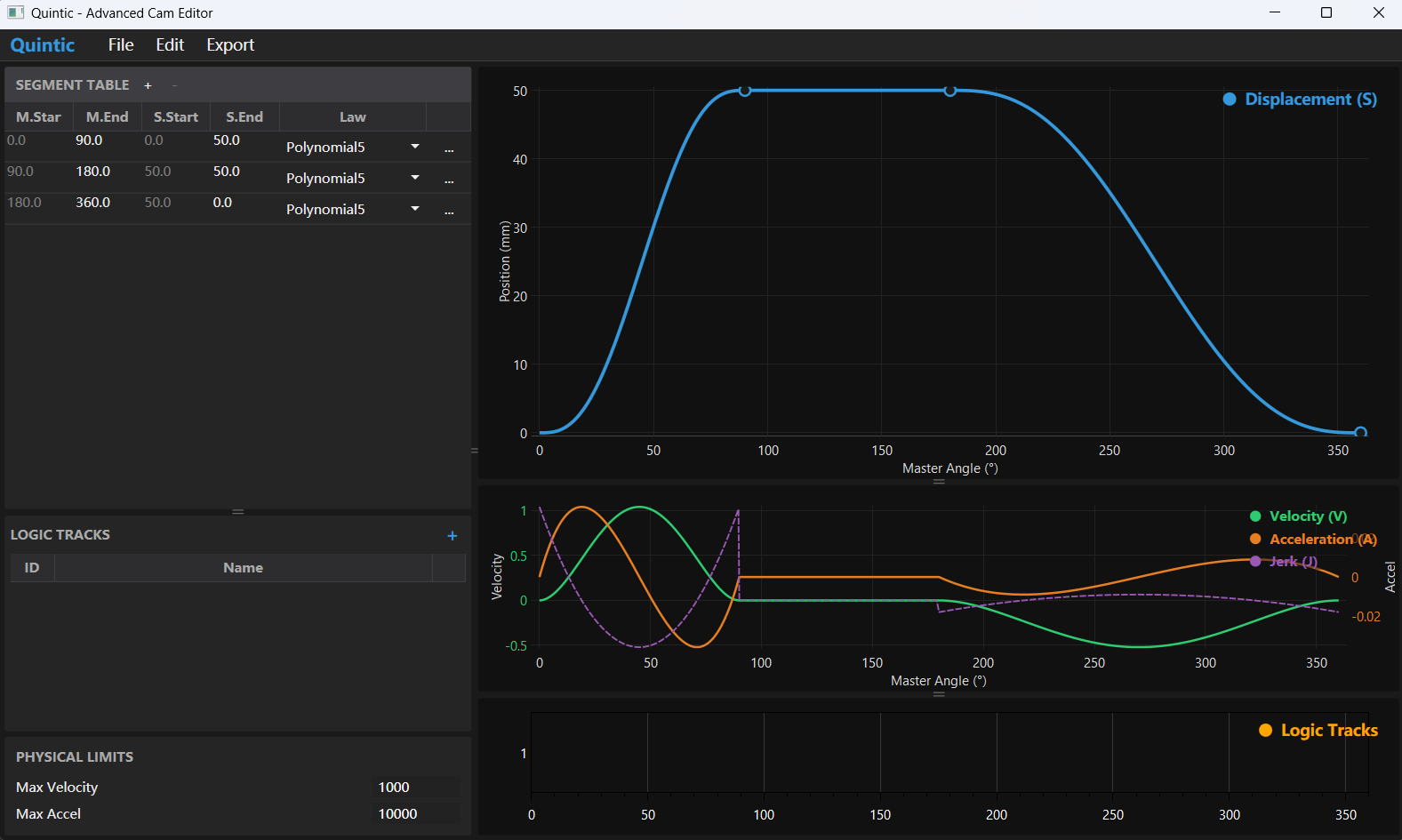
Core Features
- Golden UI Layout: Classic "Left List + Right Canvas" layout, maximizing widescreen usage, perfectly balancing macroscopic rhythm and microscopic precision.
- VDI 2143 Standard Kernel: Built-in industrial standard motion laws, generating Position (S), Velocity (V), Acceleration (A), and Jerk (J) curves via a high-precision mathematical kernel.
- Polynomial 5: The most common Rest-in-Rest curve.
- Cycloidal: Suitable for high-speed, low-vibration applications.
- Modified Trapezoid: Finite jerk, extremely smooth.
- B-Spline: Cubic spline interpolation for smooth curve fitting through arbitrary points.
- Constant Velocity / Dwell: Basic linear and dwell segments.
- High-Performance Plotting: Industrial-grade curve rendering based on
OxyPlot, supporting smooth zooming and panning of hundreds of thousands of points. - Real-time Compilation: WYSIWYG interactive experience; modifying table data triggers millisecond-level recalculation and instant curve refresh.
- Interactive Design: Drag control points directly on the canvas to intuitively shape the motion profile.
- Safety First: Global physical limit validation ($V_{max}, A_{max}$) with real-time visual alarms on charts and data grids.
- History Management: Full Undo/Redo support for safe experimentation.
- CSV Export: One-click export of high-precision point tables, supporting direct import into mainstream motion controllers like Siemens, Beckhoff, and Omron.
- ST Code Generation: Generate IEC 61131-3 compliant Structured Text (ST) arrays for direct PLC integration.
- Discrete Logic Tracks: Define multi-channel IO switch points synchronized with motion, supporting hysteresis compensation.
- PDF Reporting: One-click generation of professional Kinematic Analysis & Crash Prevention reports.
- Host Integration API: Available as a NuGet package (
Quintic.Core) for embedding the editor into custom HMI or Industrial IDEs. - Professional Visuals: Comes with a modern dark theme (charcoal background + electric blue/orange highlights) to reduce visual fatigue for engineers working long hours.
Tech Stack
- Framework: .NET 6+ / WPF
- Plotting Engine:
OxyPlot.Wpf - Architecture Pattern: MVVM (Model-View-ViewModel) + Command Pattern
- Math Core: C# Native Implementation (Ported from Python NumPy kernels)
Installation & Integration
1. Standalone Application
For end-users, simply download the latest executable (.exe) from the GitHub Releases page. No installation required.
2. WPF Integration (NuGet)
For developers integrating the editor into an HMI or Industrial IDE:
Install-Package Quintic.Core
Add the namespace and control to your XAML:
<Window ...
        xmlns:q="clr-namespace:Quintic.Wpf.Views;assembly=Quintic.Core">


    <q:CamEditorView />

</Window>
Basic Usage
- Segment Table: Use the
MOTION PROFILEtab's data grid to configure motion laws (Poly5, Cycloidal, etc.) and target coordinates manually. - Interactive Canvas:
- Add Point: Hold
Ctrl + Left Clickanywhere on the curve to split the segment and insert a new control point. - Edit Point: Drag existing control points to adjust the profile in real-time.
- Add Point: Hold
- Logic Tracks: Use the
LOGIC TRACKStab to manage digital output channels. Add tracks and define precise switch degree intervals synchronized with the master position.
Developer Setup (Source Code)
- Open the
Quintic.slnsolution. - Restore NuGet packages:
dotnet restore - Start the
Quintic.Wpfproject.
Directory Structure
Quintic.Wpf/Core/: Core business logicKernels/: Mathematical motion law implementations (Poly5, Cycloidal, etc.)Services/: Cam compiler and calculation servicesModels/: Core data models
Themes/: XAML resource dictionaries (Dark theme definitions).ViewModels/: MVVM business logic and data binding.Views/: UI interface files.
Built with ❤️ for Motion Control Engineers.
| Product | Versions Compatible and additional computed target framework versions. |
|---|---|
| .NET | net10.0-windows7.0 is compatible. |
-
net10.0-windows7.0
- MathNet.Numerics (>= 5.0.0)
- OxyPlot.Wpf (>= 2.2.0)
- QuestPDF (>= 2023.12.6)
NuGet packages
This package is not used by any NuGet packages.
GitHub repositories
This package is not used by any popular GitHub repositories.
# Release Notes
## v0.8.0 - UI Modernization & Reporting
**Date:** 2026-03-28
### 🚀 New Features
- **Automated PDF Reports**: Integrated `QuestPDF` to generate professional, one-click "Kinematic Analysis & Crash Prevention" reports containing all physical parameters, KPI alerts, and vector-rendered waveform charts.
- **Enhanced Export Data**: CSV and Structured Text (ST) code generation now automatically interleaves boolean Logic Track (IO switch) states aligned with the master position.
- **Responsive Axis Scaling**: Modifying curves or zooming into the X-axis (Angle) now continuously triggers adaptive Y-axis scaling for Velocity, Acceleration, and Jerk bounds.
### 🎨 UI/UX Improvements
- **Tabbed Workspace**: Completely refactored the Left Sidebar into a `TabControl` ("Motion Profile" vs "Logic Tracks"), vastly increasing vertical real estate for segment design.
- **Inline Switch Editor**: Overhauled the Logic Tracks interface, adding inline, multi-interval switch degree editors with clear `OnAngle` / `OffAngle` configuration.
## v0.7.0 - Kinematic Analysis & Visualization
**Date:** 2026-03-28
### 🚀 New Features
- **Dynamic Physics Overlays**: Added toggleable Torque, Power, and Regenerative Energy curves to the main motion plot.
- **Sync Cursors**: Implemented crosshair synchronization across Displacement and V/A/J plots, displaying precise instantaneous physical parameters (Nm, W, °).
- **T-N Curve Overlays**: Added continuous (S1) and intermittent (S3) boundaries to the Torque vs. Speed scatter plot.
### 🎨 UI/UX Improvements
- **Modernized Analysis Window**: Redesigned the Kinematic Analysis window to fully align with the core Dark Theme (removed white borders, modernized charts, updated typography and accent colors).
- **HUD Enhancements**: Context menu toggles now dynamically show/hide their corresponding legends in the Heads-Up Display.
## v0.6.0 - Integration & Logic Tracks
**Date:** 2026-03-27
### 🚀 New Features
- **Discrete Logic Tracks**: Added multi-channel IO switch management synchronized with master position. Supports hysteresis compensation and visual editing.
- **B-Spline Interpolation**: Implemented Cubic Spline kernel for smooth curve fitting through arbitrary control points.
- **ST Code Generation**: Export cam profiles as IEC 61131-3 Structured Text arrays for direct PLC integration.
- **Host Integration API**: Refactored core components into `Quintic.Core` library for easy embedding into third-party HMI/IDE applications.
### 🛠 Improvements
- **UI/UX**: Added Logic Tracks panel to the editor interface.
- **Visualization**: Enhanced plot view to display logic tracks aligned with motion curves.
- **Architecture**: Decoupled WPF views from the main application for better reusability.
## v0.5.0 - Advanced Motion Kernels
**Date:** 2026-03-26
### 🚀 New Features
- **Advanced Motion Laws**: Added comprehensive support for industrial standard curves:
- **Polynomial 7 (4-5-6-7)**: Provides smoother motion with zero jerk at boundaries compared to Poly5.
- **Simple Sine**: Basic harmonic motion for simple mechanisms.
- **Gutman (Freydenstein)**: Sinus-combination curve designed for vibration suppression.
- **7-Segment S-Curve**: Standard trapezoidal acceleration profile used in servo positioning.
- **Automatic Continuity**: `CamCalculator` now automatically propagates end-velocity and end-acceleration to the next segment (enabling C2 continuity for Poly5).
### 🛠 Improvements
- **Architecture**: Refactored Motion Kernels to use a unified `BaseMotionKernel` and `IMotionKernel` interface.
- **Stability**: Enforced zero-displacement logic for `Dwell` segments to prevent user configuration errors.
- **Namespace**: Unified all Core logic under `Quintic.Wpf.Core` namespace.