REslava.ResultFlow
1.54.0
Prefix Reserved
dotnet add package REslava.ResultFlow --version 1.54.0
NuGet\Install-Package REslava.ResultFlow -Version 1.54.0
<PackageReference Include="REslava.ResultFlow" Version="1.54.0"> <PrivateAssets>all</PrivateAssets> <IncludeAssets>runtime; build; native; contentfiles; analyzers</IncludeAssets> </PackageReference>
<PackageVersion Include="REslava.ResultFlow" Version="1.54.0" />
<PackageReference Include="REslava.ResultFlow"> <PrivateAssets>all</PrivateAssets> <IncludeAssets>runtime; build; native; contentfiles; analyzers</IncludeAssets> </PackageReference>
paket add REslava.ResultFlow --version 1.54.0
#r "nuget: REslava.ResultFlow, 1.54.0"
#:package REslava.ResultFlow@1.54.0
#addin nuget:?package=REslava.ResultFlow&version=1.54.0
#tool nuget:?package=REslava.ResultFlow&version=1.54.0
REslava.ResultFlow
Track B — Library-agnostic source generator for automatic Mermaid pipeline diagrams — works with any fluent Result library.
Add [ResultFlow] to any fluent method → the diagram is injected as a comment by the IDE code action (no build needed), or accessed as a const string after build. Zero runtime overhead. Zero manual maintenance.
Ships with a built-in convention dictionary pre-configured for REslava.Result, ErrorOr, LanguageExt, and FluentResults. Any other library can be supported by adding a resultflow.json file to your project. Generates _Diagram and _TypeFlow constants.
Using REslava.Result? Use Track A —
REslava.Result.Flow— for richer diagrams: typed error edges from body scanning, full type travel, and the complete constant set (_LayerView,_Stats,_ErrorSurface,_ErrorPropagation).
Installation
dotnet add package REslava.ResultFlow
No extra using required — the [ResultFlow] attribute is injected into your compilation automatically by the source generator.
Quick Start
[ResultFlow]
public async Task<Result<UserDto>> RegisterAsync(RegisterCommand cmd) =>
    await CreateUser(cmd)
        .EnsureAsync(IsEmailValid, new InvalidEmailError())
        .BindAsync(SaveUser)
        .TapAsync(SendWelcomeEmail)
        .MapAsync(ToDto);
Use the IDE code action to inject the diagram as a comment directly above the method — no build required:
/*
```mermaid
flowchart LR
    N0_EnsureAsync["EnsureAsync"]:::gatekeeper
    ...
```*/
[ResultFlow]
public async Task<Result<UserDto>> RegisterAsync(RegisterCommand cmd) => ...
Or access the generated constant after build and paste it into any Mermaid renderer:
string diagram = Generated.ResultFlow.UserService_Flows.RegisterAsync;
// Paste into mermaid.live, GitHub, Notion, VS Code, or your wiki
Generated Diagram Examples
Pipeline — guard, transforms, side effects, success/failure paths:

Node type legend — all node types with colors and shapes:

Each operation is color-coded by semantic role:
- Lavender — gatekeepers (
Ensure) — can fail validation - Mint — transforms (
Bind/Map) — shape the result - Vanilla — side effects (
Tap) — fire-and-forget - Soft pink — failure paths
Supported Libraries
The built-in convention dictionary covers the most popular Result libraries out of the box — no configuration needed:
| Library | Methods recognized |
|---|---|
| REslava.Result | Ensure, Bind, Map, Tap, TapOnFailure, TapBoth, Match, WithSuccess (+ Async variants) |
| ErrorOr | Then, ThenAsync, Switch, SwitchAsync |
| LanguageExt | Filter, Do, DoAsync, DoLeft, DoLeftAsync |
Any unrecognized method is rendered as a generic operation node — the diagram is still generated.
Custom Method Classification — resultflow.json
Add a resultflow.json file to your project to classify custom or third-party methods. Config entries override the built-in dictionary.
{
  "mappings": [
    {
      "bind":       ["Chain", "AndThen"],
      "map":        ["Transform"],
      "tap":        ["Log", "Audit"],
      "gatekeeper": ["Require"],
      "terminal":   ["Fold"]
    }
  ]
}
Register it as an AdditionalFile in your .csproj:
<ItemGroup>
  <AdditionalFiles Include="resultflow.json" />
</ItemGroup>
Supported keys: bind, map, tap, tapOnFailure, gatekeeper, terminal.
Diagram Preview — VS Code Extension (v1.1.0)
Install REslava.Result Extensions from the VS Code Marketplace to get a ▶ Open diagram preview CodeLens above every [ResultFlow] method.
One click opens the rendered Mermaid diagram in a dedicated side panel — bundled renderer, works fully offline.
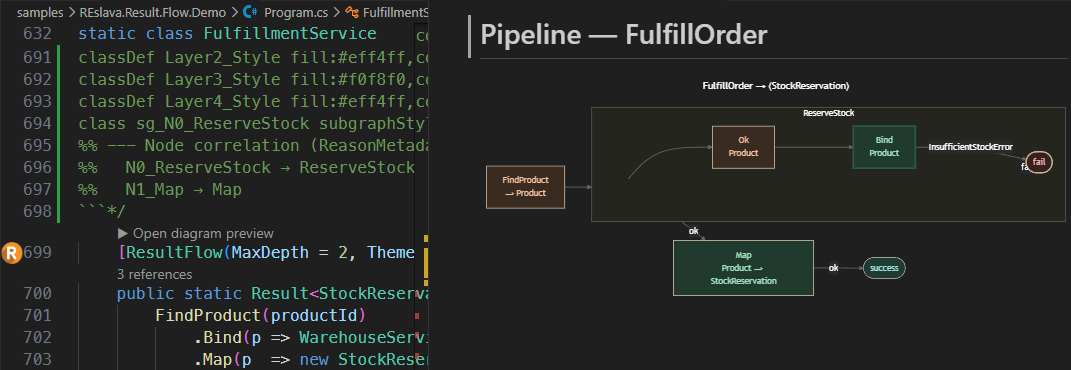
Panel features:
- Click any node to navigate to that line in your source (requires
<ResultFlowLinkMode>vscode</ResultFlowLinkMode>in your.csproj) - Source button — view and copy the raw Mermaid DSL
- Legend button — node colour guide and interaction hints
- SVG / PNG buttons — export the diagram to disk (PNG at 2× for high-DPI screens)
Code Action
The companion analyzer detects [ResultFlow] methods that are missing the diagram as a developer comment. A single-click code fix inserts the generated Mermaid diagram directly above the method body — so the diagram lives next to the code that produced it.
Debug Panel — ▶ Debug CodeLens (v1.53.0)
Make your class partial to unlock the FlowProxy — a generated wrapper that feeds the VS Code Debug panel with zero setup.
// Mark your class partial:
public partial class OrderService
{
    [ResultFlow]
    public Result<Order> Process(int userId, int productId) => ...
}

// Always-on tracing (full ring buffer — many methods, many calls):
var result = svc.Flow.Process(userId, productId);
ringBuffer.Save();   // → reslava-traces.json in bin/ — VSIX auto-loads

// Single-trace debug (one method, one execution):
svc.Flow.Debug.Process(userId, productId);
// → reslava-debug-Process.json saved automatically
// → VSIX file watcher fires → Debug panel opens with the trace
The Debug panel shows a trace list, node stepper, animated replay with diagram node highlight, and a file picker when multiple reslava-*.json files are present.
Advanced: For long-running or remote scenarios, add
REslava.Result.Diagnosticsto expose traces over HTTP (PipelineTraceHost.Start/MapResultFlowTraces).
Diagnostics
| ID | Severity | Description |
|---|---|---|
REF001 |
Info | [ResultFlow] could not detect a fluent chain — diagram not generated. Check that the method body is an expression body or ends with a return of a fluent chain. |
REF003 |
Warning | resultflow.json could not be parsed — falling back to the built-in convention dictionary. Check the JSON syntax. |
Documentation
Full documentation: reslava.github.io/nuget-package-reslava-result
MIT License | Works with any .NET project (netstandard2.0)
| Product | Versions Compatible and additional computed target framework versions. |
|---|---|
| .NET | net5.0 was computed. net5.0-windows was computed. net6.0 was computed. net6.0-android was computed. net6.0-ios was computed. net6.0-maccatalyst was computed. net6.0-macos was computed. net6.0-tvos was computed. net6.0-windows was computed. net7.0 was computed. net7.0-android was computed. net7.0-ios was computed. net7.0-maccatalyst was computed. net7.0-macos was computed. net7.0-tvos was computed. net7.0-windows was computed. net8.0 was computed. net8.0-android was computed. net8.0-browser was computed. net8.0-ios was computed. net8.0-maccatalyst was computed. net8.0-macos was computed. net8.0-tvos was computed. net8.0-windows was computed. net9.0 was computed. net9.0-android was computed. net9.0-browser was computed. net9.0-ios was computed. net9.0-maccatalyst was computed. net9.0-macos was computed. net9.0-tvos was computed. net9.0-windows was computed. net10.0 was computed. net10.0-android was computed. net10.0-browser was computed. net10.0-ios was computed. net10.0-maccatalyst was computed. net10.0-macos was computed. net10.0-tvos was computed. net10.0-windows was computed. |
| .NET Core | netcoreapp2.0 was computed. netcoreapp2.1 was computed. netcoreapp2.2 was computed. netcoreapp3.0 was computed. netcoreapp3.1 was computed. |
| .NET Standard | netstandard2.0 is compatible. netstandard2.1 was computed. |
| .NET Framework | net461 was computed. net462 was computed. net463 was computed. net47 was computed. net471 was computed. net472 was computed. net48 was computed. net481 was computed. |
| MonoAndroid | monoandroid was computed. |
| MonoMac | monomac was computed. |
| MonoTouch | monotouch was computed. |
| Tizen | tizen40 was computed. tizen60 was computed. |
| Xamarin.iOS | xamarinios was computed. |
| Xamarin.Mac | xamarinmac was computed. |
| Xamarin.TVOS | xamarintvos was computed. |
| Xamarin.WatchOS | xamarinwatchos was computed. |
This package has no dependencies.
NuGet packages
This package is not used by any NuGet packages.
GitHub repositories
This package is not used by any popular GitHub repositories.
| Version | Downloads | Last Updated |
|---|---|---|
| 1.54.0 | 87 | 4/6/2026 |
| 1.53.0 | 86 | 4/5/2026 |
| 1.52.0 | 87 | 3/30/2026 |
| 1.51.0 | 111 | 3/28/2026 |
| 1.50.1 | 89 | 3/25/2026 |
| 1.50.0 | 85 | 3/25/2026 |
| 1.49.0 | 89 | 3/24/2026 |
| 1.48.0 | 85 | 3/22/2026 |
| 1.47.5 | 85 | 3/22/2026 |
| 1.47.4 | 85 | 3/21/2026 |
| 1.47.3 | 89 | 3/20/2026 |
| 1.47.2 | 87 | 3/20/2026 |
| 1.47.1 | 90 | 3/18/2026 |
| 1.47.0 | 88 | 3/18/2026 |
| 1.46.3 | 88 | 3/18/2026 |
| 1.46.2 | 85 | 3/18/2026 |
| 1.46.1 | 83 | 3/17/2026 |
| 1.46.0 | 84 | 3/17/2026 |
| 1.45.0 | 91 | 3/17/2026 |
| 1.44.1 | 126 | 3/16/2026 |