Rumble.Net.Bots
0.1.0-preview.2
dotnet add package Rumble.Net.Bots --version 0.1.0-preview.2
NuGet\Install-Package Rumble.Net.Bots -Version 0.1.0-preview.2
<PackageReference Include="Rumble.Net.Bots" Version="0.1.0-preview.2" />
<PackageVersion Include="Rumble.Net.Bots" Version="0.1.0-preview.2" />
<PackageReference Include="Rumble.Net.Bots" />
paket add Rumble.Net.Bots --version 0.1.0-preview.2
#r "nuget: Rumble.Net.Bots, 0.1.0-preview.2"
#:package Rumble.Net.Bots@0.1.0-preview.2
#addin nuget:?package=Rumble.Net.Bots&version=0.1.0-preview.2&prerelease
#tool nuget:?package=Rumble.Net.Bots&version=0.1.0-preview.2&prerelease
Rumble.Net
A Mumble voice chat SDK for .NET, powered by a Rust core.
🇮🇩 Baca dalam Bahasa Indonesia
Rumble.Net rewrites the Mumble client stack in Rust for speed and memory safety, then exposes it to .NET 10 through an idiomatic async/event-based API. Use it to build voice clients, bots, game voice chat, recording tools and moderation dashboards.
await using var client = new RumbleClient(new RumbleClientOptions
{
    Host = "voice.example.org",
    Username = "RumbleBot",
    Audio = { Mode = AudioMode.Devices, TransmitMode = TransmitMode.PushToTalk },
});

client.UserJoined += (_, user) => Console.WriteLine($"{user.Name} joined");
client.ChannelMessageReceived += (_, msg) => Console.WriteLine($"{msg.Sender?.Name}: {msg.PlainText}");

await client.ConnectAsync();
await client.JoinChannelAsync("Games/Minecraft");
client.SendChannelMessage("Hello from Rumble.Net!");

var busiest = client.Channels.MaxBy(c => c.TotalUserCount);   // LINQ over the live server model
Screenshots
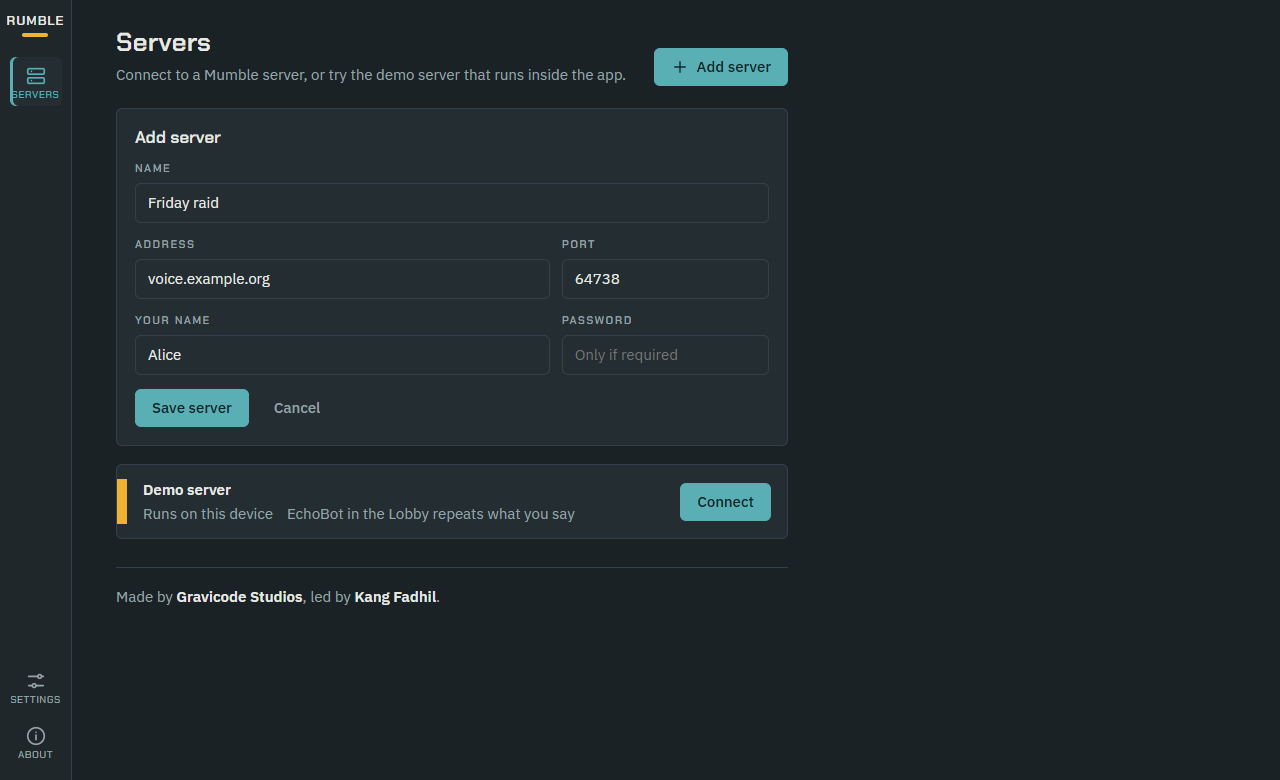
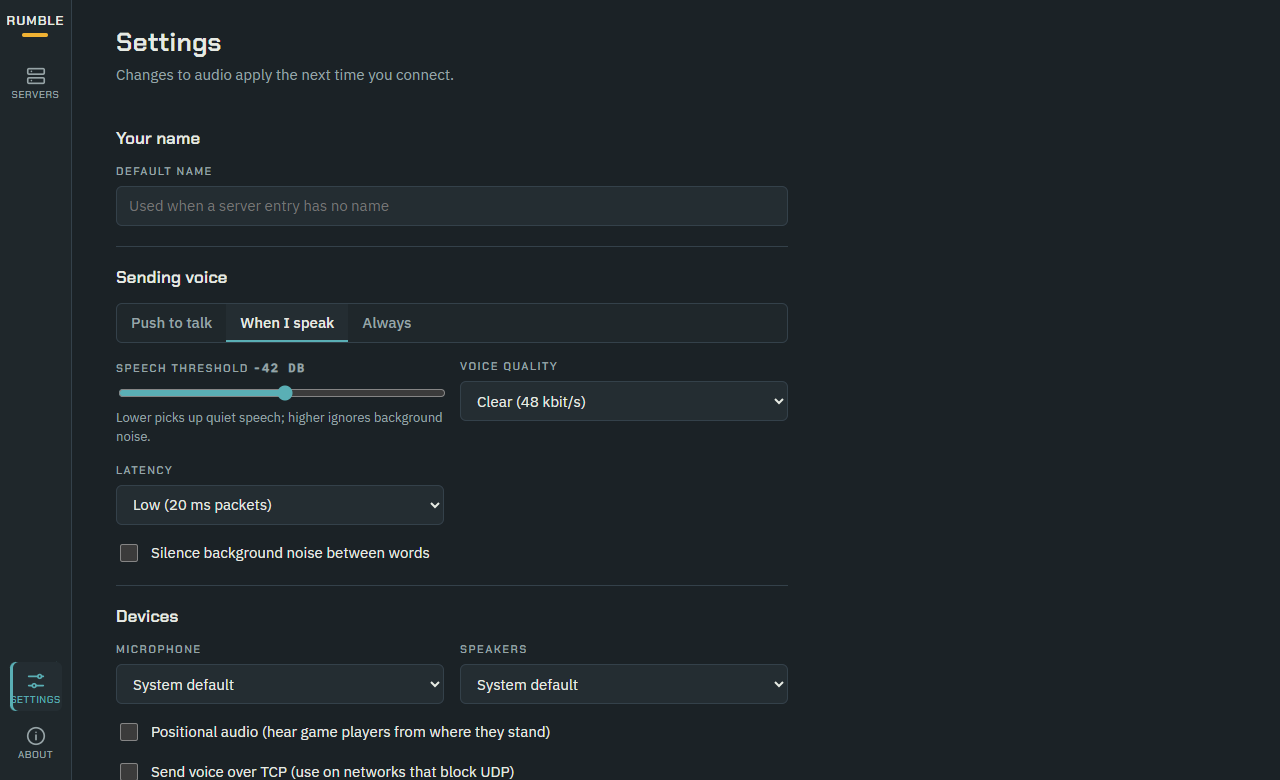
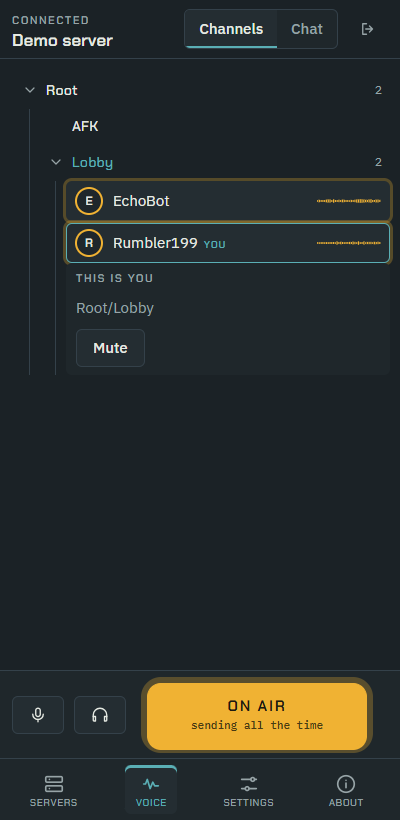
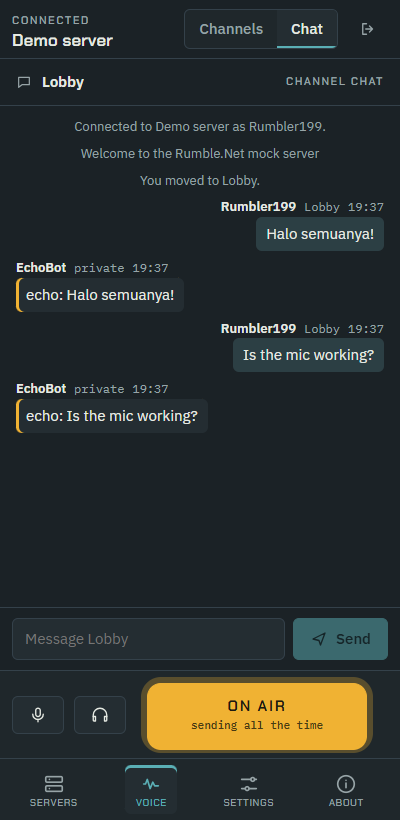
RumbleApp is a Mumble voice client built with .NET MAUI Blazor Hybrid. Each user row shows a live amber voice trace, and the transmit strip turns amber while you're on air.
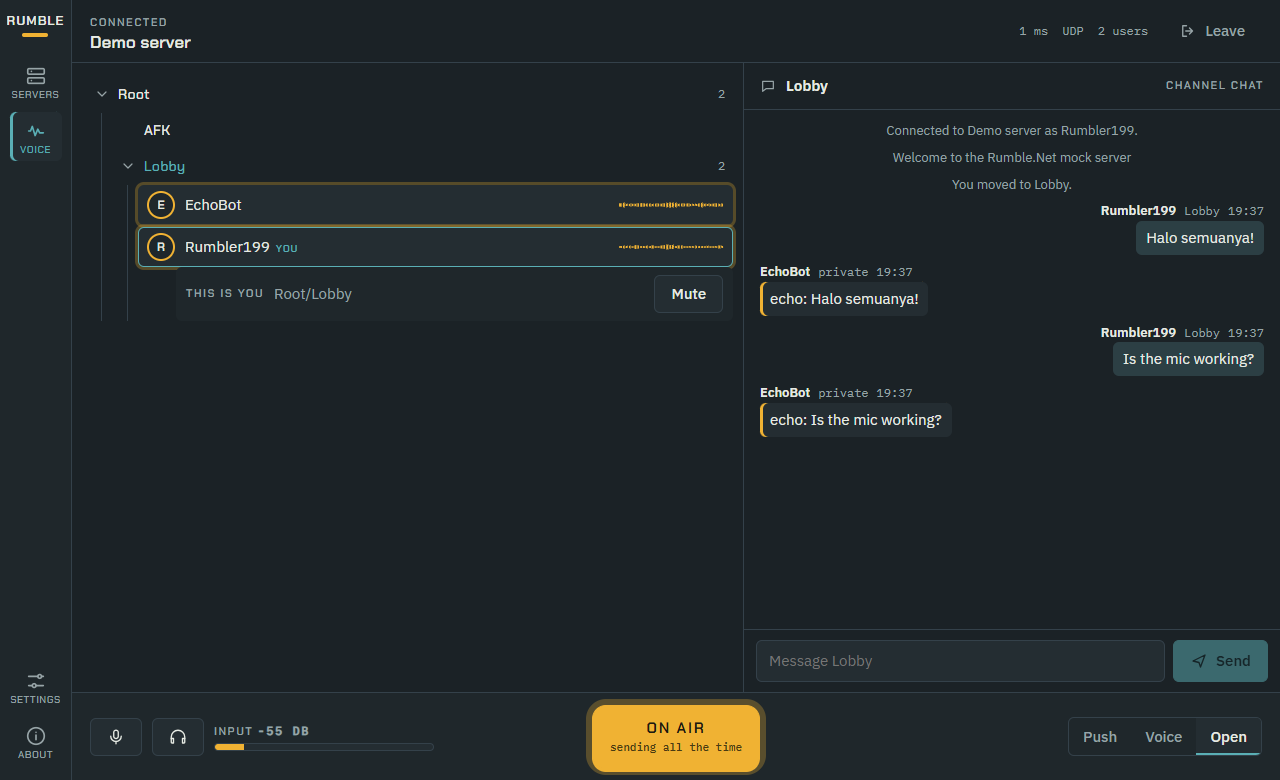
| Servers | Settings | Mobile: channels | Mobile: chat |
|---|---|---|---|
 |
 |
 |
 |
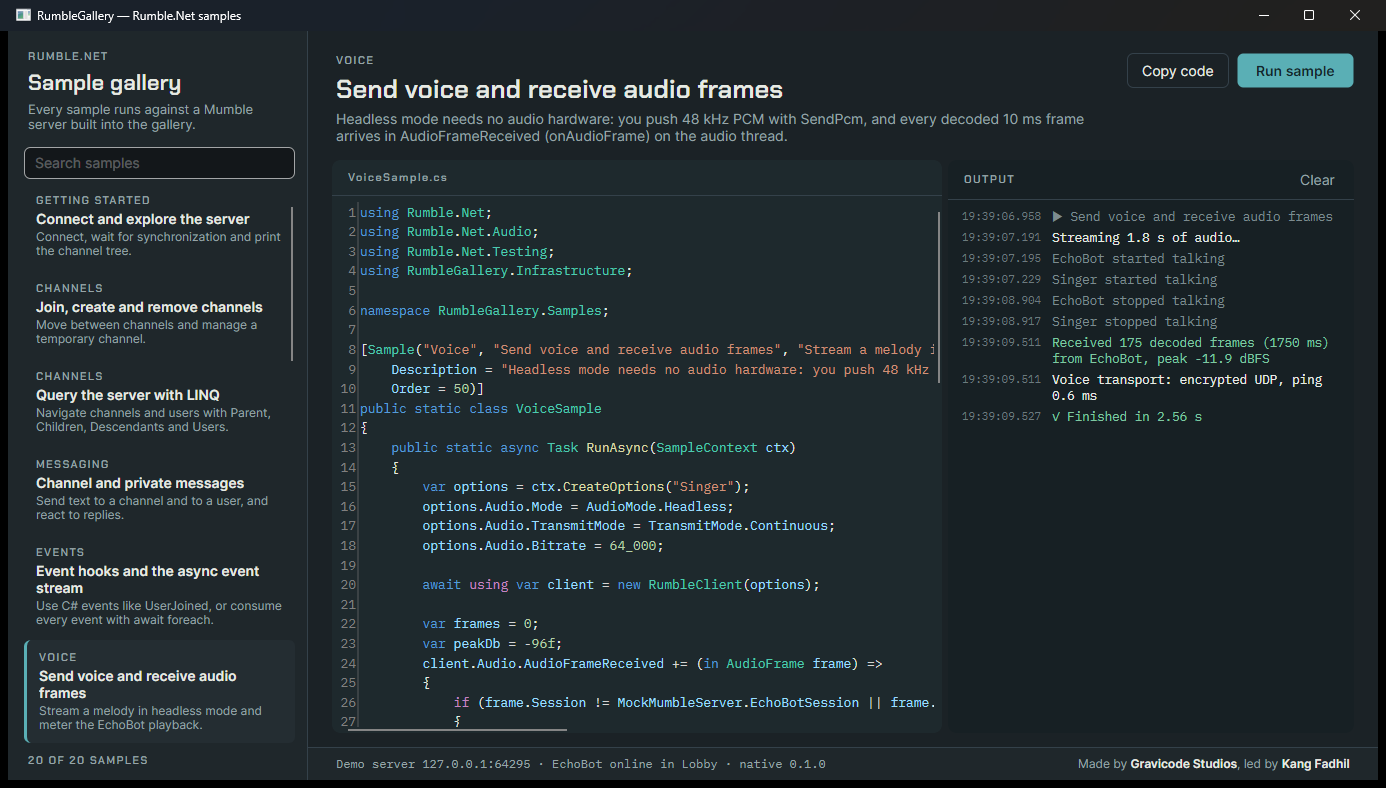
RumbleGallery is an Avalonia gallery of runnable SDK samples. Each one shows its exact source code and live output.
Features
| Area | What you get |
|---|---|
| Voice & audio | Opus (default) at 48 kHz with packet loss concealment and in-band FEC. An adaptive jitter buffer fed by lock-free SPSC queues. Positional audio with vectorized stereo panning and distance attenuation. Device I/O through WASAPI, ALSA/PulseAudio and CoreAudio. A headless PCM mode for bots. |
| Security & networking | TLS 1.2/1.3 via rustls, with no OpenSSL. OCB2-AES128 encrypted UDP that is byte-compatible with Mumble and includes the XEX* countermeasures. Automatic TCP tunnel fallback. Certificate identities and fingerprint pinning. Heartbeats and supervised auto-reconnect with backoff. |
| Protocol & control | Full control protocol: channel tree, users, text messages (channel, tree and private), mute/deafen/move/kick/ban, ACL and ban lists, voice targets (whisper/shout), listening channels, user stats, plugin data, server query ping. |
| Performance | Tokio runtime, zero-copy Bytes framing, allocation-free audio hot paths, blittable P/Invoke (LibraryImport), source-generated JSON, SIMD audio helpers. |
| .NET developer experience | async/await operations that confirm with the server, typed events, IAsyncEnumerable event streams, Microsoft.Extensions.Logging and DI integration, AOT/trimming friendly, NuGet packaging with per-RID native assets. |
| Extensibility | Plugin host, capture audio filters, voice recorder, Rumble.Net.Bots (command routing, hosted services, AI chat through Microsoft.Extensions.AI), Unity and Unreal bridges over a stable C ABI. |
| Tooling | Embedded mock Mumble server for tests and demos, Criterion and BenchmarkDotNet suites, an end-to-end latency probe, CI for Windows, Linux and macOS. |
Repository layout
native/                 Rust workspace (the core)
  crates/rumble-protocol  wire protocol, varints, OCB2-AES crypt (no I/O)
  crates/rumble-audio     Opus, jitter buffer, mixer, positional audio, DSP, devices
  crates/rumble-client    tokio/rustls client: session, reconnect, state, events
  crates/rumble-ffi       C ABI → rumble_native.{dll,so,dylib}  (include/rumble.h)
  crates/rumble-mock-server  in-process Mumble server for tests and samples
src/Rumble.Net          .NET 10 SDK
src/Rumble.Net.Bots     bot framework and AI chat
tests/Rumble.Net.Tests  xUnit tests (unit and end-to-end)
benchmarks/             BenchmarkDotNet and latency probe
samples/RumbleApp       .NET MAUI Blazor Hybrid voice client
samples/RumbleGallery   Avalonia gallery of runnable SDK samples
bridges/unity, unreal   game engine integrations
docs/                   full documentation
Getting started
Prerequisites: .NET SDK 10.0.400+ and Rust 1.85+ (rustup). You need the MAUI workload only for RumbleApp.
# Build and test everything (the .NET build compiles the Rust core automatically)
cd native; cargo test --workspace; cd ..
dotnet test --project tests/Rumble.Net.Tests/Rumble.Net.Tests.csproj

# Explore the SDK in the gallery (runs against the built-in mock server)
dotnet run --project samples/RumbleGallery

# Run the voice client (Windows)
dotnet build samples/RumbleApp -f net10.0-windows10.0.19041.0
Try it without a server by starting the embedded one:
using var server = MockMumbleServer.Start();                       // TLS + UDP on a free port
await using var client = new RumbleClient(server.CreateClientOptions("tester"));
await client.ConnectAsync();                                       // EchoBot waits in the Lobby
Measured performance
These results were measured in Release on a Windows x64 developer machine. Reproduce them with dotnet run -c Release --project benchmarks/Rumble.Net.Benchmarks -- native|latency.
| Measurement | Result |
|---|---|
| End-to-end voice latency, capture → encode → encrypt → UDP → relay → jitter buffer → decode → mix (localhost) | p50 38.4 ms · p95 42.7 ms (target < 50 ms) |
| OCB2-AES128 encrypt + decrypt, 96 B packet | 0.71 µs (≈1.4 M packets/s) |
| Opus decode, 10 ms frame | 28 µs |
| Opus encode, 10 ms frame at 48 kbit/s | 234 µs |
| Mixer with 8 speakers (jitter, decode, spatialize, mix) per 10 ms | 262 µs (2.6 % of the frame budget) |
See docs/testing-and-benchmarks.md for details.
Documentation
Start at docs/README.md:
- Getting started
- Architecture
- Client API
- Audio
- Bots and plugins
- Security
- Native C API
- Game engines
- Samples
- Testing and benchmarks
- Building and packaging
- Troubleshooting
Project tracking lives in PLAN.md (roadmap) and Progress.md (status).
Status

dotnet add package Rumble.Net --prerelease
The NuGet package includes the native core for Windows, Linux and macOS (x64 and arm64), built and tested by CI. For Android and iOS, build the core with build/build-native.*.
Version 0.1.0 is feature complete for the client protocol and verified end to end against the bundled mock server on Windows x64. Validation against production Murmur servers, the mobile native builds and the game engine bridges is still open. Progress.md tracks these items honestly.
License
MIT. See LICENSE and THIRD-PARTY-NOTICES.md.
Made by Gravicode Studios, led by Kang Fadhil.
| Product | Versions Compatible and additional computed target framework versions. |
|---|---|
| .NET | net10.0 is compatible. net10.0-android was computed. net10.0-browser was computed. net10.0-ios was computed. net10.0-maccatalyst was computed. net10.0-macos was computed. net10.0-tvos was computed. net10.0-windows was computed. |
-
net10.0
- Microsoft.Extensions.AI.Abstractions (>= 10.10.0)
- Microsoft.Extensions.Hosting.Abstractions (>= 10.0.12)
- Rumble.Net (>= 0.1.0-preview.2)
NuGet packages
This package is not used by any NuGet packages.
GitHub repositories
This package is not used by any popular GitHub repositories.
| Version | Downloads | Last Updated |
|---|---|---|
| 0.1.0-preview.2 | 42 | 9/15/2026 |
| 0.1.0-preview.1 | 40 | 9/15/2026 |