TemplateFiller 1.0.0-alpha.13
This is a prerelease version of TemplateFiller.
dotnet add package TemplateFiller --version 1.0.0-alpha.13
NuGet\Install-Package TemplateFiller -Version 1.0.0-alpha.13
This command is intended to be used within the Package Manager Console in Visual Studio, as it uses the NuGet module's version of Install-Package.
<PackageReference Include="TemplateFiller" Version="1.0.0-alpha.13" />
For projects that support PackageReference, copy this XML node into the project file to reference the package.
<PackageVersion Include="TemplateFiller" Version="1.0.0-alpha.13" />
<PackageReference Include="TemplateFiller" />
For projects that support Central Package Management (CPM), copy this XML node into the solution Directory.Packages.props file to version the package.
paket add TemplateFiller --version 1.0.0-alpha.13
The NuGet Team does not provide support for this client. Please contact its maintainers for support.
#r "nuget: TemplateFiller, 1.0.0-alpha.13"
#r directive can be used in F# Interactive and Polyglot Notebooks. Copy this into the interactive tool or source code of the script to reference the package.
#:package TemplateFiller@1.0.0-alpha.13
#:package directive can be used in C# file-based apps starting in .NET 10 preview 4. Copy this into a .cs file before any lines of code to reference the package.
#addin nuget:?package=TemplateFiller&version=1.0.0-alpha.13&prerelease
#tool nuget:?package=TemplateFiller&version=1.0.0-alpha.13&prerelease
The NuGet Team does not provide support for this client. Please contact its maintainers for support.
什么是模板填充器
模板填充器的功能是在模板中查找占位符,识别占位符的类别,然后根据占位符的路径,从数据源读取数据,并替换占位符。
模板支持
- Excel (.xls, .xlsx)
- Word (.docx)
填充的数据
- 文本
- 表格
- 图像
占位符说明
简单值占位符
使用":"分隔不同层级。在替换占位符时,仅使用匹配的值替换占位符。
示例
// 在占位符处填充一个值,值来源为 Source.Name
var p1 = "{Name}";

// 在占位符处填充一个值,值来源为 Source.Customer.Name
var p2 = "{Customer:Name}";

// 在占位符处填充一个值,值来源为 Source.Project.Customer.Name
var p3 = "{Project:Customer:Name}";
数组占位符
使用":"分隔不同层级,并且允许使用一次".",声明可枚举集合每个元素应取哪个字段
示例
// 在占位符及其下方,填充多个值,值来源为 Source.Names
var p1 = "[Names]";

// 在占位符及其下方,填充多个值,值来源为 Source.Student.Names
var p2 = "[Student:Names]";

// 在占位符及其下方,填充多个值,值来源为 Source.Students.Select(item => item.Name)
var p3 = "[Students.Name]";

// 在占位符及其下方,填充多个值,值来源为 Source.Students.Select(item => item.Info.Name)
var p4 = "[Students.Info:Name]";

// 在占位符及其下方,填充多个值,值来源为 Source.Project.Students.Select(item => item.Name)
var p5 = "[Project:Students.Name]";

// 在占位符及其下方,填充多个值,值来源为 Source.Project.Students.Select(item => item.Info.Name)
var p6 = "[Project:Students.Info:Name]";
补充说明
在占位符及其下方填充多个值的过程中,若发现待填充的行存在合并单元格或者任意文本,则会插入一行,避免修改原本的数据。
开始使用
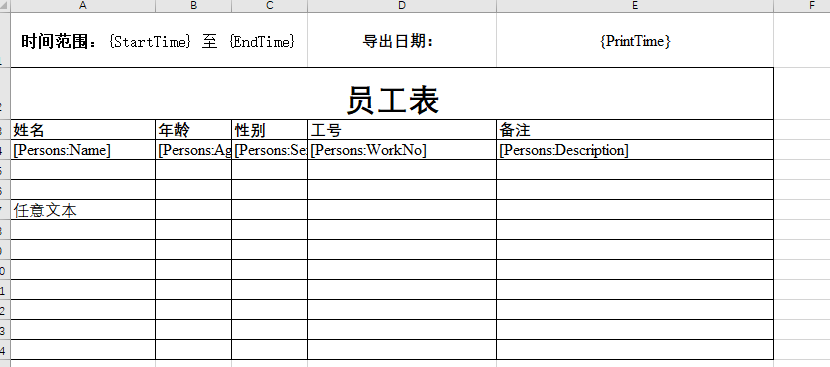
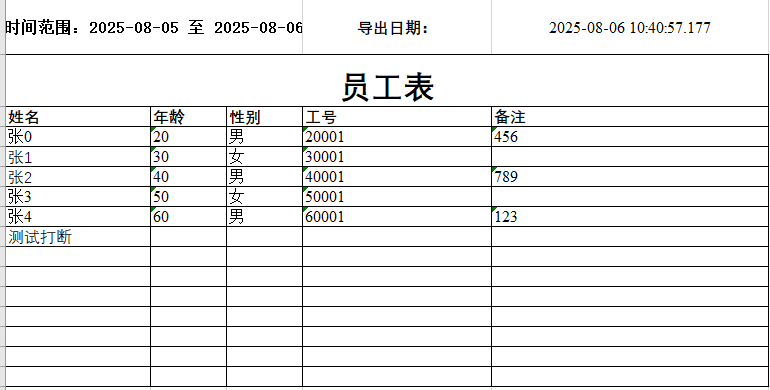
假设我按照入职时间,筛选了若干员工数据,然后需要导出一个表,体现出筛选的时间范围、导出日期和员工数据。
数据格式为:
public class DataSource
{
    public string StartTime { get; set; } = string.Empty;
    public string EndTime { get; set; } = string.Empty;
    public string PrintTime { get; set; } = string.Empty;
    public Person[] Persons { get; set; } = [];
}

public class Person
{
    public string Name { get; set; } = string.Empty;
    public int Age { get; set; }
    public string Sex { get; set; } = string.Empty;
    public string WorkNo { get; set; } = string.Empty;
    public string Description {  get; set; } = string.Empty;
}
Excel
定义模板:
var filler = new NpoiExcelTemplateFiller();
var data = new DataSource()
{
    StartTime = DateTime.Now.AddDays(-1).ToString("yyyy-MM-dd"),
    EndTime = DateTime.Now.ToString("yyyy-MM-dd"),
    PrintTime = DateTime.Now.ToString("yyyy-MM-dd HH:mm:ss.fff"),
    Persons = new Person[]
    {
        new (){ Name = "张0", Age = 20, Sex = "男", WorkNo = "20001", Description = "456" },
        new (){ Name = "张1", Age = 30, Sex = "女", WorkNo = "30001", Description = "" },
        new (){ Name = "张2", Age = 40, Sex = "男", WorkNo = "40001", Description = "789" },
        new (){ Name = "张3", Age = 50, Sex = "女", WorkNo = "50001", Description = "" },
        new (){ Name = "张4", Age = 60, Sex = "男", WorkNo = "60001", Description = "123" }
    }
};

// 填充模板
Filler.Excel.FillTemplate("Template.xlsx", "output.xlsx", data);
填充后的效果:
| Product | Versions Compatible and additional computed target framework versions. |
|---|---|
| .NET | net5.0 was computed. net5.0-windows was computed. net6.0 was computed. net6.0-android was computed. net6.0-ios was computed. net6.0-maccatalyst was computed. net6.0-macos was computed. net6.0-tvos was computed. net6.0-windows was computed. net7.0 was computed. net7.0-android was computed. net7.0-ios was computed. net7.0-maccatalyst was computed. net7.0-macos was computed. net7.0-tvos was computed. net7.0-windows was computed. net8.0 was computed. net8.0-android was computed. net8.0-browser was computed. net8.0-ios was computed. net8.0-maccatalyst was computed. net8.0-macos was computed. net8.0-tvos was computed. net8.0-windows was computed. net9.0 was computed. net9.0-android was computed. net9.0-browser was computed. net9.0-ios was computed. net9.0-maccatalyst was computed. net9.0-macos was computed. net9.0-tvos was computed. net9.0-windows was computed. net10.0 was computed. net10.0-android was computed. net10.0-browser was computed. net10.0-ios was computed. net10.0-maccatalyst was computed. net10.0-macos was computed. net10.0-tvos was computed. net10.0-windows was computed. |
| .NET Core | netcoreapp3.0 was computed. netcoreapp3.1 was computed. |
| .NET Standard | netstandard2.1 is compatible. |
| MonoAndroid | monoandroid was computed. |
| MonoMac | monomac was computed. |
| MonoTouch | monotouch was computed. |
| Tizen | tizen60 was computed. |
| Xamarin.iOS | xamarinios was computed. |
| Xamarin.Mac | xamarinmac was computed. |
| Xamarin.TVOS | xamarintvos was computed. |
| Xamarin.WatchOS | xamarinwatchos was computed. |
Compatible target framework(s)
Included target framework(s) (in package)
Learn more about Target Frameworks and .NET Standard.
-
.NETStandard 2.1
- FileSignatures (>= 2.0.0)
- NPOI (>= 2.7.3)
NuGet packages
This package is not used by any NuGet packages.
GitHub repositories
This package is not used by any popular GitHub repositories.
| Version | Downloads | Last Updated |
|---|---|---|
| 1.0.0-alpha.13 | 81 | 4/17/2026 |
| 1.0.0-alpha.12 | 291 | 8/26/2025 |
| 1.0.0-alpha.11 | 214 | 8/26/2025 |
| 1.0.0-alpha.10 | 203 | 8/26/2025 |
| 1.0.0-alpha.9 | 156 | 8/21/2025 |
| 1.0.0-alpha.8 | 147 | 8/21/2025 |
| 1.0.0-alpha.7 | 155 | 8/21/2025 |
| 1.0.0-alpha.6 | 152 | 8/20/2025 |
| 1.0.0-alpha.5 | 149 | 8/19/2025 |
| 1.0.0-alpha.4 | 156 | 8/19/2025 |
| 1.0.0-alpha.3 | 128 | 8/15/2025 |
| 1.0.0-alpha.2 | 234 | 8/6/2025 |
| 1.0.0-alpha.1 | 233 | 8/6/2025 |
修复页眉页脚的图片未被填充的问题