Tralys.Ui
0.1.0
dotnet add package Tralys.Ui --version 0.1.0
NuGet\Install-Package Tralys.Ui -Version 0.1.0
<PackageReference Include="Tralys.Ui" Version="0.1.0" />
<PackageVersion Include="Tralys.Ui" Version="0.1.0" />
<PackageReference Include="Tralys.Ui" />
paket add Tralys.Ui --version 0.1.0
#r "nuget: Tralys.Ui, 0.1.0"
#:package Tralys.Ui@0.1.0
#addin nuget:?package=Tralys.Ui&version=0.1.0
#tool nuget:?package=Tralys.Ui&version=0.1.0
Tralys.Ui
A UI library for .NET game clients, rendered through bgfx. You write views as C# components. A component renders its nodes from its props and the observable models it reads, and renders again only when something it read changes. Once warm, a frame allocates nothing, and analyzers keep it that way.
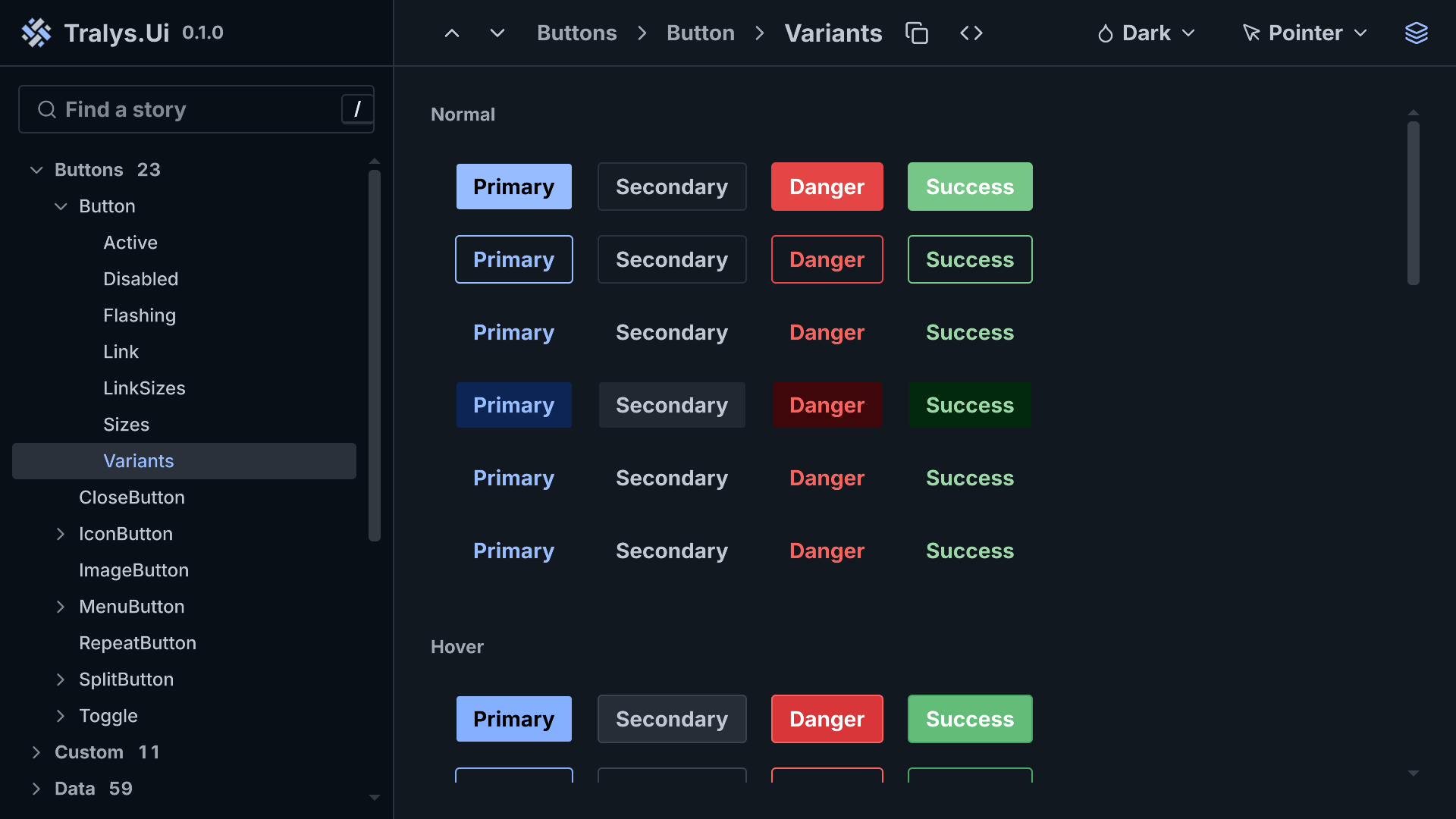
Every component's stories run in the browser, wherever WebGPU is available.
| Package | Role |
|---|---|
Tralys.Ui |
The core: components, flex and grid layout, input, focus, text editing, virtual lists, overlays, animation, theming and the built-in components. Carries the generators and analyzers. |
Tralys.Ui.Engine |
What the core and renderers build on: draw lists, tessellation, fonts on FreeType, text layout, input contracts, item sources, popup placement, themes and their token compiler, and AllocationGate. |
Tralys.Ui.Bgfx |
The bgfx renderer, with SPIR-V, D3D11, Metal and WGSL shaders embedded. |
Tralys.Ui.Mvvm |
ObservableObject, [ObservableProperty], [NotifyPropertyChangedFor] and [DelegateCommand] with their generators, plus Command, ObservableText, ObservableList and ObservableListView. |
Tralys.Ui.Docking |
Tab groups that split, float and tear out into windows, with layouts that save and load. |
Tralys.Ui.DevTools |
An in-app inspector for nodes, components, props, render counts and what each render read, plus layout, picking and repaint flashing. |
Tralys.Ui.Testing |
UiDriver, which mounts UI headless and clicks, types, drags and presses through real hit testing. |
- Targets
net11.0. The runtime packages are trim- and NativeAOT-compatible. - Keep every Tralys.Ui package on one version:
Tralys.Ui.DevToolsandTralys.Ui.Testingpin the core, and the core pinsTralys.Ui.Engine, each to the exact version of its own release. - Preview: a release before 1.0 can break the API, and the changelog lists every break.
Install
dotnet add package Tralys.Ui
dotnet add package Tralys.Ui.Bgfx
Use
sealed partial class CounterModel : ObservableObject
{
    [ObservableProperty]
    public partial int Count { get; set; }

    public ObservableText Name { get; } = new();

    [DelegateCommand]
    void Increment() => Count++;
}

readonly record struct CounterProps
{
    public CounterModel? Model { get; init; }
}

sealed class Counter : Component<CounterProps>
{
    protected override void Render(Ui ui, in CounterProps p)
    {
        var model = p.Model!;
        using (ui.Box(direction: Direction.Column, gap: 8))
        {
            ui.Input(text: model.Name, placeholder: "Your name");
            ui.Text(ui.Format($"{model.Name.Span} clicked {model.Count} times"));
            ui.Button(text: "Add", onClick: model.IncrementCommand);
        }
    }
}
var fonts = new FontCollection();
var text = new TextServices(fonts, fonts.Add(fontBytes), new BgfxTextureFactory());
var device = new BgfxRenderDevice();
var renderer = new BgfxViewRenderer(device);
var context = new UiContext(text);
var view = new UiView(context, host) { Size = new Size(1280, 720) };
view.Mount<Counter, CounterProps>(new CounterProps { Model = model });

// Each frame:
context.Advance(now);
view.Update();
device.BeginFrame();
renderer.Render(view, viewId: 8, firstLayerView: 0, layerViews: 8);
- Your game owns bgfx: it starts bgfx through Bgfx.Net before making the device, and calls
Frameafter every view has rendered. - Blurred shadows, masks, fades and clips that aren't axis-aligned rectangles render as layers, on the
layerViewsids fromfirstLayerView, which run beforeviewId.- A layer past them draws without its effect and counts in
renderer.DroppedLayers.
- A layer past them draws without its effect and counts in
tests/Tralys.Ui.PackageSmoke is a
complete headless consumer: bgfx start-up, fonts, renderer, a model-bound component, a command, the inspector and a
test driver.
Components
- A component is a sealed class over a
readonly record structof props. The generators give it its own call,ui.Counter(model: model), which takes its props and the placement every node takes (grow,margin,id, ...). - The analyzers require named arguments,
staticcallbacks and slots, and keyed loops. - A model property read during render is observed, so a change re-renders only the components that read it.
- An input edits its
ObservableTextin place: a keystroke makes no string, and re-renders what read the text. ui.Stateholds a component's own state.ui.Rememberkeeps a value,ui.Effectruns an effect andui.Loopanimates.
Hosting
- The host implements
IViewHost(cursor, clipboard, text input). - It feeds input through
PointerMove,PointerDown,PointerUp,PointerLeave,PointerCancel,Wheel,KeyDown,KeyUp,TextInput,GamepadandStick. WindowFocustells the view whether its window has the keyboard.
Themes and icons
Themes.DarkandThemes.Lightship with the engine.- For your own themes, add W3C design tokens as
AdditionalFiles:*.tokens.jsonfiles and one*.resolver.json. The build emits aThemesclass. Your tokens lay over the built-in ones, so they set only what they change. - Icons come from your icon font. Add its
IconCodepoints.json(or a*.icons.json) asAdditionalFiles, and set<TralysIconFonts>lucide=lucide</TralysIconFonts>. - The build then emits an
Iconsclass. GiveIcons.SettoUiContext.Icons; a built-in icon role it leaves out is a build error.
Tooling
new Inspector(view, host)inspects aUiViewfrom a view of its own.UiDriver.Render(ui => ui.Counter(model: model))mounts a component headless for a test.- Drive it with
Click,Type,Press,DragandSettle.
- Drive it with
[FramePath]makes the analyzers reject allocation in your per-frame code and in everything of yours it calls.[ColdPath]marks a callee that runs once for what it makes, such as a cache filled on first use.
Shipping builds
- Nodes are told apart by their caller's source path, which the compiler writes into your assembly.
<TralysStripCallerPaths>true</TralysStripCallerPaths>replaces those paths withAssemblyName#Ntokens.- The build decodes them in
obj/AssemblyName.callerpaths.txt. - The inspector can then no longer open the source.
- The build decodes them in
Custom renderers
- A renderer of your own reads a
DrawList's vertices, batches and layers. - They are
[Experimental]as TRL5001 while the vertex format may change: opt in with<NoWarn>$(NoWarn);TRL5001</NoWarn>.
Render to a texture
A BgfxRenderTarget works both ways:
- To show your game's pixels in the UI (a minimap, or a 3D preview with
depth: true), draw into itsFrameBufferand show it withui.Image(target). - To put a view on a surface in your world, draw the view into a target and sample
target.Color:
var target = new BgfxRenderTarget(512, 512, mips: true);
var renderer = new BgfxViewRenderer(device);
var view = new UiView(context, host) { Size = new Size(target.Width, target.Height) };
view.Mount<Panel, PanelProps>(props);

// Each frame, after device.BeginFrame(), on view ids that sort before the one sampling the target:
view.Update();
if (renderer.RenderTo(view, target, (ushort)(nextView + LayerViews), nextView, LayerViews))
    nextView += LayerViews + 1;
- Shared device:
- Make one
BgfxRenderDeviceafter bgfx starts; every view's renderer shares it. - Call its
BeginFrameonce a frame, before any view renders.
- Make one
- View ids:
- The view's layers take the
LayerViewsids fromnextView, and the view takes the id after them.
- The view's layers take the
- Redraws:
RenderTodraws only when the view changed, so an idle panel costs no draw calls and no view ids.- Pass
force: truewhen a texture the view draws has new pixels.
- Texels:
- Coordinate (0, 0) is the view's top left.
- Texels are premultiplied and gamma-encoded: blend with one and inverse source alpha.
- In a lit or tone-mapped pipeline, convert them in your shader.
- Input:
- Turn your ray hit into view pixels and call
PointerMove,PointerDownandPointerUp. - While a press is held, keep sending moves after the ray leaves; otherwise call
PointerLeave. PointerCancelends a press that never released.WindowFocustells the view whether it has the keyboard.
- Turn your ray hit into view pixels and call
Platforms
| Platform | bgfx renderer | Status |
|---|---|---|
| Windows x64 | Direct3D 11, Vulkan | Tested in CI |
| Linux x64 | Vulkan | Tested in CI |
| macOS arm64, x64 | Metal | Tested in CI |
| Android arm64, x64 | Vulkan | Experimental: untested |
| Browser (WebAssembly) | WebGPU | The gallery only |
- bgfx's other renderers, OpenGL and OpenGL ES included, throw
NotSupportedException. - Bgfx.Net ships no native bgfx for iOS, Linux arm64 or Windows arm64.
- The browser gallery's project builds on a .NET 12 daily SDK.
Limitations
- Text maps each character to its font's glyph and kerns the pairs, left to right.
- There are no OpenType substitutions, bidirectional text or colour glyphs. Ligatures, joining or reordering scripts, right-to-left text and emoji sequences don't render correctly.
- Editing still moves the caret and selects by whole user-perceived characters.
Demo
From a clone of the repository:
dotnet run --project samples/Tralys.Ui.Demo -c Release
This opens a gallery of every component's stories; --help lists the options and F12 toggles the inspector. In the
browser gallery, ?story=Switch.States opens a single story.
Contributing
Building, testing and releasing: CLAUDE.md.
License
MIT.
| Product | Versions Compatible and additional computed target framework versions. |
|---|---|
| .NET | net11.0 is compatible. |
-
net11.0
- FreeType.Net (>= 0.1.0)
- Tralys.Ui.Engine (= 0.1.0)
- Tralys.Ui.Mvvm (>= 0.1.0)
NuGet packages (3)
Showing the top 3 NuGet packages that depend on Tralys.Ui:
| Package | Downloads |
|---|---|
|
Tralys.Ui.Testing
A driver that mounts Tralys.Ui UI headless and works it as its user would. |
|
|
Tralys.Ui.DevTools
An inspector over a running Tralys.Ui view: its node tree with components and their props, render counts and what they read, layout, held states, picking, and overlays of the selected box, its gaps and environment, and what repainted. |
|
|
Tralys.Ui.Docking
Docking for Tralys.Ui: panels in tab groups that split, float, tear out into windows of their own and dock back, with a layout that saves and loads. |
GitHub repositories
This package is not used by any popular GitHub repositories.
| Version | Downloads | Last Updated |
|---|---|---|
| 0.1.0 | 54 | 11/23/2026 |
| 0.1.0-preview.2 | 64 | 11/19/2026 |
| 0.1.0-preview.1 | 66 | 11/19/2026 |