Tralys.Ui.Engine
0.1.0
dotnet add package Tralys.Ui.Engine --version 0.1.0
NuGet\Install-Package Tralys.Ui.Engine -Version 0.1.0
<PackageReference Include="Tralys.Ui.Engine" Version="0.1.0" />
<PackageVersion Include="Tralys.Ui.Engine" Version="0.1.0" />
<PackageReference Include="Tralys.Ui.Engine" />
paket add Tralys.Ui.Engine --version 0.1.0
#r "nuget: Tralys.Ui.Engine, 0.1.0"
#:package Tralys.Ui.Engine@0.1.0
#addin nuget:?package=Tralys.Ui.Engine&version=0.1.0
#tool nuget:?package=Tralys.Ui.Engine&version=0.1.0
Tralys.Ui
A UI library for .NET game clients, rendered through bgfx. You write views as C# components. A component renders its nodes from its props and the observable models it reads, and renders again only when something it read changes. Once warm, a frame allocates nothing, and analyzers keep it that way.
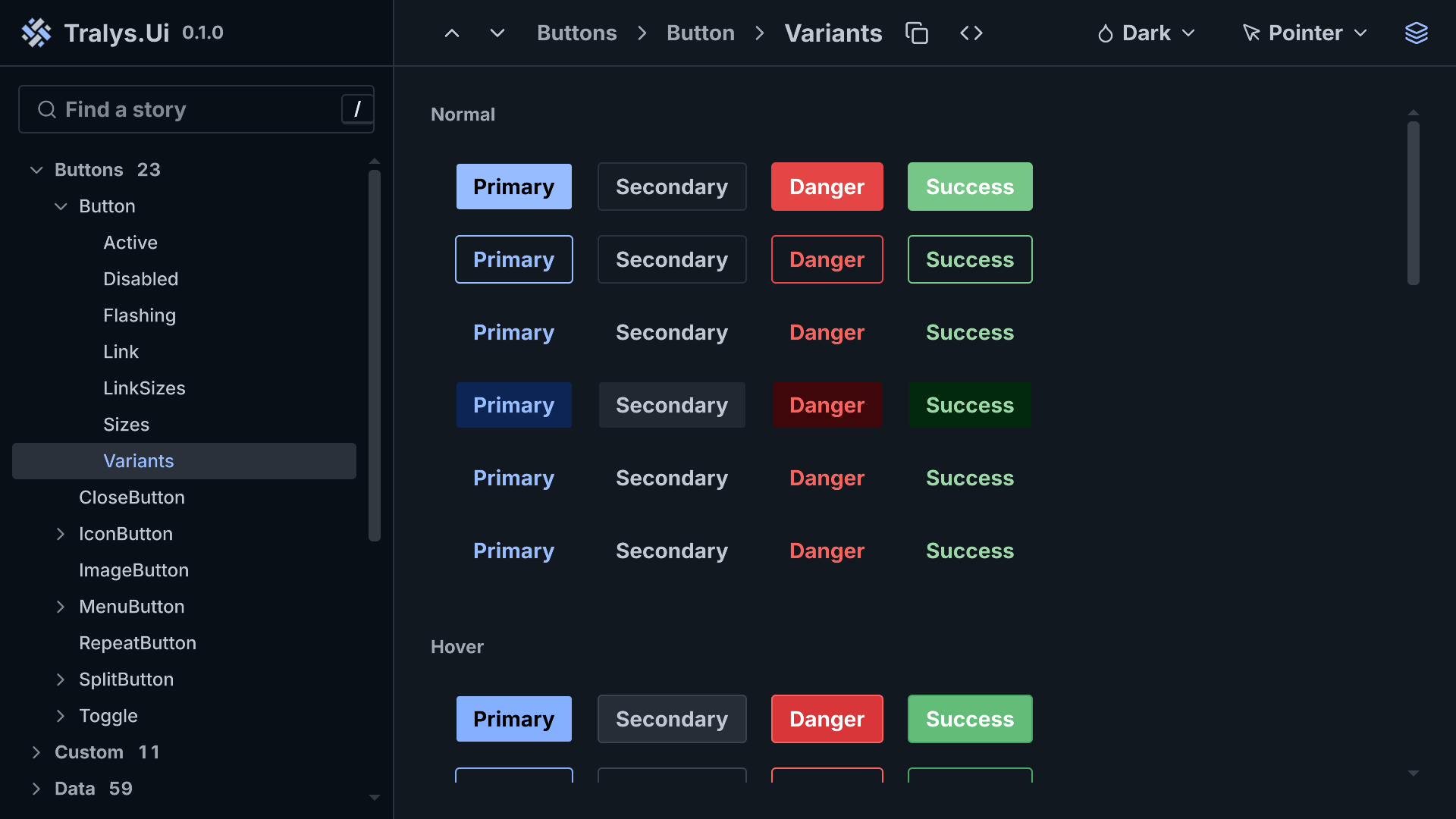
Every component's stories run in the browser, wherever WebGPU is available.
| Package | Role |
|---|---|
Tralys.Ui |
The core: components, flex and grid layout, input, focus, text editing, virtual lists, overlays, animation, theming and the built-in components. Carries the generators and analyzers. |
Tralys.Ui.Engine |
What the core and renderers build on: draw lists, tessellation, fonts on FreeType, text layout, input contracts, item sources, popup placement, themes and their token compiler, and AllocationGate. |
Tralys.Ui.Bgfx |
The bgfx renderer, with SPIR-V, D3D11, Metal and WGSL shaders embedded. |
Tralys.Ui.Mvvm |
ObservableObject, [ObservableProperty], [NotifyPropertyChangedFor] and [DelegateCommand] with their generators, plus Command, ObservableText, ObservableList and ObservableListView. |
Tralys.Ui.Docking |
Tab groups that split, float and tear out into windows, with layouts that save and load. |
Tralys.Ui.DevTools |
An in-app inspector for nodes, components, props, render counts and what each render read, plus layout, picking and repaint flashing. |
Tralys.Ui.Testing |
UiDriver, which mounts UI headless and clicks, types, drags and presses through real hit testing. |
- Targets
net11.0. The runtime packages are trim- and NativeAOT-compatible. - Keep every Tralys.Ui package on one version:
Tralys.Ui.DevToolsandTralys.Ui.Testingpin the core, and the core pinsTralys.Ui.Engine, each to the exact version of its own release. - Preview: a release before 1.0 can break the API, and the changelog lists every break.
Install
dotnet add package Tralys.Ui
dotnet add package Tralys.Ui.Bgfx
Use
sealed partial class CounterModel : ObservableObject
{
    [ObservableProperty]
    public partial int Count { get; set; }

    public ObservableText Name { get; } = new();

    [DelegateCommand]
    void Increment() => Count++;
}

readonly record struct CounterProps
{
    public CounterModel? Model { get; init; }
}

sealed class Counter : Component<CounterProps>
{
    protected override void Render(Ui ui, in CounterProps p)
    {
        var model = p.Model!;
        using (ui.Box(direction: Direction.Column, gap: 8))
        {
            ui.Input(text: model.Name, placeholder: "Your name");
            ui.Text(ui.Format($"{model.Name.Span} clicked {model.Count} times"));
            ui.Button(text: "Add", onClick: model.IncrementCommand);
        }
    }
}
var fonts = new FontCollection();
var text = new TextServices(fonts, fonts.Add(fontBytes), new BgfxTextureFactory());
var device = new BgfxRenderDevice();
var renderer = new BgfxViewRenderer(device);
var context = new UiContext(text);
var view = new UiView(context, host) { Size = new Size(1280, 720) };
view.Mount<Counter, CounterProps>(new CounterProps { Model = model });

// Each frame:
context.Advance(now);
view.Update();
device.BeginFrame();
renderer.Render(view, viewId: 8, firstLayerView: 0, layerViews: 8);
- Your game owns bgfx: it starts bgfx through Bgfx.Net before making the device, and calls
Frameafter every view has rendered. - Blurred shadows, masks, fades and clips that aren't axis-aligned rectangles render as layers, on the
layerViewsids fromfirstLayerView, which run beforeviewId.- A layer past them draws without its effect and counts in
renderer.DroppedLayers.
- A layer past them draws without its effect and counts in
tests/Tralys.Ui.PackageSmoke is a
complete headless consumer: bgfx start-up, fonts, renderer, a model-bound component, a command, the inspector and a
test driver.
Components
- A component is a sealed class over a
readonly record structof props. The generators give it its own call,ui.Counter(model: model), which takes its props and the placement every node takes (grow,margin,id, ...). - The analyzers require named arguments,
staticcallbacks and slots, and keyed loops. - A model property read during render is observed, so a change re-renders only the components that read it.
- An input edits its
ObservableTextin place: a keystroke makes no string, and re-renders what read the text. ui.Stateholds a component's own state.ui.Rememberkeeps a value,ui.Effectruns an effect andui.Loopanimates.
Hosting
- The host implements
IViewHost(cursor, clipboard, text input). - It feeds input through
PointerMove,PointerDown,PointerUp,PointerLeave,PointerCancel,Wheel,KeyDown,KeyUp,TextInput,GamepadandStick. WindowFocustells the view whether its window has the keyboard.
Themes and icons
Themes.DarkandThemes.Lightship with the engine.- For your own themes, add W3C design tokens as
AdditionalFiles:*.tokens.jsonfiles and one*.resolver.json. The build emits aThemesclass. Your tokens lay over the built-in ones, so they set only what they change. - Icons come from your icon font. Add its
IconCodepoints.json(or a*.icons.json) asAdditionalFiles, and set<TralysIconFonts>lucide=lucide</TralysIconFonts>. - The build then emits an
Iconsclass. GiveIcons.SettoUiContext.Icons; a built-in icon role it leaves out is a build error.
Tooling
new Inspector(view, host)inspects aUiViewfrom a view of its own.UiDriver.Render(ui => ui.Counter(model: model))mounts a component headless for a test.- Drive it with
Click,Type,Press,DragandSettle.
- Drive it with
[FramePath]makes the analyzers reject allocation in your per-frame code and in everything of yours it calls.[ColdPath]marks a callee that runs once for what it makes, such as a cache filled on first use.
Shipping builds
- Nodes are told apart by their caller's source path, which the compiler writes into your assembly.
<TralysStripCallerPaths>true</TralysStripCallerPaths>replaces those paths withAssemblyName#Ntokens.- The build decodes them in
obj/AssemblyName.callerpaths.txt. - The inspector can then no longer open the source.
- The build decodes them in
Custom renderers
- A renderer of your own reads a
DrawList's vertices, batches and layers. - They are
[Experimental]as TRL5001 while the vertex format may change: opt in with<NoWarn>$(NoWarn);TRL5001</NoWarn>.
Render to a texture
A BgfxRenderTarget works both ways:
- To show your game's pixels in the UI (a minimap, or a 3D preview with
depth: true), draw into itsFrameBufferand show it withui.Image(target). - To put a view on a surface in your world, draw the view into a target and sample
target.Color:
var target = new BgfxRenderTarget(512, 512, mips: true);
var renderer = new BgfxViewRenderer(device);
var view = new UiView(context, host) { Size = new Size(target.Width, target.Height) };
view.Mount<Panel, PanelProps>(props);

// Each frame, after device.BeginFrame(), on view ids that sort before the one sampling the target:
view.Update();
if (renderer.RenderTo(view, target, (ushort)(nextView + LayerViews), nextView, LayerViews))
    nextView += LayerViews + 1;
- Shared device:
- Make one
BgfxRenderDeviceafter bgfx starts; every view's renderer shares it. - Call its
BeginFrameonce a frame, before any view renders.
- Make one
- View ids:
- The view's layers take the
LayerViewsids fromnextView, and the view takes the id after them.
- The view's layers take the
- Redraws:
RenderTodraws only when the view changed, so an idle panel costs no draw calls and no view ids.- Pass
force: truewhen a texture the view draws has new pixels.
- Texels:
- Coordinate (0, 0) is the view's top left.
- Texels are premultiplied and gamma-encoded: blend with one and inverse source alpha.
- In a lit or tone-mapped pipeline, convert them in your shader.
- Input:
- Turn your ray hit into view pixels and call
PointerMove,PointerDownandPointerUp. - While a press is held, keep sending moves after the ray leaves; otherwise call
PointerLeave. PointerCancelends a press that never released.WindowFocustells the view whether it has the keyboard.
- Turn your ray hit into view pixels and call
Platforms
| Platform | bgfx renderer | Status |
|---|---|---|
| Windows x64 | Direct3D 11, Vulkan | Tested in CI |
| Linux x64 | Vulkan | Tested in CI |
| macOS arm64, x64 | Metal | Tested in CI |
| Android arm64, x64 | Vulkan | Experimental: untested |
| Browser (WebAssembly) | WebGPU | The gallery only |
- bgfx's other renderers, OpenGL and OpenGL ES included, throw
NotSupportedException. - Bgfx.Net ships no native bgfx for iOS, Linux arm64 or Windows arm64.
- The browser gallery's project builds on a .NET 12 daily SDK.
Limitations
- Text maps each character to its font's glyph and kerns the pairs, left to right.
- There are no OpenType substitutions, bidirectional text or colour glyphs. Ligatures, joining or reordering scripts, right-to-left text and emoji sequences don't render correctly.
- Editing still moves the caret and selects by whole user-perceived characters.
Demo
From a clone of the repository:
dotnet run --project samples/Tralys.Ui.Demo -c Release
This opens a gallery of every component's stories; --help lists the options and F12 toggles the inspector. In the
browser gallery, ?story=Switch.States opens a single story.
Contributing
Building, testing and releasing: CLAUDE.md.
License
MIT.
| Product | Versions Compatible and additional computed target framework versions. |
|---|---|
| .NET | net11.0 is compatible. |
-
net11.0
- FreeType.Net (>= 0.1.0)
- Tralys.Ui.Mvvm (>= 0.1.0)
NuGet packages (3)
Showing the top 3 NuGet packages that depend on Tralys.Ui.Engine:
| Package | Downloads |
|---|---|
|
Tralys.Ui
The Tralys.Ui UI core: components rendered from C#, layout, input, text, lists, overlays, theming and the built-in components, with the generators and analyzers its consumers build with. |
|
|
Tralys.Ui.FreeType
The Tralys.Ui font backend on FreeType, with FreeType's native library for Android as runtime assets. |
|
|
Tralys.Ui.Bgfx
Draws Tralys.Ui views through bgfx, with the Tralys.Ui shaders compiled for SPIR-V, D3D11, Metal and WGSL and embedded. |
GitHub repositories
This package is not used by any popular GitHub repositories.
| Version | Downloads | Last Updated |
|---|---|---|
| 0.1.0 | 57 | 11/23/2026 |
| 0.1.0-preview.2 | 73 | 11/19/2026 |
| 0.1.0-preview.1 | 80 | 11/19/2026 |