Transit.Dataverse
1.0.0.1
dotnet add package Transit.Dataverse --version 1.0.0.1
NuGet\Install-Package Transit.Dataverse -Version 1.0.0.1
<PackageReference Include="Transit.Dataverse" Version="1.0.0.1" />
<PackageVersion Include="Transit.Dataverse" Version="1.0.0.1" />
<PackageReference Include="Transit.Dataverse" />
paket add Transit.Dataverse --version 1.0.0.1
#r "nuget: Transit.Dataverse, 1.0.0.1"
#:package Transit.Dataverse@1.0.0.1
#addin nuget:?package=Transit.Dataverse&version=1.0.0.1
#tool nuget:?package=Transit.Dataverse&version=1.0.0.1
MassTransitDatavere
This library is useful when you want to develop Publish/Subscribe pattern based api to push data inside Dataverse.This libarary provides a wrapper around organization service of dataverse, methods exposed by this library are same as methods of organization service, however in background operations done in asynchronous manner. Library handles creation of Azure resources (Service Bus Topics for OperaionCompleted data, Error data) required for its functioning and you can subcribe to those topics to access operation status and related data.
Generally below pattern is followed to while developing Publish/Subscribe pattern based api for Dataverse
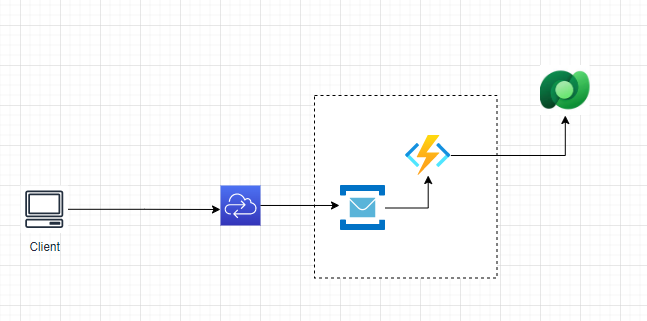
In this case you need to maintain Azure Infrastructure yourself and if you want to increase number of apis you have to keep on increasing Azure functions/webjobs and keep maintianing them.
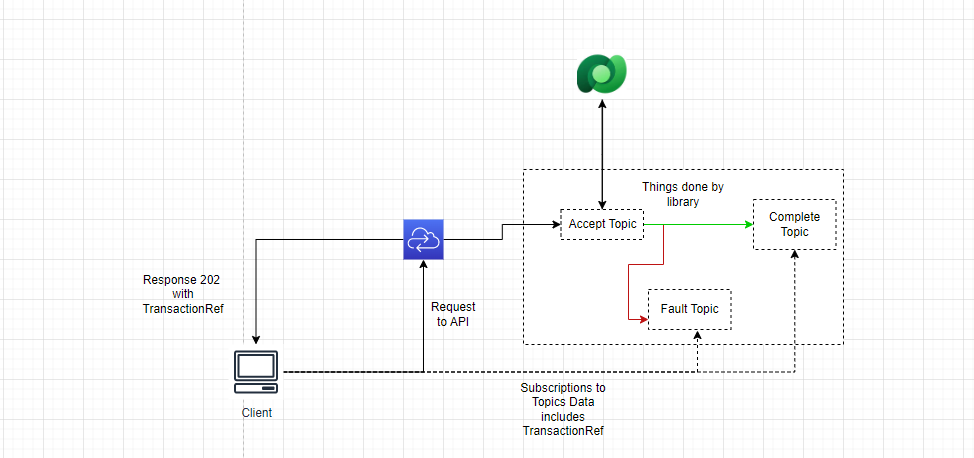
This library maintains Azure infrastructure for you and gives generic interface like IOrganizationService to create or update any data in Dataverse
Architecture with library
How to Use Library
If you are using .Net6 or above:
Add below using statement on the top of Progarm.cs file
using MassTransit;
Add below lines in Program.cs if you are using .Net6 or above
builder.Services.ConfigureTransit(builder.Configuration["Dataverse"],BusType.AzureServiceBus,azureServicebusConfiguration:(context, cfg) =>
{
   cfg.Host(builder.Configuration["ServiceBus"]);
   cfg.ConfigureEndpoints(context);
});
If you are using .Net5 Or below:
Add below using statement on the top of Startup.cs file
using MassTransit;
Add below lines under ConfigureServices method in Startup.cs file
services.ConfigureTransit(Configuration["Dataverse"], BusType.AzureServiceBus, azureServicebusConfiguration: (context, cfg) =>
{
               cfg.Host(Configuration["ServiceBus"]);
               cfg.ConfigureEndpoints(context);
});
Here "Dataverse" : Connection string for datverse please refer this link for more information https://docs.microsoft.com/en-us/powerapps/developer/common-data-service/xrm-tooling/use-connection-strings-xrm-tooling-connect
"ServiceBus": Connection string for Azure Service Bus Namespace. Please make sure SAS connection string has access to create Azure Service Bus Topics. Please use Azure Service Bus on Standard Tier.
Sample API Code is avialable in project with Project Name API you can refer it.
Sample Code for Create Request
public async Task<IActionResult> Create([FromBody] Customer customer, [FromServices] ITransitOrganizationService transitOrganizationService, CancellationToken cancellationToken= default)
       {
           var contact = new Entity("contact")
           {
               ["firstname"] = customer.FirstName,
               ["lastname"] = customer.LastName,
               ["jobtitle"] = customer.JobTitle,
               ["emailaddress1"] = customer.Email,
               ["mobilephone"] = customer.MobilePhone,
               ["address1_line1"] = customer.Address,
               ["address1_city"] = customer.City,
               ["address1_country"] = customer.Country,
               ["numberofchildren"] = "10"
           };
           var response =await transitOrganizationService.Create(contact,customer,cancellationToken);
           return Accepted(response);
       }
Sample Code for Update Request
       public async Task<IActionResult> Update([FromBody] CustomerUpdate customer, [FromServices] ITransitOrganizationService transitOrganizationService, CancellationToken cancellationToken = default)
       {
           var contact = new Entity("contact")
           {
               ["firstname"] = customer.FirstName
           };
           contact.Id = customer.Id;
           var response = await transitOrganizationService.Update(contact,customer,cancellationToken);
           return Accepted(response);
       }
Sample Code for Execute Request
       public async Task<IActionResult> Execute([FromServices] ITransitOrganizationService transitOrganizationService,CancellationToken cancellationToken=default)
       {
           var req = new OrganizationRequest("sample_CustomAPIExample")
           {
               ["StringParameter"] = "CVB"
           };

           var resp = await transitOrganizationService.Execute(req,cancellationToken:cancellationToken);
           return Accepted(resp);
       }
ITransitOrganizationService is interface available from library.
When API is run below Topics will be created in Azure Service Bus Namespace

Whenever you call endpoint you will receive Http response with response code 202 like this
{
 "id": "2bd73018-5dae-41ff-911e-f9ad67f8a11b",
 "isSumbitted": true
}
You can subscribe for completed requests by subscribing to Topic "domain.messages~completemessage"
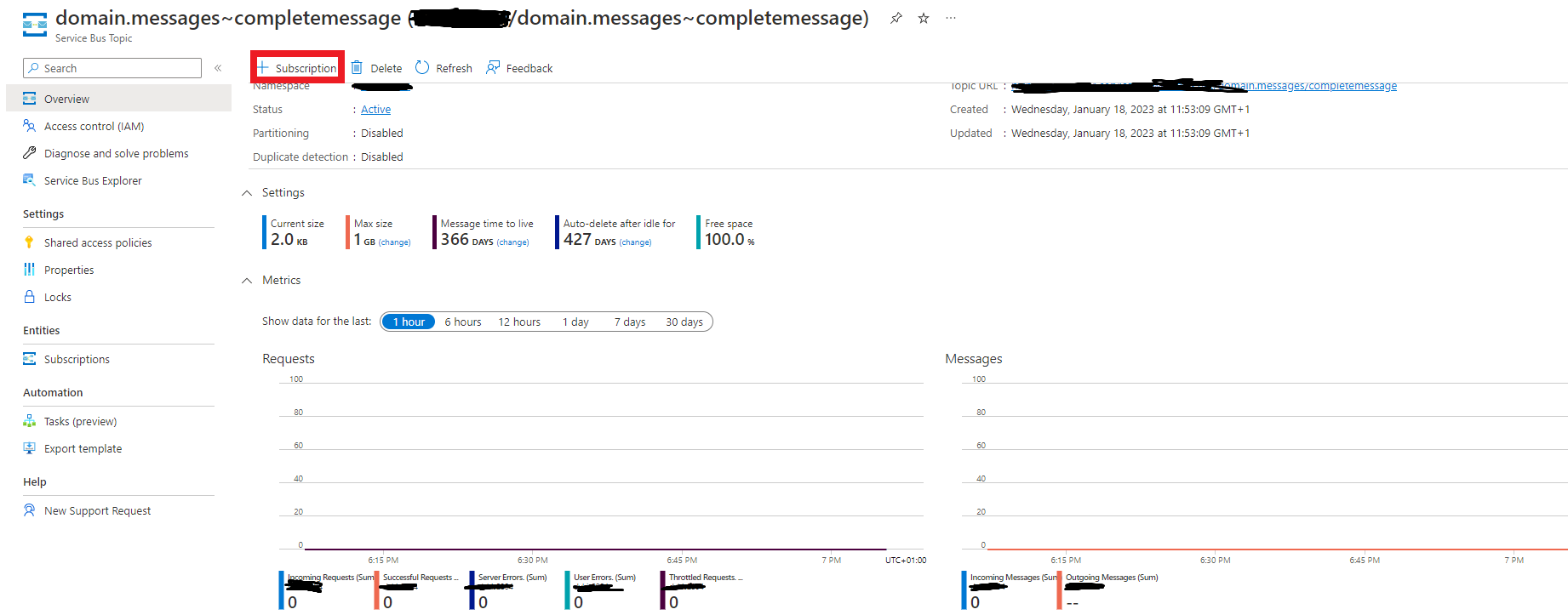
Completed Message will like this
   "messageId": "b87d0000-a566-c025-cb5b-08dafaeab474",
   "requestId": null,
   "correlationId": null,
   "conversationId": "b87d0000-a566-c025-53b0-08dafaeaac36",
   "initiatorId": null,
   "sourceAddress": "",
   "destinationAddress": "",
   "responseAddress": null,
   "faultAddress": null,
   "messageType": [
       "urn:message:DOMAIN.Messages:CompleteMessage"
   ],
   "message": {
       "dataverseId": "c5e5d7c8-c698-ed11-aad1-000d3a6554c1",
       "requestId": "52529bf1-f39a-43fc-abbc-e4b78afb543a",
       "logicalName": "contact",
       "operation": "Create",
       "attributeCollection": {
           "firstname**String": "Vn",
           "lastname**String": "sd",
           "jobtitle**String": "sdf",
           "emailaddress1**String": "sd",
           "mobilephone**String": "sd",
           "address1_line1**String": "sd",
           "address1_city**String": "sd",
           "address1_country**String": "sd",
           "numberofchildren**Int32": 10
       },
       "results": null,
       "clientRequest": {
           "firstName": "Vn",
           "lastName": "sd",
           "jobTitle": "sdf",
           "email": "sd",
           "mobilePhone": "sd",
           "address": "sd",
           "city": "sd",
           "postalCode": "sd",
           "country": "sd"
       }
   },
   "expirationTime": null,
   "sentTime": "2023-01-20T13:31:58.3190875Z",
   "headers": {},
   "host": {
       "machineName": "",
       "processName": "API",
       "processId": ,
       "assembly": "",
       "assemblyVersion": "1.0.0.0",
       "frameworkVersion": "6.0.11",
       "massTransitVersion": "8.0.10.0",
       "operatingSystemVersion": ""
   }
}
Here requestId will be same as id you got in response so that client knows which request is completed.
If Error occurs Topics for Fault will be created automatically
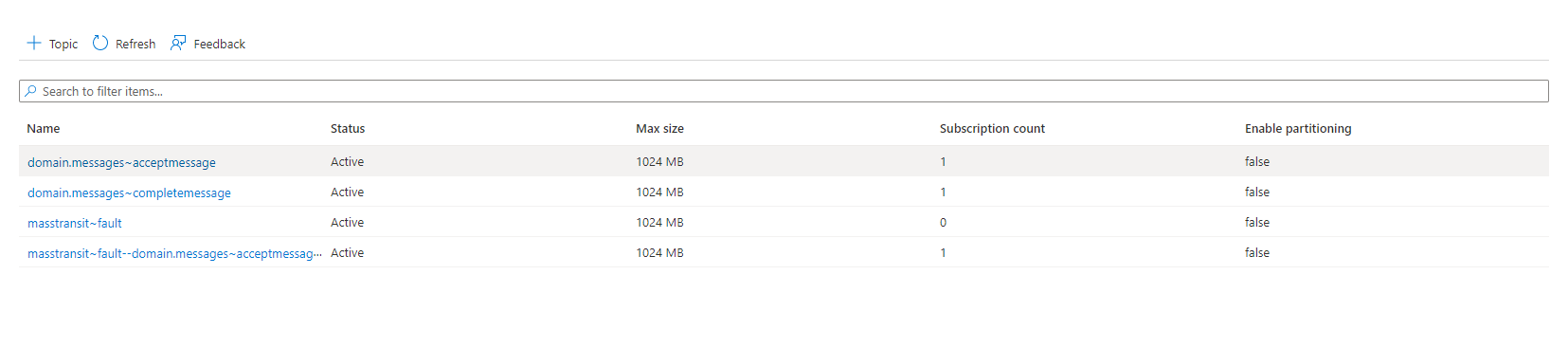
Client can subscribe to Fault Topics as well Fault Message will look like this
{
   "messageId": "101b0000-a566-c025-a8fa-08dafb14324e",
   "requestId": null,
   "correlationId": null,
   "conversationId": "101b0000-a566-c025-ac6b-08dafb143207",
   "initiatorId": null,
   "sourceAddress": "sb://dvbis2804.servicebus.windows.net/accept",
   "destinationAddress": "sb://dvbis2804.servicebus.windows.net/MassTransit/Fault--DOMAIN.Messages/AcceptMessage--?type=topic",
   "responseAddress": null,
   "faultAddress": null,
   "messageType": [
       "urn:message:MassTransit:Fault[[DOMAIN.Messages:AcceptMessage]]",
       "urn:message:MassTransit:Fault"
   ],
   "message": {
       "faultId": "101b0000-a566-c025-9d4d-08dafb14324e",
       "faultedMessageId": "101b0000-a566-c025-a81b-08dafb143207",
       "timestamp": "2023-01-20T18:28:58.8277047Z",
       "exceptions": [
           {
               "exceptionType": "System.ServiceModel.FaultException<Microsoft.Xrm.Sdk.OrganizationServiceFault>",
               "innerException": null,
               "stackTrace": "   at Microsoft.PowerPlatform.Dataverse.Client.ServiceClient.CreateAsync(Entity entity, CancellationToken cancellationToken)\r\n   at Microsoft.PowerPlatform.Dataverse.Client.ServiceClient.CreateAsync(Entity entity)\r\n   at DOMAIN.Consumers.AcceptConsumer.Consume(ConsumeContext`1 context) in C:\\Users\\VipulKulkarni\\Downloads\\MassTransitDatavere-main\\MassTransitDatavere-main\\DataverseAsync\\DOMAIN\\Consumers\\AcceptConsumer.cs:line 31\r\n   at MassTransit.DependencyInjection.ScopeConsumerFactory`1.Send[TMessage](ConsumeContext`1 context, IPipe`1 next) in /_/src/MassTransit/DependencyInjection/DependencyInjection/ScopeConsumerFactory.cs:line 22\r\n   at MassTransit.DependencyInjection.ScopeConsumerFactory`1.Send[TMessage](ConsumeContext`1 context, IPipe`1 next) in /_/src/MassTransit/DependencyInjection/DependencyInjection/ScopeConsumerFactory.cs:line 22\r\n   at MassTransit.Middleware.ConsumerMessageFilter`2.MassTransit.IFilter<MassTransit.ConsumeContext<TMessage>>.Send(ConsumeContext`1 context, IPipe`1 next) in /_/src/MassTransit/Middleware/ConsumerMessageFilter.cs:line 46",
               "message": "Incorrect attribute value type System.String",
               "source": "System.Private.ServiceModel",
               "data": null
           }
       ],
       "host": {
           "machineName": "PC-H38X2B3",
           "processName": "API",
           "processId": 6928,
           "assembly": "API",
           "assemblyVersion": "1.0.0.0",
           "frameworkVersion": "6.0.11",
           "massTransitVersion": "8.0.10.0",
           "operatingSystemVersion": "Microsoft Windows NT 10.0.19044.0"
       },
       "faultMessageTypes": [
           "urn:message:DOMAIN.Messages:AcceptMessage"
       ],
       "message": {
           "id": "08dca563-1bcf-4be2-8e26-384e5c86ac28",
           "timeStamp": "2023-01-20T18:28:58.3616636Z",
           "logicalName": "contact",
           "operation": "Create",
           "attributeCollection": {
               "firstname**String": "string",
               "lastname**String": "string",
               "jobtitle**String": "string",
               "emailaddress1**String": "string",
               "mobilephone**String": "string",
               "address1_line1**String": "string",
               "address1_city**String": "string",
               "address1_country**String": "string",
               "numberofchildren**String": "10"
           },
           "clientRequest": {
               "firstName": "string",
               "lastName": "string",
               "jobTitle": "string",
               "email": "string",
               "mobilePhone": "string",
               "address": "string",
               "city": "string",
               "postalCode": "string",
               "country": "string"
           }
       }
   },
   "expirationTime": null,
   "sentTime": "2023-01-20T18:28:58.8280058Z",
   "headers": {},
   "host": {
       "machineName": "",
       "processName": "",
       "processId": ,
       "assembly": "",
       "assemblyVersion": "",
       "frameworkVersion": "",
       "massTransitVersion": "",
       "operatingSystemVersion": ""
   }
}
id will be same as id you got in response so that client knows which request is faulted.
Supported Dataverse Messages
Library Currenly Supports Below Messages
- Create
- Update
- Execute (Only for executing Custom APIs)
*Currently CustomAPI with request parameter type Entity and EntityCollection are not supported.
Limiting number of requests made to dataverse per minute
You can limit number of requests made to dataverse per minute by using below setting in Environment Variable or Adding it as Configuration Value in App Service
Configuration__RateLimitPerMinute
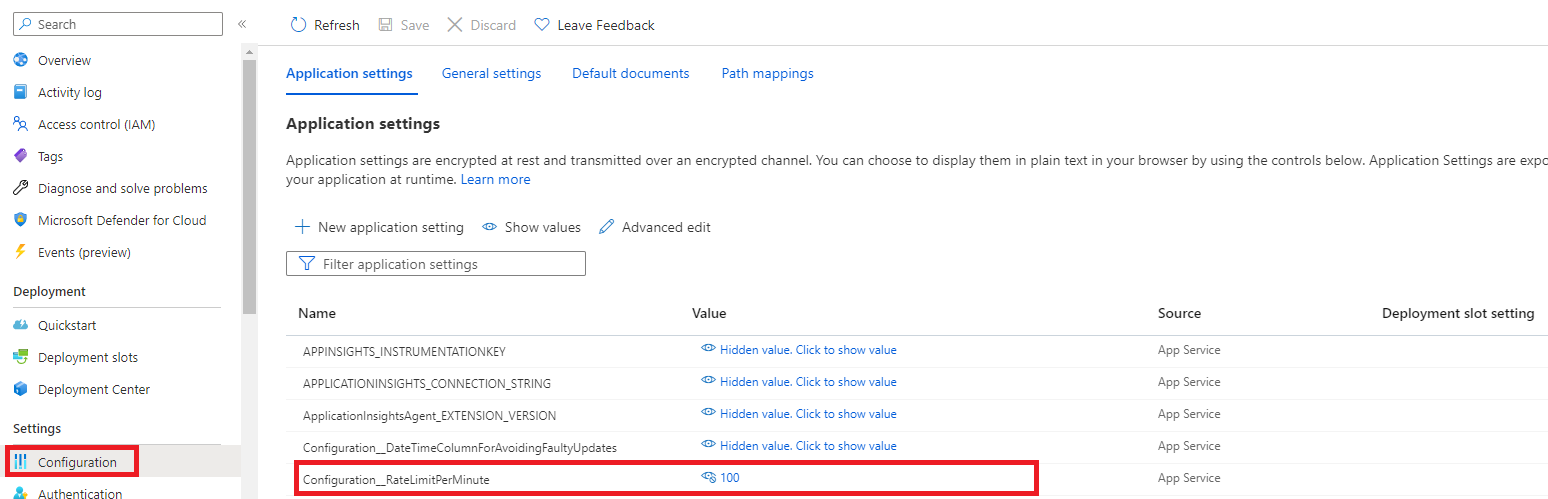
Library will make sure only those requestes are made to dataverse per minute despite of number of request received. Default value for this parameter is 800
Avoiding Faulty Updates
As library does makes transactions in dataverse in multiple parallel threads there is no gurantee that requests will be processed in same sequence as they were received.
So in this case there is a chance that out of 2 update requestes update which is made earlier will be processed after request made in later time e.g. if update requests to one entity are made at 10:00:00 AM and 10:00:01 AM then there is chance that request made at 10:00:01 AM will be processed first and request made at 10:00:00 AM will be processed later which will result in inconsistant state at dataverse side
This can be avoided by creating a datetime field on entity on which you are doing update via library and specifying this field name in Environemnt Variable Configuration__DateTimeColumnForAvoidingFaultyUpdates
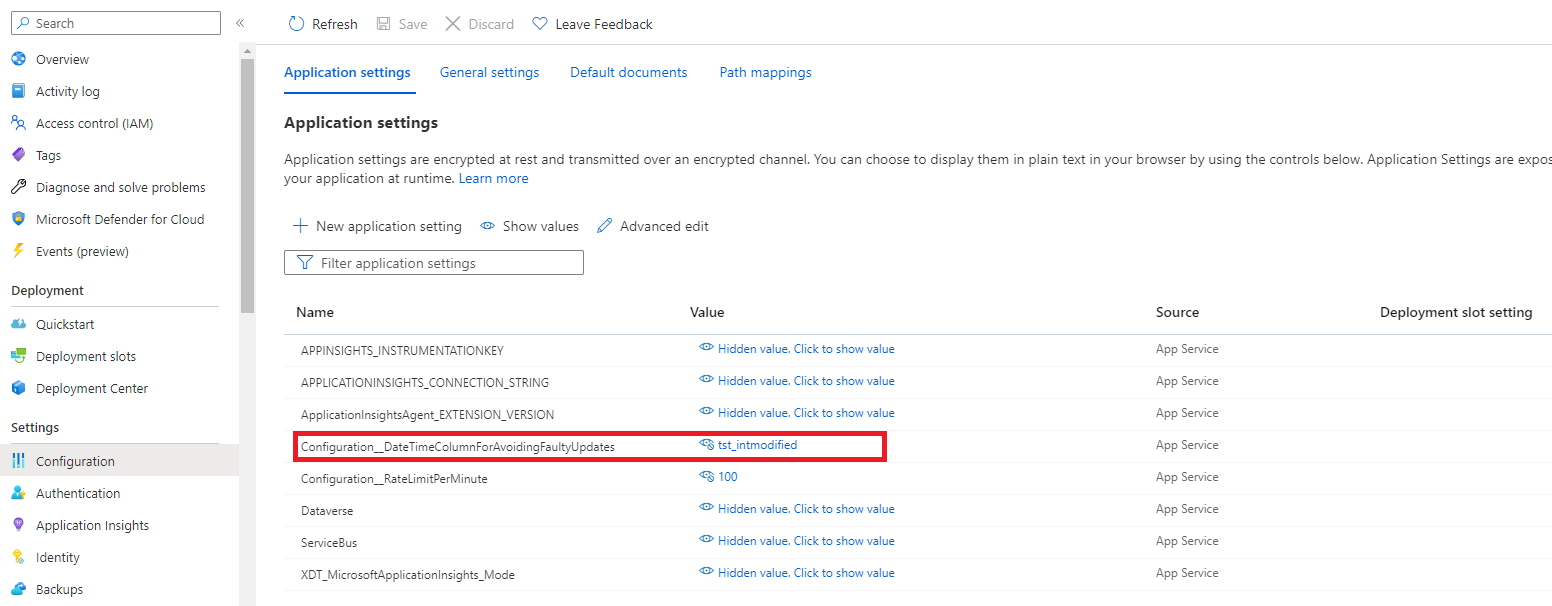
*Please make sure you keep name of field same for all entities on which you intend to do update via this library
In this case library will make sure message recived at 10:00:00 will be skipped if message received at 10:00:01 is already processed. These skipped messages will be avialble in seprate Topic. Client can subscribe to that topic so that it knows about state of its request.
| Product | Versions Compatible and additional computed target framework versions. |
|---|---|
| .NET | net5.0 was computed. net5.0-windows was computed. net6.0 is compatible. net6.0-android was computed. net6.0-ios was computed. net6.0-maccatalyst was computed. net6.0-macos was computed. net6.0-tvos was computed. net6.0-windows was computed. net7.0 was computed. net7.0-android was computed. net7.0-ios was computed. net7.0-maccatalyst was computed. net7.0-macos was computed. net7.0-tvos was computed. net7.0-windows was computed. net8.0 was computed. net8.0-android was computed. net8.0-browser was computed. net8.0-ios was computed. net8.0-maccatalyst was computed. net8.0-macos was computed. net8.0-tvos was computed. net8.0-windows was computed. net9.0 was computed. net9.0-android was computed. net9.0-browser was computed. net9.0-ios was computed. net9.0-maccatalyst was computed. net9.0-macos was computed. net9.0-tvos was computed. net9.0-windows was computed. net10.0 was computed. net10.0-android was computed. net10.0-browser was computed. net10.0-ios was computed. net10.0-maccatalyst was computed. net10.0-macos was computed. net10.0-tvos was computed. net10.0-windows was computed. |
| .NET Core | netcoreapp3.1 is compatible. |
-
.NETCoreApp 3.1
- MassTransit (>= 8.0.10)
- MassTransit.Azure.ServiceBus.Core (>= 8.0.10)
- MassTransit.RabbitMQ (>= 8.0.10)
- Microsoft.ApplicationInsights.AspNetCore (>= 2.21.0)
- Microsoft.Extensions.Options.ConfigurationExtensions (>= 7.0.0)
- Microsoft.PowerPlatform.Dataverse.Client (>= 1.0.26)
-
net6.0
- MassTransit (>= 8.0.10)
- MassTransit.Azure.ServiceBus.Core (>= 8.0.10)
- MassTransit.RabbitMQ (>= 8.0.10)
- Microsoft.ApplicationInsights.AspNetCore (>= 2.21.0)
- Microsoft.Extensions.Options.ConfigurationExtensions (>= 7.0.0)
- Microsoft.PowerPlatform.Dataverse.Client (>= 1.0.26)
NuGet packages
This package is not used by any NuGet packages.
GitHub repositories
This package is not used by any popular GitHub repositories.