UBookIt.Core
18.6.0
dotnet add package UBookIt.Core --version 18.6.0
NuGet\Install-Package UBookIt.Core -Version 18.6.0
<PackageReference Include="UBookIt.Core" Version="18.6.0" />
<PackageVersion Include="UBookIt.Core" Version="18.6.0" />
<PackageReference Include="UBookIt.Core" />
paket add UBookIt.Core --version 18.6.0
#r "nuget: UBookIt.Core, 18.6.0"
#:package UBookIt.Core@18.6.0
#addin nuget:?package=UBookIt.Core&version=18.6.0
#tool nuget:?package=UBookIt.Core&version=18.6.0
uBookIt
Bookings for Umbraco 18: rooms, desks, studios, equipment, and appointments that need a person and a place at the same time. You set up what can be booked in the backoffice, and visitors book on a page of your own site, in your own layout. Every step works with JavaScript turned off.
Get started
dotnet add package UBookIt --version "18.*"
The version keeps uBookIt on the line for your Umbraco major. Without it the newest uBookIt is chosen, which is for a later Umbraco, and the restore fails.
Run the site, and uBookIt installs its schema on first boot. It needs SQL Server (not SQLite) and Umbraco 18.3.0 or later. The full requirements are further down, and Getting started walks through the rest of the setup, from your first resource to a booking arriving by email.
Then grant the section. Like any Umbraco section, uBookIt stays hidden until you grant it to a user group: Users → User Groups → (a group) → Sections. Grant it deliberately, because it decides who can see the bookings your site has taken.
The booker's name and email address are a second question, and Umbraco's built-in Sensitive data group answers it. At first that group holds only the site's original super user, so an administrator you create later sees those details hidden until you add them. See the backoffice docs.
What it does
For the people booking
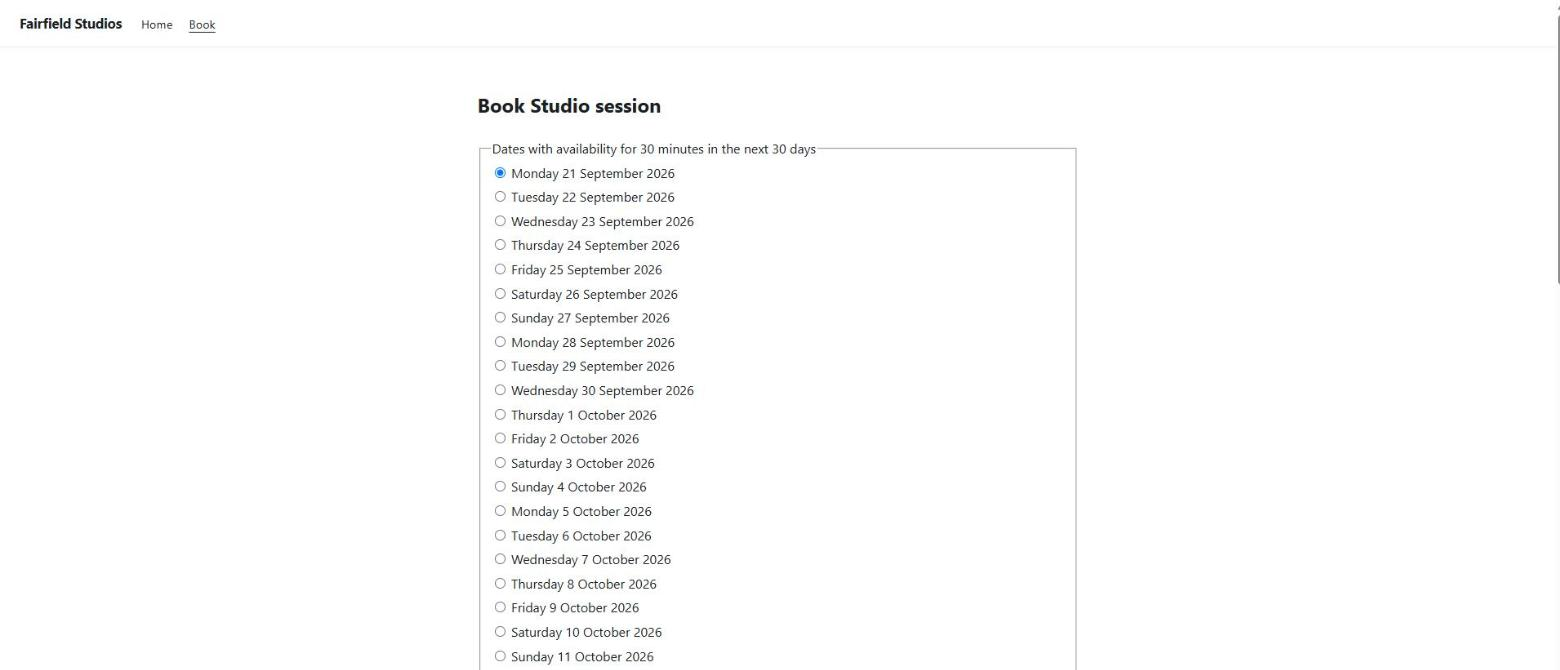
- Book from a page on your site: the whole catalogue, one service, or one resource.
- Choose from the dates and start times that are actually free, for the length they need.
- Finish without JavaScript.
- Receive a confirmation email and cancel from a link in it, if you turn those on.
For your staff, in the backoffice
- Set up bookable resources: opening hours, date exceptions, minimum and maximum lengths, and capabilities that describe what each one can do.
- Build services from roles. For example, "a haircut" can mean one stylist and one chair, and uBookIt works out which combinations are free.
- Give a service instructions for the booker, such as a link to join an online session or directions. If you send booker emails, uBookIt includes them in its own emails once the booking is confirmed.
- Close the whole organisation for a day or a run of dates, from one list, and open individual resources anyway; close a single resource for a period of its own.
- Import public holidays from a source your own code supplies. uBookIt ships no holiday data.
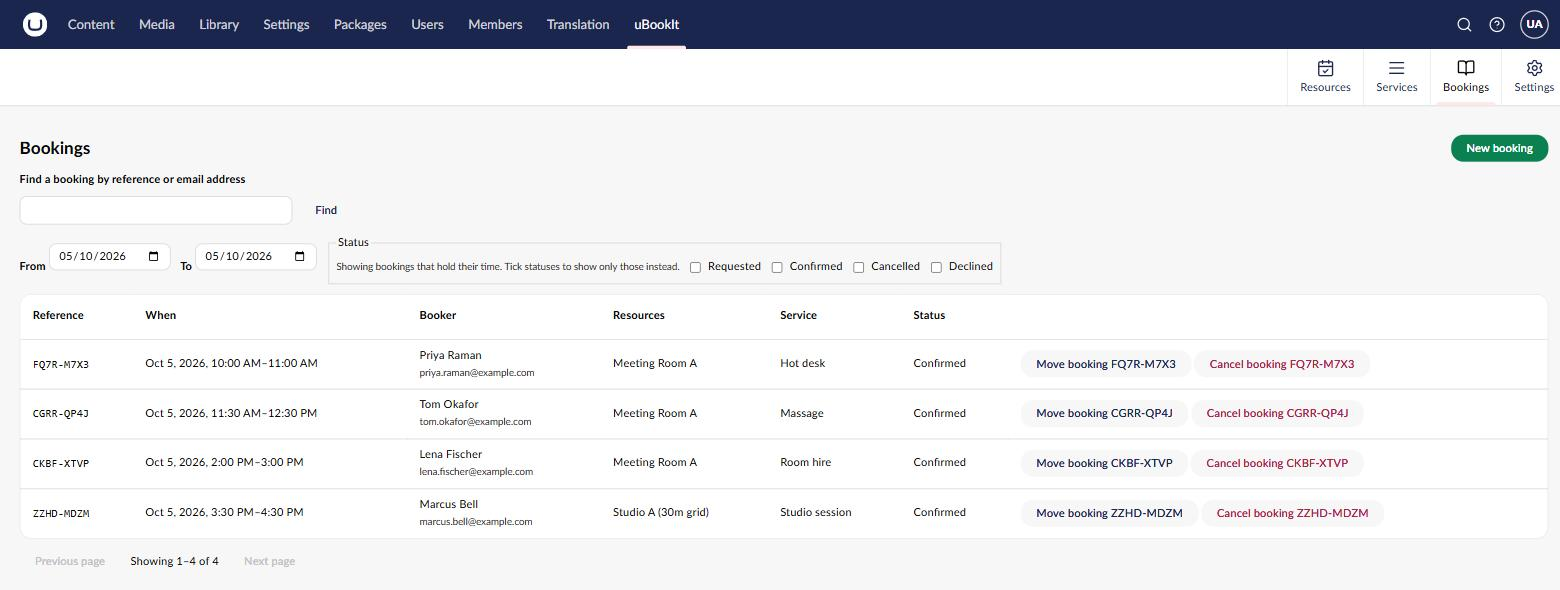
- See, find, move, cancel, confirm and decline bookings. Find one by its reference, or every booking made with an email address.
- Record a booking taken over the telephone, on the caller's behalf.
- Choose whether bookings confirm immediately or wait for somebody to approve them.
- Decide who can do what, with permissions per user group in Umbraco's ordinary group editor.
- See and change uBookIt's settings in one screen, rather than only in
appsettings.json.
For developers
- Handle notifications when a booking is placed, confirmed, declined or cancelled, to send your own messages, write to a log, or push to a CRM.
- Build your own front end on a JSON delivery API.
- Restyle with CSS custom properties, or replace the views entirely with a theme in your own Razor class library.
- Write your own email wording as Razor views, and give a service or a group of services its own set of them: name an email template set on the service, and uBookIt looks in that set's folder first. See email templates.
Off until you turn it on
A new install starts with all four of these off, or granted to nobody:
- The delivery API. The API is off by default, and reads and booking placement are turned on separately. Once on, the API is anonymous by design, and uBookIt makes no DDoS-protection claim: volume protection belongs to your host. See the delivery API.
- Emails, to the booker and to your own people. That means a site-wide list, plus the users and groups made responsible for each resource or service. A mail server is not permission to write to your customers.
- Self-service cancellation. It rides the booker's confirmation email, so it needs those emails on too. Read the configuration notes first, because the link is the credential.
- The settings screen. It needs the Change site settings permission, which nobody has, administrators included, until you grant it.
What it looks like
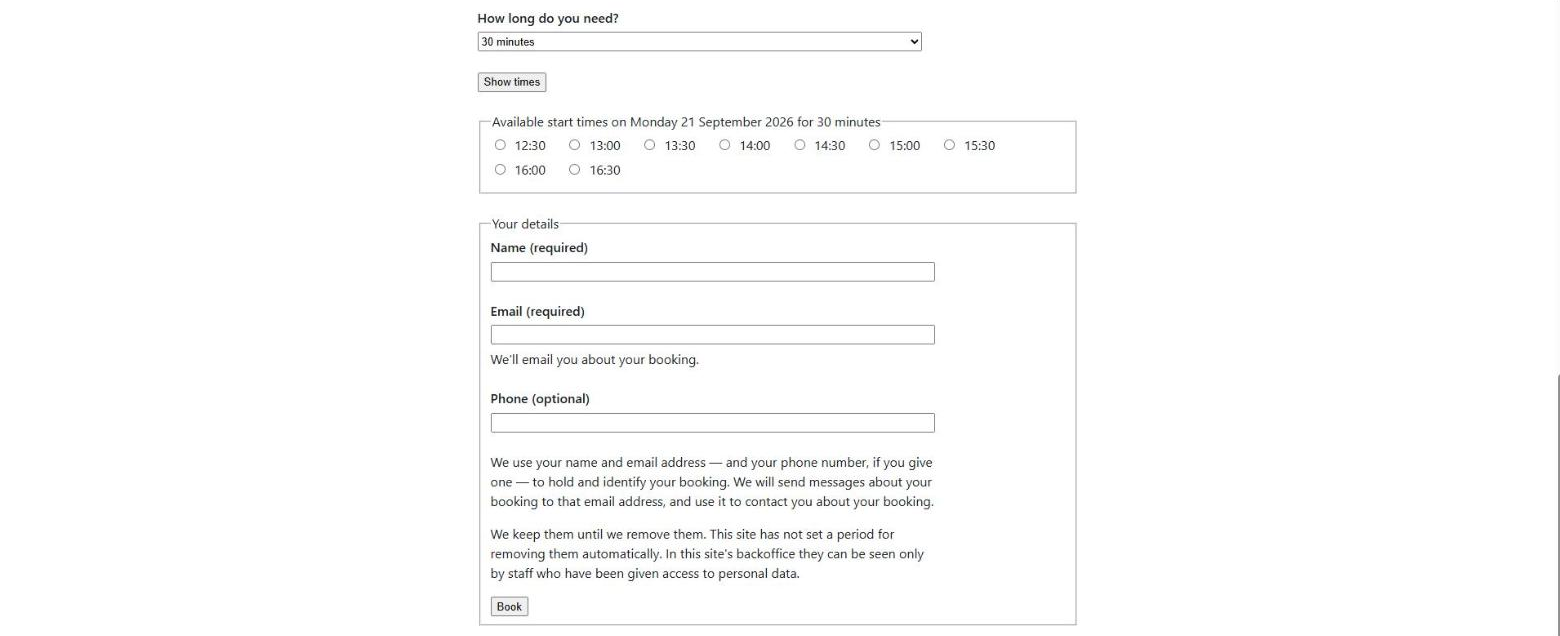
Choosing a time, and giving your details. The start times for the chosen day wrap across the page rather than running down it. Every field is labelled, and the notice explaining what the site does with the details sits where the details are asked for.
The Bookings screen in the backoffice. Find a booking by reference or email address, choose a date window, filter by status, and act on a row.
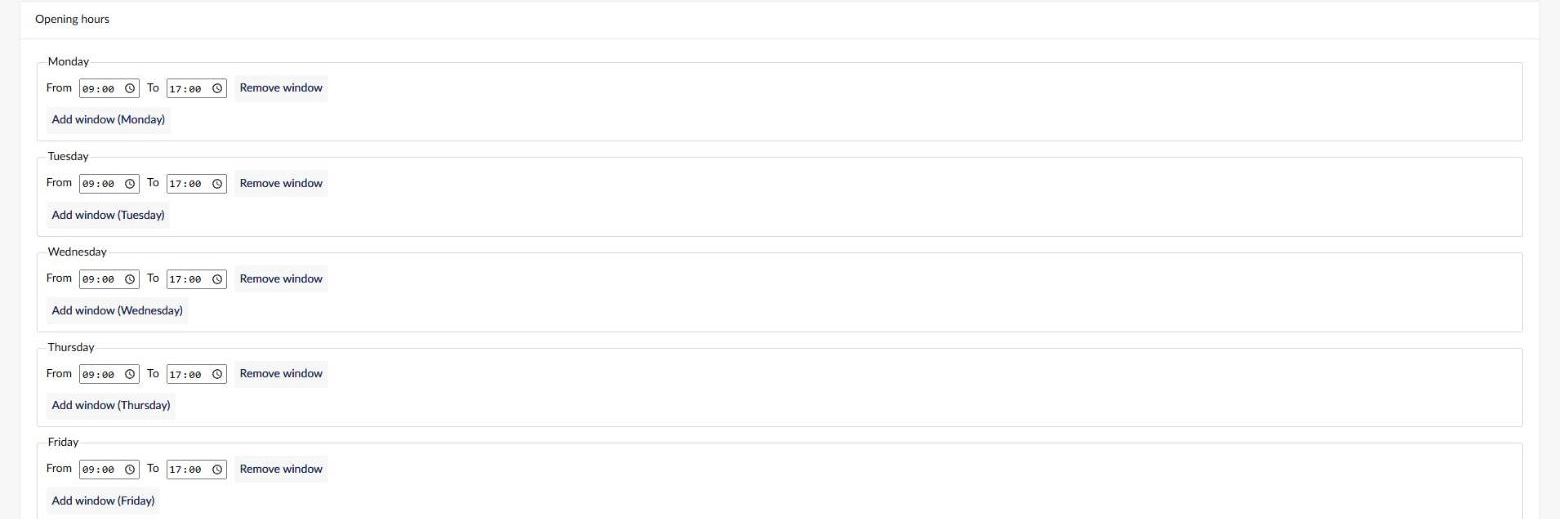
Availability, per resource. Opening hours are windows on each weekday. Add as many as a day needs, for a lunch break or a split shift.
Accessibility is a feature here, not a checkbox
Booking interfaces are notorious accessibility failures. So uBookIt's shipped flow is built to meet every WCAG 2.2 AA criterion that markup determines: labelling, grouping, programmatic relationships, keyboard operability, and reading and focus order. Every step stays usable with no stylesheet applied at all.
That claim names its own boundary, because uBookIt is a component inside your page, and WCAG conformance is a property of a page. Text contrast, focus appearance and target size are decided by CSS. The shipped stylesheet sets no text colour of its own, and non-text contrast for decorative borders is explicitly not claimed. The full account, including what becomes yours the moment you override a token or supply a theme, is in the booking page docs.
What it does not do yet
These limits are deliberate, and they're listed here so you know before you install:
- One booking per resource at a time. A resource is claimed for the whole interval, so a room that seats twenty is one bookable thing, not twenty.
- A move changes when, not what. If a booking's resource is busy at the new time, the move is refused. It isn't given a different resource.
- No search by the booker's name. You can find a booking by its reference, or every booking made with an email address, which is how an erasure request is honoured. Searching by name is a search over personal data, and uBookIt deliberately doesn't offer one.
- No recurring bookings, payment or cancellation windows, and no language other than
en-US.
How it's built
uBookIt is built with AI assistance, under a spec-driven workflow that is in the repository for anyone to read:
- Specs first. Every change starts as a written proposal and task list, with a design where one is needed, in OpenSpec. No code is written until the change is approved. The requirements agreed so far live in the repository, for example the site settings spec.
- Independent review. A separate agent that did not write the change reviews it adversarially against its spec. It can reject the change, and when it does, the findings go back through implementation. The reviewer never fixes code itself.
- CI that can't pass by skipping. Every push to a release line is built and tested on Linux against SQL Server, by the CI workflow. The run fails if any .NET test project didn't report, or any test, .NET or backoffice client, was skipped.
- Documentation under test. The test suite checks key claims in this readme: the version it states, the versioning policy, the delivery API's default, and every link into the repository.
- Gated releases. Releases are published by a workflow. It packs the tagged commit on a clean CI runner, verifies the packages there, and publishes nothing until the maintainer approves. There is no manual route around it.
The project's rules are in CLAUDE.md,
the same file the AI agents working on it read. The release procedure is in
the publishing runbook.
Versions and the API promise
uBookIt is at
18.6.0, and the public API is a promise. That doesn't mean nothing will ever change. It means a change to a published contract is deliberate, is named before you meet it, and never arrives in a patch.
The major tracks the Umbraco major, as Umbraco packages are conventionally versioned: uBookIt
17.x is for Umbraco 17 and 18.x for Umbraco 18. That means the major is not a breaking-change
signal, and this is where uBookIt departs from Semantic Versioning:
patch (x.y.1 → x.y.2) |
Never breaks. Fixes and internal changes only. |
minor (x.1.0 → x.2.0) |
New features, and the only place a breaking change may appear. |
major (17.x → 18.x) |
A different Umbraco. The API may change with it, since the CMS it targets did. |
Breaking changes are avoided: the public interface is kept as consistent as possible, and additions are preferred to changes. Where a break is genuinely unavoidable, it lands in a minor release. It is called out in the changelog, where each release opens with what upgrading asks of you, and it ships with sensible defaults or a documented upgrade path so a site that already works keeps working. A patch release never carries a breaking change.
Requirements
| Umbraco | 18.3.0 or later, and not 19. Not 13, not the 14–16 STS line, and not 17 — uBookIt 17.x is the release for Umbraco 17. On a site below 18.3.0, installing uBookIt raises the Umbraco packages it depends on and leaves the rest where they are; upgrade Umbraco.Cms itself to 18.3.0 first so every Umbraco package stays on one version. |
| .NET | 10.0 |
| Database | SQL Server 2019 or later, including LocalDB and Azure SQL. SQLite is not supported, including the SQLite database a dotnet new umbraco site gives you by default. |
SQLite is excluded for a real reason, not because it's untested: uBookIt's schema and availability queries are written for SQL Server, and a site on SQLite fails at migration time rather than quietly misbehaving.
Documentation
- Getting started: from installing the package to a visitor's booking arriving by email, step by step
- The booking page: creating it, URL parameters, styling, the deployment note about committing the installed template, and the accessibility statement
- The backoffice: resources, availability, services, closures, bookings and permissions
- Configuration: every setting, and what turning each one on means
- The delivery API: turning it on, what anonymous means, and where volume protection belongs
- Email templates: writing the emails as Razor views, the models they are given, and template sets for a service
- Reacting to bookings: whether and to whom uBookIt sends emails, and the notifications your own code can handle
- Writing a theme: replacing the rendering with your own views
The packages
Install UBookIt. It contains no code of its own and brings in the rest, which are published
separately so that a headless consumer can take the contracts without the backoffice.
| Package | |
|---|---|
UBookIt |
What you install. Brings everything below. |
UBookIt.Core |
The domain: resources, availability, slots, bookings. References nothing. |
UBookIt.Persistence |
EF Core storage and the Umbraco migration plan. |
UBookIt.Backoffice |
The Bookings section and its Management API. |
UBookIt.Web |
The Razor views, the booking page, the delivery API and the stylesheet. |
Installing the packages individually is supported. But installing UBookIt.Backoffice without
UBookIt.Web fails silently: the backoffice works, and the booking page renders nothing.
Install UBookIt.
Licence
MIT. Copyright © Norwood Design & Development Ltd.
Built by Norwood Design & Development Ltd..
| Product | Versions Compatible and additional computed target framework versions. |
|---|---|
| .NET | net10.0 is compatible. net10.0-android was computed. net10.0-browser was computed. net10.0-ios was computed. net10.0-maccatalyst was computed. net10.0-macos was computed. net10.0-tvos was computed. net10.0-windows was computed. |
-
net10.0
- No dependencies.
NuGet packages (3)
Showing the top 3 NuGet packages that depend on UBookIt.Core:
| Package | Downloads |
|---|---|
|
UBookIt.Persistence
Entity Framework Core storage for uBookIt: entities, the DbContext, the Umbraco migration plan and the repositories behind the domain's store abstractions. Requires SQL Server — SQLite is not supported. Part of uBookIt, a booking system for Umbraco; install the UBookIt package rather than this one. |
|
|
UBookIt.Web
What a visitor actually sees: the uBookIt booking flow's Razor views and view components, the booking page document type, the delivery API, and a stylesheet a site can restyle or replace. The markup itself is replaced by supplying a theme. Part of uBookIt, a booking system for Umbraco; install the UBookIt package rather than this one. |
|
|
UBookIt.Backoffice
The uBookIt backoffice: a Bookings section for managing bookable resources, availability, services and reservations, built with Lit and the Umbraco UI Library, plus the Management API behind it. Part of uBookIt, a booking system for Umbraco; install the UBookIt package rather than this one. |
GitHub repositories
This package is not used by any popular GitHub repositories.
| Version | Downloads | Last Updated |
|---|---|---|
| 18.6.0 | 112 | 10/29/2026 |
| 18.5.0 | 131 | 10/20/2026 |
| 18.4.0 | 124 | 10/20/2026 |
| 18.3.0 | 126 | 10/16/2026 |
| 18.2.2 | 129 | 10/15/2026 |
| 18.2.1 | 120 | 10/13/2026 |
| 18.2.0 | 129 | 10/11/2026 |
| 18.1.3 | 124 | 10/11/2026 |
| 18.1.2 | 137 | 9/26/2026 |
| 18.1.1 | 142 | 9/25/2026 |
| 17.7.0 | 100 | 10/29/2026 |
| 17.6.0 | 124 | 10/20/2026 |
| 17.5.0 | 124 | 10/20/2026 |
| 17.4.0 | 122 | 10/16/2026 |
| 17.3.2 | 127 | 10/15/2026 |
| 17.3.1 | 113 | 10/13/2026 |
| 17.3.0 | 120 | 10/11/2026 |
| 17.2.3 | 127 | 10/11/2026 |
| 17.2.2 | 136 | 9/26/2026 |
| 17.2.1 | 136 | 9/25/2026 |