Umbraco.Community.AdvancedPermissions
17.0.0
See the version list below for details.
dotnet add package Umbraco.Community.AdvancedPermissions --version 17.0.0
NuGet\Install-Package Umbraco.Community.AdvancedPermissions -Version 17.0.0
<PackageReference Include="Umbraco.Community.AdvancedPermissions" Version="17.0.0" />
<PackageVersion Include="Umbraco.Community.AdvancedPermissions" Version="17.0.0" />
<PackageReference Include="Umbraco.Community.AdvancedPermissions" />
paket add Umbraco.Community.AdvancedPermissions --version 17.0.0
#r "nuget: Umbraco.Community.AdvancedPermissions, 17.0.0"
#:package Umbraco.Community.AdvancedPermissions@17.0.0
#addin nuget:?package=Umbraco.Community.AdvancedPermissions&version=17.0.0
#tool nuget:?package=Umbraco.Community.AdvancedPermissions&version=17.0.0
<p align="center"> <img src="https://raw.githubusercontent.com/Luuk1983/Umbraco.Community.AdvancedPermissions/main/src/Umbraco.Community.AdvancedPermissions/package_logo_128x128.png" alt="Advanced Permissions for Umbraco" width="128" /> </p>
<h1 align="center">Advanced Permissions for Umbraco</h1>
<p align="center"> Fine-grained permission management for Umbraco v17: explicit Allow/Deny, per-entry scope control, an All Users Group baseline that can lock down critical nodes with a single entry, and full audit reasoning. </p>
<p align="center"> <a href="https://www.nuget.org/packages/Umbraco.Community.AdvancedPermissions"><img src="https://img.shields.io/nuget/v/Umbraco.Community.AdvancedPermissions" alt="NuGet" /></a> <a href="https://www.nuget.org/packages/Umbraco.Community.AdvancedPermissions"><img src="https://img.shields.io/nuget/dt/Umbraco.Community.AdvancedPermissions" alt="NuGet Downloads" /></a> <a href="https://github.com/Luuk1983/Umbraco.Community.AdvancedPermissions/blob/main/LICENSE"><img src="https://img.shields.io/github/license/Luuk1983/Umbraco.Community.AdvancedPermissions" alt="License" /></a> </p>
Umbraco's built-in permission system lets you grant a user group a set of permissions, optionally overridden per content node, with those overrides inherited down the content tree. Advanced Permissions builds on that model and adds the controls that are missing: explicit Deny entries that can revoke inherited Allows, scope control over how far each entry reaches, an All Users Group for setting baselines that apply to everyone, and a full reasoning chain that explains exactly why a permission was granted or denied.
Why Advanced Permissions?
- Protect critical content with a single explicit Deny that nothing can override.
- Pick how far each entry reaches: this node only, this node and its descendants, or descendants only.
- Use the All Users Group to apply a rule to every user at once.
- See exactly why any permission was granted or denied, with the reasoning chain in the Access Viewer.
- Your existing Umbraco user group permissions are imported automatically on first boot, so you don't start from scratch.
How it compares to the built-in permission system:
| Capability | Umbraco Built-in | Advanced Permissions |
|---|---|---|
| Grant types | Positive only (Allow). Absence of a permission implicitly denies it, but an inherited Allow cannot be explicitly revoked. | Positive and negative (Allow and Deny). An explicit Deny on a node always wins over any Allow, from any user group, whether explicit or inherited. |
| Scope control | Every node-level entry applies to the node and all descendants. | Choose This Node Only, This Node and Descendants, or Descendants Only per entry. |
| Global constraints | No built-in mechanism. | All Users Group: combine with an explicit Deny to lock down critical nodes so that no user in any group can perform the action. |
| Audit trail | Only the effective outcome is visible. | Full reasoning chain showing which user group contributed, from which node, and whether it was explicit or inherited. |
| Dedicated UI | Managed per user group via the native permissions editor. | Permissions Editor (browse the tree, manage entries per user group) and Access Viewer (inspect effective permissions with reasoning). |
Features
All Users Group
The All Users Group is a virtual user group that applies to every backoffice user regardless of their real group membership. The resolver treats it exactly like any other user group, but because it reaches everyone, a single entry on it acts as a global rule. Combined with an explicit Deny, this lets you enforce a global rule with one entry: put a Deny on a critical node for the All Users Group, and the operation is locked. Nothing overrides it: not an Allow from another user group, not an inherited permission from an ancestor. The only way to lift it is to go back and change that one entry. Use this pattern to lock down deletion of key nodes, prevent unpublishing of landing pages, or enforce any other global constraint.
Permissions Editor
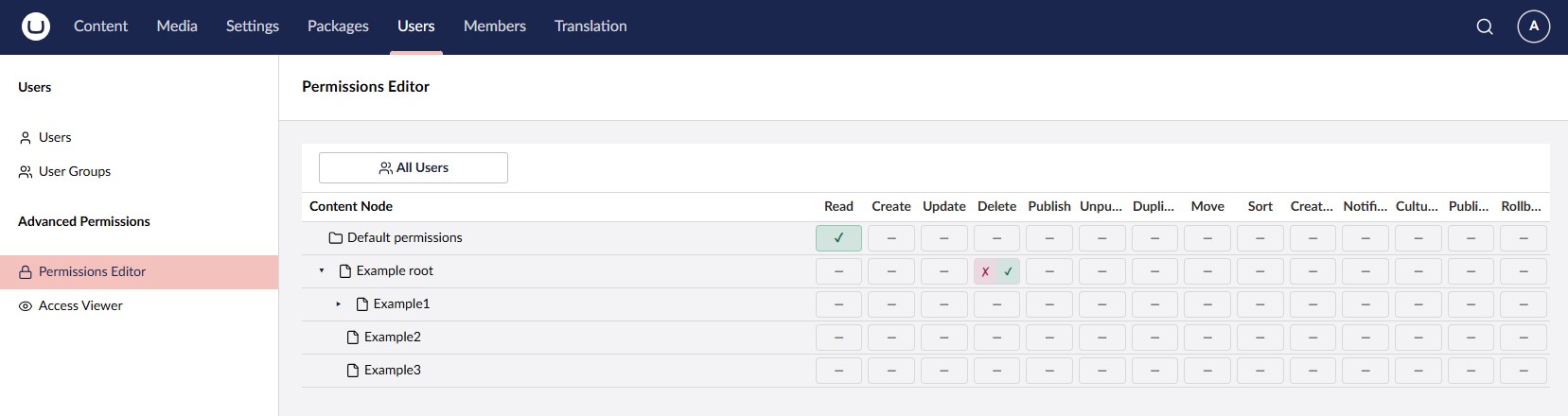
Browse the content tree, pick a user group, and manage all of its permission entries from one place. Set Allow or Deny for each verb, control the scope, and see at a glance which nodes in the tree have entries defined.
Scope Control per Entry
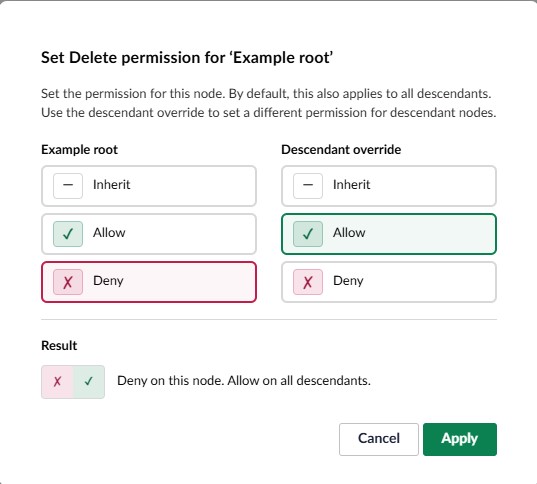
The built-in permission system applies every node-level entry to all descendants. Advanced Permissions lets you pick the scope per entry:
- This Node Only: applies only to the node where it is set
- This Node and Descendants: applies to the node and everything below it
- Descendants Only: skips the current node, applies to children and below
This lets you express patterns like "deny editing on the branch root, but allow it on everything below" in a single entry.
Reasoning Chain
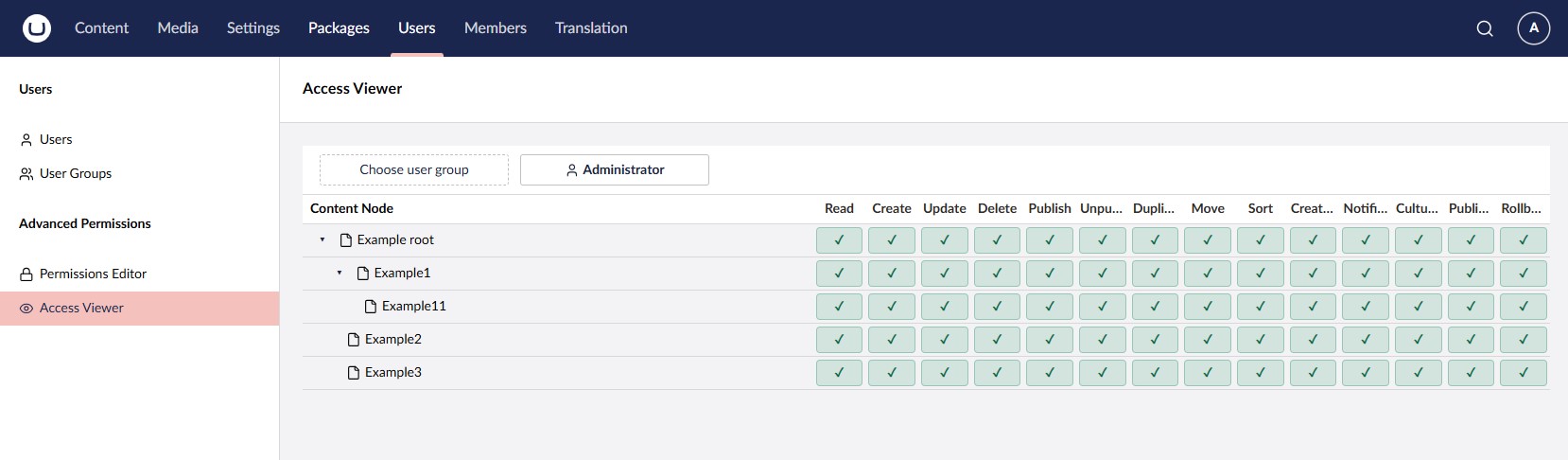
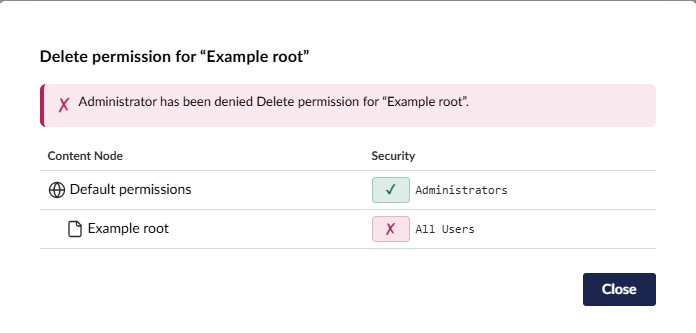
The Access Viewer shows the effective permissions for any user or user group at any content node, along with a full reasoning chain explaining exactly how each permission was determined: which user group contributed, from which node, and whether it was inherited or set explicitly.
Automatic import of existing permissions
When the package boots for the first time, the permissions on your existing user groups are imported automatically. Group-level defaults become virtual-root Allow entries; per-node granular permissions become node-level entries, with matching Deny entries for any defaults the granular set was overriding. The effective security state right after install matches what you had before, so nothing has to be reconfigured by hand. New user groups created later in the native Umbraco UI are seeded into the advanced system the same way, keeping the two aligned over time.
Resolution Order
When the resolver is asked whether a user may perform a verb on a node, it gathers every applicable entry from every user group the user belongs to (including the All Users Group), honouring each entry's scope, and applies a strict priority order:
- Any explicit Deny (from any user group, on the current node) wins.
- Any explicit Allow (from any user group, on the current node) wins.
- Any inherited Deny (from an ancestor, via any user group).
- Any inherited Allow (from an ancestor, via any user group).
- If no entry applies anywhere in the tree, the default is Deny.
The precedence does not depend on the user group. A single explicit Deny on a node beats every other result in the list: every explicit Allow from every other user group, and every inherited Allow or Deny from every ancestor. The resolver does not care which user group the Deny came from; one is enough.
Example 1. Lock a node against deletion. You have a critical landing page and want to guarantee nobody deletes it. Add a single entry: All Users Group, Deny, Delete, scope "This Node Only". Done. It does not matter which user groups a user belongs to, what those groups inherit from ancestors, or whether any of them have an explicit Allow for Delete on this same node. The Deny wins. To lift the protection, you have to remove or edit that one entry.
Example 2. Carve out an exception to a broad Allow. The "Editors" user group has Allow for Publish on the Home node with scope "This Node and Descendants", so editors can publish anywhere under Home. You want to take that away for the Press Releases branch but keep every other permission. In the built-in system you would need to redeclare every permission you want to keep on Press Releases so that Publish falls out of the list. With Advanced Permissions, one Deny entry for Publish on Press Releases does it. Every other inherited permission stays exactly as it was.
Getting Started
Prerequisites
- Umbraco v17.3.0 or later
- .NET 10
Installation
dotnet add package Umbraco.Community.AdvancedPermissions
The package auto-registers, so no additional setup code is needed.
On first boot the package imports the permissions from your existing user groups into the advanced system, so your current security setup carries over automatically and nothing has to be reconfigured. New user groups created later are seeded the same way.
After installation, two new menu items appear in the sidebar of the Users section in the Umbraco backoffice:
- Permissions Editor: manage permission entries per user group across the content tree
- Access Viewer: inspect effective permissions for any user or user group, with full reasoning
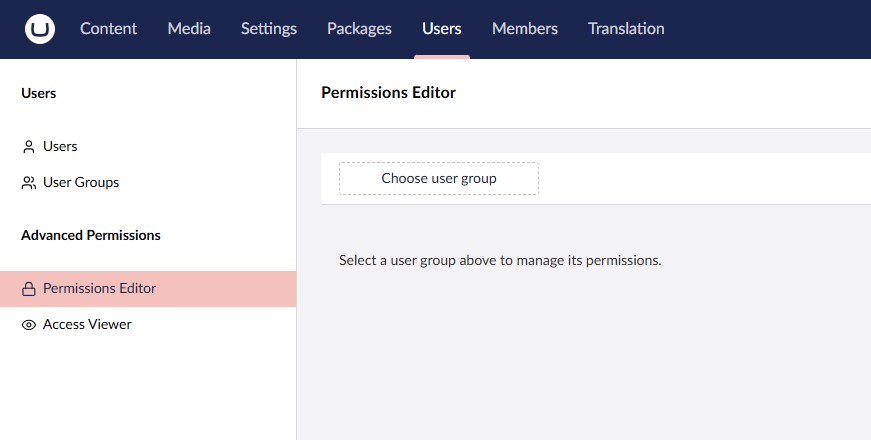
In each user group's editor, the native Documents permissions panel is replaced with a short message directing you to the Permissions Editor, where all document permission management now lives.

Configuration
No configuration is required. The package works out of the box with sensible defaults. Permission verbs are automatically derived from the standard Umbraco permissions.
Feedback
Found a bug or have a feature request? Please open an issue on GitHub.
License
This project is licensed under the MIT License.
| Product | Versions Compatible and additional computed target framework versions. |
|---|---|
| .NET | net10.0 is compatible. net10.0-android was computed. net10.0-browser was computed. net10.0-ios was computed. net10.0-maccatalyst was computed. net10.0-macos was computed. net10.0-tvos was computed. net10.0-windows was computed. |
-
net10.0
- Umbraco.Cms.Api.Management (>= 17.3.0 && < 18.0.0)
- Umbraco.Cms.Core (>= 17.3.0 && < 18.0.0)
- Umbraco.Cms.Infrastructure (>= 17.3.0 && < 18.0.0)
NuGet packages
This package is not used by any NuGet packages.
GitHub repositories
This package is not used by any popular GitHub repositories.
| Version | Downloads | Last Updated |
|---|---|---|
| 17.1.0-beta.1 | 45 | 5/22/2026 |
| 17.0.0 | 111 | 5/1/2026 |
| 17.0.0-beta.5 | 60 | 5/1/2026 |
| 17.0.0-beta.4 | 46 | 5/1/2026 |
| 17.0.0-beta.3 | 70 | 4/23/2026 |
| 17.0.0-beta.2 | 76 | 4/21/2026 |
| 17.0.0-beta.1 | 49 | 4/20/2026 |