Umbraco.Community.PropertyVisibility
2.0.0
dotnet add package Umbraco.Community.PropertyVisibility --version 2.0.0
NuGet\Install-Package Umbraco.Community.PropertyVisibility -Version 2.0.0
<PackageReference Include="Umbraco.Community.PropertyVisibility" Version="2.0.0" />
<PackageVersion Include="Umbraco.Community.PropertyVisibility" Version="2.0.0" />
<PackageReference Include="Umbraco.Community.PropertyVisibility" />
paket add Umbraco.Community.PropertyVisibility --version 2.0.0
#r "nuget: Umbraco.Community.PropertyVisibility, 2.0.0"
#:package Umbraco.Community.PropertyVisibility@2.0.0
#addin nuget:?package=Umbraco.Community.PropertyVisibility&version=2.0.0
#tool nuget:?package=Umbraco.Community.PropertyVisibility&version=2.0.0
Property Visibility
Hide properties, groups and tabs per site in the Umbraco backoffice.
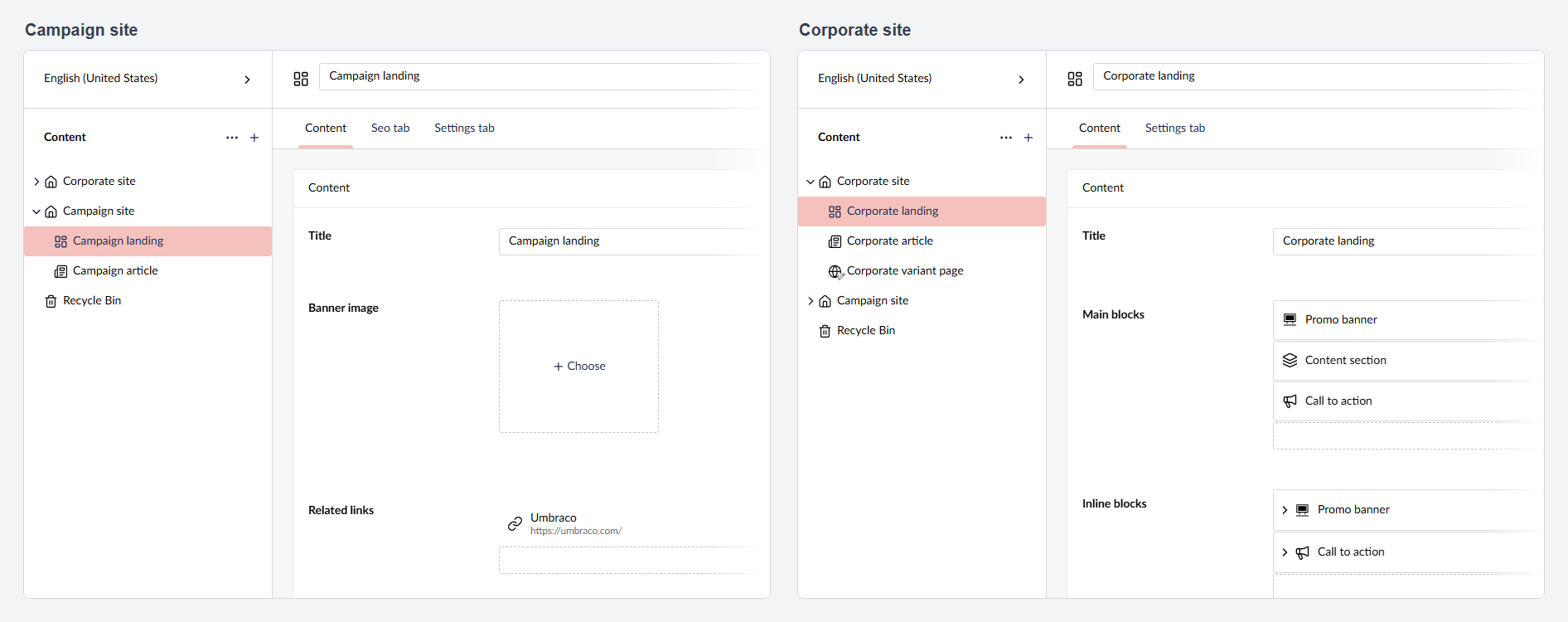
When several sites in one Umbraco installation share a document type, some of its fields often matter on one site only. This package hides those properties, tabs and groups per site, in documents and inside blocks, from rules in appsettings or a JSON file that reload without a restart. A health check reports every rule that does not resolve.
It changes what editors see, not what they are allowed to do: hidden values are still saved with the document, readable and writable through the Management API, and returned by the Delivery API.
Install
dotnet add package Umbraco.Community.PropertyVisibility
1.x runs on Umbraco 17 (from 17.6.2), 2.x on Umbraco 18 (from 18.2.1), both on .NET 10. The command adds the latest version; on an Umbraco 17 site, add --version with the latest 1.x. A version for the other Umbraco major fails the restore (NU1107), which should not be worked around. No startup code is needed.
Single site
Add this section to appsettings.json, next to the existing Umbraco section, and replace the example aliases with your own:
{
  "PropertyVisibility": {
    "ContentTypes": {
      "landingPage": { "Containers": ["seoTab"], "Properties": ["relatedLinks"] },
      "promoBanner": { "Properties": ["overlayColour"] }
    }
  }
}
Save the file and reopen a document: on every landingPage the seoTab tab and the relatedLinks property are hidden, and in every promoBanner block the overlayColour property.
The backoffice does not show tab and group aliases: Umbraco derives them from the name in camelCase ("Seo tab" becomes seoTab), and the tab's URL segment (seo-tab) is not the alias. An alias that does not exist hides nothing; the health check reports it (PV104 for a content type) and, for a tab or group, lists the type's tab and tab/group aliases (PV202).
Documentation
Per-site rules, the rules file, blocks, the health check and what the package does not do: README on GitHub and the configuration reference.
Property Visibility is a community package. It is not made, endorsed or supported by Umbraco A/S. Umbraco is a trademark of Umbraco A/S.
| Product | Versions Compatible and additional computed target framework versions. |
|---|---|
| .NET | net10.0 is compatible. net10.0-android was computed. net10.0-browser was computed. net10.0-ios was computed. net10.0-maccatalyst was computed. net10.0-macos was computed. net10.0-tvos was computed. net10.0-windows was computed. |
-
net10.0
- Umbraco.Cms.Api.Common (>= 18.2.1 && < 19.0.0)
- Umbraco.Cms.Api.Management (>= 18.2.1 && < 19.0.0)
- Umbraco.Cms.Web.Common (>= 18.2.1 && < 19.0.0)
NuGet packages
This package is not used by any NuGet packages.
GitHub repositories
This package is not used by any popular GitHub repositories.
| Version | Downloads | Last Updated |
|---|---|---|
| 2.0.0 | 46 | 10/13/2026 |
| 1.1.1 | 89 | 10/12/2026 |
| 1.1.0 | 87 | 10/10/2026 |
| 1.0.1 | 96 | 10/3/2026 |
| 1.0.0 | 98 | 9/30/2026 |
| 1.0.0-rc.3 | 60 | 9/30/2026 |
| 1.0.0-rc.2 | 64 | 9/30/2026 |
| 1.0.0-rc.1 | 61 | 9/29/2026 |